2003 CHEVROLET BLAZER automatic transmission
[x] Cancel search: automatic transmissionPage 97 of 420
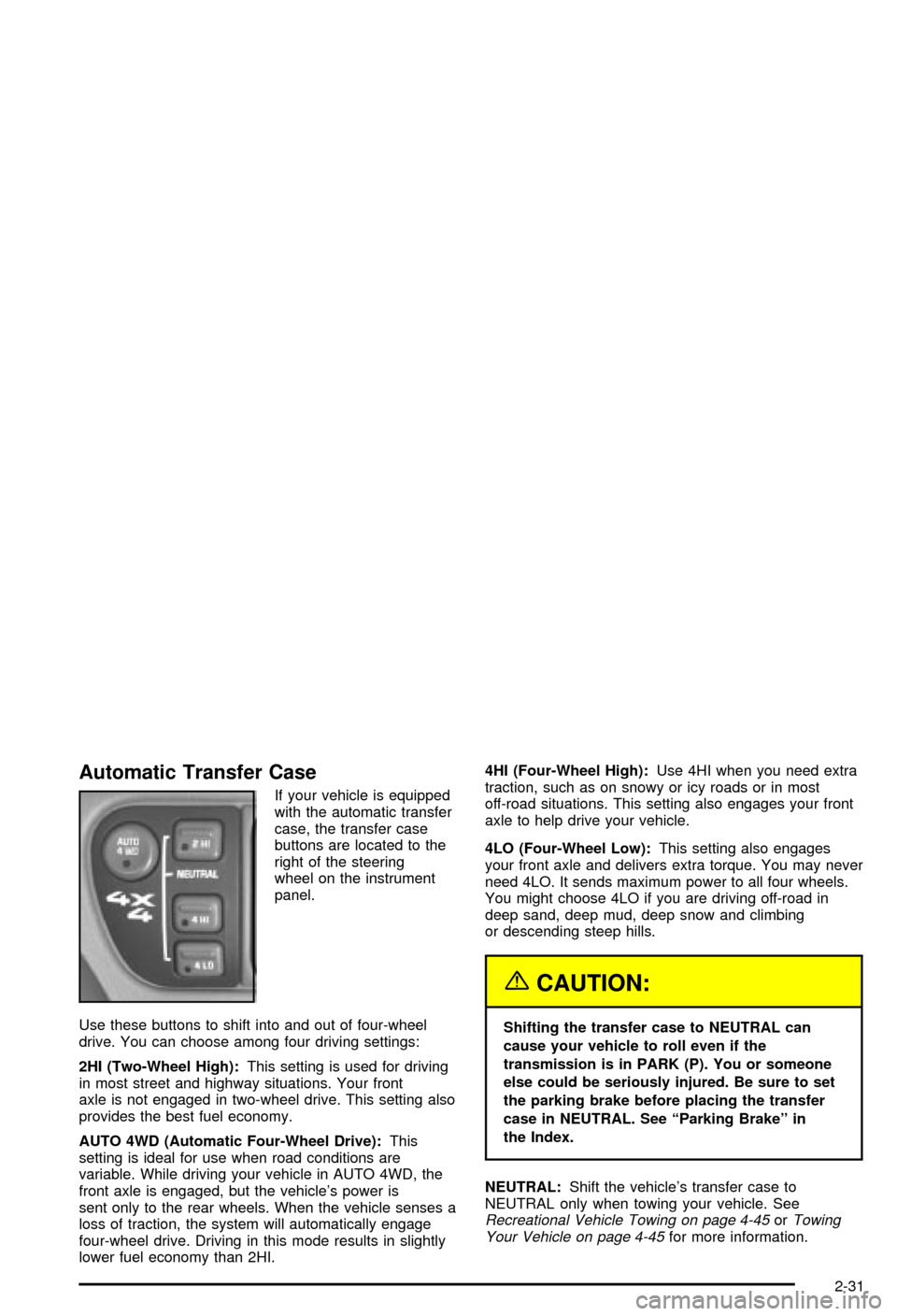
Automatic Transfer Case
If your vehicle is equipped
with the automatic transfer
case, the transfer case
buttons are located to the
right of the steering
wheel on the instrument
panel.
Use these buttons to shift into and out of four-wheel
drive. You can choose among four driving settings:
2HI (Two-Wheel High):This setting is used for driving
in most street and highway situations. Your front
axle is not engaged in two-wheel drive. This setting also
provides the best fuel economy.
AUTO 4WD (Automatic Four-Wheel Drive):This
setting is ideal for use when road conditions are
variable. While driving your vehicle in AUTO 4WD, the
front axle is engaged, but the vehicle's power is
sent only to the rear wheels. When the vehicle senses a
loss of traction, the system will automatically engage
four-wheel drive. Driving in this mode results in slightly
lower fuel economy than 2HI.4HI (Four-Wheel High):Use 4HI when you need extra
traction, such as on snowy or icy roads or in most
off-road situations. This setting also engages your front
axle to help drive your vehicle.
4LO (Four-Wheel Low):This setting also engages
your front axle and delivers extra torque. You may never
need 4LO. It sends maximum power to all four wheels.
You might choose 4LO if you are driving off-road in
deep sand, deep mud, deep snow and climbing
or descending steep hills.
{CAUTION:
Shifting the transfer case to NEUTRAL can
cause your vehicle to roll even if the
transmission is in PARK (P). You or someone
else could be seriously injured. Be sure to set
the parking brake before placing the transfer
case in NEUTRAL. See ªParking Brakeº in
the Index.
NEUTRAL:Shift the vehicle's transfer case to
NEUTRAL only when towing your vehicle. See
Recreational Vehicle Towing on page 4-45orTowing
Your Vehicle on page 4-45for more information.
2-31
Page 103 of 420

Leaving Your Vehicle With the Engine
Running
{CAUTION:
It can be dangerous to leave your vehicle
with the engine running. Your vehicle could
move suddenly if the shift lever is not fully in
PARK (P) with the parking brake ®rmly set.
If you have four-wheel drive, your vehicle
will be free to roll ± even if your lever is in
PARK (P) ± if your transfer case is in
NEUTRAL. So be sure the transfer case is in a
drive gear ± not NEUTRAL. See ªFour-Wheel
Drive (Automatic Transfer Case)º in the Index.
And, if you leave the vehicle with the engine
running, it could overheat and even catch ®re.
You or others could be injured. Don't leave
your vehicle with the engine running unless
you have to.
If you have to leave your vehicle with the engine
running, be sure your vehicle is in PARK (P) and your
parking brake is ®rmly set before you leave it. After
you've moved the shift lever into PARK (P), holdthe regular brake pedal down. Then, see if you can
move the shift lever away from PARK (P) without ®rst
pulling it toward you (or pressing the button on a console
shift lever). If you can, it means that the shift lever
wasn't fully locked into PARK (P).
Torque Lock
If you are parking on a hill and you don't shift your
transmission into PARK (P) properly, the weight of the
vehicle may put too much force on the parking pawl in the
transmission. You may ®nd it difficult to pull the shift lever
out of PARK (P). This is called torque lock. To prevent
torque lock, set the parking brake and then shift into
PARK (P) properly before you leave the driver's seat. To
®nd out how, see
Shifting Into Park (P) on page 2-35.
When you are ready to drive, move the shift lever out of
PARK (P)
beforeyou release the parking brake.
If torque lock does occur, you may need to have another
vehicle push yours a little uphill to take some of the
pressure from the parking pawl in the transmission, so
you can pull the shift lever out of PARK (P).
Shifting Out of Park (P)
Your vehicle has an automatic transmission shift lock
control system. You have to fully apply the regular
brakes before you can shift from PARK (P) when the
ignition is in RUN. See
Automatic Transmission
Operation on page 2-23.
2-37
Page 127 of 420

Vehicle Personalization
Memory Seat
If your vehicle has this
feature, the control located
on the outboard side of
the driver's seat looks
like this.
Use this memory function to save your seat cushion and
seatback settings by using the following procedure:
1. Adjust the driver's seat to a safe and comfortable
driving position.
2. Press the SET button and then press and hold
button 1 (for Driver 1) for three seconds. A chime will
sound to let you know that the position has been
stored.
A second seating can be programmed by repeating
the procedure with a second driver and pressing
button 2 for three seconds.When your vehicle is in PARK (P) for an automatic
transmission or the parking brake is engaged for
a manual transmission, press and release the numbered
memory button you just stored. The seat will move to
the set position. You will hear one chime.
Pressing the UNLOCK button of a keyless entry
transmitter will adjust the seat to the corresponding
stored memory position. You will hear one chime.
Repeat Steps 1 and 2 to readjust the seat. The
transmitter need not be reprogrammed unless it needs
to correspond to the other numbered memory button.
If there is a third driver, use the seat adjuster switch to
adjust the seat.
Pressing any of the seat adjuster switches, the SET
button or pressing the desired memory button twice will
cause the seat to stop moving.
If you press the numbered button to adjust the seat and
start the vehicle while the seat is still adjusting,
adjustment will pause while the ignition is in START.
Adjustment will resume after the ignition is in RUN.
Setting the seat memory function for a particular driver
will also personalize the radio station presets that have
been selected. Each time the driver sets this function, the
respective radio station presets will also be retained.
2-61
Page 136 of 420

To wash the window, press the wash button located on
the control. The control must be in either LO or HI.
The rear window washer uses the same ¯uid bottle as
the windshield washer. However, the rear window
washer will run out of ¯uid before the windshield washer.
If you can wash your windshield but not your rear
window, check your ¯uid level.
Cruise Control
With cruise control, you can maintain a speed of about
25 mph (40 km/h) or more without keeping your foot
on the accelerator. This can really help on long
trips. Cruise control does not work at speeds below
about 25 mph (40 km/h).
If you have an automatic transmission and you apply
your brakes, the cruise control will shut off.If you have a manual transmission and you apply your
brakes or push the clutch pedal, the cruise control
will shut off.
{CAUTION:
·Cruise control can be dangerous where
you can't drive safely at a steady speed.
So, don't use your cruise control on
winding roads or in heavy traffic.
·Cruise control can be dangerous on
slippery roads. On such roads, fast
changes in tire traction can cause
needless wheel spinning, and you could
lose control. Don't use cruise control on
slippery roads.
3-8
Page 140 of 420

There is a delay in the transition between the daytime
and nighttime operation of the Daytime Running
Lamps (DRL) and the automatic headlamp systems so
that driving under bridges or bright overhead street
lights does not affect the system. The DRL and
automatic headlamp system will only be affected when
the light sensor sees a change in lighting lasting
longer than the delay.
To idle your vehicle with the automatic headlamp
system off, set the parking brake while the ignition is off.
Then start your vehicle. The automatic headlamp
system will stay off until you release the parking brake.
As with any vehicle, you should turn on the regular
headlamps when you need them.
You may be able to turn off your automatic headlamp
system. See ªDaytime Running Lamps (DRL)º later
in this section for more information.
If you start your vehicle in a dark garage, the automatic
headlamp system will come on immediately. Once
you leave the garage, it will take approximately
one minute for the automatic headlamp system to
change to DRL if it is light outside. During that delay,
your instrument panel cluster may not be as bright
as usual. Make sure your instrument panel brightness
control is in the full bright position. See ªInstrument
Panel Brightness Controlº under
Interior Lamps
on page 3-14.
Lamps On Reminder
A reminder chime will sound when your headlamps or
parking lamps are manually turned on, the driver's door
is opened and your ignition is in OFF, LOCK or
ACCESSORY. To turn the chime off, turn the control
counterclockwise or turn the instrument panel brightness
thumbwheel down to the fully dimmed position. In the
automatic mode, the headlamps turn off once the ignition
key is in OFF.
Daytime Running Lamps
Daytime Running Lamps (DRL) can make it easier for
others to see the front of your vehicle during the
day. DRL can be helpful in many different driving
conditions, but they can be especially helpful in the short
periods after dawn and before sunset. Fully functional
daytime running lamps are required on all vehicles
®rst sold in Canada.
The DRL system will make your headlamps come on
at reduced brightness when the following conditions
are met:
·The ignition is on,
·the exterior lamp control is in OFF,
·the sensor detects daytime light,
·an automatic transmission is not in PARK (P), and
·the parking brake is released.
3-12
Page 141 of 420

When the DRL are on, only your headlamps will be on.
The taillamps, sidemarker and other lamps won't be
on. The instrument panel won't be lit up either.
When it begins to get dark, the headlamps will
automatically switch from DRL to the regular headlamps.
The DRL system on some vehicles may turn off
temporarily while the turn signals are activated.
To idle an automatic transmission vehicle with the DRL
off, put the transmission in PARK (P). To idle a
manual transmission vehicle with the DRL off, set the
parking brake. The DRL will stay off until you shift out of
PARK (P) or release the parking brake.
The following does not apply to vehicles sold in Canada.
When necessary, you may turn off the automatic
headlamp system and the Daytime Running Lamps
(DRL) feature by following the steps below:
1. Turn the ignition to RUN.
2. Press the DOME OVERRIDE button four times
within six seconds. After the fourth press of the
button, a chime will sound informing you that
the system is off. The system will revert back to the
automatic on mode when the ignition is turned to
OFF and then to RUN again.3. To return to the automatic mode, push the DOME
OVERRIDE button four times within six seconds (a
chime will sound), or turn the ignition to OFF
and then to RUN again.
As with any vehicle, you should turn on the regular
headlamp system when you need it.
Fog Lamps
Your vehicle may be equipped with fog lamps. Use your
fog lamps for better vision in foggy or misty conditions.
Your parking lamps or headlamps must be on for
your fog lamps to work.
The fog lamp button is located on the instrument panel
near the lamp control.
3-13
Page 150 of 420

Instrument Panel Cluster
Your instrument panel cluster is designed to let you know at a glance how your vehicle is running. You'll know how
fast you're going, about how much fuel you've used, and many other things you'll need to know to drive safely
and economically.
Base Level Cluster With Automatic Transmission, United States, Canada Similar
3-22
Page 151 of 420

Up-Level Cluster with Automatic Transmission, United States, Canada Similar
3-23