2003 CHEVROLET AVALANCHE CD changer
[x] Cancel search: CD changerPage 167 of 492

Horn
To sound the horn, press the center pad on the steering
wheel.
Tilt Wheel
The tilt steering wheel allows you to adjust the steering
wheel before you drive. You can raise it to the highest
level to give your legs more room when you enter
and exit the vehicle.
The tilt lever is located on
the driver's side of the
steering column under the
turn signal lever.
To tilt the wheel, hold the steering wheel and pull the
lever. Move the steering wheel to a comfortable
level, then release the lever to lock the wheel in place.
Turn Signal/Multifunction Lever
The lever on the left side of the steering column
includes the following:
·Turn and Lane Change Signals
·Headlamp High/Low-Beam Changer
·Flash-to-Pass
·Windshield Wipers
·Windshield Washer
·Cruise Control
For more information on exterior lamps, see
Exterior
Lamps on page 3-13.
3-7
Page 168 of 492

Turn and Lane Change Signals
The turn signal has two upward (for right) and two
downward (for left) positions. These positions allow you
to signal a turn or a lane change.
To signal a turn, move the lever all the way up or down.
When the turn is ®nished, the lever will return
automatically.
To signal a lane change, raise or lower the lever until
the arrow starts to ¯ash. Hold it there until you complete
your lane change. The lever will return by itself when
you release it.
An arrow on the instrument
panel cluster will ¯ash in
the direction of the
turn or lane change.
As you signal a turn or a lane change, if the arrows
¯ash more quickly than normal, a signal bulb may
be burned out and other drivers won't see your turn
signal.
If a bulb is burned out, replace it to help avoid an
accident. If the arrows don't go on at all when you signal
a turn, check for burned-out bulbs and a blown fuse.
See
Fuses and Circuit Breakers on page 5-97.
Turn Signal On Chime
If your turn signal is left on for more than 3/4 of a mile
(1.2 km), a chime will sound at each ¯ash of the
turn signal and the message TURN SIGNAL ON will
also appear in the DIC. To turn the chime and message
off, move the turn signal lever to the off position.
Headlamp High/Low-Beam Changer
53
(Headlamp High/Low Beam Changer):To
change the headlamps from low to high beam, push the
lever toward the instrument panel. To return to
low-beam headlamps, pull the multifunction lever toward
you. Then release it.
When the high beams are
on, this indicator light on
the instrument panel
cluster will also be on.
Flash-to-Pass
This feature lets you use your high-beam headlamps to
signal a driver in front of you that you want to pass.
It works even if your headlamps are in the automatic
position.
3-8
Page 248 of 492

Using Song List Mode
The integrated six-disc CD changer has a feature called
song list. This feature is capable of saving 20 track
selections.
To save tracks into the song list feature, perform the
following steps:
1. Turn the disc player on and load it with at least one
disc. See ªLOAD CDº listed previously in this
section for more information.
2. Check to see that the disc changer is not in song
list mode. S-LIST should not appear in the display.
If S-LIST is present, press the SONG LIST
button to turn it off.
3. Select the desired disc by pressing the numbered
pushbutton and then use the SEEK SCAN right
arrow button to locate the track that you want
to save. The track will begin to play.
4. Press and hold the SONG LIST button for two or
more seconds to save the track into memory.
When SONG LIST is pressed a beep will be heard
immediately. After two seconds of pressing
SONG LIST continuously, two beeps will sound to
con®rm that the track has been saved.
5. Repeat Steps 3 and 4 for saving other selections.If you attempt to save more than 20 selections, S-LIST
FULL will appear on the display.
To play the song list, press the SONG LIST button. One
beep will be heard and S-LIST will appear on the
display. The recorded tracks will begin to play in the
order that they were saved.
You may seek through the song list by using the SEEK
SCAN arrows. Seeking past the last saved track will
return you to the ®rst saved track.
To delete tracks from the song list, perform the following
steps:
1. Turn the disc player on.
2. Press the SONG LIST button to turn song list on.
S-LIST will appear on the display.
3. Press the SEEK SCAN arrows to select the desired
track to be deleted.
4. Press and hold the SONG LIST button for two
seconds. When pressing SONG LIST, one beep
will be heard immediately. After two seconds
of pressing the SONG LIST button continuously,
two beeps will be heard to con®rm that the track has
been deleted.
After a track has been deleted, the remaining tracks are
moved up the list. When another track is added to
the song list, the track will be added to the end of the
list.
3-88
Page 261 of 492
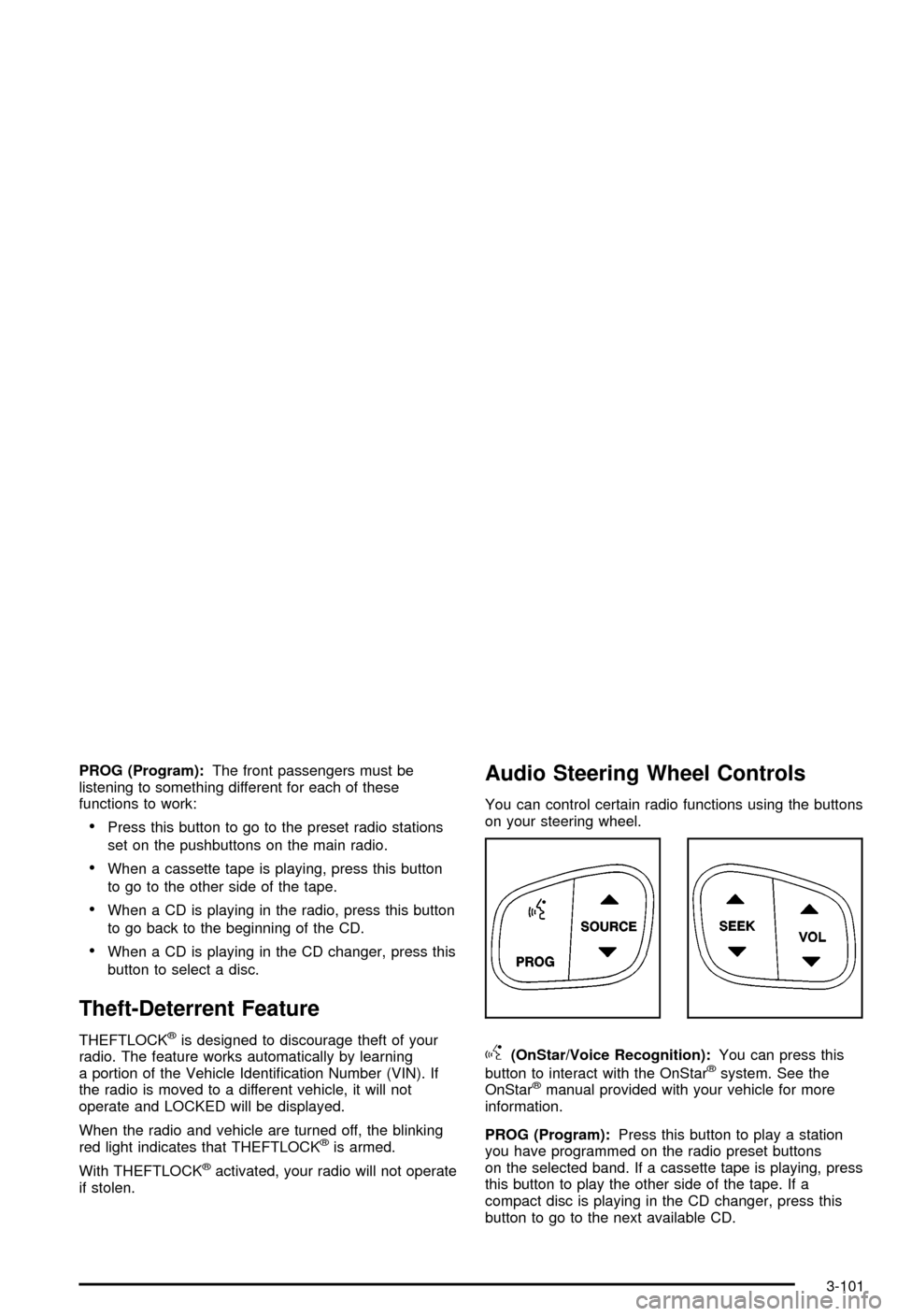
PROG (Program):The front passengers must be
listening to something different for each of these
functions to work:
·Press this button to go to the preset radio stations
set on the pushbuttons on the main radio.
·When a cassette tape is playing, press this button
to go to the other side of the tape.
·When a CD is playing in the radio, press this button
to go back to the beginning of the CD.
·When a CD is playing in the CD changer, press this
button to select a disc.
Theft-Deterrent Feature
THEFTLOCKžis designed to discourage theft of your
radio. The feature works automatically by learning
a portion of the Vehicle Identi®cation Number (VIN). If
the radio is moved to a different vehicle, it will not
operate and LOCKED will be displayed.
When the radio and vehicle are turned off, the blinking
red light indicates that THEFTLOCK
žis armed.
With THEFTLOCK
žactivated, your radio will not operate
if stolen.
Audio Steering Wheel Controls
You can control certain radio functions using the buttons
on your steering wheel.
g(OnStar/Voice Recognition):You can press this
button to interact with the OnStaržsystem. See the
OnStaržmanual provided with your vehicle for more
information.
PROG (Program):Press this button to play a station
you have programmed on the radio preset buttons
on the selected band. If a cassette tape is playing, press
this button to play the other side of the tape. If a
compact disc is playing in the CD changer, press this
button to go to the next available CD.
3-101
Page 482 of 492

G
Gage............................................................3-39
Engine Coolant Temperature.........................3-39
Fuel..........................................................3-45
Oil Pressure...............................................3-43
Speedometer..............................................3-32
Tachometer.................................................3-33
Transmission Temperature.............................3-40
Voltmeter Gage...........................................3-36
Garage Door Opener.......................................2-55
Gasoline......................................................... 5-5
Octane........................................................ 5-5
Speci®cations............................................... 5-5
Gate Operator and Canadian Programming........2-57
Getting Familiar with Off-Road Driving................4-21
Glove Box.....................................................2-59
GM Mobility Program for Persons with
Disabilities.................................................... 7-5
H
Hazard Warning Flashers................................... 3-6
Head Restraints............................................... 1-7
Headlamp High/Low-Beam Changer.................... 3-8
Headlamps....................................................5-52
Bulb Replacement.......................................5-52
Daytime Running Lamps...............................5-58Headlamps (cont.)
Front Turn Signal, Sidemarker and Daytime
Running Lamps........................................5-56
Front Turn Signal, Sidemarker and Parking
Lamps....................................................5-55
Halogen Bulbs............................................5-52
Headphones...................................................3-96
Heated Seats................................................... 1-4
Heating.........................................................3-25
Highway Hypnosis...........................................4-39
Hill and Mountain Roads..................................4-39
Hitches..........................................................4-63
HomeLink
žTransmitter, Programming................2-56
HomeLinkžTransmitter....................................2-55
Hood............................................................5-10
Checking Things Under................................5-10
Release.....................................................5-10
Horn............................................................... 3-7
How to Add Coolant to the Coolant Surge Tank......5-32
How to Add Fluid............................................5-24
How to Check Lubricant...................................5-49
How to Check Power Steering Fluid..................5-37
How to Check........................................5-22, 5-62
How to Inspect...............................................5-20
How to Use This Manual...................................... ii
How to Wear Safety Belts Properly...................1-16
Hydroplaning..................................................4-35
7