Page 156 of 473
Windshield Washer
L
(Washer Fluid):There is a paddle marked with the
windshield washer symbol at the top of the multifunction
lever. To spray washer ¯uid on the windshield, push
the paddle. The wipers will clear the window and then
either stop or return to your preset speed.
{CAUTION:
In freezing weather, don't use your washer
until the windshield is warmed. Otherwise the
washer ¯uid can form ice on the windshield,
blocking your vision.
Cruise Control
9
(Off):This position
turns the system off.
R(On):This position activates the system.
+ (Resume/Accelerate):Push the lever to this symbol
to make the vehicle accelerate or resume to a
previously set speed.
T(Set):Press this button to set the speed.
3-10
Page 162 of 473

Lamps On Reminder
If a door is open, a reminder chime will sound when
your headlamps or parking lamps are manually turned
on and your key is out of the ignition. To turn off
the chime, turn the headlamp switch to off or AUTO and
then back on. In the automatic mode, the headlamps
turn off once the ignition is in LOCK and the headlamps
on at exit delay ends (if enabled in the DIC).
Daytime Running Lamps
Daytime Running Lamps (DRL) can make it easier for
others to see the front of your vehicle during the
day. DRL can be helpful in many different driving
conditions, but they can be especially helpful in the short
periods after dawn and before sunset. Fully functional
daytime running lamps are required on all vehicles
®rst sold in Canada.
The DRL system will come on when the following
conditions are met:
·The ignition is on,
·the exterior lamps control is in AUTO,
·the transmission is not in PARK (P), and
·the light sensor determines it is daytime.When the DRL are on, only your DRL lamps will be on.
The taillamps, sidemarker and other lamps won't be
on. The instrument panel won't be lit up either.
When it begins to get dark, the automatic headlamp
system will switch from DRL to the headlamps.
As with any vehicle, you should turn on the regular
headlamp system when you need it.
Puddle Lamps
Your vehicle is equipped with puddle lamps to help you
see the area near the base of the front doors when it
is dark out. The puddle lamps will illuminate when a door
is opened or when you press the unlock button on the
keyless entry transmitter. The lamps will time out or turn
off once the engine is started.
You can program the puddle lamps not to come on if
you choose. See
Driver Information Center (DIC)
on page 3-47.
3-16
Page 165 of 473
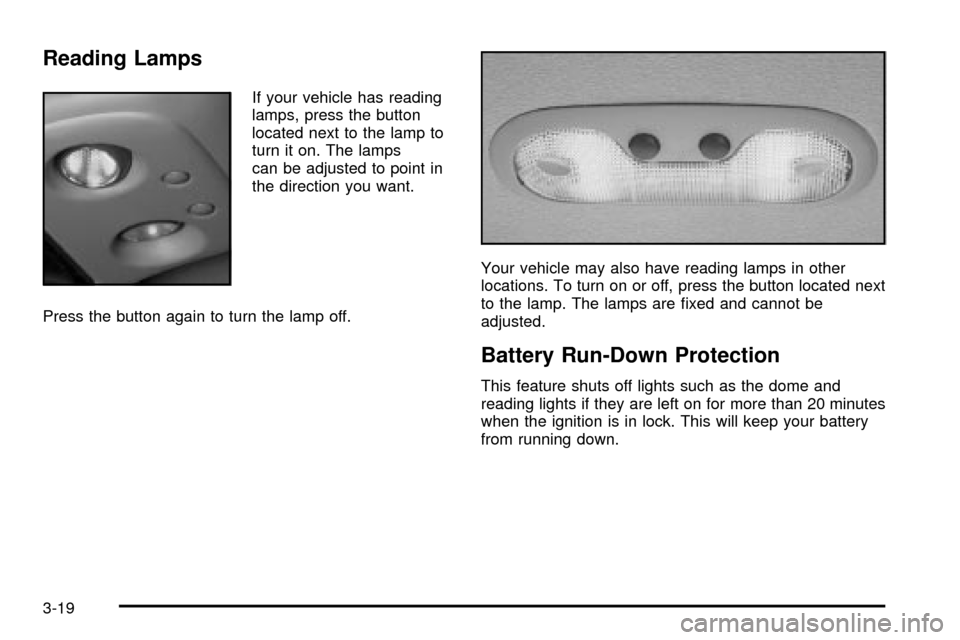
Reading Lamps
If your vehicle has reading
lamps, press the button
located next to the lamp to
turn it on. The lamps
can be adjusted to point in
the direction you want.
Press the button again to turn the lamp off.Your vehicle may also have reading lamps in other
locations. To turn on or off, press the button located next
to the lamp. The lamps are ®xed and cannot be
adjusted.
Battery Run-Down Protection
This feature shuts off lights such as the dome and
reading lights if they are left on for more than 20 minutes
when the ignition is in lock. This will keep your battery
from running down.
3-19
Page 169 of 473

Ashtrays and Cigarette Lighter
The front ashtray and lighter are located in the center
console near the cupholders. Press on the access door
to open it and use the ashtray and lighter.
Notice:Don't put papers or other ¯ammable items
into your ashtrays. Hot cigarettes or other smoking
materials could ignite them, causing a damaging ®re.
To remove the ashtray, pull it from the center console.
Slide it back in and push down to be sure it is secure.
To use the cigarette lighter, push it in all the way, and
let go. When it's ready, it will pop back out by itself.
Notice:Don't hold a cigarette lighter in with your
hand while it is heating. If you do, it won't be able to
back away from the heating element when it's
ready. That can make it overheat, damaging the
lighter and the heating element.
Analog Clock
To adjust the clock, do the following:
1. Locate the adjustment button to the lower left
corner of the clock.
2. Push and hold the adjustment button to spin the
clock hands. Release the button
beforeyou get to
the desired time.
3. Push and release the button to increase the time by
one minute increments until the desired time is
reached.
3-23
Page 170 of 473

Climate Controls
Automatic Climate Control System
With this system, you can control the heating, cooling
and ventilation in your vehicle. Your vehicle also has a
¯ow-through ventilation system described later in this
section.
You can select different climate control settings for the
driver and passengers.
Driver's Side Temperature Knob
The driver's side knob is used to adjust the temperature
of the air coming through the system on the driver's
side. The temperature can be adjusted even if the
system is turned off. This is possible since outside airwill always ¯ow through the system as the vehicle is
moving forward unless it is set to recirculation mode.
See ªRecirculationº later in this section.
Turn the knob counterclockwise or clockwise to lower or
increase the cabin temperature. The display will show
the temperature setting decreasing or increasing and
an arrow pointing to the driver will be displayed
under and to the left of the temperature setting.
Passenger's Side Temperature Knob
The passenger's side knob can be used to change
the temperature of the air coming through the system
on the passenger's side of the vehicle. The temperature
can be adjusted even if the system is turned off.
This is possible since outside air will always ¯ow through
the system as the vehicle is moving forward unless it
is set to recirculation mode. See ªRecirculationº later in
this section.
Turn the knob counterclockwise or clockwise to lower or
increase the cabin temperature. The display will show
the temperature setting decreasing or increasing and
an arrow pointing to the passenger will be displayed
under and to the right of the temperature setting.
The passenger's temperature setting can be set to
match the driver's temperature setting by pressing and
holding the AUTO button for four seconds. Both the
driver and passenger arrows will be displayed.
3-24
Page 176 of 473

Outlet Adjustment
Use the air outlets located in the center and on the side
of your instrument panel to direct the air¯ow.
Your vehicle has air outlets that allow you to adjust the
direction and amount of air¯ow inside the vehicle.
Move the louvers up or down. Use the thumbwheel
next to or underneath the outlet to close the louvers.
For the most efficient air¯ow and temperature control,
keep the outlet in the fully opened position.
Operation Tips
·
Keep the hood and front air inlets free of ice, snow,
or any other obstruction (such as leaves). The
heater and defroster will work far better, reducing
the chance of fogging the inside of your windows.
·Keep the air path under the front seats clear
of objects. This helps air to circulate throughout your
vehicle.
·Adding outside equipment to the front of your
vehicle, such as hood-air de¯ectors, etc., may affect
the performance of the heating and air conditioning
system. Check with your dealer before adding
equipment to the outside of your vehicle.
Climate Controls Personalization
You can store and recall the climate control settings for
temperature, air delivery mode and fan speed for
two different drivers. The personal choice settings
recalled are determined by the transmitter used to enter
the vehicle.
After the button with the unlock symbol on a remote
keyless entry transmitter is pressed, the climate control
will adjust to the last settings of the identi®ed driver.
The settings can also be changed by pressing one of the
memory buttons (1 or 2) located on the driver's door.
When adjustments are made, the new settings are
automatically saved for that driver.
3-30
Page 185 of 473

Anti-Lock Brake System Warning
Light
With the anti-lock brake
system, this light will come
on when you start your
engine and may stay on
for several seconds.
That's normal. If the light doesn't come on then, have it
®xed so it will be ready to warn you if there is a problem.
If the light stays on, or comes on when you're driving,
your vehicle needs service. You will also hear a
chime sound when the light is on steady. If the regular
brake system warning light isn't on, you still have
brakes, but you don't have anti-lock brakes. If the
regular brake system warning light is also on you don't
have anti-lock brakes and there's a problem with
your regular brakes. In addition to both lights, you will
also hear a chime sound on the ®rst occurrence of
a problem and each time the vehicle is shut off and then
restarted. See
Brake System Warning Light on
page 3-38.
Traction Off Light
If you have the
Stabilitrakžsystem,
this light should come on
brie¯y when you turn
the ignition to RUN.
If the light doesn't come on then, the system may
require service; have it ®xed so it will be there to
warn you if the system is turned off.
For more information on the traction off light,
see
StabilitrakžSystem on page 4-10.
3-39
Page 197 of 473

Personalization Button
You can program certain features to a preferred setting
for up to two people. Press the personalization button
to scroll through the following personalization features.
All of the personalization options may not be available
on your vehicle. Only the options available will be
displayed on your DIC.
·AUTOMATIC LOCKING
·AUTOMATIC UNLOCKING
·DELAYED LOCKING
·REMOTE LOCK FEEDBACK
·ALARM WARNING TYPE
·REMOTE UNLOCK FEEDBACK
·HEADLAMPS ON AT EXIT
·PERIMETER LIGHTING
·SEAT POSITION RECALL
·EASY EXIT DRIVER SEAT
·CURB VIEW ASSIST
·DISPLAY LANGUAGE
·DISPLAY UNITS (ENG/MET)
The default options for the above features were set
when your vehicle left the factory. The default options
are noted in the text following, but may have been
changed from their default state since then.
The driver's preferences can be recalled by pressing the
unlock button on the remote keyless entry transmitter
labeled 1 or 2 or by pressing the appropriate memory
button 1 or 2 located on the driver's door.
3-51