2003 CADILLAC ESCALADE EXT lights
[x] Cancel search: lightsPage 165 of 473
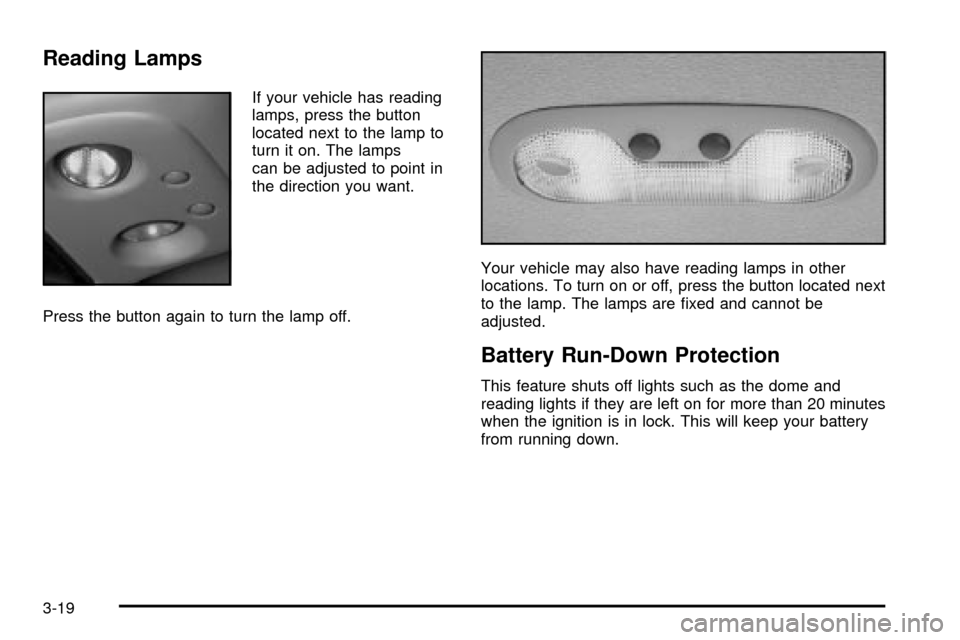
Reading Lamps
If your vehicle has reading
lamps, press the button
located next to the lamp to
turn it on. The lamps
can be adjusted to point in
the direction you want.
Press the button again to turn the lamp off.Your vehicle may also have reading lamps in other
locations. To turn on or off, press the button located next
to the lamp. The lamps are ®xed and cannot be
adjusted.
Battery Run-Down Protection
This feature shuts off lights such as the dome and
reading lights if they are left on for more than 20 minutes
when the ignition is in lock. This will keep your battery
from running down.
3-19
Page 166 of 473

Ultrasonic Rear Parking Assist
(URPA)
Ultrasonic Rear Parking Assist can help you to
determine how close an object is to your rear bumper
within a given area, making parking easier.
The URPA display is
located inside the vehicle,
above the rear window.
It has three color-coded
lights that can be seen
through the rearview mirror
or by turning around.
URPA can be disabled by
pressing the on/off button
located near the climate
control system and radio.
{CAUTION:
Even with the Ultrasonic Rear Park Assist
system, the driver must check carefully before
backing up. The system does not operate above
typical backing speeds of 3 mph (5 km/h) while
parking. And, the system doesn't detect objects
that are more than 5 feet (1.5 meters) behind
the vehicle.
So, unless you check carefully behind you
before and when you back up, you could strike
children, pedestrians, bicyclists or pets behind
you, and they could be injured or killed.
Whether or not you are using Rear Park Assist,
always check carefully behind your vehicle
before you back up and then watch closely as
you do.
3-20
Page 167 of 473

How the System Works
URPA comes on automatically when the shift lever is
moved into REVERSE (R) and the vehicle speed is less
than 3 mph (5 km/h). When the system comes on,
the three lights on the display will illuminate to let you
know that the system is working. URPA senses
how close your vehicle is to an object. The distance is
determined by the four ultrasonic sensors located on the
rear bumper. When you shift into REVERSE (R) and
an object is detected, the following will occur in
sequence depending on the distance from the object:
·At 5 feet (1.5 m) a chime will sound and one
amber light will be lit;
·at 40 inches (1.0 m) both amber lights will be lit;
·at 20 inches (0.5 m) a continuous chime will sound
and all three lights (amber/amber/red) will be lit;
and
·at 1 foot (0.3 m) a continuous chime will sound and
all three lights (amber/amber/red) will ¯ash.
URPA can detect objects 3 inches (7.6 cm) and wider,
and at least 10 inches (25.4 cm) tall, but it cannot detect
objects that are above the center of the Cadillac crest
badge on the tailgate. In order for the rear sensors
to recognize an object, it must be within operating range.
Notice:The URPA system will not work correctly
with the tailgate lowered. You could damage
your vehicle by backing into an object before URPA
detects it. Turn off the URPA system when driving
with the tailgate lowered.
If the URPA Display Flashes Red
If the URPA system is not functioning properly, the
display will ¯ash red, indicating that there is a problem.
The light will also ¯ash red while driving if any of the
following conditions exist:
·A trailer or trailer-hitch ball mount is attached to
your vehicle.
·A bicycle or object is on the back of, or hanging out
the cargo area.
·If the tailgate is lowered.
·If your vehicle is moving in REVERSE (R) at a
speed greater than 3 mph (5 km/h).
The light will continue to ¯ash until the trailer or the
object is removed or the tailgate is raised and your
vehicle is driven forward at least 15 mph (25 km/h).
It may also ¯ash red if the ultrasonic sensors are not
kept clean.
3-21
Page 177 of 473

Warning Lights, Gages and
Indicators
This part describes the warning lights and gages on
your vehicle. The pictures will help you locate them.
Warning lights and gages can signal that something is
wrong before it becomes serious enough to cause
an expensive repair or replacement. Paying attention to
your warning lights and gages could also save you
or others from injury.
Warning lights come on when there may be or is a
problem with one of your vehicle's functions. As you
will see in the details on the next few pages, some
warning lights come on brie¯y when you start the engine
just to let you know they're working. If you are familiar
with this section, you should not be alarmed when
this happens.Gages can indicate when there may be or is a problem
with one of your vehicle's functions. Often gages
and warning lights work together to let you know when
there's a problem with your vehicle.
When one of the warning lights comes on and stays on
when you are driving, or when one of the gages shows
there may be a problem, check the section that tells you
what to do about it. Please follow this manual's advice.
Waiting to do repairs can be costly ± and even
dangerous. So please get to know your warning lights
and gages. They're a big help.
Your vehicle also has a message center that works
along with the warning lights and gages. See
Driver
Information Center (DIC) on page 3-47.
3-31
Page 182 of 473

If the word OFF or the off symbol is lit on the air bag
status indicator, it means that the passenger sensing
system has turned off the right front passenger's frontal
air bag. See
Passenger Sensing System on page 1-60for more on this, including important safety information.
If, after several seconds, all status indicator lights
remain on, or if there are no lights at all, there may be
a problem with the lights or the passenger sensing
system. See your dealer for service.
{CAUTION:
If the off indicator and the air bag readiness
light ever come on together, it means that
something may be wrong with the air bag
system. If this ever happens, have the vehicle
serviced promptly, because an adult-size
person sitting in the right front passenger seat
may not have the protection of the frontal air
bag. See ªAir Bag Readiness Lightº in the
Index.
Charging System Light
The charging system light
will come on brie¯y when
you turn on the ignition,
but the engine is not
running, as a check to
show you it is working.
It should go out once the engine is running. If it stays
on, or comes on while you are driving, you may have a
problem with the charging system. It could indicate
that you have problems with a generator drive belt, or
another electrical problem. Have it checked right
away. Driving while this light is on could drain your
battery.
When this light comes on the DIC will also display the
battery not charging message. See
DIC Warnings
and Messages on page 3-58.
If you must drive a short distance with the light on, be
certain to turn off all your accessories, such as the radio
and air conditioner.
3-36
Page 185 of 473

Anti-Lock Brake System Warning
Light
With the anti-lock brake
system, this light will come
on when you start your
engine and may stay on
for several seconds.
That's normal. If the light doesn't come on then, have it
®xed so it will be ready to warn you if there is a problem.
If the light stays on, or comes on when you're driving,
your vehicle needs service. You will also hear a
chime sound when the light is on steady. If the regular
brake system warning light isn't on, you still have
brakes, but you don't have anti-lock brakes. If the
regular brake system warning light is also on you don't
have anti-lock brakes and there's a problem with
your regular brakes. In addition to both lights, you will
also hear a chime sound on the ®rst occurrence of
a problem and each time the vehicle is shut off and then
restarted. See
Brake System Warning Light on
page 3-38.
Traction Off Light
If you have the
Stabilitrakžsystem,
this light should come on
brie¯y when you turn
the ignition to RUN.
If the light doesn't come on then, the system may
require service; have it ®xed so it will be there to
warn you if the system is turned off.
For more information on the traction off light,
see
StabilitrakžSystem on page 4-10.
3-39
Page 200 of 473

DELAYED LOCKING OFF:The doors will lock
immediately when pressing the power lock switch or the
lock button on the keyless entry transmitter.
Choose one of the two options and press the
personalization button while it is displayed on the DIC to
select it and move on to the next feature. For more
information on automatic door locks see
Programmable
Automatic Door Locks on page 2-10.
This feature will not operate if the key is in the ignition.
Seat Position Recall
Press the personalization button until SEAT POSITION
RECALL appears in the display. To select your
personalization for seat position recall, press the select
button while SEAT POSITION RECALL is displayed
on the DIC. Pressing the select button will scroll through
the following choices:
SEAT POSITION RECALL OFF (default):The memory
seat position you saved will only be recalled when the
memory button 1 or 2 is pressed.
SEAT POSITION RECALL AT KEY IN:The memory
seat position you saved will be recalled when you
put the key in the ignition.SEAT POSITION RECALL ON REMOTE:The memory
seat position you saved will be recalled when you unlock
the vehicle with the remote keyless entry transmitter.
Choose one of the three options and press the
personalization button while it is displayed on the DIC to
select it and move on to the next feature. For more
information on seat position recall see
Memory Seat on
page 2-72.
Perimeter Lighting
Press the personalization button until PERIMETER
LIGHTING appears in the display. To select your
personalization for perimeter lighting, press the select
button while PERIMETER LIGHTING is displayed on the
DIC. Pressing the select button will scroll through the
following choices:
PERIMETER LIGHTING ON (default):The headlamps
and back-up lamps will come on for 40 seconds, if it
is dark enough outside, when you unlock the vehicle
with the remote keyless entry transmitter.
PERIMETER LIGHTING OFF:The perimeter lights will
not come on when you unlock the vehicle with the
remote keyless entry transmitter.
Choose one of the two options and press the
personalization button while it is displayed on the DIC to
select it and move on to the next feature.
3-54
Page 256 of 473

Avoid needless heavy braking. Some people drive in
spurts Ð heavy acceleration followed by heavy braking
Ð rather than keeping pace with traffic. This is a
mistake. Your brakes may not have time to cool between
hard stops. Your brakes will wear out much faster if
you do a lot of heavy braking. If you keep pace with the
traffic and allow realistic following distances, you will
eliminate a lot of unnecessary braking. That means
better braking and longer brake life.
If your engine ever stops while you're driving, brake
normally but don't pump your brakes. If you do,
the pedal may get harder to push down. If your engine
stops, you will still have some power brake assist.
But you will use it when you brake. Once the power
assist is used up, it may take longer to stop and
the brake pedal will be harder to push.Anti-lock Brake System
Your vehicle has anti-lock brakes. ABS is an advanced
electronic braking system that will help prevent a
braking skid.
When you start your engine and begin to drive away,
your anti-lock brake system will check itself. You may
hear a momentary motor or clicking noise while this test
is going on. This is normal.
If there's a problem with
the anti-lock brake system,
this warning light will
stay on. See
Anti-Lock
Brake System Warning
Light on page 3-39
.
Along with ABS, your vehicle has a Dynamic Rear
Proportioning (DRP) system. If there's a DRP problem,
both the brake and ABS warning lights will come on
accompanied by a 10-second chime. The lights and
chime will come on each time the ignition is turned on
until the problem is repaired. See your dealer for service.
4-7