Page 149 of 435
2-81
The main components of the instrument panel are the following:
A. Air Outlets
B. Turn Signal/Multifunction Lever
C. Reconfigurable Steering Wheel Controls
D. Instrument Panel Cluster
E. Cruise Control Buttons
F. Audio Mute Button (Base Radio) or Voice
Recognition Button (Navigation System)
G. Audio Volume Knob and Source Button
H. Windshield Wiper LeverI. Storage Compartment or Ashtray (Option)
J. Hazard Warning Flasher Button
K. Transmission Shift Lever
L. Accessory Power Outlet or Cigarette
Lighter (Option)
M. Climate Control System
N. Audio/Navigation System (Option)
O. Glove Box
Page 197 of 435

2-129
TCS (Traction Control System): You can enable
or disable the traction control system using this menu
item. Press the TUNE/SEL knob to switch between on
and off.
You can also turn the traction control system off using
the traction control button located in the glove box or
by programming one of the steering wheel controls
(1, 2, 3 or 4) or audio system softkeys to enable/disable
the TCS. See ªReconfigurable Steering Wheel Controlsº
and ªConfigurable Radio Display Keysº in the Index for
more information.
When you disable the traction control system, the
Traction Suspended message will appear on the DIC and
the traction control system warning light on the
instrument panel cluster will come on. See ªDriver
Information (DIC) Messagesº and ªTraction Control
System Warning Lightº listed previously in this section
for more information.SET CLOCK
Use this menu item to
set the time on the
vehicle's clock.
See ªSetting the Clockº in the Index for more
information.
SETUP: When you select this menu item, the following
submenu is available:
�Personalization
�Configure Display Keys
�Configure SWC (Steering Wheel Control) Keys
�Clear Tape Hours
You can use the items on this submenu to customize
your vehicle's audio system and optional memory
features. See ªVehicle Programming and Personalization
Features,º ªReconfigurable Steering Wheel Controlsº
and ªCare of Your Cassette Tape Playerº in the Index for
more information on these menu items.
Page 222 of 435
3-
3-1
Section 3 Comfort Controls and Audio Systems
In this section, you'll find out how to operate the comfort control and audio systems offered with your vehicle.
Be sure to read about the particular systems supplied with your vehicle.
3
-2 Comfort Controls
3
-2 Climate Control System
3
-6 Air Conditioning
3
-6 Defogging and Defrosting
3
-6 Rear Window Defogger
3
-7 Ventilation System
3
-9 Climate Control Steering Wheel Controls
3
-9 Audio Systems
3
-10 Setting the Clock
3
-10 AM-FM Radio with Cassette Tape and
Compact Disc Player with Radio Data
Systems (RDS) and Digital Signal
Processing (DSP)3
-27 Navigation/Radio System (Option)
3
-27 Theft-Deterrent Feature
3
-28 Audio Steering Wheel Controls
3
-29 Understanding Radio Reception
3
-30 Tips About Your Audio System
3
-31 Care of Your Cassette Tape Player
3
-32 Care of Your Compact Discs
3
-32 Care of Your Compact Disc Player
3
-33 Diversity Antenna System
Page 226 of 435

3-5
Interior Temperature Sensor
This sensor
monitors the interior
temperature of the
vehicle. It is located to
the right of the
steering wheel on the
instrument panel.
While the climate control system is in AUTO, the
system uses both the interior temperature sensor and the
electronic solar sensor to automatically adjust the
temperature and airflow in the vehicle. See ªElectronic
Solar Sensorº following for more information. Be sure
not to cover the sensor with anything. If you do, the
automatic climate control system will not work properly.Electronic Solar Sensor
This sensor monitors the sun's solar radiation. It is located
on top of the instrument panel near the windshield.
While the climate control system is in AUTO, the system
uses the information collected by the electronic solar
sensor to automatically adjust the temperature and airflow
to maintain your comfort. The climate control system may
supply cooler air to one side of your vehicle, if that side is
facing the sun. Be sure not to cover the sensor on top of
the instrument panel. If you do, the automatic climate
control system will not work properly.
Page 230 of 435
3-9 Climate Control Steering Wheel Controls
There are four controls that can be programmed for use
with the climate control system.
The controls are located
on the left spoke of the
steering wheel.
See ªReconfigurable Steering Wheel Controlsº in
the Index for more information on programming
these controls.
Audio Systems
Your audio system has been designed to operate easily
and to give years of listening pleasure. You will get the
most enjoyment out of it if you acquaint yourself with it
first. Find out what your audio system can do and how
to operate all of its controls to be sure you're getting the
most out of the advanced engineering that went into it.
Your vehicle has a feature called Retained Accessory
Power (RAP). With RAP, you can play your audio
system even after the ignition is turned off. See
ªRetained Accessory Powerº in the Index.
Page 249 of 435
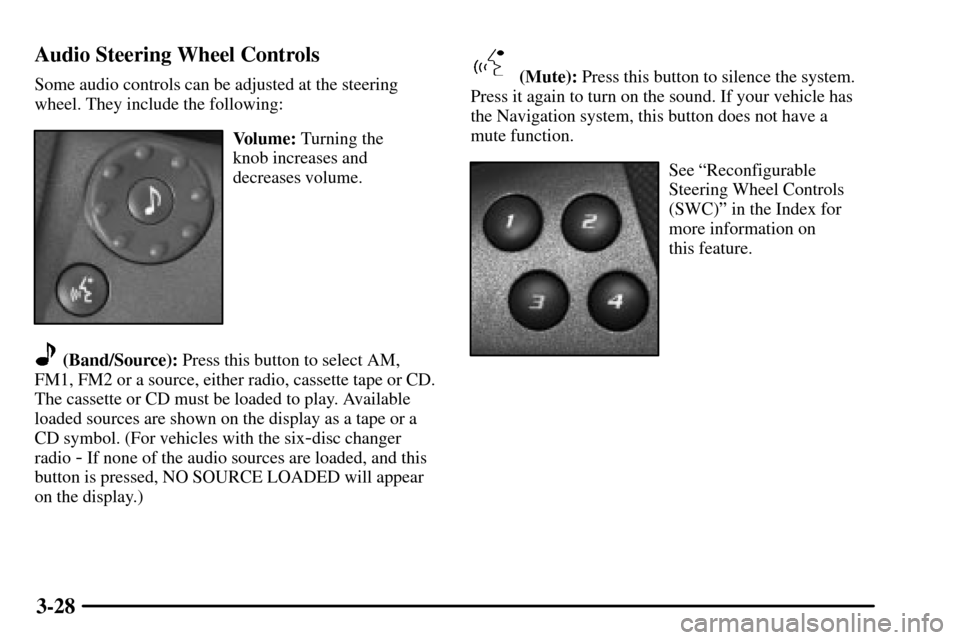
3-28 Audio Steering Wheel Controls
Some audio controls can be adjusted at the steering
wheel. They include the following:
Volume: Turning the
knob increases and
decreases volume.
(Band/Source): Press this button to select AM,
FM1, FM2 or a source, either radio, cassette tape or CD.
The cassette or CD must be loaded to play. Available
loaded sources are shown on the display as a tape or a
CD symbol. (For vehicles with the six
-disc changer
radio
- If none of the audio sources are loaded, and this
button is pressed, NO SOURCE LOADED will appear
on the display.)
(Mute): Press this button to silence the system.
Press it again to turn on the sound. If your vehicle has
the Navigation system, this button does not have a
mute function.
See ªReconfigurable
Steering Wheel Controls
(SWC)º in the Index for
more information on
this feature.
Page 263 of 435

4-9
Remember: Anti-lock doesn't change the time you need
to get your foot up to the brake pedal or always decrease
stopping distance. If you get too close to the vehicle in
front of you, you won't have time to apply your brakes
if that vehicle suddenly slows or stops. Always leave
enough room up ahead to stop, even though you have
anti
-lock brakes.
Using Anti
-Lock
Don't pump the brakes. Just hold the brake pedal down
firmly and let anti
-lock work for you. You may hear the
anti
-lock pump or motor operate, and feel the brake
pedal pulsate, but this is normal.
Braking in Emergencies
With anti-lock, you can steer and brake at the same
time. In many emergencies, steering can help you more
than even the very best braking.
Traction Control System
Your vehicle has a traction control system that limits
wheel spin. This is especially useful in slippery road
conditions. The system operates only if it senses that one
or both of the rear wheels are spinning or beginning to
lose traction. When this happens, the system brakes the
spinning wheel(s) and/or reduces engine power to limit
wheel spin.You may feel or hear the system working, but this
is normal.
This warning light will
come on to let you know if
there's a problem with your
traction control system.
See ªTraction Control System Warning Lightº in the
Index. When this warning light is on, the system will not
limit wheel spin. Adjust your driving accordingly.
When the system is limiting wheel spin, the Traction
Control System warning light will be blinking.
The traction control system automatically comes on
whenever you start your vehicle. To limit wheel spin,
especially in slippery road conditions, you should
always leave the system on. But you can turn the
traction control system off if you ever need to. You
should turn the system off if your vehicle ever gets stuck
in sand, mud or snow and rocking the vehicle is
required. See ªRocking Your Vehicleº in the Index.
Page 265 of 435

4-11
If your vehicle is in cruise control when the Stabilitrak
activates, the cruise control will automatically
disengage. When road conditions allow you to safely
use it again, you may reengage the cruise control. See
ªCruise Controlº in the Index.
Steering
Power Steering
If you lose power steering assist because the engine
stops or the system is not functioning, you can steer
but it will take much more effort.
Speed Variable Assist Steering
(If Equipped)
This system varies the amount of effort required to steer
the vehicle in relation to the speed of the vehicle.
The amount of steering effort required is less at slower
speeds to make the vehicle more maneuverable and
easier to park. At faster speeds, the steering effort
increases to provide a sport
-like feel to the steering.
This provides maximum control and stability.If your vehicle seems harder to steer than normal when
parking or driving slowly, there may be a problem with
the system. You will still have power steering, but
steering will be stiffer than normal at slow speeds. See
your dealer for service.
Steering Tips
Driving on Curves
It's important to take curves at a reasonable speed.
A lot of the ªdriver lost controlº accidents mentioned on
the news happen on curves. Here's why:
Experienced driver or beginner, each of us is subject to
the same laws of physics when driving on curves. The
traction of the tires against the road surface makes it
possible for the vehicle to change its path when you turn
the front wheels. If there's no traction, inertia will keep
the vehicle going in the same direction. If you've ever
tried to steer a vehicle on wet ice, you'll understand this.
The traction you can get in a curve depends on the
condition of your tires and the road surface, the angle
at which the curve is banked, and your speed. While
you're in a curve, speed is the one factor you
can control.