2003 BUICK PARK AVENUE rear seat
[x] Cancel search: rear seatPage 101 of 372

Outside Convex Mirror
Your passenger's side mirror is convex. A convex
mirror's surface is curved so you can see more from the
driver's seat.
{CAUTION:
A convex mirror can make things (like other
vehicles) look farther away than they really are.
If you cut too sharply into the right lane, you
could hit a vehicle on your right. Check your
inside mirror or glance over your shoulder
before changing lanes.
Outside Automatic Dimming
Heated Mirror
If you have this feature, the driver's side outside
rearview mirror will adjust for the glare of headlamps
behind you. This feature is controlled using the on and
off settings on the automatic dimming rearview mirror.
See ªAutomatic Dimming Rearview Mirrorº or ªAutomatic
Dimming Rearview Mirror with Compassº earlier in
this section.If you have this feature, the left and right outside mirrors
are also heated when you activate the rear window
defogger. See ªRear Window Defoggerº under
Dual Automatic Climate Control System on page 3-22.
Both outside mirrors can be folded forward or rearward.
In the rearward position, they will fold ¯ush with the
vehicle. This feature is particularly useful in automatic
car washes.
OnStaržSystem
Your vehicle may have this feature. OnStaržuses
global positioning system (GPS) satellite technology,
wireless communications, and state of the art call
centers to provide you with a wide range of safety,
security, information and convenience services.
A complete OnStar
žuser's guide and the terms and
conditions of the OnStaržSubscription Service
Agreement are included in your OnStarž-equipped
vehicle's glove box literature.
2-37
Page 108 of 372
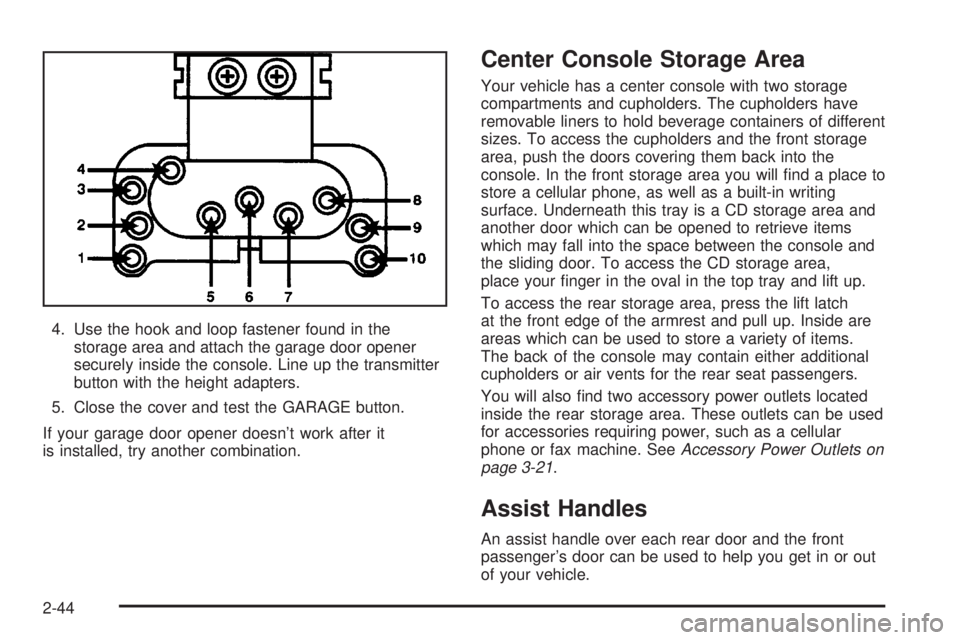
4. Use the hook and loop fastener found in the
storage area and attach the garage door opener
securely inside the console. Line up the transmitter
button with the height adapters.
5. Close the cover and test the GARAGE button.
If your garage door opener doesn't work after it
is installed, try another combination.
Center Console Storage Area
Your vehicle has a center console with two storage
compartments and cupholders. The cupholders have
removable liners to hold beverage containers of different
sizes. To access the cupholders and the front storage
area, push the doors covering them back into the
console. In the front storage area you will ®nd a place to
store a cellular phone, as well as a built-in writing
surface. Underneath this tray is a CD storage area and
another door which can be opened to retrieve items
which may fall into the space between the console and
the sliding door. To access the CD storage area,
place your ®nger in the oval in the top tray and lift up.
To access the rear storage area, press the lift latch
at the front edge of the armrest and pull up. Inside are
areas which can be used to store a variety of items.
The back of the console may contain either additional
cupholders or air vents for the rear seat passengers.
You will also ®nd two accessory power outlets located
inside the rear storage area. These outlets can be used
for accessories requiring power, such as a cellular
phone or fax machine. See
Accessory Power Outlets on
page 3-21.
Assist Handles
An assist handle over each rear door and the front
passenger's door can be used to help you get in or out
of your vehicle.
2-44
Page 109 of 372

Rear Storage Area
If your vehicle has this feature, the rear storage armrest
contains two cupholders. To access the cupholders,
pull the armrest down from the rear seatback.
This armrest also includes a storage area inside the
armrest. To open it, pull up on the lever at the front edge
of the armrest.
Rear Seat Armrest
Your vehicle's rear seat armrest contains two
cupholders. To access the cupholders, pull the armrest
down from the rear seatback.
Rear Seat Pass Through
Your vehicle is equipped with a rear storage armrest
with a pass-through feature that allows for trunk access.
Pull the rear armrest down, then push down on the
trunk access panel latch to open the panel. To close,
push the access panel until it latches.
Convenience Net
Your vehicle may have a convenience net. You'll see it
just inside the back wall of the trunk.
Put small loads, like grocery bags, behind the net. It can
help keep them from falling over during sharp turns or
quick starts and stops.The net isn't for larger, heavier loads. Store them in the
trunk as far forward as you can.
You can unhook the net so that it will lie ¯at when
you're not using it.
Sunroof
Your vehicle may be equipped with a sunroof. The
sunroof has both manual and express features
for opening the glass panel and sunshade.
The switch for the sunroof
is located on the headliner
between the sun visors.
The sunroof switch has four positions that control
sunroof movement.
The switch will only work when the ignition is on or
when the RAP is active. See ªRetained Accessory
Power (RAP)º under
Ignition Positions on page 2-21.
2-45
Page 110 of 372

Open:Press and hold the switch rearward to the ®rst
position to open the glass panel and sunshade. The
sunshade can also be opened manually.
Comfort Stop:Press and release the switch rearward
to the second position to express open the glass
panel to the comfort stop position. The comfort stop
position is designed to help reduce noise and make
passengers more comfortable.
Express Open:When the glass panel is express
opening, pressing the switch in any direction will stop it
in a partially-opened position. The glass panel may
be fully opened by pressing the switch rearward again.
If you press and hold the switch in the express open
position for more than one and a half seconds, the
express open operation will be overridden and
the sunroof will operate manually.
Close:To close the glass panel, press and hold the
switch forward. As the glass panel reaches the closed
position, it will open slightly toward the vent position and
then drop down to the closed position to provide a
better seal. The sunshade must be closed manually.
Vent:Once the sunroof is closed, it can be opened to
the vent position by pushing the switch upward. To
close the glass panel, pull the switch downward. The
sunshade must be opened and closed manually for vent
operation.Vehicle Personalization
Memory Seat and Mirrors
If your vehicle has this
feature, the controls are
located on the driver's door
panel, and are used to
program and recall
memory settings for the
driver's seating, outside
mirror positions and
climate controls. See
Climate Controls
Personalization on
page 3-28
for more
information.
To save your seat and mirror positions into memory,
use the following procedure:
1. First identify the DRIVER # on the Driver Information
Center (DIC) by pressing the MEMORY button
1 or 2 or by pressing the unlock button on the
remote keyless entry transmitter. See
Driver
Information Center (DIC) on page 3-43.
2-46
Page 139 of 372

Use the thumbwheel
located between the rear
passenger outlets to
open and close the outlets.
Adjust the direction of
the air¯ow from side
to side with the levers in
the center of each
rear outlet.
Operation Tips
·
Clear away any ice, snow or leaves from the air
inlets at the base of the windshield that may
block the ¯ow of air into your vehicle.
·Use of non-GM approved hood de¯ectors may
adversely affect the performance of the system.
·Keep the path under the front seats clear of objects
to help circulate the air inside of your vehicle more
effectively.
·If the air¯ow seems low when the fan is at the
highest setting, the passenger compartment air ®lter
may need to be replaced. See
Passenger
Compartment Air Filter on page 3-27.
Passenger Compartment Air Filter
Passenger compartment air, both outside air and
recirculated air, is routed through a passenger
compartment ®lter, which is part of a three piece ®lter
system. The ®lter removes certain particles from the air,
including pollen and dust particles. Reductions in
air¯ow, which may occur more quickly in dusty areas,
indicate that the ®lter needs to be replaced early.
The particle ®lter is located inside of the air control
module. The air control module is located behind
an access panel near the accelerator pedal.
3-27
Page 160 of 372

4. Scroll through the following messages and feature
options:
·PARALLEL PARK ± OFF/ON
·AUTO DOOR LOCKS ± OFF/ON
·UNLOCK IN PARK ± OFF/ON
·WHICH DOORS ± ALL/DRIVER
·DELAYED LOCKING ± OFF/ON
·LOCK FEEDBACK ± OFF/ON
·LOCK FEEDBACK ± LIGHTS/LIGHTS + HORN
·UNLOCK FEEDBACK ± OFF/LIGHTS
·PERIMETER LIGHTS ± OFF/ON
·SEAT RECALL ± OFF/ON
·RECALL POSITION ± MEMORY/EXIT
·WINDOW LOCKOUT ± ALL PASS/REAR
If you would like to exit the selection mode without
moving through each of the personal choice features,
simply press a different button on the DIC or turn off the
ignition. However, personal choices you made may
not be retained.
If you happen to move past a selection you would like to
make a personal choice for, press the unlock button on
your transmitter or press the appropriate driver number
on the seat control. This will return you to the beginning of
the option feature programming mode.
A description of each feature programmable through the
DIC follows.
Outside Curb View Assist Mirror
The outside curb view assist mirror, which tilts the
passenger mirror while the vehicle is in REVERSE (R),
can be made active or inactive through the DIC.
When PARALLEL PARK-OFF-ON appears on the
display, use the ENG/MET button to toggle the arrow
between OFF and ON. When you have made your
choice, press the RESET button to record your
selection. For more information on this feature, see
Outside Curb View Assist Mirror on page 2-36.
Programmable Automatic Door Locks
The automatic door lock modes, when shifting in and out
of PARK (P), can be changed through the DIC. You
can change these modes using different selections from
the following DIC displays:
·AUTO DOOR LOCKS Ð OFF/ON
·UNLOCK IN PARK ÐOFF/ON
If you choose OFF for AUTO DOOR LOCKS, your door
locks will operate normally with no automatic feature.
If you choose ON for AUTO DOOR LOCKS, and ON for
UNLOCK IN PARK, your doors will lock every time
you shift out of PARK (P), and the doors will unlock
every time you stop and shift into PARK (P).
3-48
Page 163 of 372

You can also program this feature to recall your
memory seat position or the exit seat position.
·Memory Position: Choose ON when the SEAT
RECALL choice appears, and then choose
MEMORY when the RECALL POSITION choice
appears.
·Exit Position: Choose ON when the SEAT RECALL
choice appears, then choose EXIT when the
RECALL POSITION choice appears and your seat
will move to the stored exit position. The seat
will also move when you enter the vehicle after
unlocking it with a remote keyless entry transmitter.
This will allow for easy entry as well.
For more information on this feature, see
Memory Seat
and Mirrors on page 2-46.
Window Lock Out
The number of passenger windows locked out by the
WINDOW LOCK button can be programmed through the
DIC.
If you choose ALL PASS, all three passenger window
switches will be inactive when the WINDOW LOCK
button is enabled.
If you choose REAR, only the two rear passenger
window switches will be locked out when the WINDOW
LOCK button is enabled.To change modes do the following:
1. Move the arrow on the display between ALL PASS
and REAR by pressing the ENG/MET button.
2. Once you have made your selection, press the
RESET button. Your choice will be retained in
memory.
For more information on this feature, see ªWindow Lock
Outº under
Power Windows on page 2-16.
Audio System(s)
Notice:Before you add any sound equipment to
your vehicle ± like a tape player, CB radio, mobile
telephone or two-way radio ± be sure you can
add what you want. If you can, it's very important to
do it properly. Added sound equipment may
interfere with the operation of your vehicle's engine,
radio or other systems, and even damage them.
Your vehicle's systems may interfere with the
operation of sound equipment that has been added
improperly.
So, before adding sound equipment, check with
your dealer and be sure to check federal rules
covering mobile radio and telephone units.
3-51
Page 214 of 372

If you put things inside your vehicle ± like suitcases,
tools, packages, or anything else ± they will go as fast
as the vehicle goes. If you have to stop or turn
quickly, or if there is a crash, they'll keep going.
{CAUTION:
Things you put inside your vehicle can strike
and injure people in a sudden stop or turn, or
in a crash.
·Put things in the trunk of your vehicle. In a
trunk, put them as far forward as you can.
Try to spread the weight evenly.
·Never stack heavier things, like suitcases,
inside the vehicle so that some of them
are above the tops of the seats.
·Don't leave an unsecured child restraint in
your vehicle.
·When you carry something inside the
vehicle, secure it whenever you can.
Automatic Level Control
This feature keeps the rear of your vehicle level as the
load changes. It's automatic ± you don't need to
adjust anything.
Towing a Trailer
{CAUTION:
If you do not use the correct equipment and
drive properly, you can lose control when you
pull a trailer. For example, if the trailer is too
heavy, the brakes may not work well Ð or even
at all. You and your passengers could be
seriously injured. You may also damage your
vehicle; the resulting repairs would not be
covered by your warranty. Pull a trailer only if
you have followed all the steps in this section.
Ask your dealer for advice and information
about towing a trailer with your vehicle.
Your vehicle can tow a trailer if it is equipped with the
proper trailer towing equipment. To identify what
the vehicle trailering capacity is for your vehicle, you
should read the information in ªWeight of the Trailerº that
appears later in this section. But trailering is different
than just driving your vehicle by itself. Trailering means
changes in handling, durability and fuel economy.
Successful, safe trailering takes correct equipment, and
it has to be used properly.
4-32