2003 BUICK LESABRE ignition
[x] Cancel search: ignitionPage 179 of 380

Cassette Tape Messages
If an error message appears while trying to play a
cassette tape, it could be for one of the following
reasons:
·TIGHT TAPE:The tape is tight and the player can't
turn the tape hubs. Remove the tape. Hold the tape
with the open end down and try to turn the right
hub counterclockwise with a pencil. Turn the tape
over and repeat. If the hubs do not turn easily, your
tape may be damaged and should not be used in
the player. Try a new tape to make sure your player
is working properly.
·BROKEN TAPE:The tape is broken. Try a
new tape.
CLEAN PLAYER:If this message appears on the
display, the cassette tape player needs to be cleaned. It
will still play tapes, but you should clean it as soon as
possible to prevent damage to the tapes and player. See
Care of Your Cassette Tape Player on page 3-79.
If any error occurs repeatedly or if an error can not be
corrected, contact your dealership. If your radio displays
an error number, write it down and provide it to your
dealership when reporting the problem.
CD Adapter Kits
It is possible to use a portable CD player adapter kit
with your cassette tape player after activating the bypass
feature on your tape player.
To activate the bypass feature, use the following steps:
1. Turn the ignition on.
2. Turn the radio off.
3. Insert the adapter into the cassette slot.
4. Press and hold the CD TAPE button until READY is
displayed.
The override feature will remain active until the eject
button is pressed.
Playing a Compact Disc
Insert a disc partway into the slot, label side up. The
player will pull it in. The disc should begin playing. If you
want to insert a CD while the ignition or the radio is
off, ®rst press the eject button or DISP.
If you turn off the ignition or radio with a disc in the
player, it will stay in the player. When you turn on the
ignition or system, the disc will start playing where
it stopped, if it was the last selected audio source.
3-71
Page 185 of 380

·E34:The CD changer door is open. Completely
close the door to restore normal operation.
·E35:An empty magazine is inserted in the CD
changer. Try the magazine again with a disc loaded
on one of the trays.
If any error occurs repeatedly or if an error cannot be
corrected, contact your dealership. If your radio displays
an error number other than the error codes listed
previously, write it down and provide it to your dealership
when reporting the problem.
Personal Choice Radio Controls
If your vehicle has this feature it will enable two drivers
to store and recall personal settings for radio presets,
last tuned station, volume, tone, and audio source
(radio, cassette, or CD).
The memory buttons 1 and 2 for this feature are located
on the driver's door panel and correspond to the
numbers 1 and 2 found on the back of each remote
keyless entry transmitter.
To recall audio sources, press the unlock button on the
remote keyless entry transmitter and turn the ignition
on. The source last listened to will be recalled for
the identi®ed driver 1 or 2.To program this feature, do the following:
1. Set all radio preferences. For more information see
ªSetting Preset Stationsº and ªSetting the Toneº
listed for your particular radio.
2. Locate the memory buttons on the driver's
door panel.
3. Press one of the memory buttons 1 or 2 until you
hear two beeps. The beeps con®rm that your
selection has been saved and can now be recalled.
Follow these steps each time you want to change the
stored settings.Theft-Deterrent Feature
THEFTLOCKžis designed to discourage theft of your
radio. It works by using a secret code to disable all radio
functions whenever battery power is removed and the
radio is placed in a different vehicle. This feature
requires no user input to be activated. It is automatically
armed when it is put into the vehicle for the ®rst time.
When the ignition is turned off, the blinking red light
indicates that THEFTLOCK
žis armed.
If THEFTLOCK
žis activated, your radio will not operate
if stolen. The radio will display LOCKED and a red
LED indicator light will come on above the key symbol
to indicate a locked condition. If this occurs, the radio will
need to be returned to the dealer.
3-77
Page 189 of 380

Diversity Antenna System
Your AM-FM antennas are located in the windshield and
rear window. Be sure that the inside surfaces of the
windshield and rear window are not scratched and that
the lines on the glass are not damaged. If the inside
surfaces are damaged, they could interfere with
radio reception. Also, for proper radio reception, the
antenna connectors at the top-center of the front
and rear windows need to be properly attached to the
posts on the glass.
Notice:Do not apply aftermarket glass tinting with
metallic ®lm. The metallic ®lm in some tinting
materials will interfere with or distort the incoming
radio reception. Any damage caused to your
backglass antenna due to metallic tinting materials
will not be covered by your warranty.
Notice:Do not try to clear frost or other material
from the inside of the rear window with a razor blade
or anything else that is sharp. This may damage
the rear defogger grid and affect your radio's ability
to pick up stations clearly. The repairs wouldn't
be covered by your warranty.
If, when you turn on your rear window defogger, you
hear static on your radio station, it could mean that
a defogger grid line has been damaged. If this is true,
the grid line must be repaired.If you choose to add an aftermarket cellular telephone
to your vehicle, and the antenna needs to be attached to
the glass, be sure that you do not damage the grid
lines for the AM-FM antennas or place the cellular
telephone antenna over the grid lines.
XMŸ Satellite Radio Antenna
System (United States Only)
Your XMŸ Satellite Radio antenna is located on the
roof of your vehicle. Keep this antenna clear of
snow and ice build up for clear radio reception.
The performance of your XM system may be affected if
your sunroof is open.
Chime Level Adjustment
The volume level of the vehicle's chimes can be
controlled by the radio. To change the volume level,
press and hold pushbutton 6 with the ignition on and the
radio power off. The chime volume level will change
from the normal level to loud, and LOUD will be
displayed on the radio. To change back to the default or
normal setting, press and hold pushbutton 6 again.
The chime level will change from the loud level
to normal, and NORMAL will be displayed.
3-81
Page 215 of 380

{CAUTION:
Coasting downhill in NEUTRAL (N) or with the
ignition off is dangerous. Your brakes will have
to do all the work of slowing down. They could
get so hot that they wouldn't work well. You
would then have poor braking or even none
going down a hill. You could crash. Always
have your engine running and your vehicle in
gear when you go downhill.
·Know how to go uphill. Drive in the highest gear
possible.
·Stay in your own lane when driving on two-lane
roads in hills or mountains. Don't swing wide or
cut across the center of the road. Drive at speeds
that let you stay in your own lane.
·As you go over the top of a hill, be alert. There
could be something in your lane, like a stalled car or
an accident.
·You may see highway signs on mountains that
warn of special problems. Examples are long
grades, passing or no-passing zones, a falling rocks
area or winding roads. Be alert to these and take
appropriate action.
Winter Driving
Here are some tips for winter driving:
·Have your vehicle in good shape for winter.
·You may want to put winter emergency supplies in
your trunk.
4-25
Page 275 of 380
Notice:If you leave your radio on, it could be badly
damaged. The repairs wouldn't be covered by
your warranty.
3. Turn off the ignition on both vehicles. Unplug
unnecessary accessories plugged into the cigarette
lighter or in the accessory power outlet(s). Turn
off the radio and all lamps that aren't needed. This
will avoid sparks and help save both batteries.
And it could save your radio!
4. Open the hood on the other vehicle and locate the
positive (+) and negative (-) terminal locations on
that vehicle.
Open the hood on your vehicle and ®nd the remote
positive (+) terminal, located in the engine
compartment on the passenger side of the vehicle.
See
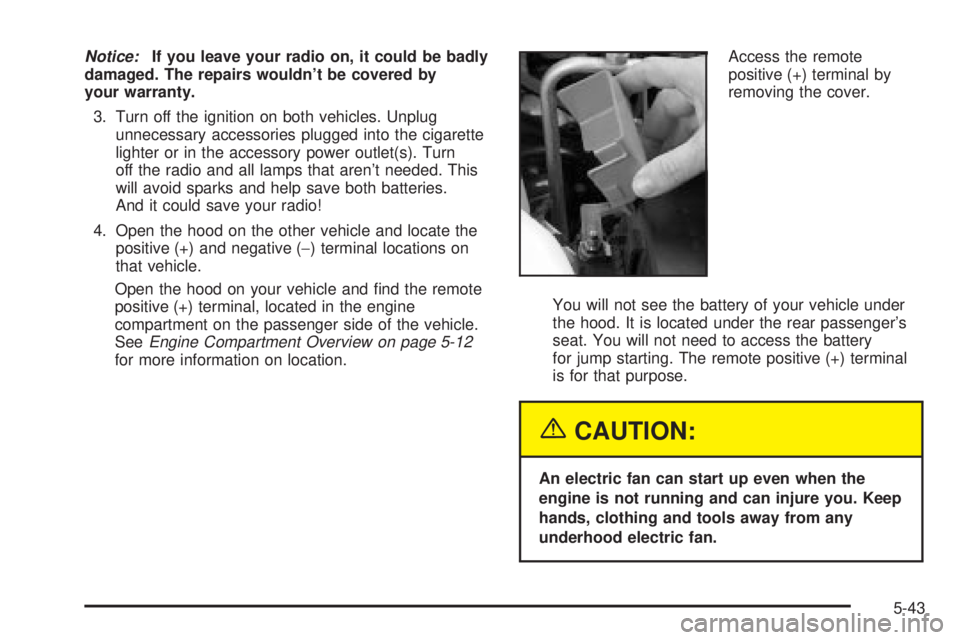
Engine Compartment Overview on page 5-12for more information on location.Access the remote
positive (+) terminal by
removing the cover.
You will not see the battery of your vehicle under
the hood. It is located under the rear passenger's
seat. You will not need to access the battery
for jump starting. The remote positive (+) terminal
is for that purpose.
{CAUTION:
An electric fan can start up even when the
engine is not running and can injure you. Keep
hands, clothing and tools away from any
underhood electric fan.
5-43
Page 292 of 380

If the anti-lock brake system warning light comes on,
the check tire pressure system may not be working
properly. See your dealer for service. Also, see
Anti-Lock Brake System Warning Light on page 3-38.
The check tire pressure system detects differences
in tire rotation speeds that are caused by changes in tire
pressure. The system can alert you about a low tire ±
but it doesn't replace normal tire maintenance. See
Tires
on page 5-58.
When the CHECK TIRE PRESSURE message appears
on the Driver Information Center, you should stop as
soon as you can and check all your tires for damage. If
a tire is ¯at, see
If a Tire Goes Flat on page 5-66.
Also check the tire pressure in all four tires as soon as
you can. See
In¯ation -- Tire Pressure on page 5-58.
Any time you adjust a tire's pressure or have one
or more tires repaired or replaced, you'll need to reset
(calibrate) the check tire pressure system. You'll
also need to reset the system whenever you rotate
the tires, buy new tires and install or remove the
compact spare.
Don't reset the check tire pressure system without ®rst
correcting the cause of the problem and checking
and adjusting the pressure in all four tires. If you reset
the system when the tire pressures are incorrect,
the check tire pressure system will not work properly
and may not alert you when a tire is low or high.To reset (calibrate) the system:
1. Turn the ignition switch to RUN.
2. Press the GAGE INFO button on the DIC until TIRE
PRESSURE appears on the display.
3. Press and hold the DIC RESET button for about ®ve
seconds. After ®ve seconds, the display will show
TIRE PRESSURE RESET. If TIRE PRESSURE
RESET does not appear in the display after about
®ve seconds retry the process. If it does not work
after two tries, see your dealer for service. After you
release the DIC RESET button, TIRE PRESSURE
NORMAL will appear in the display.
The system completes the calibration process during
driving. Calibration time can take 45 to 90 minutes,
depending on your driving habits. After the system has
been calibrated, the system will alert the driver that
a tire is low, up to a maximum speed of 65 mph
(105 km/h).
Tire Inspection and Rotation
Tires should be rotated every 6,000 to 8,000 miles
(10 000 to 13 000 km).
Any time you notice unusual wear rotate your tires as
soon as possible and check wheel alignment. Also
check for damaged tires or wheels. See
When It Is Time
for New Tires on page 5-62andWheel Replacement
on page 5-65for more information.
5-60
Page 318 of 380
Power Windows and Other Power
Options
Circuit breakers in the rear fuse block protect the power
windows and other power accessories. When the
current load is too heavy, the circuit breaker opens and
closes, protecting the circuit until the problem is ®xed
or goes away.
Fuses and Circuit Breakers
The wiring circuits in your vehicle are protected from
short circuits by a combination of fuses and circuit
breakers. This greatly reduces the chance of ®res
caused by electrical problems.
Look at the silver-colored band inside the fuse. If the
band is broken or melted, replace the fuse. Be sure you
replace a bad fuse with a new one of the identical
size and rating.
You will ®nd a fuse puller clipped in both of the fuse
blocks. Snap the wide end of the fuse puller at the side
indentations and pull the fuse out.
The MaxiFuses are located in two fuse blocks, one
located in the engine compartment on the passenger's
side and the other under the rear seat on the driver's
side. If a MaxiFuse should blow, have your vehicle
serviced by your dealer immediately.
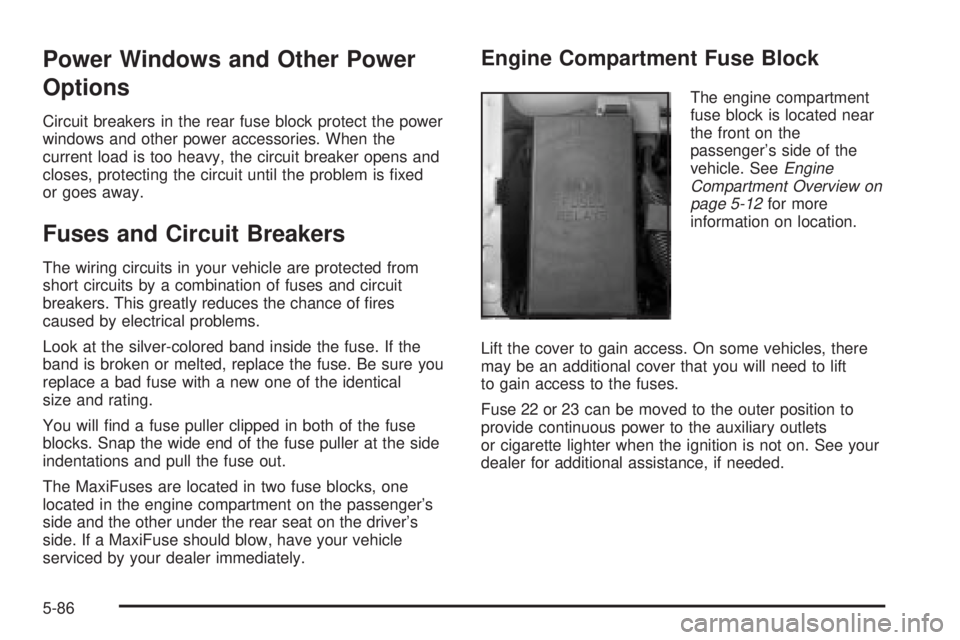
Engine Compartment Fuse Block
The engine compartment
fuse block is located near
the front on the
passenger's side of the
vehicle. See
Engine
Compartment Overview on
page 5-12
for more
information on location.
Lift the cover to gain access. On some vehicles, there
may be an additional cover that you will need to lift
to gain access to the fuses.
Fuse 22 or 23 can be moved to the outer position to
provide continuous power to the auxiliary outlets
or cigarette lighter when the ignition is not on. See your
dealer for additional assistance, if needed.
5-86
Page 319 of 380

Fuses Usage
1 Not Used
2 Accessory
3 Windshield Wipers
4 Not Used
5 Left Low-Beam Headlamp
6 Right Low-Beam Headlamp
7 Instrument PanelFuses Usage
8 Powertrain Control Module Battery
9 Right High-Beam Headlamp
10 Left High-Beam Headlamp
11 Ignition 1
12 Not Used
13 Transaxle
14 Cruise Control
15 Direct Ignition System
16 Injector Bank #2
17 Not Used
18 Not Used
19 Powertrain Control Module Ignition
20 Oxygen Sensor
21 Injector Bank #1
22 Auxiliary Power
23 Cigarette Lighter
24 Fog Lamps/Daytime Running Lamps
25 Horn
26 Air Conditioner Clutch
5-87