2003 BUICK LESABRE key
[x] Cancel search: keyPage 92 of 380

Torque Lock
If you are parking on a hill and you don't shift your
transaxle into PARK (P) properly, the weight of
the vehicle may put too much force on the parking pawl
in the transaxle. You may ®nd it difficult to pull the
shift lever out of PARK (P). This is called ªtorque lock.º
To prevent torque lock, set the parking brake and
then shift into PARK (P) properly before you leave the
driver's seat. To ®nd out how, see
Shifting Into Park (P)
on page 2-28.
When you are ready to drive, move the shift lever out of
PARK (P)
beforeyou release the parking brake.
If torque lock does occur, you may need to have another
vehicle push yours a little uphill to take some of the
pressure from the parking pawl in the transaxle, so you
can pull the shift lever out of PARK (P).
Shifting Out of Park (P)
Your vehicle has an automatic transaxle shift lock
control system. You have to fully apply your regular
brake before you can shift from PARK (P) when
the ignition is in RUN. See
Automatic Transaxle
Operation on page 2-25.
If you cannot shift out of PARK (P), ease pressure on
the shift lever then push the shift lever all the way
into PARK (P) as you maintain brake application. Then
move the shift lever into the gear you want.
If you ever hold the brake pedal down but still can't shift
out of PARK (P), try this:
1. Turn the key to OFF. Open and close the driver's
door to turn off the RAP feature.
2. Apply and hold the brake until the end of Step 4.
3. Shift to NEUTRAL (N).
4. Start the vehicle and then shift to the drive gear
you want.
5. Have the vehicle ®xed as soon as you can.
2-30
Page 104 of 380

Resetting Defaults
To reset HomeLinkžto default settings do the following:
1. Hold down the two outside buttons for about
20 seconds until the indicator light begins to ¯ash.
2. Continue to hold both buttons until the HomeLink
ž
indicator light turns off.
3. Release both buttons.
For questions or comments, contact HomeLink
žat
1-800-355-3515, or on the internet at
www.homelink.com.
Storage Areas
Glove Box
Use the door key to lock and unlock the glove box. To
open, lift the latch release on the left side of the
glove box door.
Center Console Storage Area
Your vehicle has a center console with two storage
compartments and cupholders. The cupholders have
removable liners to hold beverage containers of different
sizes. To access the cupholders and the front storage
area, push the doors covering them back into the
console. In the front storage area you will ®nd a place to
store a cellular phone, as well as a built-in writing
surface. Underneath this tray is a CD storage area and
another door which can be opened to retrieve items
which may fall into the space between the console and
the sliding door. To access the CD storage area,
place your ®nger in the oval in the top tray and lift up.
To access the rear storage area, press the lift latch
at the front edge of the armrest and pull up. Inside are
areas which can be used to store a variety of items.
The back of the console may contain either additional
cupholders or air vents for the rear seat passengers.
You will also ®nd two accessory power outlets located
inside the rear storage area. These outlets can be used
for accessories requiring power, such as a cellular
phone. See
Accessory Power Outlets on page 3-22.
2-42
Page 106 of 380

Express Open:When the glass panel is express
opening, pressing the switch in any direction will stop it
in a partially-opened position. The glass panel may
be fully opened by pressing the switch rearward again.
If you press and hold the switch in the express open
position for more than one and a half seconds, the
express open operation will be overridden and
the sunroof will operate manually.
Close:To close the glass panel, press and hold the
switch forward. As the glass panel reaches the closed
position, it will open slightly toward the vent position and
then drop down to the closed position to provide a
better seal. The sunshade must be closed manually.
Vent:Once the sunroof is closed, it can be opened to
the vent position by pushing the switch upward. To
close the glass panel, pull the switch downward. The
sunshade must be opened and closed manually for vent
operation.Vehicle Personalization
Memory Seat and Mirrors
If your vehicle has this feature, the controls are located
on the driver's door panel, and are used to program
and recall memory settings for the driver's seating,
outside mirror positions and climate controls. See
Climate Control System on page 3-24for more
information.
To save your seat and mirror positions into memory,
use the following procedure:
1. First identify the DRIVER # on the Driver Information
Center (DIC) by pressing the MEMORY button 1
or 2 or by pressing the unlock button on the remote
keyless entry transmitter. See
Driver Information
Center (DIC) on page 3-45.
2-44
Page 114 of 380
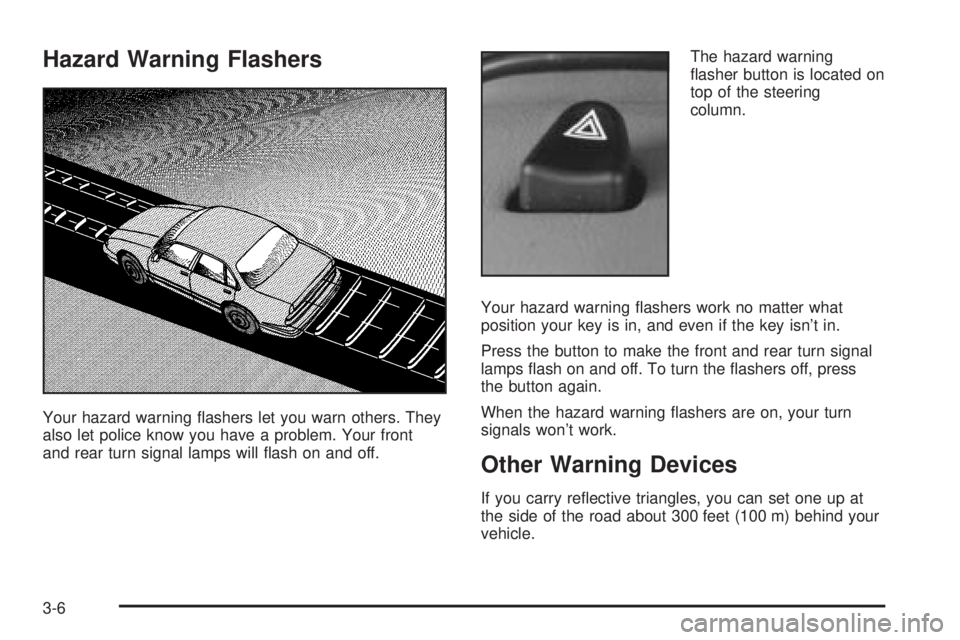
Hazard Warning Flashers
Your hazard warning ¯ashers let you warn others. They
also let police know you have a problem. Your front
and rear turn signal lamps will ¯ash on and off.The hazard warning
¯asher button is located on
top of the steering
column.
Your hazard warning ¯ashers work no matter what
position your key is in, and even if the key isn't in.
Press the button to make the front and rear turn signal
lamps ¯ash on and off. To turn the ¯ashers off, press
the button again.
When the hazard warning ¯ashers are on, your turn
signals won't work.
Other Warning Devices
If you carry re¯ective triangles, you can set one up at
the side of the road about 300 feet (100 m) behind your
vehicle.
3-6
Page 122 of 380

Ending Cruise Control
There are two ways to turn off the cruise control:
·Step lightly on the brake pedal; or
·press ON/OFF.
Erasing Speed Memory
When you turn off the cruise control or the ignition, your
cruise control set speed memory is erased.
Exterior Lamps
The exterior lamp control
buttons are located to the
left of the steering
column.
<(Parking Lamps):Press this button to turn on the
parking lamps, together with the following:
·Sidemarker Lamps
·Taillamps
·License Plate Lamps
·Instrument Panel Lights
O(Headlamps):Press this button to turn on the
headlamps, together with the previously listed lamps and
lights.
Wiper Activated Headlamps
This feature turns on the low-beam headlamps,
instrument panel cluster backlighting and taillamps when
the Twilight Sentinel
žis in day mode and after the
windshield wipers have been in use for approximately
six seconds.
To operate the wiper activated headlamps, the Twilight
Sentinel
žmust be on. If the wiper activated headlamps
are on and the ignition switch is turned to RUN, the
wiper activated headlamps will continue. When you turn
the key to OFF, the wiper activated headlamps will
immediately turn off. The wiper activated headlamps will
also turn off if you turn off the Twilight Sentinel
žor
the windshield wipers.
3-14
Page 123 of 380

Headlamps On Reminder
If you leave the exterior lamp buttons for the headlamps
or parking lamps on, remove the key from the ignition
and open the driver's door, you will hear a continuous
warning chime. The chime will turn off when the
lamps are turned off.
Daytime Running Lamps
Daytime Running Lamps (DRL) can make it easier for
others to see the front of your vehicle during the
day. DRL can be helpful in many different driving
conditions, but they can be especially helpful in the short
periods after dawn and before sunset. Fully functional
daytime running lamps are required on all vehicles
®rst sold in Canada.
A light sensor on top of the instrument panel monitors
the exterior light level for the operation of DRL and
Twilight Sentinel
ž, so be sure it isn't covered.
The DRL system will make your high-beam headlamps
turn on at reduced brightness in daylight when the
following conditions are met:
·The ignition is on,
·the exterior lamp button for the headlamps is
off and
·the transaxle is not in PARK (P).When the DRL are on, only your high-beam headlamps
will be on. The parking lamps, taillamps, sidemarker
and other lamps won't be on.
When it is dark enough outside, your low-beam
headlamps will come on. The other lamps that turn on
with your headlamps will also turn on. When it is
bright enough outside, the regular lamps will go off, and
your high-beam headlamps change to the reduced
brightness of DRL.
To turn off all exterior lighting at night when you are
parked, turn off the headlamps and move the Twilight
Sentinel
žlever all the way toward OFF. The exterior
lamps will turn back on automatically when you move
the transaxle out of PARK (P).
As with any vehicle, you should turn on the regular
headlamp system when you need it.
Cornering Lamps
If your vehicle has this feature, the cornering lamps
come on when the headlamps or parking lamps are on
and you signal a turn with the multifunction lever.
They provide more light for cornering.
3-15
Page 126 of 380

Courtesy Lamps
If it is dark enough outside, when any door is opened,
several lamps go on. They make it easy for you to enter
and leave the vehicle. You can also turn these lamps
on by sliding the INTERIOR lever all the way to the top.
Entry Lighting
If it is dark enough outside when you press the unlock
button on the remote keyless entry transmitter, the
interior courtesy lamps will turn on and stay on
for approximately 40 seconds. The lamps will turn off
immediately by pressing the lock button on the remote
keyless entry transmitter, turning the ignition key to
RUN or activating the power door locks.
Delayed Entry Lighting
If it is dark enough outside when you open the door, the
interior lamps will turn on. When you close the door
with the ignition off, the interior lamps will stay on for up
to 25 seconds or until the ignition is turned to an on
position. When the lamps turn off as a result of
the 25 second timer or the ignition switch being turned
on, the lighting will deactivate via the theater dimming
effect. Locking the doors will override the delayed entry
lighting feature and the lamps will turn off right away.
Theater Dimming
This feature allows for a three to ®ve-second fade out of
the courtesy lamps instead of immediate turn off.
Delayed Exit Lighting
If it is dark enough outside when you remove the key
from the ignition, the interior lamps will turn on and stay
on for approximately 25 seconds. This will give you
time to ®nd the door pull handle or lock switches. Once
the key is inserted into the ignition the exit lighting
will be cancelled and the lighting will fade out.
Perimeter Lighting
If it is dark enough outside when the unlock button on
the remote keyless entry transmitter is pressed, the
DRL, parking lamps and back-up lamps will come on.
Personal Choice Programming
This feature can be programmed in the on or off mode
for each transmitter.
If your vehicle is equipped with the Driver Information
Center (DIC), you must use it to program this feature.
See
Driver Information Center (DIC) on page 3-45.
To turn the feature off, do the following:
1. Close all the doors and turn the ignition on. Keep
all doors closed throughout this procedure.
2. Press and hold LOCK on the power door lock
switch throughout this procedure. All the doors
will lock.
3. Press the instant alarm on the transmitter. Perimeter
lighting remains on at this time and the horn will
chirp two times.
3-18
Page 130 of 380

3. Now press the image height adjuster switch to
position the image as low as possible, while still
keeping it in full view.
4. Slide the dimmer lever downward until the HUD
image is no brighter than necessary.
To turn the HUD display off, slide the dimmer lever all
the way down.
If the sun comes out and the sky becomes cloudy, you
may need to adjust the HUD brightness using the
dimmer lever. Polarized sunglasses could make the
HUD image harder to see.
To change the display from English to metric units, push
the ENG/MET button located to the left of the steering
column.
Clean the inside of the windshield as necessary to
remove any dirt or ®lm that reduces the sharpness or
clarity of the HUD image.
To clean the HUD lens, spray household glass cleaner
on a soft, clean cloth. Gently wipe and dry the HUD
lens. Do not spray cleaner directly on the lens to avoid
cleaner leaking inside the unit.
If the ignition is on and you can't see the HUD image,
check to see if:
·Something is covering the HUD unit.
·The HUD dimmer lever is adjusted properly.
·The HUD image is adjusted to the proper height.
·A fuse is blown. SeeFuses and Circuit Breakers on
page 5-86
.Keep in mind that your windshield is part of the HUD
system. If you ever have your windshield replaced,
be sure to get one that is designed for HUD or your HUD
image may look blurred or out of focus.
Accessory Power Outlets
The accessory power outlets can be used to plug in
electrical equipment such as a cellular telephone or
CB radio.
Your vehicle may have up to three power outlets
depending on the type of front seat you have. If your
vehicle has front bucket seats with a center console, you
will ®nd two outlets inside the rear storage compartment.
(An extra power outlet can be found in the ashtray.)
Your vehicle may have a small cap that must be pulled
down to access the accessory power outlet. If it
does, when not using the outlet be sure to cover it with
the protective cap.
The accessory power outlets will only operate when the
ignition key is in RUN and for 10 minutes after turning
the ignition off. If you would like the outlets to operate
regardless of ignition position, and for extended periods
of time, see ªEngine Compartment Fuse Blockº under
Fuses and Circuit Breakers on page 5-86or contact
your dealer.
3-22