2003 BUICK LESABRE brake light
[x] Cancel search: brake lightPage 147 of 380

Traction Control System (TCS)
Warning Light
For vehicles equipped with
the traction control system,
this warning light should
come on brie¯y when
the engine is started.
If the warning light doesn't come on then, have it ®xed
so it will be ready to warn you if there's a problem.
If it stays on, or comes on when you're driving, there
may be a problem with your traction control system and
your vehicle may need service. When this warning
light is on, the system will not limit wheel spin. Adjust
your driving accordingly.The traction control system warning light may come on
for the following reasons:
·If you turn the system off by pressing the button
located on the end of the gearshift lever, the
warning light will come on and stay on. To turn the
system back on, press the button again. The
warning light should go off. See
Traction Control
System (TCS) on page 4-9for more information.
·If there's a brake system problem that is speci®cally
related to traction control, the traction control
system will turn off and the warning light will come
on. If your brakes begin to overheat, the traction
control system will turn off and the warning light will
come on until your brakes cool down.
·If the traction control system is affected by an
engine-related problem, the system will turn off and
the warning light will come on.
If the traction control system warning light comes on
and stays on for an extended period of time when the
system is turned on, your vehicle needs service.
3-39
Page 197 of 380

Anti-lock Brake System (ABS)
Your vehicle has anti-lock brakes. ABS is an advanced
electronic braking system that will help prevent a
braking skid.
When you start your engine, or when you begin to drive
away, your anti-lock brake system will check itself.
You may hear a momentary motor or clicking noise while
this test is going on, and you may even notice that
your brake pedal moves or pulses a little. This is normal.
If there's a problem with
the anti-lock brake system,
this warning light will
stay on. See
Anti-Lock
Brake System Warning
Light on page 3-38
.
Let's say the road is wet and you're driving safely.
Suddenly, an animal jumps out in front of you. You slam
on the brakes and continue braking. Here's what
happens with ABS:
A computer senses that wheels are slowing down. If
one of the wheels is about to stop rolling, the computer
will separately work the brakes at each front wheel
and at both rear wheels.
4-7
Page 198 of 380
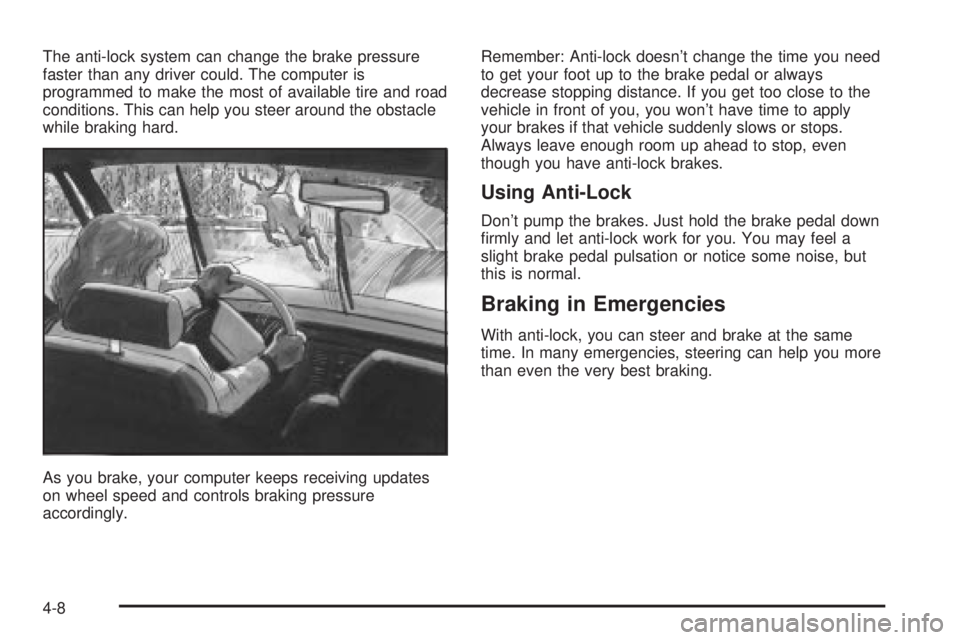
The anti-lock system can change the brake pressure
faster than any driver could. The computer is
programmed to make the most of available tire and road
conditions. This can help you steer around the obstacle
while braking hard.
As you brake, your computer keeps receiving updates
on wheel speed and controls braking pressure
accordingly.Remember: Anti-lock doesn't change the time you need
to get your foot up to the brake pedal or always
decrease stopping distance. If you get too close to the
vehicle in front of you, you won't have time to apply
your brakes if that vehicle suddenly slows or stops.
Always leave enough room up ahead to stop, even
though you have anti-lock brakes.
Using Anti-Lock
Don't pump the brakes. Just hold the brake pedal down
®rmly and let anti-lock work for you. You may feel a
slight brake pedal pulsation or notice some noise, but
this is normal.
Braking in Emergencies
With anti-lock, you can steer and brake at the same
time. In many emergencies, steering can help you more
than even the very best braking.
4-8
Page 199 of 380

Traction Control System (TCS)
Your vehicle may have a traction control system that
limits wheel spin. This is especially useful in slippery
road conditions. The system operates only if it senses
that one or both of the front wheels are spinning or
beginning to lose traction. When this happens,
the system works the front brakes and reduces engine
power to limit wheel spin.
You may feel or hear the system working, but this is
normal.
If your vehicle is in cruise control when the traction
control system begins to limit wheel spin, the cruise
control will automatically disengage. When road
conditions allow you to safely use it again, you may
reengage the cruise control. See ªCruise Controlº under
Turn Signal/Multifunction Lever on page 3-7.This light should come on
brie¯y when you start the
engine. If it stays on or
comes on while you
are driving, there's a
problem with your traction
control system.
See
Traction Control System (TCS) Warning Light on
page 3-39. When this warning light is on, the system will
not limit wheel spin. Adjust your driving accordingly.
The traction control system automatically comes
on whenever you start your vehicle. To limit wheel spin,
especially in slippery road conditions, you should
always leave the system on. But you can turn the
traction control system off if you ever need to. You
should turn the system off if your vehicle ever gets stuck
in sand, mud or snow and rocking the vehicle is
required. See ªRocking Your Vehicle To Get It Outº
under
If You Are Stuck: In Sand, Mud, Ice or Snow on
page 4-30.
4-9
Page 209 of 380
{CAUTION:
Wet brakes can cause accidents. They won't
work as well in a quick stop and may cause
pulling to one side. You could lose control of
the vehicle.
After driving through a large puddle of water
or a car wash, apply your brake pedal lightly
until your brakes work normally.
Hydroplaning
Hydroplaning is dangerous. So much water can build up
under your tires that they can actually ride on the
water. This can happen if the road is wet enough and
you're going fast enough. When your vehicle is
hydroplaning, it has little or no contact with the road.Hydroplaning doesn't happen often. But it can if your
tires do not have much tread or if the pressure in one or
more is low. It can happen if a lot of water is standing
on the road. If you can see re¯ections from trees,
telephone poles or other vehicles, and raindrops
ªdimpleº the water's surface, there could be
hydroplaning.
Hydroplaning usually happens at higher speeds. There
just isn't a hard and fast rule about hydroplaning.
The best advice is to slow down when it is raining.
Driving Through Deep Standing Water
Notice:If you drive too quickly through deep
puddles or standing water, water can come in
through your engine's air intake and badly damage
your engine. Never drive through water that is
slightly lower than the underbody of your vehicle. If
you can't avoid deep puddles or standing water,
drive through them very slowly.
4-19
Page 229 of 380

Safety Chains
You should always attach chains between your vehicle
and your trailer. Cross the safety chains under the
tongue of the trailer so that the tongue will not drop to
the road if it becomes separated from the hitch.
Instructions about safety chains may be provided by the
hitch manufacturer or by the trailer manufacturer.
Follow the manufacturer's recommendation for attaching
safety chains and do not attach them to the bumper.
Always leave just enough slack so you can turn
with your rig. And, never allow safety chains to drag on
the ground.
Trailer Brakes
Does your trailer have its own brakes? Be sure to read
and follow the instructions for the trailer brakes so
you'll be able to install, adjust and maintain them
properly.
Because you have anti-lock brakes, do not try to tap
into your vehicle's brake system. If you do, both brake
systems won't work well, or at all.
Trailer Wiring Harness
All of the electrical circuits required for your trailer
lighting system can be accessed at the driver's side rear
lamp connector. This connector is located under the
carpet on the rear corner of the trunk compartment.
Driving with a Trailer
Towing a trailer requires a certain amount of experience.
Before setting out for the open road, you'll want to get
to know your rig. Acquaint yourself with the feel of
handling and braking with the added weight of the trailer.
And always keep in mind that the vehicle you are
driving is now a good deal longer and not nearly as
responsive as your vehicle is by itself.
Before you start, check the trailer hitch and platform
(and attachments), safety chains, electrical connector,
lamps, tires and mirror adjustment. If the trailer has
electric brakes, start your vehicle and trailer moving and
then apply the trailer brake controller by hand to be
sure the brakes are working. This lets you check your
electrical connection at the same time.
During your trip, check occasionally to be sure that the
load is secure, and that the lamps and any trailer
brakes are still working.
4-39
Page 231 of 380

Your vehicle has bulb warning lights. When you plug a
trailer lighting system into your vehicle's lighting
system, its bulb warning lights may not let you know if
one of your lamps goes out. So, when you have a trailer
lighting system plugged in, be sure to check your
vehicle and trailer lamps from time to time to be sure
they're all working. Once you disconnect the trailer
lamps, the bulb warning lights again can tell you if one
of your vehicle lamps is out.
Driving On Grades
Reduce speed and shift to a lower gearbeforeyou start
down a long or steep downgrade. If you don't shift
down, you might have to use your brakes so much that
they would get hot and no longer work well.
On a long uphill grade, shift down to THIRD (3) and
reduce your speed to around 45 mph (70 km/h) to
reduce the possibility of engine and transaxle
overheating.
Parking on Hills
{CAUTION:
You really should not park your vehicle, with a
trailer attached, on a hill. If something goes
wrong, your rig could start to move. People
can be injured, and both your vehicle and the
trailer can be damaged.
But if you ever have to park your rig on a hill, here's
how to do it:
1. Apply your regular brakes, but don't shift into
PARK (P) yet.
2. Have someone place chocks under the trailer
wheels.
3. When the wheel chocks are in place, release the
regular brakes until the chocks absorb the load.
4. Reapply the regular brakes. Then apply your
parking brake, and then shift to PARK (P).
5. Release the regular brakes.
4-41
Page 270 of 380
The other reason is that ¯uid is leaking out of the brake
system. If it is, you should have your brake system
®xed, since a leak means that sooner or later your
brakes won't work well, or won't work at all.
So, it isn't a good idea to ªtop offº your brake ¯uid.
Adding brake ¯uid won't correct a leak. If you add ¯uid
when your linings are worn, then you'll have too
much ¯uid when you get new brake linings. You should
add (or remove) brake ¯uid, as necessary, only when
work is done on the brake hydraulic system.
{CAUTION:
If you have too much brake ¯uid, it can spill on
the engine. The ¯uid will burn if the engine is
hot enough. You or others could be burned,
and your vehicle could be damaged. Add brake
¯uid only when work is done on the brake
hydraulic system.
When your brake ¯uid falls to a low level, your brake
warning light will come on. A chime will sound if you try
to drive with this warning light on. See
Brake System
Warning Light on page 3-37.
What to Add
When you do need brake ¯uid, use only DOT-3 brake
¯uid. Refer toPart D: Recommended Fluids and
Lubricants on page 6-23. Use new brake ¯uid from a
sealed container only.
Always clean the brake ¯uid reservoir cap and the area
around the cap before removing it. This will help
keep dirt from entering the reservoir.
{CAUTION:
With the wrong kind of ¯uid in your brake
system, your brakes may not work well, or
they may not even work at all. This could
cause a crash. Always use the proper
brake ¯uid.
Notice:
·Using the wrong ¯uid can badly damage brake
system parts. For example, just a few drops of
mineral-based oil, such as engine oil, in your
brake system can damage brake system
parts so badly that they'll have to be replaced.
Don't let someone put in the wrong kind of ¯uid.
5-38