Page 131 of 380

Notice:When using an accessory power outlet,
maximum electrical load must not exceed 15 amps.
Always turn off any electrical equipment when
not in use. Leaving electrical equipment on for
extended periods will drain your battery.
Certain electrical accessories may not be compatible to
the accessory power outlets and could result in blown
vehicle or adapter fuses. If you experience a problem
see your dealer for additional information on the
accessory power outlets.
Notice:Adding some electrical equipment to your
vehicle can damage it or keep other things from
working as they should. This wouldn't be covered by
your warranty. Check with your dealer before
adding electrical equipment, and never use anything
that exceeds the amperage rating.
When adding electrical equipment, be sure to follow the
proper installation instructions included with the
equipment.
Notice:Power outlets are designed for accessory
plugs only. Do not hang any type of accessory
or accessory bracket from the plug. Improper use of
the power outlet can cause damage not covered
by your warranty.
Ashtrays and Cigarette Lighter
Pull down the front center tray to reveal the front
ashtray, cigarette lighter and accessory power outlet.
The front center and rear ashtrays may be removed for
cleaning. Hold the sides of the ashtray and then pull
the ashtray up and out.
Notice:Don't put papers or other ¯ammable
items into your ashtrays. Hot cigarettes or other
smoking materials could ignite them, causing
a damaging ®re.
To use a lighter, push the center all the way in and let it
go. When it is ready, the center will pop back out by
itself. Pull out the entire unit to use it.
Notice:Don't hold a cigarette lighter in with your
hand while it is heating. If you do, it won't be able to
back away from the heating element when it's
ready. That can make it overheat, damaging the
lighter and the heating element.
The cigarette lighter will only operate when the ignition
key is in RUN and for 10 minutes after turning the
ignition off. If you would like the lighter to operate
regardless of ignition position, and for extended periods
of time, see ªEngine Compartment Fuse Blockº under
Fuses and Circuit Breakers on page 5-86or see
your dealer.
3-23
Page 163 of 380

Audio System(s)
Notice:Before you add any sound equipment to
your vehicle ± like a tape player, CB radio, mobile
telephone or two-way radio ± be sure you can
add what you want. If you can, it's very important to
do it properly. Added sound equipment may
interfere with the operation of your vehicle's engine,
radio or other systems, and even damage them.
Your vehicle's systems may interfere with the
operation of sound equipment that has been added
improperly.
So, before adding sound equipment, check with
your dealer and be sure to check federal rules
covering mobile radio and telephone units.
Your audio system has been designed to operate easily
and to give years of listening pleasure. You will get
the most enjoyment out of it if you acquaint yourself with
it ®rst. Figure out which radio you have in your vehicle,
®nd out what your audio system can do and how to
operate all of its controls to be sure you're getting the
most out of the advanced engineering that went into it.Your vehicle has a feature called Retained Accessory
Power (RAP). With RAP, you can play your audio
system even after the ignition is turned off. See
ªRetained Accessory Power (RAP)º underIgnition
Positions on page 2-22.
Setting the Time
Press and hold H until the correct hour appears on the
display. AM will also appear for morning hours.
Press and hold M until the correct minute appears on
the display. The time may be set with the ignition on
or off.
To synchronize the time with an FM station broadcasting
Radio Data System (RDS) information, press and
hold H and M at the same time until TIME UPDATED
appears on the display. If the time is not available from
the station, NO UPDATE will appear on the display
instead.
3-55
Page 267 of 380
11. By this time, the coolant level inside the radiator
®ller neck may be lower. If the level is lower, add
more of the proper DEX-COOL
žcoolant mixture
through the ®ller neck until the level reaches
the base of the ®ller neck.
12. Then replace the
pressure cap. At any
time during this
procedure if coolant
begins to ¯ow out
of the ®ller neck,
reinstall the pressure
cap. Be sure the arrow
on the pressure cap
lines up like this.
Power Steering Fluid
The power steering ¯uid reservoir is located below the
generator and behind the accessory drive belt in the rear
of the engine compartment on the passenger's side of
the vehicle.
5-35
Page 275 of 380
Notice:If you leave your radio on, it could be badly
damaged. The repairs wouldn't be covered by
your warranty.
3. Turn off the ignition on both vehicles. Unplug
unnecessary accessories plugged into the cigarette
lighter or in the accessory power outlet(s). Turn
off the radio and all lamps that aren't needed. This
will avoid sparks and help save both batteries.
And it could save your radio!
4. Open the hood on the other vehicle and locate the
positive (+) and negative (-) terminal locations on
that vehicle.
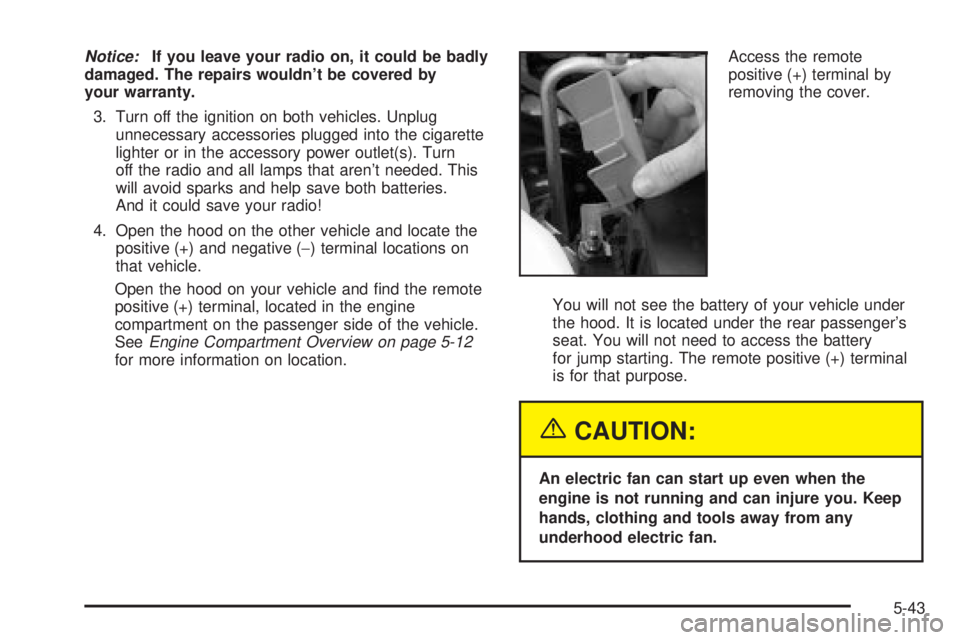
Open the hood on your vehicle and ®nd the remote
positive (+) terminal, located in the engine
compartment on the passenger side of the vehicle.
See
Engine Compartment Overview on page 5-12for more information on location.Access the remote
positive (+) terminal by
removing the cover.
You will not see the battery of your vehicle under
the hood. It is located under the rear passenger's
seat. You will not need to access the battery
for jump starting. The remote positive (+) terminal
is for that purpose.
{CAUTION:
An electric fan can start up even when the
engine is not running and can injure you. Keep
hands, clothing and tools away from any
underhood electric fan.
5-43
Page 319 of 380
Fuses Usage
1 Not Used
2 Accessory
3 Windshield Wipers
4 Not Used
5 Left Low-Beam Headlamp
6 Right Low-Beam Headlamp
7 Instrument PanelFuses Usage
8 Powertrain Control Module Battery
9 Right High-Beam Headlamp
10 Left High-Beam Headlamp
11 Ignition 1
12 Not Used
13 Transaxle
14 Cruise Control
15 Direct Ignition System
16 Injector Bank #2
17 Not Used
18 Not Used
19 Powertrain Control Module Ignition
20 Oxygen Sensor
21 Injector Bank #1
22 Auxiliary Power
23 Cigarette Lighter
24 Fog Lamps/Daytime Running Lamps
25 Horn
26 Air Conditioner Clutch
5-87
Page 323 of 380
Fuses Usage
1 Fuel Pump
2 HVAC Blower
3 Memory
4 Assembly Line Diagnostic Link
5 Not Used
6 Compact Disc (CD)
7 Driver's Door Module
8 Air Bag System (SIR)
9 Not Used
10 Right Parking Lamp
11 Vent Solenoid
12 Ignition 1
13 Left Parking LampFuses Usage
14 Dimmer
15 Satellite Digital Radio
16 Left Front Heated Seat
17 Not Used
18 Rear Door Module
19 Stoplamp
20 Park/Reverse
21 Audio
22 Retained Accessory Power (RAP)
23 Not Used
24 Not Used
25 Passenger Door Module
26 Body
27 Interior Lamps
28 Not Used
29 Ignition Switch
30 Instrument Panel
31 Right Front Heated Seat
32 Not Used
33 HVAC
34 Ignition 3 Rear
35 Anti-Lock Brake System (ABS)
36 Turn Signal/Hazard
37 HVAC Battery
38 Dimmer
5-91
Page 324 of 380
Relays Usage
39 Fuel Pump
40 Parking Lamp
41 Ignition 1
42 Rear Fog Lamp
43 Not Used
44 Park
45 Reverse
46 Retained Accessory Power (RAP)
47 Fuel Tank Door Lock
48 Not Used
49 Ignition 3
50 Fuel Tank Door Release
51 Interior Lamps
52 Trunk Release
53 Front Courtesy Lamps
54 Not Used
55 Electronic Level Control (ELC)
Circuit
BreakersUsage
56 Power Seats
57 Power WindowsRelays Usage
58 Cigar
59 Rear Defogger
Fuses Usage
60 Not Used
61 Rear Defog
62 Not Used
63 Audio Ampli®er
64 Electronic Level Control (ELC)
65 Cigar
66 Not Used
67 Not Used
68 Not Used
69 Spare
70 Spare
71 Spare
72 Spare
73 Spare
74 Spare
75 Fuse Puller
5-92
Page 365 of 380

A
Accessory Power Outlets.................................3-22
Adding Washer Fluid.......................................5-36
Additional Program Information........................... 7-9
Additives, Fuel................................................. 5-6
Add-On Electrical Equipment............................5-85
Adjusting the Speakers (Balance/Fade)......3-57, 3-65
Air Bag Systems.............................................1-46
How Does an Air Bag Restrain?....................1-52
Servicing Your Air Bag-Equipped Vehicle.........1-54
What Makes an Air Bag In¯ate?....................1-51
What Will You See After an Air
Bag In¯ates?...........................................1-52
When Should an Air Bag In¯ate?...................1-50
Where Are the Air Bags?..............................1-49
Air Bag .........................................................3-36
Readiness Light..........................................3-36
Air Cleaner/Filter, Engine.................................5-18
AM ...............................................................3-78
Antenna, Diversity Antenna System...................3-81
Antenna, XMŸ Satellite Radio
Antenna System..........................................3-81
Anti-lock Brake System (ABS)............................ 4-7
Anti-Lock Brake, System Warning Light..............3-38
Appearance Care............................................5-77
Care of Safety Belts....................................5-80
Chemical Paint Spotting...............................5-83Appearance Care (cont.)
Cleaning the Inside of Your Vehicle................5-77
Cleaning the Outside of Your Vehicle..............5-80
Finish Damage............................................5-83
Sheet Metal Damage...................................5-82
Underbody Maintenance...............................5-83
Vehicle Care/Appearance Materials................5-84
Weatherstrips..............................................5-80
Ashtrays........................................................3-23
Audio System(s).............................................3-55
Audio Steering Wheel Controls......................3-78
Care of Your Cassette Tape Player................3-79
Care of Your CD Player...............................3-80
Care of Your CDs........................................3-80
Chime Level Adjustment...............................3-81
Diversity Antenna System.............................3-81
Personal Choice Radio Controls....................3-77
Radio with Cassette and CD.........................3-62
Radio with CD............................................3-56
Setting the Time..........................................3-55
Theft-Deterrent Feature................................3-77
Trunk-Mounted CD Changer..........................3-73
Understanding Radio Reception.....................3-78
XMŸ Satellite Radio Antenna System............3-81
Automatic Door Locks.....................................3-51
Automatic Level Control...................................4-35
Automatic Operation........................................3-27
Automatic Transaxle Check..............................6-18
1


