2003 BMW M3 COUPE ESP
[x] Cancel search: ESPPage 44 of 158
44
SeatsWhen adjusting your seat, always
observe the following precautions
Never try to adjust your seat while
operating the vehicle. The seat
could respond with an unexpected
movement, and the ensuing loss of
vehicle control could lead to an acci-
dent. Never ride with the backrest
reclined to an extreme angle. This is
especially important for the front pas-
senger to remember. If you do so, there
is a risk that you will slide under the
safety belt in an accident, thus reducing
the protection provided by the safety
belt.<
Seat adjustment>Manual seat adjustment, refer to
page 44
>Power seat adjustment, refer to
page 45
>Head restraint, refer to page 46.
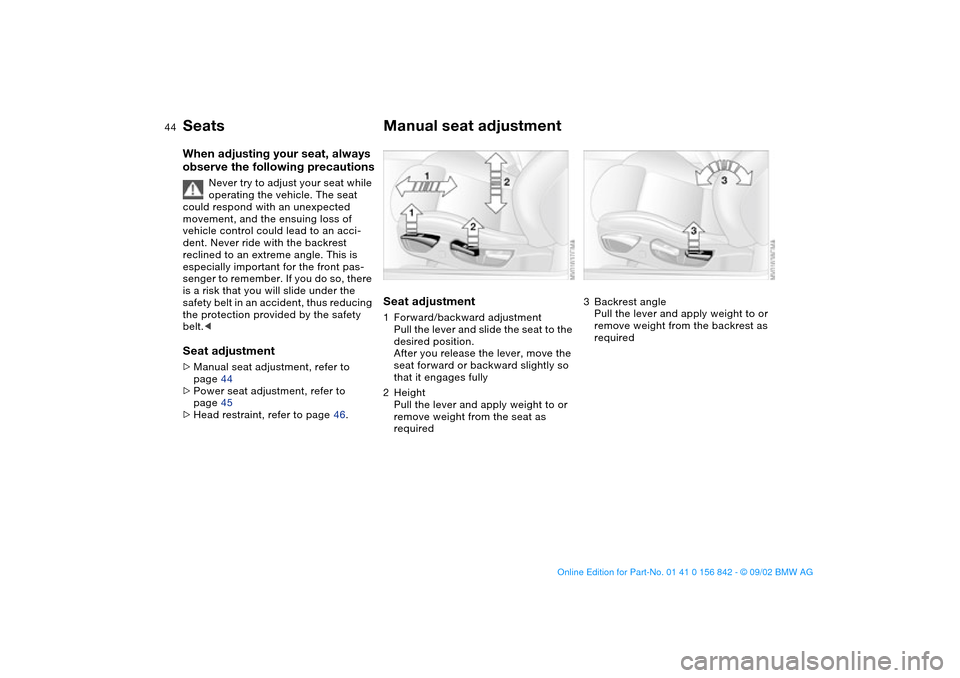
Manual seat adjustmentSeat adjustment1Forward/backward adjustment
Pull the lever and slide the seat to the
desired position.
After you release the lever, move the
seat forward or backward slightly so
that it engages fully
2Height
Pull the lever and apply weight to or
remove weight from the seat as
required
3Backrest angle
Pull the lever and apply weight to or
remove weight from the backrest as
required
handbook.book Page 44 Saturday, July 27, 2002 1:12 PM
Page 51 of 158

51
Steering wheelTo adjust
Never attempt to adjust the steer-
ing wheel while driving the vehicle
– it could respond with unexpected
movement, posing a potential accident
hazard.<
1. Push the locking lever downward
2. Adjusting steering column reach and
rake for your selected seating posi-
tion
3. Pull the lever back up.
MirrorsTo adjust exterior mirrors1Switch for 4-way adjustment
2Selection switch for changing
between mirrorsTo adjust manuallyThe mirrors can also be adjusted manu-
ally:
Press the edges of the lens.
To store the mirror settings, refer to
Seat and mirror memory on page 49.
The mirror on the passenger's
side is convex. When estimating
the distance between yourself and
other traffic, bear in mind that the
objects reflected in the mirror are closer
than they appear. This means that esti-
mations of the distance to following
traffic should not be regarded as pre-
cise.
OverviewControlsMaintenanceRepairsDataIndex
handbook.book Page 51 Saturday, July 27, 2002 1:12 PM
Page 53 of 158
53 Passenger safety systems
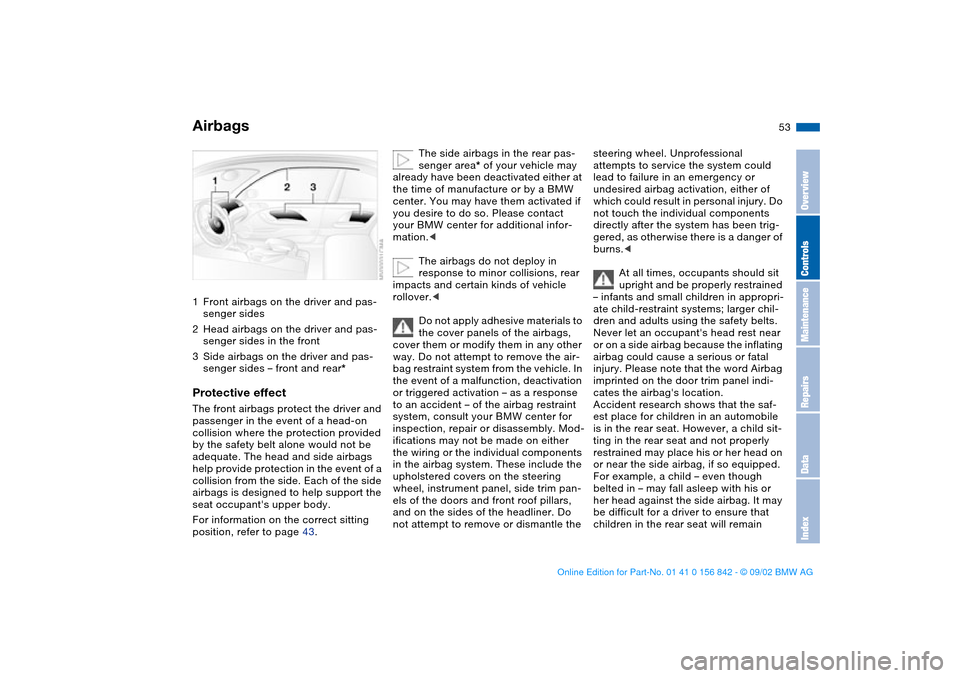
Airbags1Front airbags on the driver and pas-
senger sides
2Head airbags on the driver and pas-
senger sides in the front
3Side airbags on the driver and pas-
senger sides – front and rear*Protective effectThe front airbags protect the driver and
passenger in the event of a head-on
collision where the protection provided
by the safety belt alone would not be
adequate. The head and side airbags
help provide protection in the event of a
collision from the side. Each of the side
airbags is designed to help support the
seat occupant's upper body.
For information on the correct sitting
position, refer to page 43.
The side airbags in the rear pas-
senger area* of your vehicle may
already have been deactivated either at
the time of manufacture or by a BMW
center. You may have them activated if
you desire to do so. Please contact
your BMW center for additional infor-
mation.<
The airbags do not deploy in
response to minor collisions, rear
impacts and certain kinds of vehicle
rollover.<
Do not apply adhesive materials to
the cover panels of the airbags,
cover them or modify them in any other
way. Do not attempt to remove the air-
bag restraint system from the vehicle. In
the event of a malfunction, deactivation
or triggered activation – as a response
to an accident – of the airbag restraint
system, consult your BMW center for
inspection, repair or disassembly. Mod-
ifications may not be made on either
the wiring or the individual components
in the airbag system. These include the
upholstered covers on the steering
wheel, instrument panel, side trim pan-
els of the doors and front roof pillars,
and on the sides of the headliner. Do
not attempt to remove or dismantle the
steering wheel. Unprofessional
attempts to service the system could
lead to failure in an emergency or
undesired airbag activation, either of
which could result in personal injury. Do
not touch the individual components
directly after the system has been trig-
gered, as otherwise there is a danger of
burns.<
At all times, occupants should sit
upright and be properly restrained
– infants and small children in appropri-
ate child-restraint systems; larger chil-
dren and adults using the safety belts.
Never let an occupant's head rest near
or on a side airbag because the inflating
airbag could cause a serious or fatal
injury. Please note that the word Airbag
imprinted on the door trim panel indi-
cates the airbag's location.
Accident research shows that the saf-
est place for children in an automobile
is in the rear seat. However, a child sit-
ting in the rear seat and not properly
restrained may place his or her head on
or near the side airbag, if so equipped.
For example, a child – even though
belted in – may fall asleep with his or
her head against the side airbag. It may
be difficult for a driver to ensure that
children in the rear seat will remain
OverviewControlsMaintenanceRepairsDataIndex
handbook.book Page 53 Saturday, July 27, 2002 1:12 PM
Page 55 of 158
55
If there is a system malfunction, there is
a risk that the airbags will not be trig-
gered within their normal response
range, even if the level of impact would
normally have triggered them.
Have your BMW center inspect the sys-
tem immediately.
Transporting children safelyCommercially available child-restraint
systems are designed to be secured
with a lap belt or with the lap belt por-
tion of a combination lap/shoulder belt.
Improperly or inadequately installed
restraint systems can increase the risk
of injury to children. Always read and
follow the instructions that come with
the system.
Child-restraint system with tether
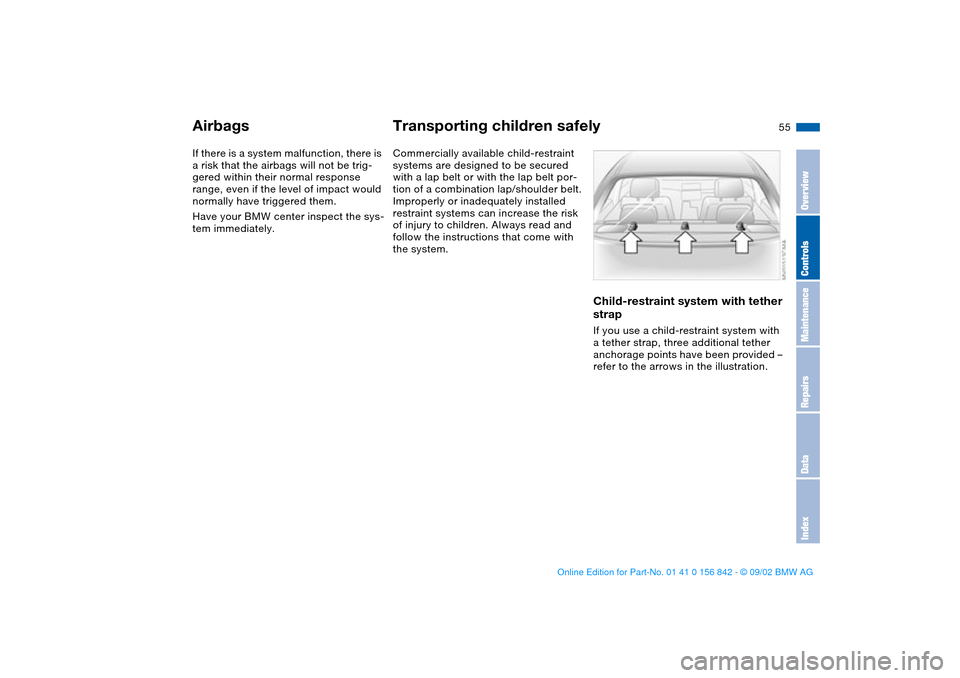
strapIf you use a child-restraint system with
a tether strap, three additional tether
anchorage points have been provided –
refer to the arrows in the illustration.
Airbags
OverviewControlsMaintenanceRepairsDataIndex
handbook.book Page 55 Saturday, July 27, 2002 1:12 PM
Page 56 of 158

56
Depending on the location selected for
seating in the rear passenger area,
attach the tether strap to the corre-
sponding anchorage point to secure the
child-restraint system, as shown in the
illustration.
If the respective seating position is fit-
ted with a headrest lift the headrest and
pass the tether strap between the
headrest and the seat back.
It is recommended to readjust the head
restraint in the lowest possible position.
Adjust the tether strap according to the
child-restraint manufacturer's instruc-
tions.
Before installing any child-
restraint device or child seat,
please read the following:
Never install a rearward-facing child-
restraint system in the front passenger
seat of this vehicle.
Your vehicle is equipped with an airbag
supplemental restraint system for the
front passenger. Because the backrest
on any rear-facing child-restraint sys-
tem – of the kind designed for infants
under 1 year and 20 lbs/9 kg – would be
within the airbag's deployment range,
you should never mount such a device
in the front passenger seat, since the
impact of the airbag against the child
restraint's backrest could lead to seri-
ous or fatal injuries.
If it is necessary for a child – not an
infant – to ride in the front seat, certain
precautions should be taken. First,
move the passenger seat as far away
from the instrument panel as possible.
This important precaution is intended to
maximize the distance between the air-
bag and the child. Older children
should be tightly secured with the
safety belt after they have outgrown a
booster seat that is appropriate for their
age, height, and weight.
Younger children should be secured in
an appropriate forward-facing child-
restraint system that has first been
properly secured with a safety belt.
Never install a rearward-facing child-
restraint system in the front passenger
seat.
We strongly urge you to carefully read
and comply with the instructions for
installation and use provided by the
child-restraint's manufacturer whenever
you use such a device.
Do not attempt to modify child-restraint
systems. If you do this, the protection
provided by these systems could be
impaired.
Be sure that all occupants – of all ages –
remain properly and securely restrained
at all times.<
All rear seating positions in your vehicle
meet the recommendations of
SAE J1819, an industry recommended
practice for securing child-restraint sys-
tems in motor vehicles.
Transporting children safely
handbook.book Page 56 Saturday, July 27, 2002 1:12 PM
Page 65 of 158

65
Sequential M gearbox SMG II*The conceptThe sequential M gearbox SMG II is an
automated manual gearbox with which
clutching and shifting is assumed by an
electro-hydraulic system.
The SMG II is operated via two shift
paddles on the steering wheel and the
selector lever in the center console.
It offers the following functions:
>Sequential and automated shifting
mode
>Ability to choose between different
driving programs – Drivelogic
>Gradient assistance, refer to page 68
>Upshift display and shift lights, refer
to page 69
>RPM matching on downshifts
>Driving dependent functions:
The respective driving situation, e.g.
cornering, mountain driving or brak-
ing, is detected by sensors and taken
into account for shifting, e.g. to
achieve optimum gear selection dur-
ing deceleration and subsequent
acceleration
>Slip recognition at the rear axle for
increasing driving stability, e.g. dur-
ing downshifting on slippery road
surfaces
>Operating safety through protection
against misshifting.Under normal operating conditions, fuel
consumption is lowest when driving in
the first driving program of the auto-
mated shifting mode.
Selector lever positionR: Reverse position
0: Position 0 (Neutral)
Forward position with one-touch mode:
>S: sequential mode
>A: automated mode
>+: upshifting in sequential mode
>–: downshifting in sequential mode.
The SMG II is ready for operation from
ignition key position two or higher.
For your safety, it is only possible to
engage a driving position with the vehi-
cle stopped approx. two seconds after
engaging position 0 with the footbrake
depressed – shift-lock function.
OverviewControlsMaintenanceRepairsDataIndex
handbook.book Page 65 Saturday, July 27, 2002 1:12 PM
Page 67 of 158

67
Shifting gears with shift paddles on
steering wheel:
>To upshift, briefly pull the right pad-
dle +
>To downshift, briefly pull the left pad-
dle –.
Shift paddles with various widths
matched to the shape of your
hand are available from your BMW cen-
ter.<
Shifting gears with selector lever:
>To upshift, pull the selector lever
backward in the "+" direction
>To downshift, push the selector lever
in the "–" direction.
No automatic upshifting is carried out in
the sequential mode.
You accelerate from higher gears, e.g.
during passing, by manually downshift-
ing.
In the following situations the SMG II
helps you think in the sequential mode:
>Upshifts and downshifts are only exe-
cuted when the new gear will provide
a suitable combination of vehicle and
engine speed, i.e., downshifts that
would cause the engine to overrev
will not be executed
>During a stop the gearbox is auto-
matically downshifted into the first
gear so that, e.g. before a traffic light,
it is only necessary to accelerate to
continue driving
>When the speed is reduced, the
gearbox is automatically down-
shifted shortly before a gear-depen-
dent minimum speed is reached with-
out you taking any action.A – Automated modeEach time the engine is started, the
automated mode is activated as soon
as you move the selector lever into the
forward driving position.
In the automated mode all forward
gears are automatically shifted.Changeover from sequential to auto-
mated mode: tap the selector lever to
the right toward "A". Watch the display
in the instrument cluster, refer to
page 66.
For rapid acceleration, e.g. during
passing, depress the accelerator pedal
completely – kick-down. The gearbox
now downshifts in dependence on the
selected driving program.
Even in the automated mode, you can
help specify the shifting point: if a gear-
dependent minimum speed is
exceeded, you can upshift by slowly
reducing pressure on the accelerator
pedal. In the process, the respective
driving situation is detected by sensors
and taken into account.
Sequential M gearbox SMG II*
OverviewControlsMaintenanceRepairsDataIndex
handbook.book Page 67 Saturday, July 27, 2002 1:12 PM
Page 68 of 158
68
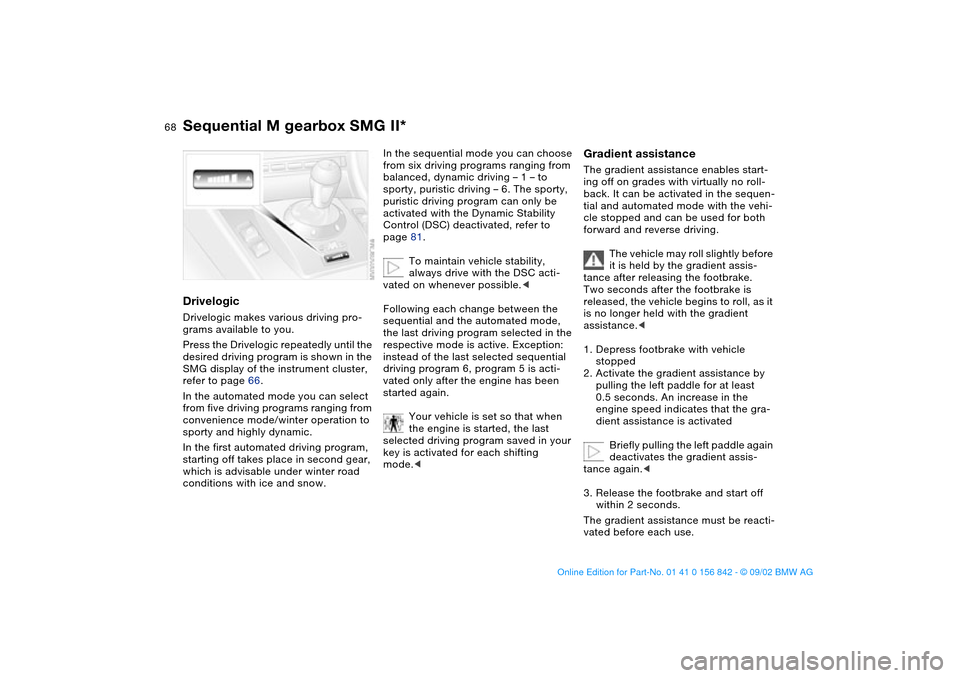
DrivelogicDrivelogic makes various driving pro-
grams available to you.
Press the Drivelogic repeatedly until the
desired driving program is shown in the
SMG display of the instrument cluster,
refer to page 66.
In the automated mode you can select
from five driving programs ranging from
convenience mode/winter operation to
sporty and highly dynamic.
In the first automated driving program,
starting off takes place in second gear,
which is advisable under winter road
conditions with ice and snow.
In the sequential mode you can choose
from six driving programs ranging from
balanced, dynamic driving – 1 – to
sporty, puristic driving – 6. The sporty,
puristic driving program can only be
activated with the Dynamic Stability
Control (DSC) deactivated, refer to
page 81.
To maintain vehicle stability,
always drive with the DSC acti-
vated on whenever possible.<
Following each change between the
sequential and the automated mode,
the last driving program selected in the
respective mode is active. Exception:
instead of the last selected sequential
driving program 6, program 5 is acti-
vated only after the engine has been
started again.
Your vehicle is set so that when
the engine is started, the last
selected driving program saved in your
key is activated for each shifting
mode.<
Gradient assistanceThe gradient assistance enables start-
ing off on grades with virtually no roll-
back. It can be activated in the sequen-
tial and automated mode with the vehi-
cle stopped and can be used for both
forward and reverse driving.
The vehicle may roll slightly before
it is held by the gradient assis-
tance after releasing the footbrake.
Two seconds after the footbrake is
released, the vehicle begins to roll, as it
is no longer held with the gradient
assistance.<
1. Depress footbrake with vehicle
stopped
2. Activate the gradient assistance by
pulling the left paddle for at least
0.5 seconds. An increase in the
engine speed indicates that the gra-
dient assistance is activated
Briefly pulling the left paddle again
deactivates the gradient assis-
tance again.<
3. Release the footbrake and start off
within 2 seconds.
The gradient assistance must be reacti-
vated before each use.
Sequential M gearbox SMG II*
handbook.book Page 68 Saturday, July 27, 2002 1:12 PM