2003 BMW M3 CONVERTIBLE lock
[x] Cancel search: lockPage 53 of 166

53
Seat and mirror memory You can store and recall three different
driver's seat and outside mirror posi-
tions.
The setting for the lumbar support
is not stored in memory.
to the desired position
3. Press the MEMORY button: the indi-
cator lamp in the button lights up
4. Press memory button 1, 2 or 3, as
desired. The indicator lamp goes out.
To select a stored setting
Do not select a memory position
while the vehicle is moving. If you
do so, there is a risk of accident from
unexpected seat movement.<
Driver's door open after unlocking or
ignition key in position 1:
>Briefly press memory button 1, 2 or 3,
as desired.
Movement stops immediately when
one of the seat-adjustment or mem-
ory buttons is operated during the
adjustment process.
With the driver's door closed and the
ignition key either removed or in posi-
tion 0 or 2:
>Press and hold the desired memory
button – 1, 2 or 3 – until the adjust-
ment process is completed.
If you press the MEMORY button
accidentally: press the button
again; the indicator lamp goes out.<
Your BMW center can adjust your
vehicle's systems in such a man-
ner that your personalized settings are
automatically set for the seat and exte-
rior mirror positions when you unlock
the vehicle with your personal remote
control.<
Before activating the programmed
adjustment feature, ensure that
the footwell behind the driver's seat is
empty and unobstructed. If you fail to
do so, any persons, animals or objects
behind the seat could be injured or
damaged by a rearward movement of
the seat.<
OverviewControlsMaintenanceRepairsDataIndex
handbook.book Page 53 Tuesday, July 30, 2002 9:28 AM
Page 55 of 166

55
Steering wheelTo adjust
Never attempt to adjust the steer-
ing wheel while driving the vehicle
– it could respond with unexpected
movement, posing a potential accident
hazard.<
1. Push the locking lever downward
2. Adjusting steering column reach and
rake for your selected seating posi-
tion
3. Pull the lever back up.
MirrorsTo adjust exterior mirrors1Switch for 4-way adjustment
2Selection switch for changing
between mirrorsTo adjust manuallyThe mirrors can also be adjusted manu-
ally:
Press the edges of the lens.
To store the mirror setting, refer to Seat
and mirror memory on page 53.
The passenger-side mirror fea-
tures a convex lens. When esti-
mating the distance between yourself
and other traffic, bear in mind that the
objects reflected in the mirror are closer
than they appear. This means that esti-
mations of the distance to following
traffic should not be regarded as pre-
cise.
OverviewControlsMaintenanceRepairsDataIndex
handbook.book Page 55 Tuesday, July 30, 2002 9:28 AM
Page 61 of 166
61
should be tightly secured with the
safety belt after they have outgrown a
booster seat that is appropriate for their
age, height, and weight.
Younger children should be secured in
an appropriate forward-facing child-
restraint system that has first been
properly secured with a safety belt.
Never install a rearward-facing child-
restraint system in the front passenger
seat.
We strongly urge you to carefully read
and comply with the instructions for
installation and use provided by the
child-restraint's manufacturer whenever
you use such a device.
Do not attempt to modify child-restraint
systems. If you do this, the protection
provided by these systems could be
impaired.
Be sure that all occupants – of all ages –
remain properly and securely restrained
at all times.<
All rear seating positions in your vehicle
meet the recommendations of
SAE J1819, an industry-recommended
practice for securing child-restraint sys-
tems in motor vehicles.
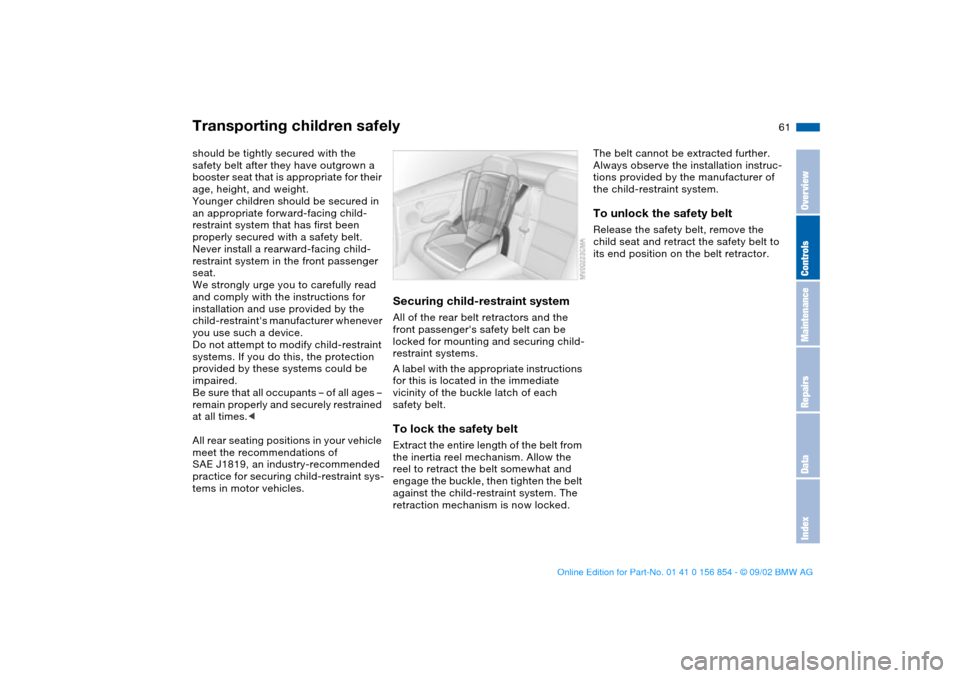
Securing child-restraint systemAll of the rear belt retractors and the
front passenger's safety belt can be
locked for mounting and securing child-
restraint systems.
A label with the appropriate instructions
for this is located in the immediate
vicinity of the buckle latch of each
safety belt.To lock the safety beltExtract the entire length of the belt from
the inertia reel mechanism. Allow the
reel to retract the belt somewhat and
engage the buckle, then tighten the belt
against the child-restraint system. The
retraction mechanism is now locked.
The belt cannot be extracted further.
Always observe the installation instruc-
tions provided by the manufacturer of
the child-restraint system.To unlock the safety belt Release the safety belt, remove the
child seat and retract the safety belt to
its end position on the belt retractor.
Transporting children safely
OverviewControlsMaintenanceRepairsDataIndex
handbook.book Page 61 Tuesday, July 30, 2002 9:28 AM
Page 65 of 166

65
Vehicle Memory, Key MemoryHow the system functionsYou have probably frequently wished
that you could configure individual
functions of your vehicles to reflect your
own personal requirements. In engi-
neering your vehicle, BMW has pro-
vided for a number of options for per-
sonal adjustment that can be
programmed into your vehicle at your
BMW center.
The available configuration data fall into
two categories, according to whether
their primary orientation is the vehicle –
Vehicle Memory – or the individual –
Key Memory. You can have up to four
different basic settings adjusted for four
different persons. The only require-
ment is that each person uses his or her
own remote control key.
When your vehicle is unlocked with the
remote control, the vehicle recognizes
the individual user by means of a data
exchange with the key, and makes
adjustments accordingly.
In order for you to distinguish between
different keys, colored decals are sup-
plied together with the keys.What the system can doYour BMW center can provide you with
details on the possibilities that the Vehi-
cle and Key Memory systems offer.
Examples for Vehicle Memory:
>Various signals that can serve as
acknowledgment for locking and
unlocking the vehicle, refer to
page 31
>Activates/deactivates the Follow me
home lamps function, refer to
page 92
>Activates/deactivates daytime driv-
ing lamps, refer to page92
>Sets the units of measure for display-
ing time, outside temperature, dis-
tance traveled and fuel consumption
in the instrument cluster.
>Indicates via an acoustic tone that
PDC has been activated, refer to
page 86>Switches on rear window defroster
automatically, refer to page 99
>After giving an ice warning, the dis-
play returns to the previous setting,
refer to page 84.
Examples for Key Memory:
>Locks the vehicle automatically after
you start off, refer to page 34
>Automatically moves the seat and
outside mirror into position for the
programmed driver when unlocking
the vehicle, refer to page 53
>Automatic tilting of the passenger-
side mirror, refer to page 54
>After the engine is started, calls up
the last selected driving program for
each shifting mode, refer to page 74.
You will see this symbol through-
out the Owner's Manual. It is to
remind you at appropriate places of the
settings that are available to you.<
OverviewControlsMaintenanceRepairsDataIndex
handbook.book Page 65 Tuesday, July 30, 2002 9:28 AM
Page 66 of 166

66Driving
Ignition lockIgnition key positions0Steering locked
1Steering unlocked
2Ignition switched on
3Starting engineSteering lockedThe key can be inserted or removed in
this position only.
After removing the key, turn the steer-
ing wheel slightly to the left or right until
the lock engages.
If the key is not removed, an acoustic
signal is sounded after the driver's door
has been opened.
Once the ignition has been switched
off, ignition key in position 0 or
removed, the radio functions are still
available for approx. 20 minutes. Turn
the radio back on to use it.Steering unlockedYou will find that it is often easier to turn
the ignition key from position 0 to posi-
tion 1 when you move the steering
wheel slightly to help disengage the
lock.
Individual electrical accessories are
ready for operation.
handbook.book Page 66 Tuesday, July 30, 2002 9:28 AM
Page 69 of 166

69
Switching off the engine
You should never remove the igni-
tion key when the vehicle is in
motion, as the steering lock could
engage.
When you leave the vehicle, always
remove the ignition key and engage the
steering lock.<
Always engage the parking brake
when parking on downhill roads.
Engaging a gear may not sufficiently
secure the vehicle against rolling.<
Manual transmissionTurn the ignition key to position 1 or 0.Sequential M gearbox SMG IIIf you turn the ignition key to position 1
or 0 with the selector lever in the for-
ward or reverse position, a gear auto-
matically remains engaged.
If you turn the ignition key to position 1
or 0 with the selector lever in position 0,
a warning tone and the flashing gear
indicator in the SMG display remind you
that the vehicle is not secured against
rolling.
The warning stops after approx. ten
seconds. If you move the selector lever
into a forward or reverse position dur-
ing this time, a gear is automatically
engaged.
Parking brakeThe parking brake is designed primarily
to prevent the vehicle from rolling when
it is parked. It operates against the rear
wheels.To engageThe detent engages automatically, and
the indicator lamp in the instrument
cluster comes on when the ignition key
is in position 2, refer to page 18.To releasePull up slightly on the lever, press the
button – see arrow – and lower the
lever.
OverviewControlsMaintenanceRepairsDataIndex
handbook.book Page 69 Tuesday, July 30, 2002 9:28 AM
Page 71 of 166

71
Sequential M gearbox SMG II*The conceptThe sequential M gearbox SMG II is an
automated manual gearbox with which
clutching and shifting is assumed by an
electro-hydraulic system.
The SMG II is operated via two shift
paddles on the steering wheel and the
selector lever in the center console.
It offers the following functions:
>Sequential and automated shifting
mode
>Ability to choose between different
driving programs, Drivelogic
>Gradient assistance, refer to page 74
>Upshift display and shift lights, refer
to page 75
>RPM matching on downshifts
>Driving dependent functions:
The respective driving situation, e.g.
cornering, mountain driving or brak-
ing, is detected by sensors and taken
into account for shifting, e.g. to
achieve optimum gear selection dur-
ing deceleration and subsequent
acceleration
>Slip recognition at the rear axle for
increasing driving stability, e.g. dur-
ing downshifting on slippery road
surfaces
>Operating safety through protection
against misshifting.Under normal operating conditions, fuel
consumption is lowest when driving in
the first driving program of the auto-
mated shifting mode.
Selector lever positionR: Reverse position
0: Position 0 (Neutral)
Forward position with one-touch mode:
>S: sequential mode
>A: automated mode
>+: upshifting in sequential mode
>–: downshifting in sequential mode.
The SMG II is ready for operation from
ignition key position two or higher.
For your safety, it is only possible to
engage a driving position with the vehi-
cle stopped approx. 2 seconds after
engaging position 0 with the footbrake
depressed – Shiftlock function.
OverviewControlsMaintenanceRepairsDataIndex
handbook.book Page 71 Tuesday, July 30, 2002 9:28 AM
Page 83 of 166

83
ClockIf you wish to have a permanent time
display, you can make this adjustment
in the car radio* display, refer to the
Owner's Manual for Radio.
You can set the time of day, and the
display for the car radio, as follows.
To adjustWhen the ignition key is in position 1 or
higher, the time of day appears in the
display.
To set ahead: turn the right button to
the right.
To set back: turn the right button to the
left.
The adjustment speed will increase the
longer you continue to hold the right
button.
To change the display mode: press the
right button briefly.
Every time you press the knob, the
clock display alternates between the
12-hour and 24-hour mode.
In ignition key position 0: the time is
displayed for a few seconds after you
press the left button, refer to Odometer
on page 80.
OverviewControlsMaintenanceRepairsDataIndex
handbook.book Page 83 Tuesday, July 30, 2002 9:28 AM