Page 162 of 420

�µ�µ
�µ
�Ó
�Ó
�Ó�Ó
�´
�µ
�´�µ
Select the CD changer by pressing
the CD button. You will see ‘‘Cd’’ in
the display. The system will begin
playing the last selected disc in the
CD changer. You will see the disc
and track numbers displayed.
When that disc ends, the next disc in
the CD changer is loaded and played.
Af ter the last disc f inishes, the
system returns to disc 1.
To select a dif f erent disc, press the
appropriate Preset button (1 6). If
youselectanemptypositioninthe
CD changer, the system will go into
the loading sequence (see page ).
You can use the SKIP buttons while
a disc is playing to select passages
and change tracks. To activate the Repeat
f eature, press and release the RPT
button. You will see RPT in the
display as a reminder. The system
continuously replays the current
track. Press the RPT button again to
turn it off. Pressing either of the
SKIP buttons also turns off the
repeat feature.
This feature,
when activated, plays the tracks
within a CD in random order, rather
than in the order they are recorded
on the CD. To activate Random Play,
press the RDM button. You will see
RDM in the display. The system will
then select and play tracks randomly.
This continues until you deactivate
RandomPlaybypressingtheRDM
button again, or you select a
dif f erent CD with a preset button.
To move rapidly within a track, press
and hold the appropriate SKIP
button. You will hear a beep and the
system will continue to move. Press
the button to move forward, or
the button to move backward.
Release the button when the system
reaches the point you want.
Each time you press the button
and release it, the system skips
f orward to the beginning of the next
track. Press and release the
buttontoskipbackwardtothe
beginning of the current track. Press
and release it again to skip to the
beginning of the previous track.
156
Audio System
Comf ort and Convenience Feat ures
Operat ionREPEAT
RANDOM PLAY
158
Page 164 of 420
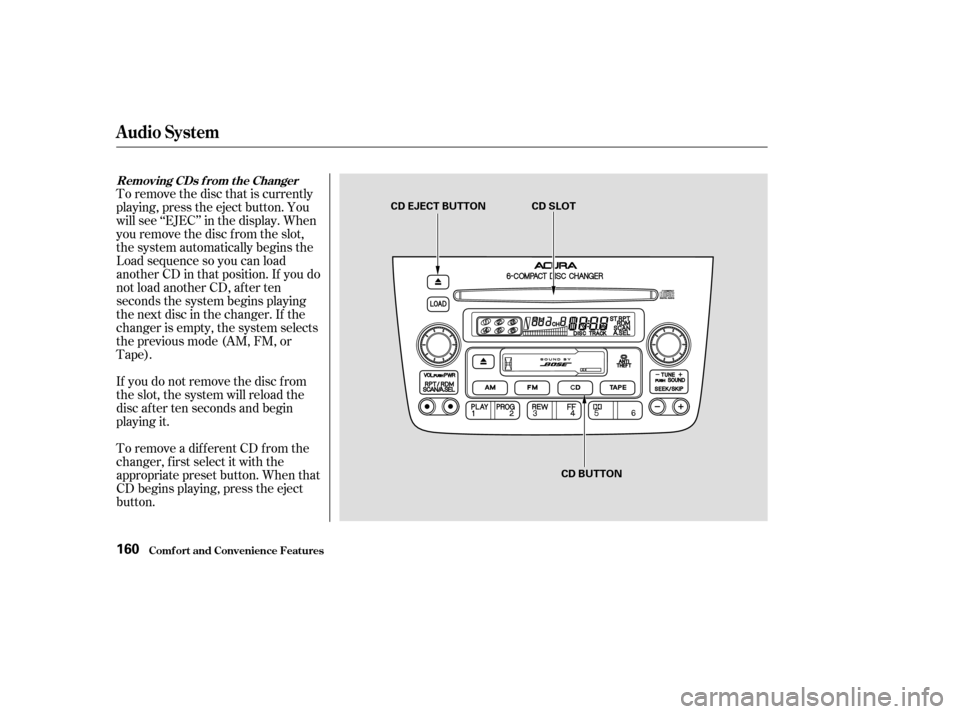
To remove the disc that is currently
playing, press the eject button. You
will see ‘‘EJEC’’ in the display. When
you remove the disc f rom the slot,
the system automatically begins the
Load sequence so you can load
another CD in that position. If you do
not load another CD, af ter ten
seconds the system begins playing
the next disc in the changer. If the
changer is empty, the system selects
the previous mode (AM, FM, or
Tape).
If you do not remove the disc f rom
the slot, the system will reload the
disc af ter ten seconds and begin
playing it.
To remove a different CD from the
changer,firstselectitwiththe
appropriate preset button. When that
CD begins playing, press the eject
button.
Removing CDs f rom t he Changer
Comf ort and Convenience Feat ures
Audio System
160
CD EJECT BUTTON CD SLOTCD BUTTON
Page 166 of 420
Indication
If you see an error indication in the
display while operating the CD
changer, f ind the cause in the chart
to the right. If you cannot clear the
error indication, take the vehicle to
your Acura dealer. Cause
Solution
Disc-changer
malf unction.
High temperature.
Disc-changer
malf unction.
High temperature. Consult your Acura dealer.
Will disappear when the temperature returns to
normal.
Consult your Acura dealer.
Will disappear when the temperature returns to
normal.
CD Changer Error Indications
Audio System
Comf ort and Convenience Feat ures162
Page 168 of 420
The band and f requency that the
radio was last tuned to is displayed.
To change bands, press the AM or
FM button. On the FM band, ST will
be displayed if the station is broad-
castinginstereo.Stereo
reproduction on AM is not available. The ignition switch must be in
ACCESSORY (I) or ON (II) to
operate the audio system. Turn the
system on by pushing the PWR/
VOL knob. Adjust the volume by
turning the same knob. Operating the Radio
Audio System
Comf ort and Convenience Feat ures164
PWR/VOL KNOB PRESET BUTTONS TUNE KNOBSCAN BUTTON AM BUTTONFM BUTTON
SEEK BUTTONS
Page 170 of 420
�µIf you are
traveling far from home and can no
longer receive the stations you
preset, you can use the Auto Select
feature to find stations in the local
area.
If you are in a remote area, Auto
Select may not f ind six strong AM
stations or twelve strong FM stations.
If this happens, you will see a ‘‘0’’
displayed when you press any preset
button that does not have a station
stored. To activate Auto Select, press the
A. SEL button. A. SEL will f lash in
the display, and the system will go
into scan mode f or several seconds.
It automatically scans both bands,
looking f or stations with strong
signals. It stores the f requencies of
six AM stations and twelve FM
stations in the preset buttons. You
can then use the preset buttons to
select those stations. AUTO SELECT
Audio System
Comf ort and Convenience Feat ures166
A.SEL INDICATOR
A.SEL BUTTON
Page 173 of 420

You can use the instrument panel
brightness control knob to adjust the
illumination of the audio system (see
page ). The audio system
illuminates when the parking lights
are on, even if the radio is turned of f .
Your Acura’s radio can receive the
complete AM and FM bands.
Those bands cover these f requen-
cies:
AM band:
530 to 1,710 kilohertz
FM band:
87.7 to 107.9 megahertz
Radio stations on the AM band are
assigned f requencies at least ten
kilohertz apart (530, 540, 550).
Stations on the FM band are
assigned f requencies at least 0.2
megahertz apart (87.9, 88.1, 88.3).Stations must use these exact
f requencies. It is f airly common f or
stations to round-of f the f requency in
their advertising, so your radio could
display a f requency of 100.9 even
though the announcer may identif y
the station as ‘‘FM101.’’
How well your Acura’s radio receives
stations is dependent on many
f actors, such as the distance f rom
the station’s transmitter, nearby
large objects, and atmospheric
conditions.
A radio station’s signal gets weaker
as you get f arther away f rom its
transmitter. If you are listening to an
AM station, you will notice the sound
volume becoming weaker, and the
stationdriftinginandout.If youare
listening to an FM station, you will
see the stereo indicator f lickering of f
and on as the signal weakens.
Eventually, the stereo indicator willgo of f and the sound will f ade
completely as you get out of range of
the station’s signal.
Driving very near the transmitter of
a station that is broadcasting on a
f requency close to the f requency of
the station you are listening to can
also af f ect your radio’s reception.
You may temporarily hear both
stations,orhearonlythestationyou
are close to.
82
A udio System L ighting
Radio Frequencies
Radio Reception
Comf ort and Convenience Feat ures
Audio System
169
Page 175 of 420
You operate the CD player with the
same controls used f or the radio.
With the system on, insert the disc
into the CD slot. Push the disc in
half way, the drive will pull it in the
rest of the way and begin to play.
The number of the track that is
playing is shown in the display.
You can also play 3-inch (8-cm) discs
without using an adapter ring. In all
cases, play only standard round discs.
Odd-shaped CDs may jam in the
driveorcauseotherproblems.
For best results when using CD-R
discs, use only high quality discs
labeled f or audio use. When
recording a CD-R, the recording
must be closed in order f or the disc
to be used by CD players. CD-RW
discs will not work in this unit. Operating the CD Player
Audio System
Comf ort and Convenience Feat ures171
CD SLOT SKIP BUTTONS
REPEAT BUTTON CD BUTTON RDM BUTTON
Page 176 of 420

�µ
�Ó
�Ó �µ
�Ó �Ó
�´
�µ
�´�µ
You can use the SKIP buttons while
a disc is playing to select passages
and change tracks.
This feature,
when activated, plays the tracks on
the CD in random order, rather than
in the order they are recorded on the
CD. To activate Random Play, press
the RDM button. You will see RDM
in the display. The system will then
select and play tracks randomly.
This continues until you deactivate
RandomPlaybypressingtheRDM
button again.
To move rapidly within a track, press
and hold an appropriate SKIP button.
Press the button to move f orward,
or the button to move backward.
Release the button when the system
reaches the point you want.
To activate the Repeat
feature, press and release the Repeat
button. You will see REPEAT in the
display. The system continuously
replays the current track. Press the
Repeat button again to turn it off.
Each time you press the button
and release it, the system skips
f orward to the beginning of the next
track. Press and release the
buttontoskipbackwardtothe
beginning of the current track. Press
and release it again to skip to the
beginning of the previous track.
When the system reaches the end of
the disc, it will return to the begin-
ning and play the disc again.
You can switch to the radio while a
CD is playing by pressing the AM or
FM button. Press the CD button to
return to playing the CD. The CD
will begin playing where it lef t of f .
If you eject the disc, but do not
remove it from the slot, the system
will automatically reload the disc
af ter 15 seconds and put the CD
player in pause mode. To begin
playing the disc, press the CD button. Press the eject button to remove the
disc f rom the drive. If you turn the system of f while a CD
is playing, either with the PWR/VOL
knob or by turning off the ignition,
the disc will stay in the drive. When
youturnthesystembackon,theCD
will begin playing where it lef t of f .
RANDOM PLAY REPEAT
Audio System
Comf ort and Convenience Feat ures172