Page 149 of 420
�Î
�Î
The anti-thef t f eature will disable the
system if it is disconnected f rom the
car’s battery. To get the system
working again, you must enter a
code number (see page ).
Your Acura’s audio system provides
clear reception on both AM and FM
bands, while the preset buttons allow
you to easily select your f avorite
stations.
The cassette system f eatures Dolby
noise reduction, automatic sensing of
chromium-dioxide (CrO ) tape, and
auto-reverse f or continuous play.
The in-dash CD changer holds up to
six discs. You operate the CD
changer with the same controls used
f or the radio. See page f or CD
changer operation.
155
182
Touring Model
2
Dolby noise reduction manuf actured under
license from Dolby Laboratories Licensing Corpo-
ration. ‘‘DOLBY’’ and the double-D symbol are trademarks of Dolby Laboratories
Licensing Corporation.
Audio System
Comf ort and Convenience Feat ures
A M/FM/Cassette/CD Changer
Audio System
145
Page 151 of 420
�µThe preset f requencies will be lost if
your car’s battery goes dead, is
disconnected, or the radio f use is
removed.
Once a station’s f requency is stored,
simply press and release the proper
Preset button to tune to it.
Repeat steps 1 to 3 to store a total
of six stations on AM and twelve
on FM. Pick the Preset button you want
for that station. Press the button
and hold it until you hear a beep. Use the TUNE or SEEK f unction
to tune the radio to a desired
station. Select the desired band, AM or
FM. FM1 and FM2 let you store
two f requencies with each preset
button.
To store a f requency: You can store the
f requencies of your f avorite radio
stations in the six preset buttons.
Each button will store one f requency
on the AM band, and two
f requencies on the FM band.
1.
2.
3.
4.
CONT INUED
Audio System
Comf ort and Convenience Feat ures
Preset
147
PWR/VOL
KNOB AM
BUTTONFM
BUTTON STEREO
INDICATOR TUNE KNOB
SCAN BUTTON PRESET BUTTONS SEEK BUTTONS
Page 167 of 420
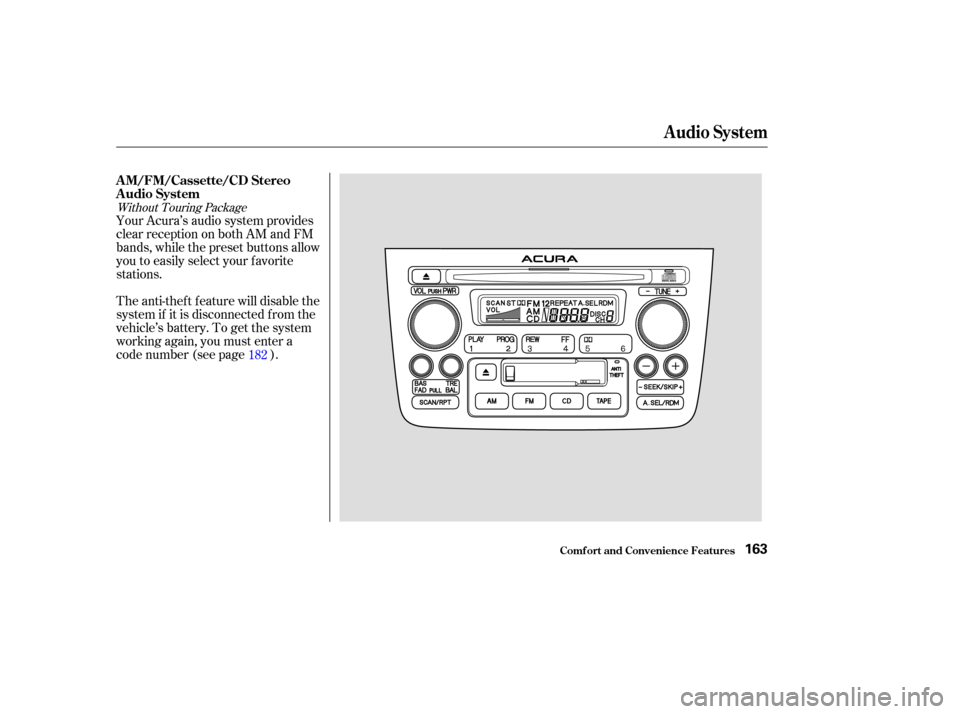
The anti-thef t f eature will disable the
system if it is disconnected f rom the
vehicle’s battery. To get the system
working again, you must enter a
code number (see page ). Your Acura’s audio system provides
clear reception on both AM and FM
bands, while the preset buttons allow
you to easily select your f avorite
stations.182
Without Touring Package
AM/FM/Cassette/CD Stereo
Audio System
Audio System
Comf ort and Convenience Feat ures163
Page 169 of 420

�µ
�µ
�µ
�µ
�Ó�Ó
�µ�´
The SCAN f unction
samples all the stations with strong
signals on the selected band. To
activate it, press the SCAN button,
then release it. The system will scan
up the band for a station with a
strong signal. When it f inds one, it
will stop and play that station f or
approximately f ive seconds. If you do
nothing, the system will then scan
f or the next strong station and play
that f or f ive seconds. When it plays a
station that you want to continue
listening to, press the SCAN button
again. To store a f requency:
Select the desired band, AM or
FM. FM1 and FM2 let you store
two f requencies with each preset
button.
Use the TUNE or SEEK f unction
to tune the radio to a desired
station.
Pick the Preset button you want
for that station. Press the button
and hold it until you hear a beep.
Repeat steps 1 to 3 to store a total
of six stations on AM and twelve
on FM.
Once a station’s frequency is stored,
simply press and release the proper
preset button to tune to it.
You can use any of f our methods to
f ind radio stations on the selected
band: TUNE, SEEK, SCAN or the
Preset buttons.
Use the TUNE knob to
tune the radio to a desired f requency.
Turn the knob clockwise to tune to a
higher f requency, or
counterclockwise to tune to a lower
f requency.
The preset f requencies will be lost if
your vehicle’s battery goes dead, is
disconnected, or the radio f use is
removed.
You can store the
f requencies of your f avorite radio
stations in the six preset buttons.
Each button will store one f requency
on the AM band, and two
f requencies on the FM band.
The SEEK f unction
searches the band for a station with
a strong signal. To activate it, press
either SEEK button ( or ), then
release it. Depending on which
SEEK button you press, the system
scans upward or downward f rom the
current f requency. It stops when it
finds a station with a strong signal. 1.
2.
3.
4.
SCAN
TUNE
Preset
SEEK
Audio System
Comf ort and Convenience Feat ures165
Page 186 of 420

You will have to store your favorite
stations in the Preset buttons after
the system begins working. Your
original settings were lost when
power was disconnected.
If your vehicle’s battery is discon-
nected or goes dead, the audio
system will disable itself . If this
happens, you will see ‘‘Code’’ in the
frequencydisplaythenexttimeyou
turn on the system. Use the Preset
buttons to enter the five-digit code. If
it is entered correctly, the radio will
start playing.
If you make a mistake entering the
code, do not start over or try to
correct your mistake. Complete the
f ive-digit sequence, then enter the
correct code. You have ten tries to
enter the correct code. If you are
unsuccessful in ten attempts, you
must then leave the system on for
one hour bef ore trying again.
Your vehicle’s audio system will
disable itself if it is disconnected
f rom electrical power f or any reason.
To make it work again, the user
must enter a specif ic f ive-digit code
in the Preset buttons. Because there
are hundreds of number
combinations possible f rom f ive
digits, making the system work
without knowing the exact code is
nearly impossible.
Youshouldhavereceivedacardthat
lists your audio system’s code
number and serial number. It is best
tostorethiscardinasafeplaceat
home. In addition, you should write
the audio system’s serial number in
this Owner’s Manual. If you should
happen to lose the card, you must
obtain the code number f rom your
Acura dealer. To do this, you will
need the system’s serial number. Thef t Protection
Audio System
Comf ort and Convenience Feat ures182
Page 187 of 420
�Î
�Î
CONT INUED
The cassette system f eatures Dolby
noise reduction, automatic sensing of
chromium-dioxide (CrO ) tape, and
autoreverse f or continuous play.
The anti-thef t f eature will disable the
system if it is disconnected f rom the
vehicle’s battery. To get the system
working again, you must enter a
code number (see page ). Your Acura’s audio system provides
clear reception on both AM and FM
bands, while the preset buttons allow
you to easily select your f avorite
stations.182
2
Dolby noise reduction manuf actured under
license from Dolby Laboratories Licensing Corpo-
ration. ‘‘DOLBY’’ and the double-D symbol are trademarks of Dolby Laboratories
Licensing Corporation.
Optional on U.S. Touring model only
Audio System
Comf ort and Convenience Feat ures
A M/FM/CD/DVD A udio system
183
Page 190 of 420

�µ
�µ �µ
�µ
�µ�´
You can use any of f our methods to
f ind radio stations on the selected
band: TUNE, SEEK, SCAN or the
Preset buttons.
Use the TUNE knob to
tune the radio to a desired f requency.
Turn the TUNE knob to the right to
tune to a higher f requency, or to the
lef t to tune to a lower f requency.
Turn the knob right or lef t until the
display reaches the desired
f requency.
The SEEK f unction
searches the band for a station with
a strong signal. To activate it, press
theSEEKbaror,then
release it. Depending on which part
of the SEEK bar you press, the
system scans upward or downward
f rom the current f requency. It stops
when it finds a station with a strong
signal. The SCAN f unction
samples all the stations with strong
signals on the selected band. To
activate it, press the SCAN button,
then release it. When the system is
intheSCANmode,SCNshowsin
the display. The system will scan up
the band for a station with a strong
signal. When it f inds one, it will stop
and play that station for
approximately f ive seconds. If you do
nothing, the system will then scan
f or the next strong station and play
that f or f ive seconds. When it plays a
station that you want to continue
listening to, press the SCAN button
again.
You can store the
f requencies of your f avorite radio
stations in the six preset buttons.
Each button will store one f requency
on the AM band, and two
f requencies on the FM band. To store a f requency:
Select the desired band, AM or
FM. FM1 and FM2 let you store
two f requencies with each preset
button.
Use the TUNE or SEEK f unction
to tune the radio to a desired
station.
Pick the Preset button you want
for that station. Press the button
and hold it until you hear a beep.
Repeat steps 1 to 3 to store a total
of six stations on AM and twelve
on FM.
Once a station’s frequency is stored,
simply press and release the proper
Preset button to tune to it. The
preset f requencies will be lost if your
vehicle’s battery goes dead, is
disconnected, or the radio f use is
removed. 1.
2.
3.
4.
Comf ort and Convenience Feat ures
Audio System
TUNE
SEEK SCAN
Preset
186
Page 213 of 420
Indication CauseSolution
If you see an error indication in the
display while operating the DVD
player,findthecauseinthechartto
the right. If you cannot clear the
error indication, take the vehicle to
your Acura dealer.
FOCUS Error
Mechanical Error
High Temperature
Low Vehicle Battery
Voltage Press the EJECT button and pull out the disc.
Check if the disc is inserted correctly in the
DVD Player.
Make sure the disc is not scratched or damaged.
Press the EJECT button and pull out the disc.
Check the disc for damage or deformation.
If the DVD cannot be pulled out or the error
indication does not disappear after the disc is
ejected, see your Acura dealer.
Do not try to force the disc out of the player.
Will disappear when the temperature returns to
normal.
Run the engine to recharge the battery.
Rear Entertainment System
Comf ort and Convenience Feat ures
DVDPlayerErrorIndications
209