2002 VOLVO S60 light
[x] Cancel search: lightPage 18 of 106

Rear fog light
This light indicates that the fog light is on.
Oil pressure warning light
If the light comes on while driving, stop the car and then stop the engine immediately and check the engine oil level.
See page 172
. If the light stays on after restart, have the car towed to the nearest authorized Volvo retailer. After hard
driving, the light may come on occasionally when the engine is idling. This is normal, provided it goes off when the
engine speed is increased.
CHECK ENGINE Malfunction indicator light
On-Board Diagnostic II (OBDII): As you drive, a computer called "OBDII" monitors your car's engine, transmission,
electrical and emission systems. The CHECK ENGINE light will light up if the computer senses a condition that
potentially may need correcting. When this happens, please have your car checked by a Volvo retailer as soon as
possible.
A CHECK ENGINE light may have many causes. Sometimes, you may not notice a change in your car's behavior.
Even so, an uncorrected condition could hurt fuel economy, emission cleanliness, and driveability. Extended driving
without correcting the cause could even damage other components in your car.
Canadian models are equipped with this warning light:
pg. 34 Indicator and warning symbols
Turn signal indicator - trailer (certain models)
If you are towing a trailer, this light will flash simultaneously with the turn signals on the trailer. If the light does not
flash when signaling, neither the trailer's turn signals nor the car's turn signals are functioning.
Seat belt reminder
This symbol lights up to indicate that the driver has not fastened his/her seat belt.
pg. 35 Indicator and warning symbols
Cars equipped with STC or DSTC (option) Cars equipped with STC or DSTC have a switch in the center console
marked STC or DSTC. See pages 37, 38
.
If the indicator light flashes, it indicates that the STC or DSTC system is working.
ProCarManuals.com
Page 19 of 106

The indicator light stays on when the STC or DSTC system has been switched off with the appropriate button in the
center console.
Fault in the STC or DSTC system
If the indicator light remains on, there is a fault in one of the systems.
Stop the car in a safe place and switch off the engine. Restart the engine.
If the indicator light goes off, no further action is necessary.
If the indicator light remains on, drive to an authorized Volvo retailer to have the system inspected.
pg. 36 Indicator and warning symbols
Messages in the text window
When a warning light in the instrument panel comes on, a message is also displayed in the text window. After you
have read the message, you can erase it by pressing button A (see illustration).
NOTE: Certain messages cannot be erased until the condition has been corrected. If a warning message is displayed
when e. g. you are using the trip computer or would like to use the telephone, this message must be erased before you
can access the function of your choice. Press button A to erase the warning message.
You can scroll through the stored messages by pressing button A (see illustration). The text window can be cleared
(the message will be returned to memory) by pressing button A again.
MessageMeaning:
STOP
SAFELY Stop and switch off the engine - to help prevent serious risk of damage.
STOP
ENGINE Stop and switch off the engine - to help prevent serious risk of damage.
SERVICE
URGENT Take your car to an authorized Volvo retailer for inspection as soon as possible.
SEE
MANUAL Refer to your owner's manual. For additional information, please contact your Volvo retailer.
SERVICE
REQUIRED Take your car to an authorized Volvo retailer for inspection at your convenience (but preferably before
the next scheduled maintenance service).
FIX NEXT
SERVICE Have the system affected inspected at the next scheduled maintenance service.
TIME FOR
REGULAR
SERVICE This light will come on at 7,500 mile (12,000 km) intervals, after 750 hours of driving or after 12
months, whichever occurs first, to remind the driver that the service interval has been exceeded. The
light will stay on for 2 minutes after start until reset by the servicing retailer.
pg. 37 Switches in the center console
ProCarManuals.com
Page 20 of 106

1. Folding head restraints (option)
This button is used to fold down the outboard rear head restraints. The ignition key must be in position I or II or the
engine must be running.
NOTE: If the head restraints have been folded down, they must be returned to their original position manually. The
head restraints should be in the upright position before the rear seat backrests are folded down.
WARNING!
For safety reasons, no one should be allowed to sit in the outboard rear seat positions if the head restraints are folded
down. If these positions are occupied, the head restraints should be in the upright (fixed) position.
2. Valet lock (trunk lock)
Pressing this switch locks the trunk, even if the doors are unlocked. The trunk will remain locked even if the doors are
locked/unlocked using the master key or the remote control.
To use this function:
Turn the master key to position II.
Press the "Valet lock" button. An LED in the button will light up and "VALET LOCK ON" will be displayed on the
text window to indicate that this function is activated.
The function can be turned off (deactivated) by turning the ignition key to position II and pressing the "Valet lock"
button again (the LED in the button will go out and "VALET LOCK OFF" will be displayed in the text window).
3. Not in use
4. Stability Traction Control system (option)
NOTE: Press this switch for at least half a second to turn the STC system on or off. An LED in the switch will light
up to indicate that the system is on. See page 143
for more information on STC. This system should be switched off if
you, for any reason, temporarily have to drive with tires of different dimensions (e. g., spare tire).
NOTE: To help reduce the risk that this system is turned off inadvertently, the switch must be held in for at least half
a second to turn STC off. The warning symbol in the instrument panel will light up to indicate that STC is OFF.
pg. 38 Switches in the center console
Dynamic Stability Traction Control system (option)
This button is used to switch DSTC off. When the LED in the button is ON, this indicates that the system is ON (the
light will also come on if a fault has been detected in the system).
NOTE: To avoid inadvertently switching the system off, the button must be pressed for at least half a second before
DSTC is deactivated. The text "DSTC off" will be displayed briefly in the text window. The warning symbol will come
on to indicate that DSTC has been switched off. The system is automatically switched on when the engine is started.
DSTC should be switched off if the steering wheel position or the front wheels are not properly aligned. See
page 144
for more information on
ProCarManuals.com
Page 21 of 106

WARNING!
Please be aware that the car's handling characteristics may be affected if Dynamic Stability Traction Control (DSTC)
is switched off.
5. Not in Use
6. Temporarily disconnecting the alarm sensors (option)
See page 126
for more details.
7. Not in use
8. 12 volt socket
This 12 volt socket can be used to plug in certain accessories such as cellular telephones, etc. The ignition key must be
in position 1 (or higher) for the auxiliary socket to function.
NOTE: The auxiliary sockets can also be used for cigarette lighters, which are available at your Volvo retailer.
pg. 39 Steering wheel adjustment
Both the height and the reach of the steering wheel can be adjusted to a comfortable position for the driver. Pull down
the lever on the left of the steering column. Adjust the steering wheel to a suitable position and press the lever back
into place to lock the steering wheel in the new position. Check that the steering wheel is locked in the new position.
WARNING!
Never adjust the steering wheel while driving.
pg. 40 Lighting panel
A - Headlights and parking lights
All lighting off.
Models with daytime running lights:
ProCarManuals.com
Page 22 of 106

Low beam headlights will automatically come on if the ignition key is in position II. Front and rear parking lights and
license plate lights will also be on. Volvo recommends the use of daytime running lights. If, however, you would
prefer to have these lights turned off (USA only), please consult your Volvo retailer. Please note that the use of
daytime running lights is mandatory in Canada.
Parking lights on. The parking lights should be switched off when you leave the car to help avoid battery
drain.
Headlights, parking lights, license plate lights and instrument panel illumination are on if the ignition key is in
position II.
If the headlight switch is in this position, all lights will go out when the ignition is switched off.
The headlight switch must be in this position before the high beams will function.
Switch from high to low beams and vice versa by pulling the turn signal switch lever on the left side of steering
column toward you.
B - Instrument lighting
Move the thumb wheel up to increase brightness or down to decrease brightness. There is also an instrument panel
illumination sensor (see illustration on page 56
) which automatically adjusts the level of illumination.
The symbols have maximum illumination in daylight (only the background lighting can be adjusted). At night, both the
symbol light and background lighting can be adjusted.
C - Unlocking the fuel filler door
Press this button when the car is at a standstill to unlock the fuel filler door. Please note that the fuel filler door will
remain unlocked until the car is driven again at a speed of over approximately 5 mph (8 km/h). An audible click will
be heard when the fuel filler door relocks.
D - Front fog lights *
The front fog lights will function only in combination with the low beam headlights.
An LED in the switch indicates when the front fog lights are on.
E - Rear fog light*
The rear fog light is considerably brighter than the normal tail lights and should be used only when conditions such as
fog, rain, snow, smoke or dust reduce visibility for other vehicles to less than 500 ft (150 meters).
An LED in the switch indicates when the rear fog light is on.
The rear fog light will only function in combination with the high/low beam headlights. By design, there is one rear fog
light only, located in the driver's side tail light cluster.
* Standard on T5/accessory on the other models.
These lights will be automatically switched off the next time the car is started.
Contents | Top of Page
ProCarManuals.com
Page 23 of 106

2 0 0 2
VOLVO S60
Climate control
pg. 53 Climate control
Climate control systems - general information 54
Air distribution55
Electronic climate control, ECC (2.4T and T5)56
Manual climate control with air conditioning, (A/C)60
pg. 54 Climate control systems - general information
Condensation on the inside of the windows
Keeping the insides of the windows clean will help reduce the amount of condensation that forms on the windows. Use
a commercial window cleaning agent to clean the windows.
Ice and snow
Always keep the air intake grille at the base of the windshield free of snow.
Cabin air filter
Replace the cabin air filter with a new one at the recommended intervals. The filter should be replaced more often
when driving under dirty and dusty conditions. The filter cannot be cleaned and therefore should always be replaced
with a new one.
Sensors
The sunlight sensor on the dashboard and passenger compartment temperature sensor in the ECC control panel should
not be covered in any way as this could cause incorrect information to be sent to the ECC system.
Parking the car in warm weather
If your car has been parked in the sun in warm weather, opening the windows and sun roof (option) for several
minutes before driving will help release the warm air from the passenger compartment. When the engine is running,
close the windows and sun roof and use the recirculation function for several minutes to enable the air conditioning to
cool the compartment as quickly as possible.
Windows and optional sun roof
The optional ECC system (2.4T and T5 models only) will function best if the windows and optional sun roof are
closed. If you drive with the sun roof open, we recommend that you manually adjust the temperature and blower
control (the LED in the AUTO switch should be off).
Acceleration
The air conditioning is momentarily disengaged during full-throttle acceleration.
Climate control maintenance
All maintenance on the climate control systems should be carried out by an authorized Volvo service technician only.
Refrigerant
ProCarManuals.com
Page 25 of 106
D Vertical air flow
Direct the outer air vents toward the side windows to defrost.
In cold weather, close the air vents in the center of the dash to direct as much air as possible toward the windows.
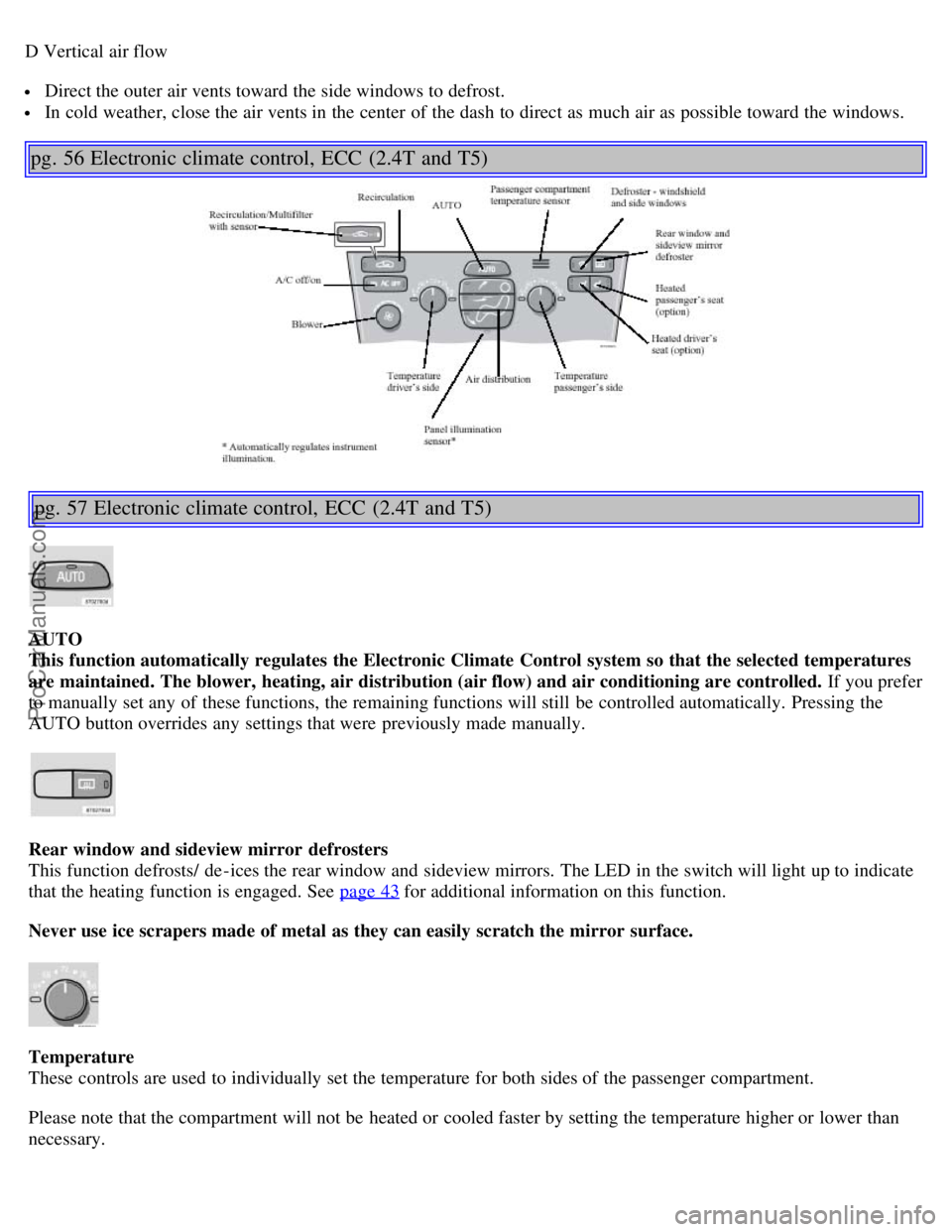
pg. 56 Electronic climate control, ECC (2.4T and T5)
pg. 57 Electronic climate control, ECC (2.4T and T5)
AUTO
This function automatically regulates the Electronic Climate Control system so that the selected temperatures
are maintained. The blower, heating, air distribution (air flow) and air conditioning are controlled. If you prefer
to manually set any of these functions, the remaining functions will still be controlled automatically. Pressing the
AUTO button overrides any settings that were previously made manually.
Rear window and sideview mirror defrosters
This function defrosts/ de -ices the rear window and sideview mirrors. The LED in the switch will light up to indicate
that the heating function is engaged. See page 43
for additional information on this function.
Never use ice scrapers made of metal as they can easily scratch the mirror surface.
Temperature
These controls are used to individually set the temperature for both sides of the passenger compartment.
Please note that the compartment will not be heated or cooled faster by setting the temperature higher or lower than
necessary.
ProCarManuals.com
Page 26 of 106

Set the control to the temperature you prefer.
Defroster
This function defrosts/ de -ices the windshield and front side windows. The LED in the switch will light up to indicate
that the defrost function is engaged. Blower speed increases automatically and the air in the passenger compartment is
dehumidified. Recirculation will not function while defrost is engaged.
Blower control
Turn the control clockwise to increase or counterclockwise to decrease the blower speed. Pressing the AUTO switch
will automatically regulate blower speed and override manual adjustment.
NOTE: Turning the blower control counter-clockwise until an orange LED comes on will turn both the blower and
the air conditioning off.
pg. 58 Electronic climate control, ECC (2.4T and T5)
Air distribution
Press AUTO to automatically regulate air flow or press any combination of the controls shown in the illustration to
manually adjust air flow. An LED in the switch will light up if an air flow control has been pressed.
Heated front seats (option)
Press the switch once for maximum seat heating. Both LEDs in the switch will be lit.
Press the switch a second time for comfort heating. One LED in the switch will be lit.
Press the switch a third time to turn the heating off completely. The LED will go off. The seat heating for the
passenger seat should be switched off when the seat is not occupied.
A/C - ON/OFF
Press the switch to turn the air conditioning on or off. The "ON" or "OFF" LED will light up to indicate if the system
is switched on or off. Other functions will still be regulated automatically (if the AUTO switch is on).
The air conditioning functions only at temperatures above 32° F (0° C).
ProCarManuals.com