REMOTE CONTROL INFORMATION
THE REMOTE CONTROLS PROVIDED WITH YOUR SYSTEM
The 3 button remotes included with your system have separate LOCK and UNLOCK buttons on the
front �and a PANICbutton on the back �.
The RS3200 may be controlled by as many as 4 remote controls, so you may add two additional
remote controls to the two included with your system. Contact your Toyota dealer for more details.
PROGRAMMING
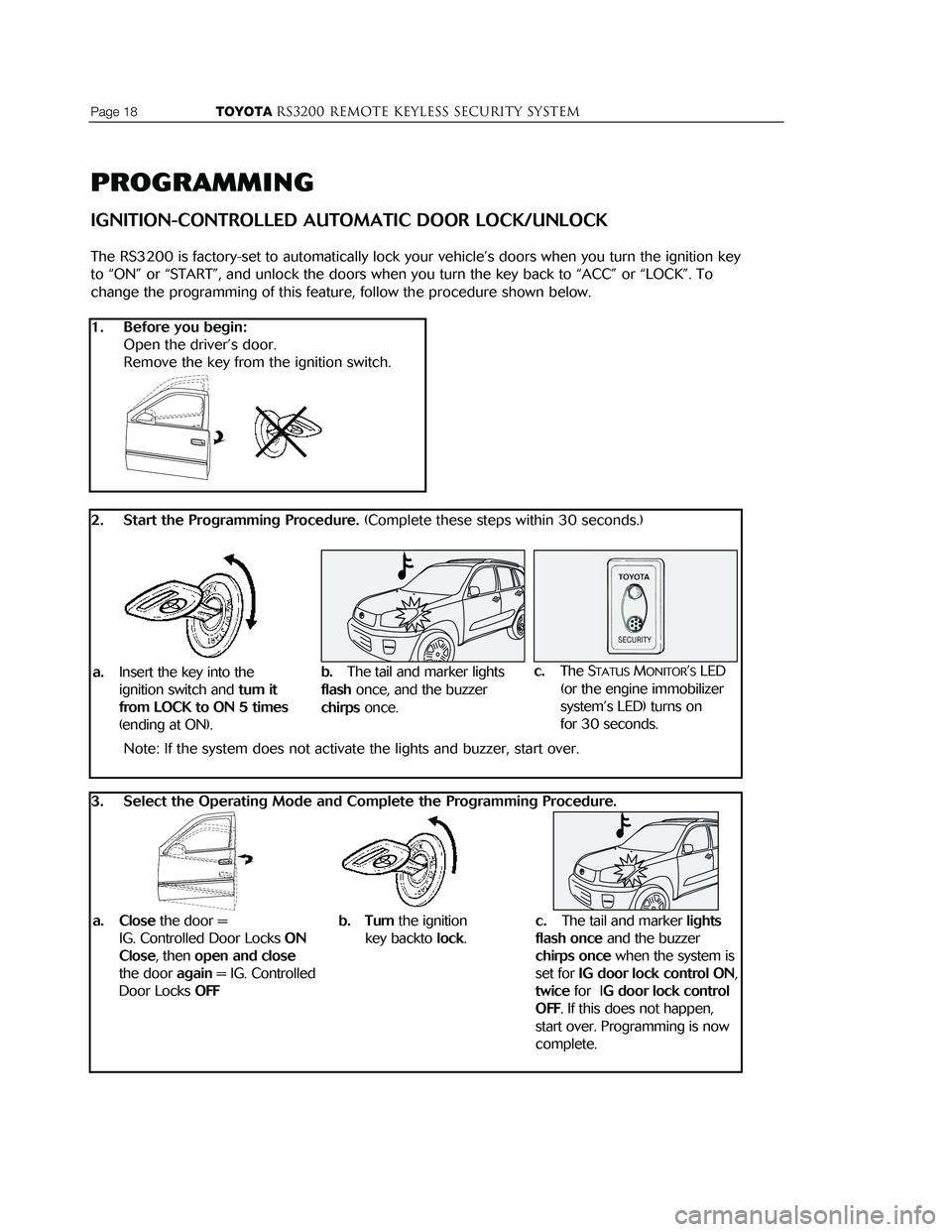
IGNITION-CONTROLLED AUTOMATIC DOOR LOCK/UNLOCK
The RS3200 is factory-set to automatically lock your vehicle ’s doors when you turn the ignition key
to “ON” or “START”, and unlock the doors when you turn the key back to “ACC” or “LOCK”. To
change the programming of this feature, follow the procedure shown below.
1. Before you begin:
Open the driver’s door.
Remove the key from the ignition switch.
2. Start the Programming Procedure. (Complete these steps within 30 seconds.)
Note: If the system does not activate the lights and buzzer, start over.
3. Select the Operating Mode and Complete the Programming Procedure.
Page 18 TOYOTARS3200 REMOTE KEYLESS Security systemTOYOTARS3200 remote keyless Security systemPage 3
�Front Button
FLASHES WHEN
BUTTONS PRESSED
PUSH TO LOCK
DOORS AND ARM
SYSTEM
PUSH TO UNLOCK
DOORS AND DISARM
SYSTEM
� Back Button
HOLD TO ACTIVATE
PANIC MODE
OPERATION
NOTE: This equipment has been tested and found to comply with the limits for a class B digital device, pursuant to part 15 of the FCC rules. These
limits are designed to provide reasonable protection against harmful inter
ference in a residential installation. This equipment generates, uses, and
can radiate radio frequency energy and, if not installed and used in accor
dance with the instruction manual, may cause harmful interference to
radio communications. However, there is no guarantee that interference
will not occur in a particular installation. If this equipment does cause
harmful interference to radio or television reception, which can be deter
mined by turning the equipment off and on, the user is encouraged to try
and correct the interference by one or more of the following measures:
• Reorient or relocate the receiving antenna
• Increase the separation between the equipment and the receiver
• Connect the equipment into an outlet on a circuit different from that to which the receiver is connected
• Consult the dealer or an experienced radio/TV technician for help.
a.Insert the key into the
ignition switch and
turn it
from LOCK to ON 5 times
(ending at ON).
c.The STATUSMONITOR’SLED
(or the engine immobilizer
system ’s LED) turns on
for 30 seconds.
b. Turn the ignition
key backto
lock.
a. Closethe door =
IG. Controlled Door Locks
ON
Close
, then open and close
the door again = IG. Controlled
Door Locks
OFF c.
The tail and marker lights
flash once
and the buzzer
chirps oncewhen the system is
set for
IG door lock control ON,
twice for IG door lock control
OFF
. If this does not happen,
start over. Programming is now
complete.
b.The tail and marker lights
flash once, and the buzzer
chirps once.
INTRODUCTION
Congratulations on your choice of the RS3200 remote keyless security system to protect your
vehicle! To get the most from the system, we strongly recommend that you read this Owner’s
Guide completely to learn all of its features and functions.
The RS3200 provides the convenience of remote keyless operation, enabling you to A
RMand
D
ISARMat the same time you remotely lock and unlock the doors. The system provides comprehen-
sive security protection through point-of-entry monitoring, glass breakage detection and ignition
switch monitoring. While A
RMED, the system will be TRIGGEREDand sound an ALARMwhen a door,
trunk or hatch is forcibly unlocked or opened*, or when a window is tapped on or broken. During
the A
LARM, the vehicle’s horn sounds and the headlights, tail lights and front marker lights flash.
A l s o , the vehicle ’s starter is disabled, to prevent engine start.
An important note about your system
Throughout this guide, there are references to the STATUSMONITOR� �for this system. Illustrated
below, this panel holds the LED indicator (for the system ’s operating status) and the G
LASS
BREAKAGESENSOR’Smicrophone. In vehicles with an engine immobilizer, there is already a LED�
installed in the vehicle, so the RS3200 utilizes the engine immobilizer system LED� and a micro-
phone mounted in a separate location. If your vehicle falls into this category, remember to look at
that LED when the information refers to the S
TATUSMONITOR. If you do not know where the LED is
located, refer to your vehicle ’s owner’s guide for specific information.
About the ignition-controlled automatic door locking/unlocking function.
The RS3200 is programmed to automatically lock your vehicle ’s doors when you turn the key in
the ignition switch to the “ON” or “START” position, and unlock them when you turn the key back
to the “ACC” or “LOCK” position. You may disable this feature by reprogramming the system; refer
to page 18 for programming information.
* When the system is P
ASSIVELY(AUTOMATICALLY) ARMED, there is an ENTRYDELAYthat will
elapse when a door is opened before an A
LARMis TRIGGERED.
YOUR ENGINE IMMOBILIZER
SYSTEM LED MAY LOOK
DIFFERENT THAN THE ONE ILLUSTRATED HERE
LIGHTS FOR
30 SECONDS(PRE-ARMING)THEN STARTS
FLASHING
(SYSTEM ISARMED)
Page 2 TOYOTARS3200 REMOTE KEYLESS Security systemTOYOTARS3200 remote keyless Security systemPage 19
� �
REMOTE CONTROL BATTERY REPLACEMENT
The following shows the procedure to replace the batteries in your remote controls. We recom-
mend that you replace the batteries at least once a year, or when the remote control ’s transmitting
range diminishes. You may obtain the replacement battery from your Toyota dealer, as well as
many retailers that sell watch batteries.
The battery replacement type is a Lithium CR2025.
Important notes on battery replacement:
When replacing the battery, be careful not to lose the components.
Take care not to bend or damage the rubber gasket.
REMOVE THE BATTERY
1. Lay the remote control on a towel or other soft material.
Place it with the back side facing up.
2. Using a coin, pry open the remote control.
Use gentle pressure to avoid deforming the plastic.
3. Set the back cover aside.
4. Remove the rubber gasket and set it aside.
5. Push the battery down and toward you, and hold it down.
6. Pry the back edge of the battery up and toward you.
�