Page 14 of 238
’02MY CELICA U (L/O 0108)
102002 MY CELICA_U (OM20792U)
CAUTION
Before driving, be sure that the side
doors are closed and locked, espe-
cially when small children are in the
vehicle. Along with the proper use of
seat belts, locking the side doors
helps prevent the driver and passen-
gers from being thrown out from the
vehicle during an accident. It also
helps prevent the side doors from be-
ing opened unintentionally.
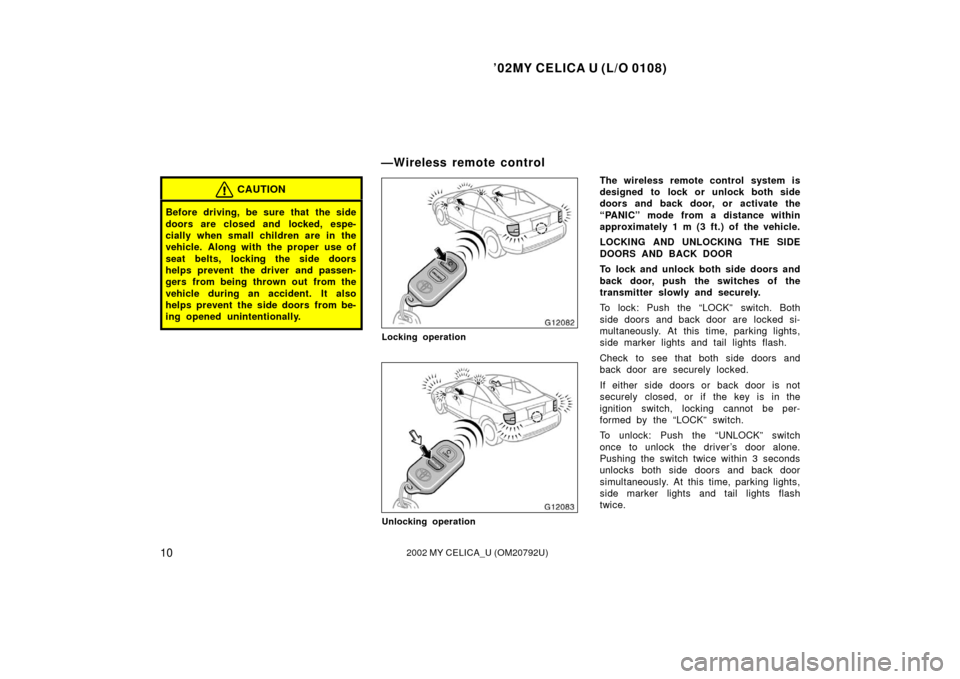
Locking operation
Unlocking operation
The wireless remote control system is
designed to lock or unlock both side
doors and back door, or activate the
“PANIC” mode from a distance within
approximately 1 m (3 ft.) of the vehicle.
LOCKING AND UNLOCKING THE SIDE
DOORS AND BACK DOOR
To lock and unlock both side doors and
back door, push the switches of the
transmitter slowly and securely.
To lock: Push the “LOCK” switch. Both
side doors and back door are locked si-
multaneously. At this time, parking lights,
side marker lights and tail lights flash.
Check to see that both side doors and
back door are securely locked.
If either side doors or back door is not
securely closed, or if the key is in the
ignition switch, locking cannot be per-
formed by the “LOCK” switch.
To unlock: Push the “UNLOCK” switch
once to unlock the driver ’s door alone.
Pushing the switch twice within 3 seconds
unlocks both side doors and back door
simultaneously. At this time, parking lights,
side marker lights and tail lights flash
twice.
—Wireless remote control
Page 70 of 238
’02MY CELICA U (L/O 0108)
662002 MY CELICA_U (OM20792U)
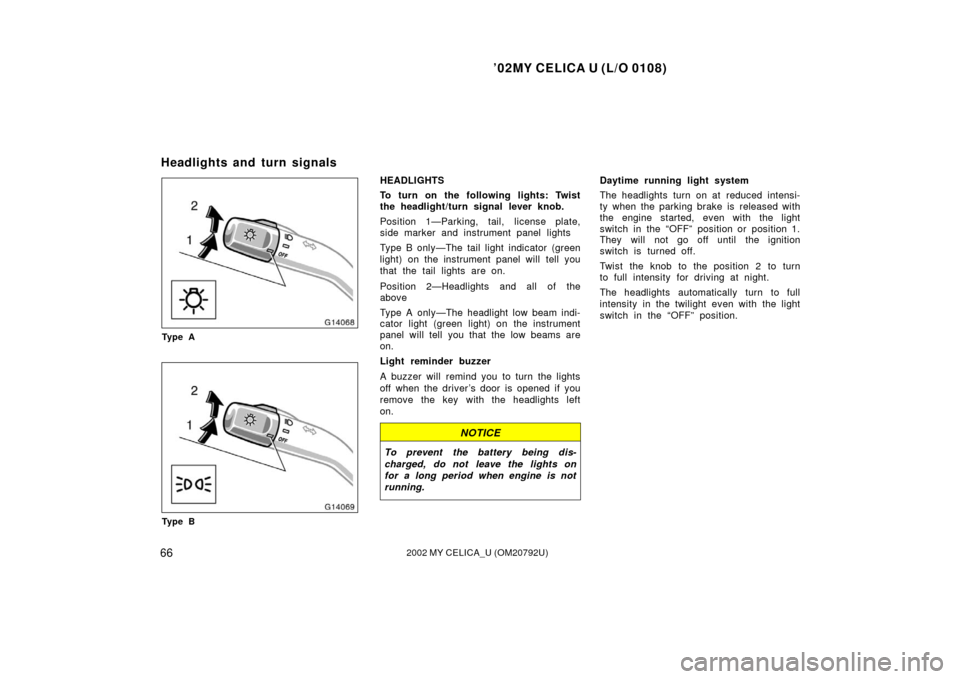
Ty p e A
Ty p e B
HEADLIGHTS
To turn on the following lights: Twist
the headlight/turn signal lever knob.
Position 1—Parking, tail, license plate,
side marker and instrument panel lights
Type B only—The tail light indicator (green
light) on the instrument panel will tell you
that the tail lights are on.
Position 2—Headlights and all of the
above
Type A only—The headlight low beam indi-
cator light (green light) on the instrument
panel will tell you that the low beams are
on.
Light reminder buzzer
A buzzer will remind you to turn the lights
off when the driver ’s door is opened if you
remove the key with the headlights left
on.
NOTICE
To prevent the battery being dis-
charged, do not leave the lights on
for a long period when engine is not
running.
Daytime running light system
The headlights turn on at reduced intensi-
ty when the parking brake is released with
the engine started, even with the light
switch in the “OFF” position or position 1.
They will not go off until the ignition
switch is turned off.
Twist the knob to the position 2 to turn
to full intensity for driving at night.
The headlights automatically turn to full
intensity in the twilight even with the light
switch in the “OFF” position.
Headlights and turn signals
Page 212 of 238
’02MY CELICA U (L/O 0108)
2082002 MY CELICA_U (OM20792U)
NOTICE
Do not use engine antifreeze or any
other substitute because it may dam-
age your vehicle’s paint.
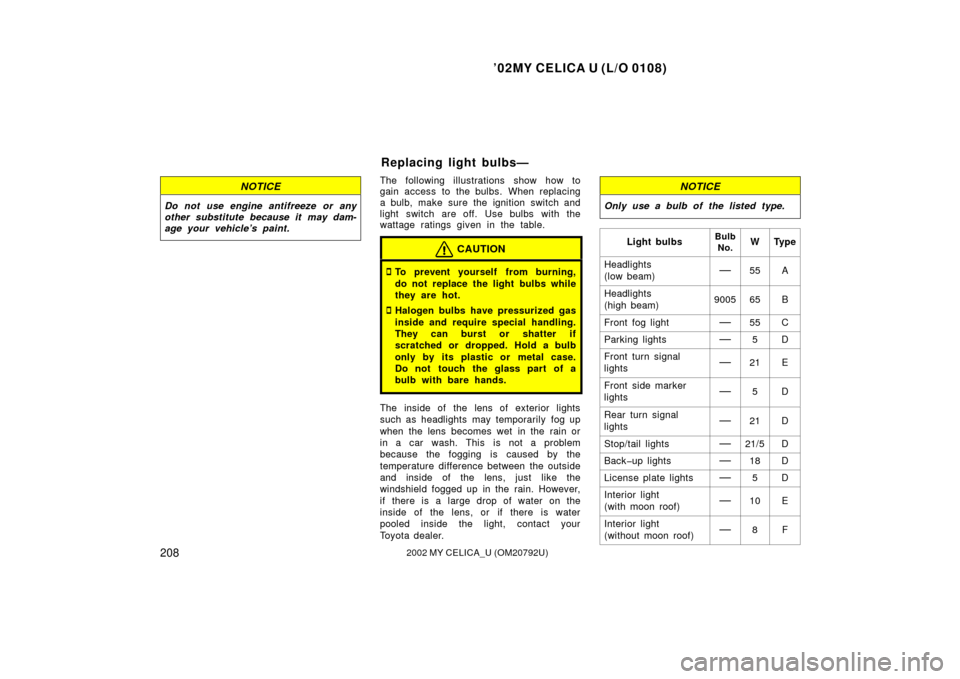
The following illustrations show how to
gain access to the bulbs. When replacing
a bulb, make sure the ignition switch and
light switch are off. Use bulbs with the
wattage ratings given in the table.
CAUTION
�To prevent yourself from burning,
do not replace the light bulbs while
they are hot.
�Halogen bulbs have pressurized gas
inside and require special handling.
They can burst or shatter if
scratched or dropped. Hold a bulb
only by its plastic or metal case.
Do not touch the glass part of a
bulb with bare hands.
The inside of the lens of exterior lights
such as headlights may temporarily fog up
when the lens becomes wet in the rain or
in a car wash. This is not a problem
because the fogging is caused by the
temperature difference between the outside
and inside of the lens, just like the
windshield fogged up in the rain. However,
if there is a large drop of water on the
inside of the lens, or if there is water
pooled inside the light, contact your
Toyota dealer.
NOTICE
Only use a bulb of the listed type.
Light bulbsBulbNo.WTy p e
Headlights
(low beam)—55A
Headlights
(high beam)900565B
Front fog light—55C
Parking lights—5D
Front turn signal
lights—21E
Front side marker
lights—5D
Rear turn signal
lights—21D
Stop/tail lights—21/5D
Backup lights—18D
License plate lights—5D
Interior light
(with moon roof)—10E
Interior light
(without moon roof)—8F
Replacing light bulbs—
Page 218 of 238
’02MY CELICA U (L/O 0108)
2142002 MY CELICA_U (OM20792U)
If either the left or right front fog or
front side marker lights burns out, con-
tact your Toyota dealer.
NOTICE
Do not try to replace the front fog or
front side marker light bulbs by your-
self. You may damage the vehicle.
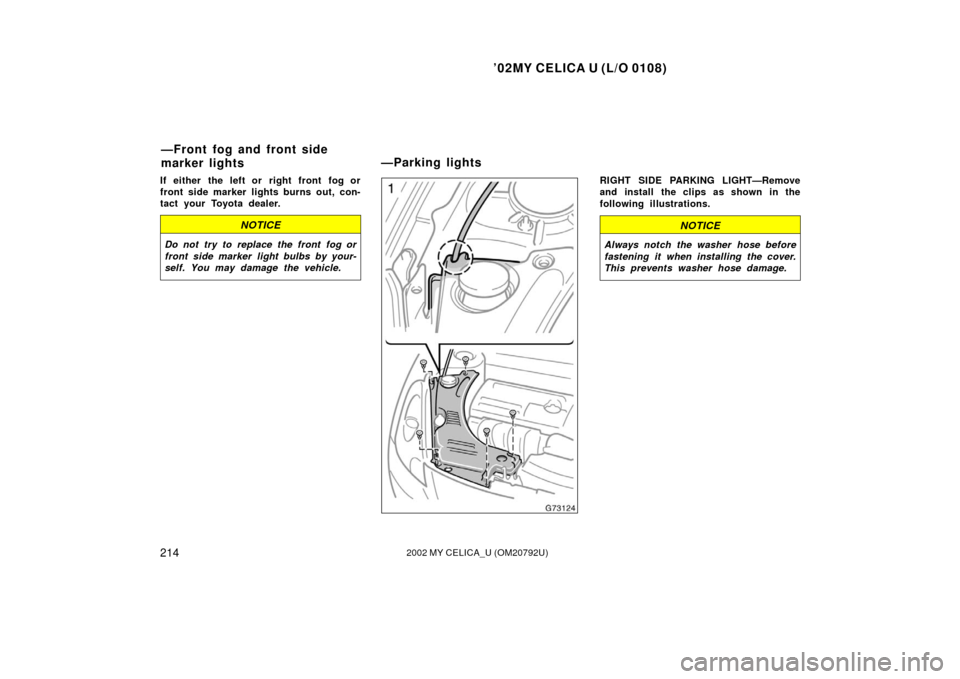
RIGHT SIDE PARKING LIGHT—Remove
and install the clips as shown in the
following illustrations.
NOTICE
Always notch the washer hose before
fastening it when installing the cover.
This prevents washer hose damage.
—Front fog and front side
marker lights—Parking lights