Page 6 of 238
’02MY CELICA U (L/O 0108)
22002 MY CELICA_U (OM20792U)
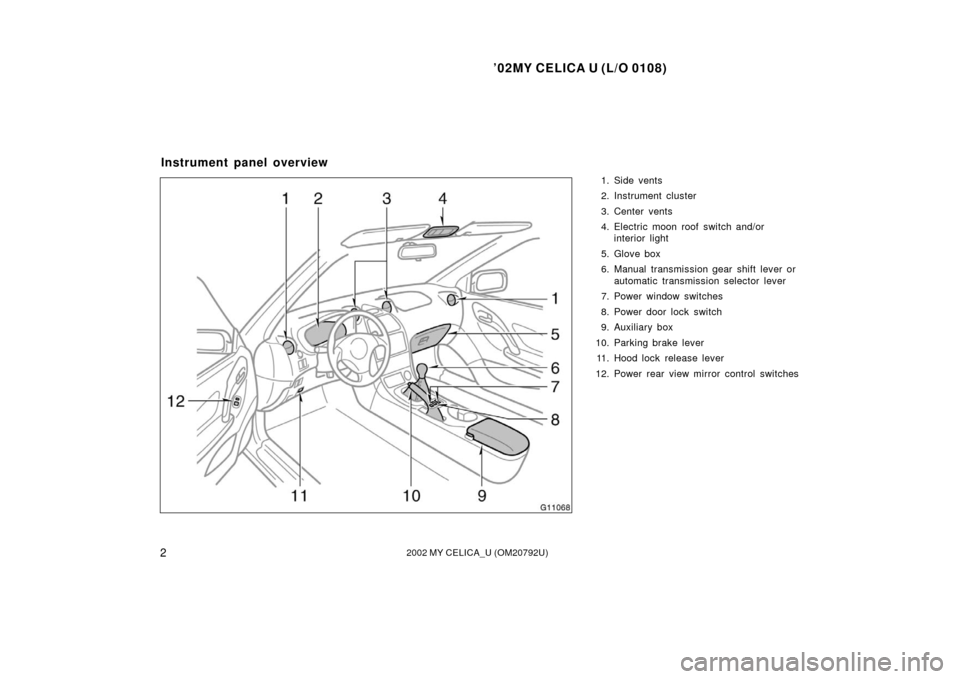
1. Side vents
2. Instrument cluster
3. Center vents
4. Electric moon roof switch and/orinterior light
5. Glove box
6. Manual transmission gear shift lever or automatic transmission selector lever
7. Power window switches
8. Power door lock switch
9. Auxiliary box
10. Parking brake lever 11. Hood lock release lever
12. Power rear view mirror control switches
Instrument panel overview
Page 7 of 238
’02MY CELICA U (L/O 0108)
32002 MY CELICA_U (OM20792U)
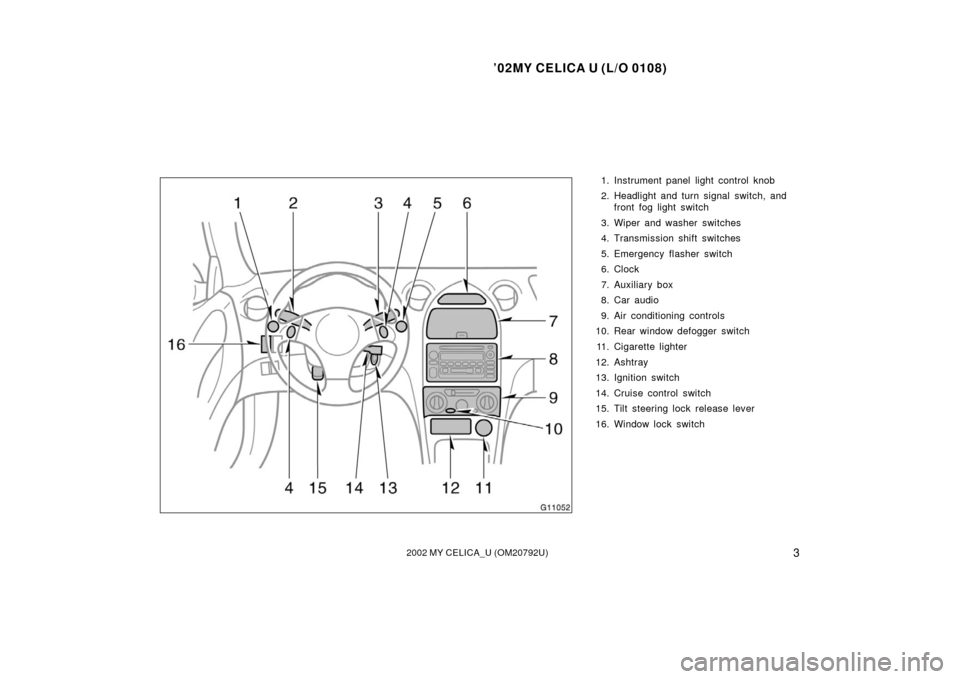
1. Instrument panel light control knob
2. Headlight and turn signal switch, andfront fog light switch
3. Wiper and washer switches
4. Transmission shift switches
5. Emergency flasher switch
6. Clock
7. Auxiliary box
8. Car audio
9. Air conditioning controls
10. Rear window defogger switch
11. Cigarette lighter
12. Ashtray
13. Ignition switch
14. Cruise control switch
15. Tilt steering lock release lever
16. Window lock switch
Page 13 of 238
’02MY CELICA U (L/O 0108)
92002 MY CELICA_U (OM20792U)
Vehicles with a power door lock system—
When both side doors and back door are
unlocked simultaneously with a key, the
interior light comes on for about 15 sec-
onds and then fades out, even if the door
is not opened. (For further information,
see “Interior light” in Section 14.)
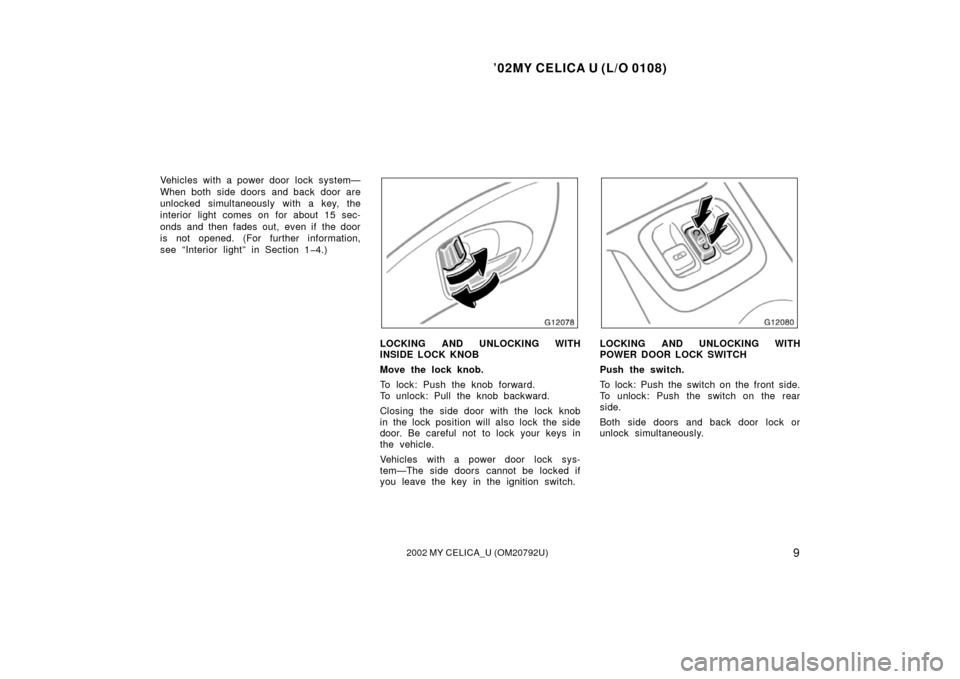
LOCKING AND UNLOCKING WITH
INSIDE LOCK KNOB
Move the lock knob.
To lock: Push the knob forward.
To unlock: Pull the knob backward.
Closing the side door with the lock knob
in the lock position will also lock the side
door. Be careful not to lock your keys in
the vehicle.
Vehicles with a power door lock sys-
tem—The side doors cannot be locked if
you leave the key in the ignition switch.LOCKING AND UNLOCKING WITH
POWER DOOR LOCK SWITCH
Push the switch.
To lock: Push the switch on the front side.
To unlock: Push the switch on the rear
side.
Both side doors and back door lock or
unlock simultaneously.
Page 29 of 238
’02MY CELICA U (L/O 0108)
252002 MY CELICA_U (OM20792U)
�While adjusting the seat, do not put
your hands under the seat or near
the moving parts. You may jam
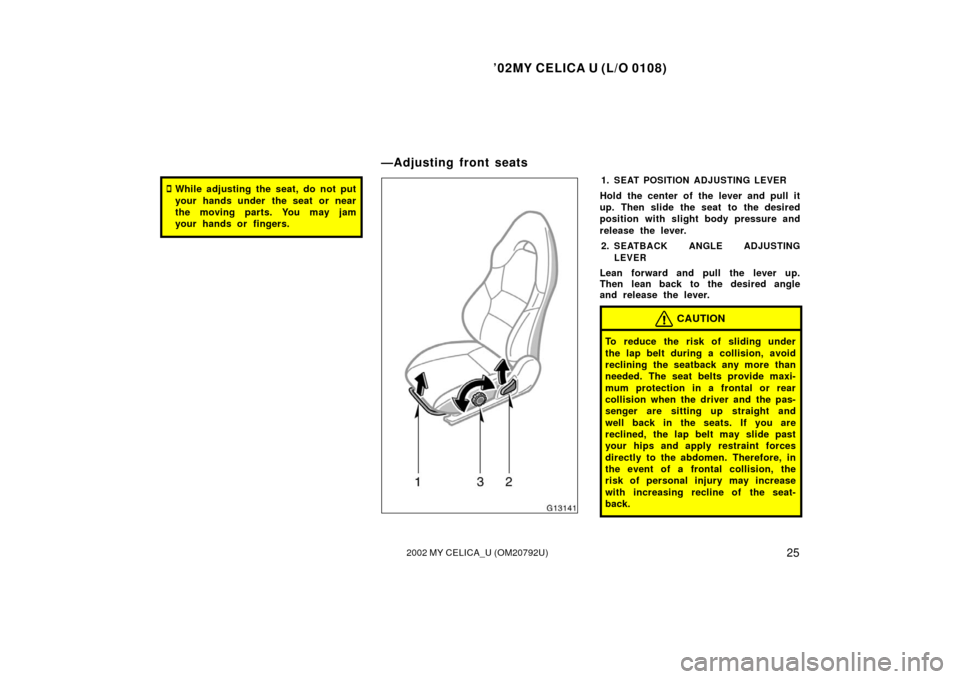
your hands or fingers.1.SEAT POSITION ADJUSTING LEVER
Hold the center of the lever and pull it
up. Then slide the seat to the desired
position with slight body pressure and
release the lever.2.
SEATBACK ANGLE ADJUSTING
LEVER
Lean forward and pull the lever up.
Then lean back to the desired angle
and release the lever.
CAUTION
To reduce the risk of sliding under
the lap belt during a collision, avoid
reclining the seatback any more than
needed. The seat belts provide maxi-
mum protection in a frontal or rear
collision when the driver and the pas-
senger are sitting up straight and
well back in the seats. If you are
reclined, the lap belt may slide past
your hips and apply restraint forces
directly to the abdomen. Therefore, in
the event of a frontal collision, the
risk of personal injury may increase
with increasing recline of the seat-
back.
—Adjusting front seats
Page 47 of 238

’02MY CELICA U (L/O 0108)
432002 MY CELICA_U (OM20792U)
The SRS side airbag system may not
activate if the vehicle is subjected to a
collision from the side at certain
angles, or a collision to the side of the
vehicle body other than the passenger
compartment as shown in the illustra-
tion.
The SRS side airbags are designed to
inflate when the passenger compartment
area suffers a severe impact from the
side.
For the safety of all occupants, always
wear your seat belts properly.
Collision from the rear
Collision from the front Vehicle rollover
The SRS side airbags are not designed
to inflate if the vehicle is involved in a
front or rear collision, if it rolls over,
or if it is involved in a lowspeed side
collision.The SRS side airbag system consists
mainly of the following components, and
their locations are shown in the illustra-
tion.1. SRS warning light
2. Door side airbag sensors
3. Side airbag modules (airbag and inflator)
4. Side airbag sensors
5. Airbag sensor assembly
The SRS side airbag system is controlled
by the airbag sensor assembly. The airbag
sensor assembly consists of a safing sen-
sor and airbag sensor.
Page 66 of 238
’02MY CELICA U (L/O 0108)
622002 MY CELICA_U (OM20792U)
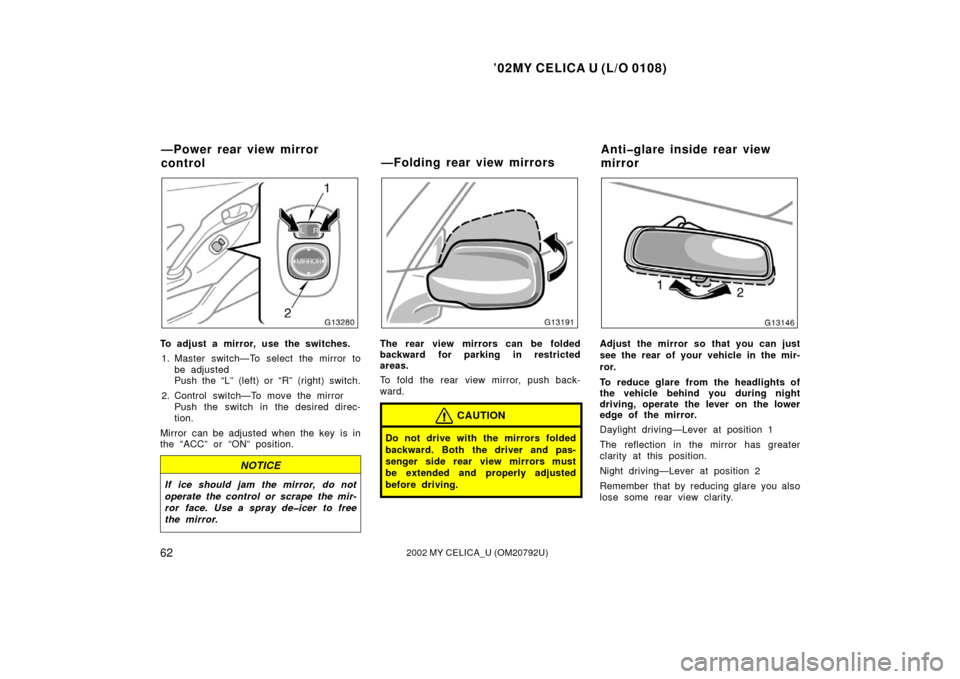
To adjust a mirror, use the switches.1. Master switch—To select the mirror to be adjusted
Push the “L” (left) or “R” (right) switch.
2. Control switch—To move the mirror Push the switch in the desired direc-
tion.
Mirror can be adjusted when the key is in
the “ACC” or “ON” position.
NOTICE
If ice should jam the mirror, do not
operate the control or scrape the mir-
ror face. Use a spray deicer to free
the mirror.
The rear view mirrors can be folded
backward for parking in restricted
areas.
To fold the rear view mirror, push back-
ward.
CAUTION
Do not drive with the mirrors folded
backward. Both the driver and pas-
senger side rear view mirrors must
be extended and properly adjusted
before driving.
Adjust the mirror so that you can just
see the rear of your vehicle in the mir-
ror.
To reduce glare from the headlights of
the vehicle behind you during night
driving, operate the lever on the lower
edge of the mirror.
Daylight driving—Lever at position 1
The reflection in the mirror has greater
clarity at this position.
Night driving—Lever at position 2
Remember that by reducing glare you also
lose some rear view clarity.
—Power rear view mirror
control —Folding rear view mirrorsAntiglare inside rear view
mirror
Page 69 of 238

’02MY CELICA U (L/O 0108)
652002 MY CELICA_U (OM20792U)
OPERATION OF INSTRUMENTS AND
CONTROLS
Lights, Wipers and Defogger
Headlights and turn signals66
. . . . . . . . . . . . . . . . . . . . . . . . . . . . . . . . . . .
Emergency flashers 68
. . . . . . . . . . . . . . . . . . . . . . . . . . . . . . . . . . . . \
. . . . . .
Instrument panel light control 68
. . . . . . . . . . . . . . . . . . . . . . . . . . . . . . . . .
Front fog lights 69
. . . . . . . . . . . . . . . . . . . . . . . . . . . . . . . . . . . . \
. . . . . . . . . .
Interior light 69
. . . . . . . . . . . . . . . . . . . . . . . . . . . . . . . . . . . . \
. . . . . . . . . . . . .
Luggage compartment light 70
. . . . . . . . . . . . . . . . . . . . . . . . . . . . . . . . . . .
Windshield wipers and washer 71
. . . . . . . . . . . . . . . . . . . . . . . . . . . . . . . .
Rear window wiper and washer 71
. . . . . . . . . . . . . . . . . . . . . . . . . . . . . . .
Rear window defogger 72
. . . . . . . . . . . . . . . . . . . . . . . . . . . . . . . . . . . . \
. . .
SECTION 1 4
Page 71 of 238
’02MY CELICA U (L/O 0108)
672002 MY CELICA_U (OM20792U)
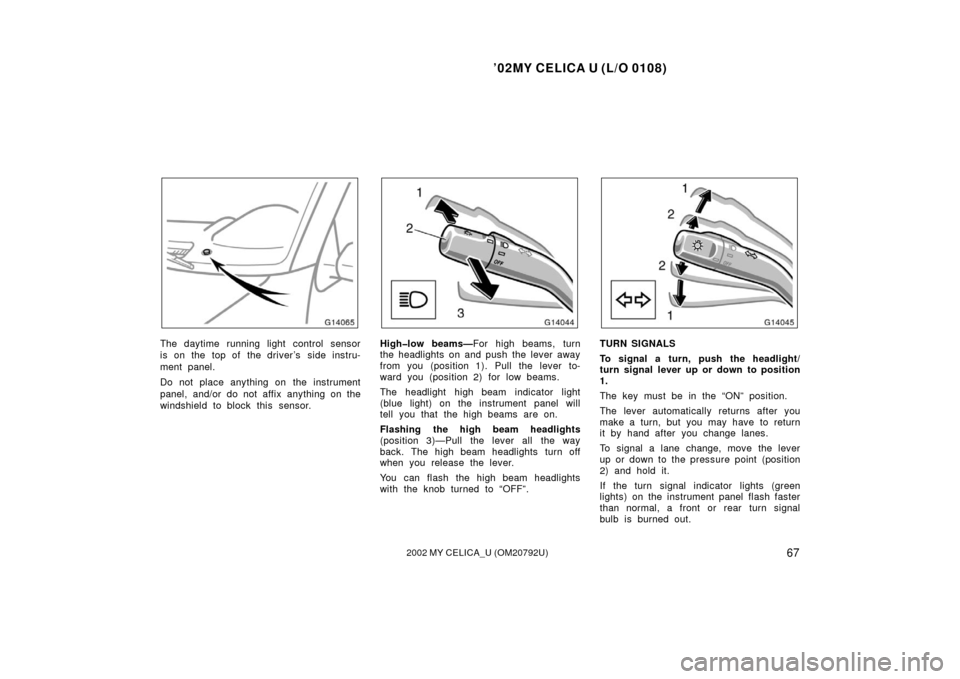
The daytime running light control sensor
is on the top of the driver’s side instru-
ment panel.
Do not place anything on the instrument
panel, and/or do not affix anything on the
windshield to block this sensor.Highlow beams—For high beams, turn
the headlights on and push the lever away
from you (position 1). Pull the lever to-
ward you (position 2) for low beams.
The headlight high beam indicator light
(blue light) on the instrument panel will
tell you that the high beams are on.
Flashing the high beam headlights
(position 3)—Pull the lever all the way
back. The high beam headlights turn off
when you release the lever.
You can flash the high beam headlights
with the knob turned to “OFF”.TURN SIGNALS
To signal a turn, push the headlight/
turn signal lever up or down to position
1.
The key must be in the “ON” position.
The lever automatically returns after you
make a turn, but you may have to return
it by hand after you change lanes.
To signal a lane change, move the lever
up or down to the pressure point (position
2) and hold it.
If the turn signal indicator lights (green
lights) on the instrument panel flash faster
than normal, a front or rear turn signal
bulb is burned out.