2002 SAAB 9-5 light
[x] Cancel search: lightPage 70 of 272
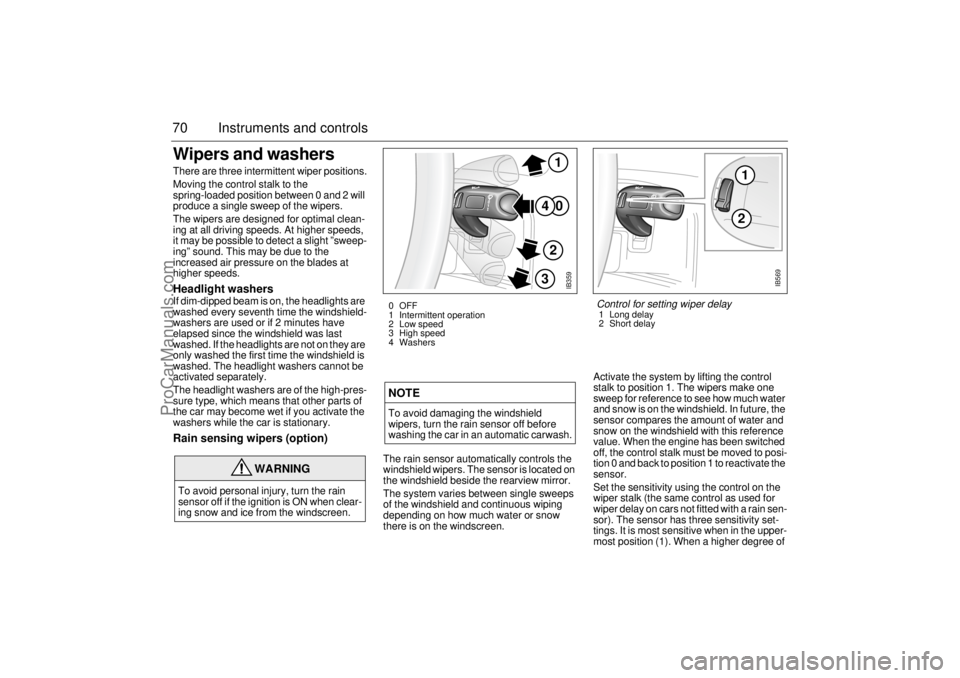
70 Instruments and controlsWipers and washers There are three intermittent wiper positions.
Moving the control stalk to the
spring-loaded position between 0 and 2 will
produce a single sweep of the wipers.
The wipers are designed for optimal clean-
ing at all driving speeds. At higher speeds,
it may be possible to detect a slight ”sweep-
ing” sound. This may be due to the
increased air pressure on the blades at
higher speeds.Headlight washersIf dim-dipped beam is on, the headlights are
washed every seventh time the windshield-
washers are used or if 2 minutes have
elapsed since the windshield was last
washed. If the headlights are not on they are
only washed the first time the windshield is
washed. The headlight washers cannot be
activated separately.
The headlight washers are of the high-pres-
sure type, which means that other parts of
the car may become wet if you activate the
washers while the car is stationary.Rain sensing wipers (option)
The rain sensor automatically controls the
windshield wipers. The sensor is located on
the windshield beside the rearview mirror.
The system varies between single sweeps
of the windshield and continuous wiping
depending on how much water or snow
there is on the windscreen.Activate the system by lifting the control
stalk to position 1. The wipers make one
sweep for reference to see how much water
and snow is on the windshield. In future, the
sensor compares the amount of water and
snow on the windshield with this reference
value. When the engine has been switched
off, the control stalk must be moved to posi-
tion 0 and back to position 1 to reactivate the
sensor.
Set the sensitivity using the control on the
wiper stalk (the same control as used for
wiper delay on cars not fitted with a rain sen-
sor). The sensor has three sensitivity set-
tings. It is most sensitive when in the upper-
most position (1). When a higher degree of
WARNING
To avoid personal injury, turn the rain
sensor off if the ignition is ON when clear-
ing snow and ice from the windscreen.
NOTETo avoid damaging the windshield
wipers, turn the rain sensor off before
washing the car in an automatic carwash.
IB359
0
41
2
3
0 OFF
1 Intermittent operation
2 Low speed
3 High speed
4 Washers
12
IB569
Control for setting wiper delay1 Long delay
2 Short delay
ProCarManuals.com
Page 71 of 272

71 Instruments and controls
sensitivity is selected, the wipers make one
sweep of the windshield for reference.
The rain sensor has a daylight and a night
time mode. The sensor measures the
amount of available light and automatically
selects the appropriate mode. The sensor is
more sensitive at night. The function of the
rain sensor is impaired by dry snow.Rear-window wiper (9-5 Wagon)The rear-window wiper and washer are
operated with the same stalk switch as
used for washing and wiping the windshield
and headlights.
This stalk has two additional switches,
ON/OFF and .
The ON position provides intermittent wip-
ing.
The position provides washing and
wiping. After a few sweeps the wiper stops
or reverts to intermittent wiping, if this has
been chosen. About 15 seconds after com-
pletion of the washing/wiping of the rear
window, the wiper makes a single sweep to
wipe away any remaining washer fluid.
A spring-loaded position between the OFF
and ON positions allows for a single sweep
of the rear-window wiper.
Intermittent wiping of the rear window
occurs when reverse gear is engaged if the
windshield wipers are in position 1, 2 or 3,
see page 70.
2 1
IB1207
Rear-window wiper1 Intermittent wiping
2 Washers
ProCarManuals.com
Page 79 of 272

79 Instruments and controls
Programming IIIt is also possible to customize the ACC system, e.g. to adapt to
driving and weather conditions.
Function Operation in AUTO mode
after Programming II Standard operation
in AUTO mode
The A/C compressor will not
activate unless the outdoor
temperature is above 55
°F
(+13°C).
–This function saves fuel by
delaying the activation of the
A/C compressor. However,
in wet weather it is advisable
to have the A/C compressor
running when outdoor tem-
peratures are below
57°
(+14°C), as the A/C system
reduces the likelihood of the
windows fogging up.
A/C compressor cuts
in when outdoor tem-
perature is above 41
°F
(+5°C)
Recirculation will be
switched on if the speed of
the car is less than 6 mph (10
km/h) and will be switched off
when the speed has risen
above 20 mph (30 km/h), but
not if the ECON mode has
been programmed according
to ”Programming II”.
–This function is useful to
prevent fumes being drawn
into the car in traffic jams.
Recirculation is
switched on about
45 seconds after start-
ing if the outdoor tem-
perature is above 86
°F
(+30°C) and the
selected temperature
for the cabin is well
below the actual tem-
perature in both tem-
perature zones.
The heating will come on
about five seconds after the
engine has started if the out-
door temperature is below
41°F (+5°C).
–This function helps to pre-
vent ice or mist forming on
the rear window in cold,
damp weather. Fuel con-
sumption may increase
slightly.
Rear-window heating
can only be switched
on manually.
ProCarManuals.com
Page 92 of 272

92 Saab 9-5 Audio SystemType II (metal) tapes The cassette has an automatic tape-type
selector. Cleaning-due indicator After 30 hours’ playing time, the following
message will appear on the display:
The message will be displayed for ten
seconds each time the cassette player is
selected.
A cleaning tape should be used to clean the
heads inside the cassette player to maintain
good reproduction and to prevent unneces-
sary wear.
To reset the playing-time meter:
1 Remove the current tape.
2 Load the cleaning tape and play it for the
required time.
3 Remove the cleaning tape and reload
the other one.
Tape care Do not expose cassette tapes to direct sun-
light or to extremes of temperature as this
can damage the cassette and the tape.
Always keep cassettes in their boxes when
not in use.
If a cassette should become jammed in the
deck, contact an authorized Saab dealer.
ProCarManuals.com
Page 102 of 272

102 Saab 9-5 Audio SystemAntennas The Audio System has three antennas
incorporated in the rear window; two for FM
diversity and one for AM.
The car has a factory-fitted roof antenna for
a mobile phone/OnStar. Roof loads may
negatively affect telecommunication.
Multipath propagation Multipath propagation occurs when radio
waves from an FM transmitter are reflected
by, e.g. large buildings, causing them to
arrive slightly later than the direct waves.
This can create interference to radio recep-
tion. To avoid this problem as much as pos-
sible the system is equipped with two FM
antennas, so called FM diversity.
NOTERefrain from placing hard or sharp
objects on the rear parcel shelf, to avoid
damaging the antenna leads.
Do not use sun protective film which con-
tains metal particles on the rear window,
this can be the cause of radio interfer-
ence.
WARNING
To reduce the risk of head injuries in the
event of a crash, the headliner and pillar
trims incorporate energy absorbing mate-
rial. These areas must not be modified in
any way. Work on these areas must only
be carried out at an authorized Saab
dealer.
IB386
IB389
IB1743
Accessories and other equipment must
not be fitted to the surfaces marked as
these are where the airbags inflate in the
event of a crash
ProCarManuals.com
Page 105 of 272

105 OnStar - Telematics
OnStar - Telematics
Using OnStar................... 106OnStar is Easy............................ 106
OnStar Services Button .............. 106
Emergency button ...................... 107
White dot button ......................... 107
System status light ..................... 107The OnStar Center .......... 108Connecting to the OnStar center 108
Your personal identification number
(PIN) ........................................... 108
The OnStar Safety and
Security Plan................. 108
Automatic notification of air bag
deployment ................................. 108
Emergency services ................... 108
Roadside assistance................... 109
Stolen vehicle tracking ................ 109
Accident Assist™ ........................ 109
OnStar Med-Net.......................... 109
Hands-free communication ......... 109The OnStar Premium
Services Plan 109Route support ............................. 109
Ride Assist .................................. 109
Information and Convenience ser-
vices ........................................... 109
Concierge services ..................... 110
Additional Services......... 110Personal Calling: ........................ 110Virtual Advisor: ............... 114
OnStar Subscriber
Website .......................... 115
Limitations ....................... 115
Additional Information.... 116Warranty .................................... 116
A Note About Privacy ................. 116
Transferring OnStar .................... 116
OnStar Subscription Information 116
ProCarManuals.com
Page 107 of 272

107 OnStar - Telematics
System status lightSolid Green — Indicates the OnStar
system in the vehicle is powered ON and
ready to make calls or receive calls from the
OnStar Center.
Blinking Green — The light blinks green to
indicate a call is being connected or in
progress. If you notice this light blinking
while you are not on a call, press the White
dot button.
Red — This signals that your OnStar
system may not be functioning properly.
Press the OnStar button to attempt to con-
tact an OnStar advisor. If the connection is
made, the advisor will assist you in making
sure your OnStar system is operating prop-
erly. If you cannot contact the OnStar Cen-
ter, please take your car to the nearest Saab
dealer for diagnosis and service.The OnStar Center is the heart of your ser-
vice — staffed 24 hours a day, 7 days a
week with knowledgeable OnStar advisors.
Even on weekends and holidays, there is
always someone ready to help.
OnStar uses sophisticated Global Position-
ing System (GPS) satellites to locate your
Saab, and wireless technology to provide
the communications link and seamless inte-
gration into your Saab. This system allows
the OnStar advisors to pinpoint your Saab´s
location precisely. This way, advisors can
provide you with a range of helpful services
to protect you and your Saab. Plus, with the
Premium Services Plan* included for 12
months with your Saab, advisors can also
access an extensive database to assist you
with directions, making reservations and
other convenience services.
*) New retail deliveries only.
Emergency button
In an emergency, press this
button to connect with an
OnStar advisor. Your call will
be given the highest priority,
and you will hear a tone fol-
lowed by the words ”Connect-
ing to OnStar Emergency.” An
advisor will locate your Saab,
find out what kind of assistance
you require, and contact the
nearest emergency services
provider who can dispatch
ambulance, fire, police or other
emergency services. Please
use this button only for true
emergencies.
White dot button
Press this button at the end of a
call. You’ll hear the words
”OnStar Request Ended.” Also,
press this button to answer a
call from the OnStar Center, or
cancel a call if one of the other
buttons is accidentally
pressed. This button is also
used to access OnStar Per-
sonal Calling services which
are described on page 110.
ProCarManuals.com
Page 114 of 272

114 OnStar - TelematicsVirtual AdvisorOnce you have activated Personal Calling,
you can enjoy your time in your Saab even
more with the OnStar Virtual Advisor. This
service allows you to listen to your favorite
news and information topics, such as
weather reports, stock quotes and sports
scores. You can even listen to your e-mail,
whenever you want, without ever taking
your eyes off the road. Using simple voice
commands, you can browse your personal
topics and skip or listen to those you
choose. You can also search for additional
information on special topics that interest
you.
To find out how to set up a customized pro-
file, visit the OnStar subscriber website at
www.onstar.com, or turn to the OnStar sub-
scriber website section on page 31 of this
guide. If you do not have Internet access,
you can still take advantage of the OnStar
Virtual Advisor services as a default profile
will be set up for you.
Calling the Virtual Advisor
Getting Information from the Virtual
AdvisorThe OnStar Virtual Advisor will prompt you
for information you desire. These offerings
will change to provide you with services and
information that you and other subscribers
want and need. The prompts are very clear
and easy to understand and use.Information AvailableOnStar will continue to add new features
and categories to the Virtual Advisor. The
following general categories will give you an
overview of the types of information avail-
able to you. For complete up-to-date cate-
gories, you can go to the Saab Cars USA,
Inc. website at www.saabusa.com or the
OnStar website at www.onstar.com, and
then click on the link to the subscriber web-
site.
WeatherThe OnStar Virtual advisor will deliver an
up-to-date weather forecast for the current
location of the vehicle. The forecast
includes current temperature, daily
high/low, tomorrow’s high/low, precipitation
forecast, and unusual conditions.Stock QuotesThe OnStar Virtual advisor can provide you
with current quotes for the stocks you have
specified in your customized profile as well
as other requested stocks. All market data
is delayed by twenty minutes. If you have
not set your profile, you can still access the
stock quote feature through your default
profile and then request the stock of your
choice.Sports ScoresThe OnStar Virtual advisor can provide you
with scores for your favorite college and pro-
fessional teams with up-to-the- minute high-
lights, even if they are being broadcast on a
local station. See the team selection option
in your Mobile Profiler section of the sub-
scriber section of OnStar.com.
If you have not set your profile or are still
using the default profile, you can access the
sports option of the Virtual advisor and ask
for an update on your favorite sport. You
always have access to the options in the Vir-
tual Advisor. 1 Press the
OnStar White
Dot buttonOnStar will respond
”Ready”
2Say ”Virtual
Advisor”You will be connected
to Virtual Advisor
ProCarManuals.com