2002 SAAB 9-5 lights
[x] Cancel search: lightsPage 68 of 272

68 Instruments and controlsFront fog lightsThe front fog lights can be activated in both
dimmed headlight and parking light posi-
tions. Fog lights should only be used in poor
visibility conditions.
Make sure you are familiar with the appli-
cable provincial/state law regarding the
use of fog lights. Reversing lightsThe reversing lights come on automatically
when reverse gear is engaged or selected
with the ignition switched on.
Hazard warning lightsWhen this button is pressed, all the turn
signal indicators and a symbol in the button
flash simultaneously. If the ignition is on,
both indicator lights on the instrument panel
will also flash.
If the hazard warning lights are left on for
some time, the flasher frequency will be
reduced to save the battery.
Hazard warning lights should only be used
if the car constitutes a hazard to other road
users.
WARNING
Switch on the hazard flashers if the car
has to be left at the roadside on account
of a crash, engine trouble or a puncture. If
you carry a warning triangle or flares, they
should be set up along side of the road
300 ft. (100 m) behind your vehicle. If the
car is not clearly visible (e.g. over the
brow of a hill or bridge), place the trian-
gle/flare even further back.
IB355
IB356
Hazard warning lights
ProCarManuals.com
Page 69 of 272

69 Instruments and controls
Interior lighting The interior lighting consists of one dome
light in the front and one in the back, a
map-reading light in the front, two reading
lights in the back, floor courtesy lights in the
front (in some model variants) and door
courtesy lights on all doors.
The courtesy lights come on automatically
when the respective door is opened. Each
reading light has its own switch adjacent to
the lamp.
The switch for the dome lights is on the front
overhead panel. When the switch is in the
mid-position (door-activated), the interior
lighting will come on: When the car is unlocked from the out-
side.
When any door is opened.
When the ignition key is withdrawn from
the ignition switch.
When the switch on the overhead panel is in
the mid-position, the lighting is switched off
automatically 30 seconds after the last door
has been closed or when the ignition is
switched ON.
There is also a light in the sun visors. The
light comes on when the cover over the
vanity mirror is opened.
When the ignition is OFF, if a door has been
left open for 20 minutes, the interior lighting
will be switched off automatically to save the
battery.
Luggage-compartment lightingThe luggage-compartment lighting comes
on automatically when the trunk is opened
and goes out when the trunk is closed.
The lighting will also be switched off auto-
matically after 20 minutes if the trunk has
been left open.
123
IB357
1 Interior lighting on continuously
2 Lighting comes on when a door is opened
3 Lighting always off
1
2
1
IB358
1 Reading lights
2 Dome light
ProCarManuals.com
Page 70 of 272
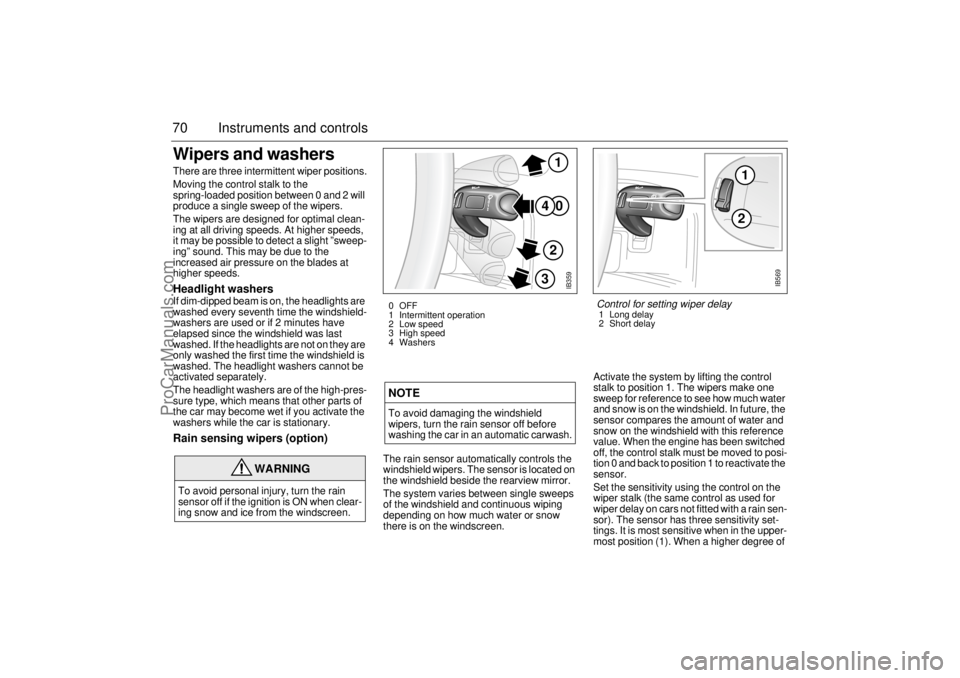
70 Instruments and controlsWipers and washers There are three intermittent wiper positions.
Moving the control stalk to the
spring-loaded position between 0 and 2 will
produce a single sweep of the wipers.
The wipers are designed for optimal clean-
ing at all driving speeds. At higher speeds,
it may be possible to detect a slight ”sweep-
ing” sound. This may be due to the
increased air pressure on the blades at
higher speeds.Headlight washersIf dim-dipped beam is on, the headlights are
washed every seventh time the windshield-
washers are used or if 2 minutes have
elapsed since the windshield was last
washed. If the headlights are not on they are
only washed the first time the windshield is
washed. The headlight washers cannot be
activated separately.
The headlight washers are of the high-pres-
sure type, which means that other parts of
the car may become wet if you activate the
washers while the car is stationary.Rain sensing wipers (option)
The rain sensor automatically controls the
windshield wipers. The sensor is located on
the windshield beside the rearview mirror.
The system varies between single sweeps
of the windshield and continuous wiping
depending on how much water or snow
there is on the windscreen.Activate the system by lifting the control
stalk to position 1. The wipers make one
sweep for reference to see how much water
and snow is on the windshield. In future, the
sensor compares the amount of water and
snow on the windshield with this reference
value. When the engine has been switched
off, the control stalk must be moved to posi-
tion 0 and back to position 1 to reactivate the
sensor.
Set the sensitivity using the control on the
wiper stalk (the same control as used for
wiper delay on cars not fitted with a rain sen-
sor). The sensor has three sensitivity set-
tings. It is most sensitive when in the upper-
most position (1). When a higher degree of
WARNING
To avoid personal injury, turn the rain
sensor off if the ignition is ON when clear-
ing snow and ice from the windscreen.
NOTETo avoid damaging the windshield
wipers, turn the rain sensor off before
washing the car in an automatic carwash.
IB359
0
41
2
3
0 OFF
1 Intermittent operation
2 Low speed
3 High speed
4 Washers
12
IB569
Control for setting wiper delay1 Long delay
2 Short delay
ProCarManuals.com
Page 71 of 272

71 Instruments and controls
sensitivity is selected, the wipers make one
sweep of the windshield for reference.
The rain sensor has a daylight and a night
time mode. The sensor measures the
amount of available light and automatically
selects the appropriate mode. The sensor is
more sensitive at night. The function of the
rain sensor is impaired by dry snow.Rear-window wiper (9-5 Wagon)The rear-window wiper and washer are
operated with the same stalk switch as
used for washing and wiping the windshield
and headlights.
This stalk has two additional switches,
ON/OFF and .
The ON position provides intermittent wip-
ing.
The position provides washing and
wiping. After a few sweeps the wiper stops
or reverts to intermittent wiping, if this has
been chosen. About 15 seconds after com-
pletion of the washing/wiping of the rear
window, the wiper makes a single sweep to
wipe away any remaining washer fluid.
A spring-loaded position between the OFF
and ON positions allows for a single sweep
of the rear-window wiper.
Intermittent wiping of the rear window
occurs when reverse gear is engaged if the
windshield wipers are in position 1, 2 or 3,
see page 70.
2 1
IB1207
Rear-window wiper1 Intermittent wiping
2 Washers
ProCarManuals.com
Page 107 of 272

107 OnStar - Telematics
System status lightSolid Green — Indicates the OnStar
system in the vehicle is powered ON and
ready to make calls or receive calls from the
OnStar Center.
Blinking Green — The light blinks green to
indicate a call is being connected or in
progress. If you notice this light blinking
while you are not on a call, press the White
dot button.
Red — This signals that your OnStar
system may not be functioning properly.
Press the OnStar button to attempt to con-
tact an OnStar advisor. If the connection is
made, the advisor will assist you in making
sure your OnStar system is operating prop-
erly. If you cannot contact the OnStar Cen-
ter, please take your car to the nearest Saab
dealer for diagnosis and service.The OnStar Center is the heart of your ser-
vice — staffed 24 hours a day, 7 days a
week with knowledgeable OnStar advisors.
Even on weekends and holidays, there is
always someone ready to help.
OnStar uses sophisticated Global Position-
ing System (GPS) satellites to locate your
Saab, and wireless technology to provide
the communications link and seamless inte-
gration into your Saab. This system allows
the OnStar advisors to pinpoint your Saab´s
location precisely. This way, advisors can
provide you with a range of helpful services
to protect you and your Saab. Plus, with the
Premium Services Plan* included for 12
months with your Saab, advisors can also
access an extensive database to assist you
with directions, making reservations and
other convenience services.
*) New retail deliveries only.
Emergency button
In an emergency, press this
button to connect with an
OnStar advisor. Your call will
be given the highest priority,
and you will hear a tone fol-
lowed by the words ”Connect-
ing to OnStar Emergency.” An
advisor will locate your Saab,
find out what kind of assistance
you require, and contact the
nearest emergency services
provider who can dispatch
ambulance, fire, police or other
emergency services. Please
use this button only for true
emergencies.
White dot button
Press this button at the end of a
call. You’ll hear the words
”OnStar Request Ended.” Also,
press this button to answer a
call from the OnStar Center, or
cancel a call if one of the other
buttons is accidentally
pressed. This button is also
used to access OnStar Per-
sonal Calling services which
are described on page 110.
ProCarManuals.com
Page 114 of 272

114 OnStar - TelematicsVirtual AdvisorOnce you have activated Personal Calling,
you can enjoy your time in your Saab even
more with the OnStar Virtual Advisor. This
service allows you to listen to your favorite
news and information topics, such as
weather reports, stock quotes and sports
scores. You can even listen to your e-mail,
whenever you want, without ever taking
your eyes off the road. Using simple voice
commands, you can browse your personal
topics and skip or listen to those you
choose. You can also search for additional
information on special topics that interest
you.
To find out how to set up a customized pro-
file, visit the OnStar subscriber website at
www.onstar.com, or turn to the OnStar sub-
scriber website section on page 31 of this
guide. If you do not have Internet access,
you can still take advantage of the OnStar
Virtual Advisor services as a default profile
will be set up for you.
Calling the Virtual Advisor
Getting Information from the Virtual
AdvisorThe OnStar Virtual Advisor will prompt you
for information you desire. These offerings
will change to provide you with services and
information that you and other subscribers
want and need. The prompts are very clear
and easy to understand and use.Information AvailableOnStar will continue to add new features
and categories to the Virtual Advisor. The
following general categories will give you an
overview of the types of information avail-
able to you. For complete up-to-date cate-
gories, you can go to the Saab Cars USA,
Inc. website at www.saabusa.com or the
OnStar website at www.onstar.com, and
then click on the link to the subscriber web-
site.
WeatherThe OnStar Virtual advisor will deliver an
up-to-date weather forecast for the current
location of the vehicle. The forecast
includes current temperature, daily
high/low, tomorrow’s high/low, precipitation
forecast, and unusual conditions.Stock QuotesThe OnStar Virtual advisor can provide you
with current quotes for the stocks you have
specified in your customized profile as well
as other requested stocks. All market data
is delayed by twenty minutes. If you have
not set your profile, you can still access the
stock quote feature through your default
profile and then request the stock of your
choice.Sports ScoresThe OnStar Virtual advisor can provide you
with scores for your favorite college and pro-
fessional teams with up-to-the- minute high-
lights, even if they are being broadcast on a
local station. See the team selection option
in your Mobile Profiler section of the sub-
scriber section of OnStar.com.
If you have not set your profile or are still
using the default profile, you can access the
sports option of the Virtual advisor and ask
for an update on your favorite sport. You
always have access to the options in the Vir-
tual Advisor. 1 Press the
OnStar White
Dot buttonOnStar will respond
”Ready”
2Say ”Virtual
Advisor”You will be connected
to Virtual Advisor
ProCarManuals.com
Page 124 of 272

124 Interior equipment and trunkCars equipped with a programmable
driver’s seat also have the ability to angle
the passenger’s mirror down when revers-
ing, e.g. for a better view of the curb.
After selecting reverse, press the tiny button
adjacent to the doormirror switch to tilt the
mirror. The mirror will be reset automatically
when reverse gear is deselected.
Rearview mirror with auto dimming
functionThe interior rearview mirror has two sen-
sors, one forward-facing and one rear-fac-
ing.
The system is activated when the for-
ward-facing sensor detects that it is dark
outside and the rear-facing sensor detects,
for example, if the car following has not
dimmed its headlights. The rearview mirror
is then darkened to prevent the strong light
source from dazzling the driver. This dark-
ening is stepless.
The mirror returns to its normal state when
the strong light source diminishes.
The auto dimming function can be turned
OFF with the switch on the lower edge of the
rear-view mirror.
NOTE
Towing a trailer can cause the system to
malfunction, as the rear-facing sensor may
sense light from the trailer.
IB568
Button for angling passenger’s mirror
down on reversing
IB1284
1
23
1 Forward-facing sensor
2 ON/OFF switch, auto dimming function
3 Rear-facing sensor
ProCarManuals.com
Page 146 of 272

146 Starting and drivingIgnition switchThe combined ignition switch and
gear-lever lock is located in the center con-
sole between the front seats. The ignition
key can only be removed when reverse is
engaged (automatic transmission: selector
in ”P” position).
The key fits all the locks on the car. The key
number is specified on the small plastic
strap that comes with the keys when the car
is delivered. Keep a note of the key number
in a safe place, as you will need to quote it if
ordering a replacement key.
See also page 38.
LOCK position Engage reverse and turn the key to LOCK.
Automatic transmission: select ”P”.
The gear lever is locked. This is the only position in which the key can be
removed.
The parking lights, hazard warning lights and interior lighting all work. OFF position Gear lever no longer locked.
Certain electrical circuits operationalON position All electrical circuits working. Do not leave the key in the ON position
when the engine is not running. Turn the key to OFF to switch off the
electrical circuits. In the ON position certain warning and indicator lights
come on as a check, and they normally are extinguished after about
3 seconds.ST (starter) position The starter operates when the key is turned to this position. When
released, the key will spring back to the ON position. If the engine fails to
start, the key must first be turned back to the position between OFF and
LOCK before the starter can be operated again.
When the starter motor is running, several electrical circuits are
disconnected to facilitate starting.
LOCK
OFFONST
LOCK
OFFONST
LOCK
OFFONST
LOCK
OFFONST
IB1120
ProCarManuals.com