Page 39 of 155

17-06-2002
YOUR 206 IN DETAIL41
Button
Function
A Radio on/off.
B-Decrease volume.
C+Increase volume.
D RDS RDS function on / off.
Press for more than 2 seconds: regional following mode on/off.
ETATraffic information priority on/off.
F Press fully: cassette rewind.
G Press fully: cassette fast forward.
F+G jk Press half way: reversal of direction of play of the cassette.
jj kk Press fully: ejection of the cassette.
H Increase audio setting.
I Decrease audio setting.
J Adjustment of bass, treble, loudness, sound distribution and automatic
volume correction.
K SRC Selection of source: radio, cassette or CD changer.
Press for more than 2 seconds: CD shuffle.
L kk Automatic search of higher frequency.
Selection of next CD track.
M MAN
Manual/automatic operation of buttons Land Nin radio mode.
N jj Automatic search of lower frequency.
Selection of previous CD track.
O BND Selectioo of FM1, FM2, FMast and AM wavebands.
ASTPress for more than 2 seconds : automatic storing of stations in the memory (autostore).
1 to 6 Selection of station stored in the memory.
Press for more than 2 seconds: storing of a station in the memory.Selection of a CD changer disc.
Page 40 of 155

17-06-2002
GENERAL FUNCTIONSOn/off With the ignition key in the accessories or ignition on position, press button Ato switch the set on or off.
The set can operate for 30 minutes without the vehicle ignition being switched on.
Anti-theft systemThe audio system is coded in such a way that it can operate only on your vehicle. It would not function if fitted to another vehicle. The anti-theft system is automatic and requires no action on your part. ADJUSTING THE VOLUME Press button Cto increase the volume, or button Bto decrease it.
Continuous pressure on buttons Band Callows a gradual adjustment of the volume.
AUDIO SETTINGS Press button Jseveral times in succession to access the bass (BASS), treble (TREB), loudness (LOUD),
fader (FAD) , balance (BAL)and automatic volume correction.
Exit from audio mode is automatic after a few seconds without pressing any button, or by pressing button J
after configuration of the automatic volume correction. Note: bass and treble settings are specific to each source. It is possible to set them differently for radio, cas-
sette (RB3) , CD (RD3) and CD changer.
YOUR 206 IN DETAIL
44
Page 41 of 155

17-06-2002
Adjusting the bassWhen "BASS" is displayed, press button Hor Ito vary the setting.
- "BASS -9" for a minimum bass setting,
- "BASS 0" for a normal setting,
- "BASS +9" for a maximum bass setting.
Adjusting the treble When "TREB" is displayed, press button Hor Ito vary the setting.
- "TREB -9" for a minimum treble setting,
- "TREB 0" for a normal setting,
- "TREB +9" for a maximum treble setting.
Adjusting the loudnessThis function automatically emphasises bass and treble tones. Press button Hor Ito switch the function on or off.
Adjusting the front/rear sound distribution (Fader) When "FAD" is displayed, press button Hor I.
Button Hincreases the volume in the front.
Button Iincreases the volume in the rear.
Adjusting the right/left sound distribution (Balance)When "BAL" is displayed, press button Hor I.
Button Hincreases the volume on the right-hand side.
Button Iincreases the volume on the left-hand side.
Automatic volume correctionThis function enables the volume to be automatically adjusted depending on the level of noise produced by the speed of the vehicle. Press buttons Hor Ito switch the function on or off.
YOUR 206 IN DETAIL 45
Page 43 of 155

17-06-2002
Manual station search Press the "MAN"button.
Briefly press button Lor Nto increase or decrease the frequency displayed.
By continuing to press the button in the direction selected, you will obtain continuous scrolling of the frequency. The scrolling stops at the first station found as soon as the button is released.Pressing the "MAN"button again returns you to automatic station search.
Manual storing of stations in the memory Select the station required. Press and hold one of the buttons "1"to "6" for more than two seconds.
The sound stops then becomes audible again, confirming that the station has been stored in the memory. Automatic storing of FM stations in the memory (autostore)
Audio RB3:press and hold the "BND/AST" button for more than two seconds.
Audio RD3: press and hold button Pfor more than two seconds.
Your radio automatically stores the six stations with the strongest signal in FM. These stations are stored in the FMast wave-
band.
If it is not possible to find six stations, the remaining memories are empty. Recalling stations stored in the memory For each waveband, briefly press buttons "1"to "6" to recall the corresponding station.
YOUR 206 IN DETAIL 47
Page 45 of 155

17-06-2002
CASSETTE: AUDIO RB3 Selecting cassette modeWhen a cassette is inserted, the cassette player will start automatically. If a cassette is already inserted, press the "SRC"button until cassette mode is selected.
Note: before inserting the cassette, ensure that the tape is taut.
Ejecting the cassette Fully press buttons Fand Gto eject the cassette from the player.
Direction of play
The player will play sides 1 and 2 of the cassette alternately, by automatically reversing the direction of play at the end of a
side.
To manually reverse the direction of play, press buttons Fand Ghalf-way.
Fast forward/rewind Fully press button For Gto fast forward or rewind the cassette. At the end of the fast forward/rewind, the set plays the cur-
rent side. Recommendations for using casssettes
- Use good quality cassettes.
- Avoid the use of cassettes which play for longer than 90 minutes.
- Never expose the cassettes to heat or the direct rays of the sun.
- Re-tighten the tape if necessary before inserting the cassette in the player.
- Clean the playing head regularly with a damp type cleaning cassette.
YOUR 206 IN DETAIL
50
Page 46 of 155
17-06-2002
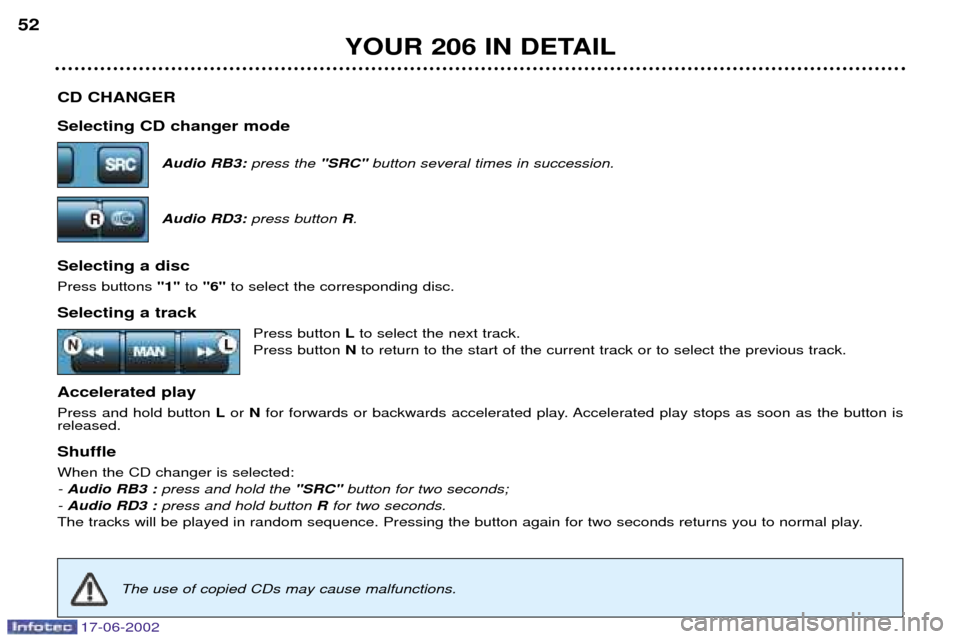
CD CHANGER Selecting CD changer modeAudio RB3: press the "SRC" button several times in succession.
Audio RD3: press button R.
Selecting a disc Press buttons "1"to "6" to select the corresponding disc.
Selecting a track Press button Lto select the next track.
Press button Nto return to the start of the current track or to select the previous track.
Accelerated playPress and hold button Lor N for forwards or backwards accelerated play. Accelerated play stops as soon as the button is
released. Shuffle When the CD changer is selected: - Audio RB3 : press and hold the "SRC" button for two seconds;
- Audio RD3 : press and hold button Rfor two seconds.
The tracks will be played in random sequence. Pressing the button again for two seconds returns you to normal play.
YOUR 206 IN DETAIL
52
The use of copied CDs may cause malfunctions.
Page 48 of 155
17-06-2002
YOUR 206 IN DETAIL43
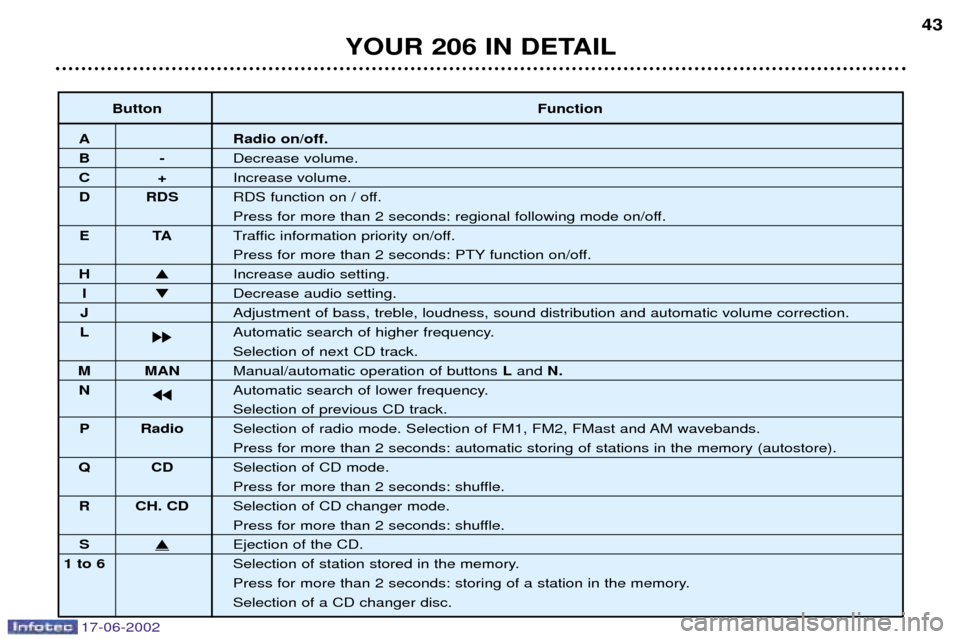
Button Function
A Radio on/off.
B-Decrease volume.
C+Increase volume.
D RDS RDS function on / off.
Press for more than 2 seconds: regional following mode on/off.
ET ATraffic information priority on/off.
Press for more than 2 seconds: PTY function on/off.
H Increase audio setting.
I Decrease audio setting.
J Adjustment of bass, treble, loudness, sound distribution and automatic volume correction.
L kk Automatic search of higher frequency.
Selection of next CD track.
M MAN
Manual/automatic operation of buttons Land N.
N jj Automatic search of lower frequency.
Selection of previous CD track.
P Radio Selection of radio mode. Selection of FM1, FM2, FMast and AM wavebands.
Press for more than 2 seconds: automatic storing of stations in the memory (autostore).
QC DSelection of CD mode.
Press for more than 2 seconds: shuffle.
R CH. CD Selection of CD changer mode.
Press for more than 2 seconds: shuffle.
SEjection of the CD.
1 to 6 Selection of station stored in the memory.
Press for more than 2 seconds: storing of a station in the memory.Selection of a CD changer disc.
Page 50 of 155

17-06-2002
Manual station search Press the "MAN"button.
Briefly press button Lor Nto increase or decrease the frequency displayed.
By continuing to press the button in the direction selected, you will obtain continuous scrolling of the frequency. The scrolling stops at the first station found as soon as the button is released.Pressing the "MAN"button again returns you to automatic station search.
Manual storing of stations in the memory Select the station required. Press and hold one of the buttons "1"to "6" for more than two seconds.
The sound stops then becomes audible again, confirming that the station has been stored in the memory. Automatic storing of FM stations in the memory (autostore)
Audio RB3:press and hold the "BND/AST" button for more than two seconds.
Audio RD3: press and hold button Pfor more than two seconds.
Your radio automatically stores the six stations with the strongest signal in FM. These stations are stored in the FMast wave-
band.
If it is not possible to find six stations, the remaining memories are empty. Recalling stations stored in the memory For each waveband, briefly press buttons "1"to "6" to recall the corresponding station.
YOUR 206 IN DETAIL 47