Page 103 of 393
2-35 Windshield Washer
There's a paddle marked with the windshield washer
symbol on the top of the multifunction lever.
To spray washer fluid on the windshield, push the
paddle. The wipers will clear the window and then
either stop or return to your preset speed.
CAUTION:
In freezing weather, don't use your washer until
the windshield is warmed. Otherwise the washer
fluid can form ice on the windshield, blocking
your vision.
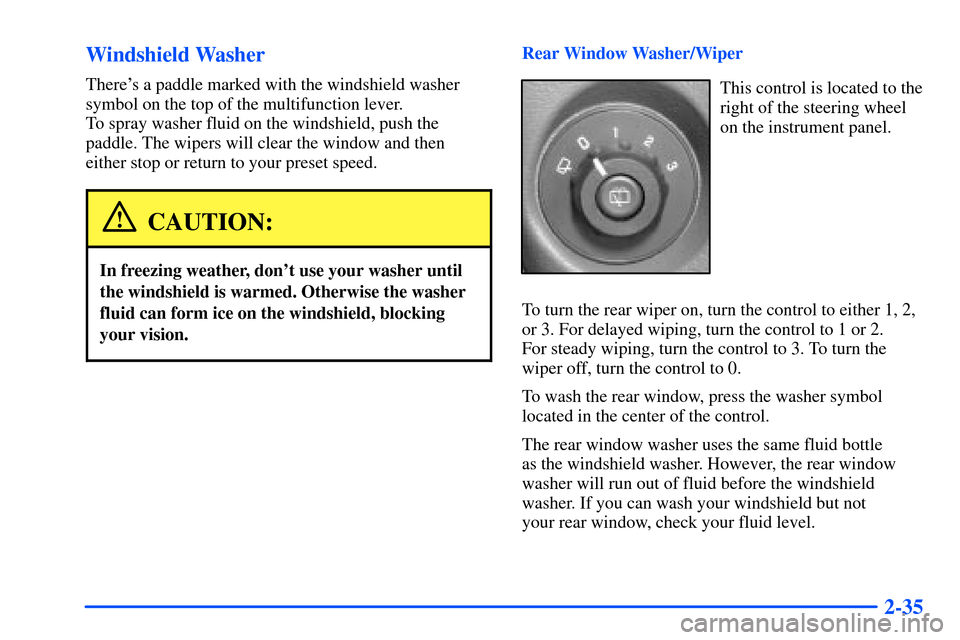
Rear Window Washer/Wiper
This control is located to the
right of the steering wheel
on the instrument panel.
To turn the rear wiper on, turn the control to either 1, 2,
or 3. For delayed wiping, turn the control to 1 or 2.
For steady wiping, turn the control to 3. To turn the
wiper off, turn the control to 0.
To wash the rear window, press the washer symbol
located in the center of the control.
The rear window washer uses the same fluid bottle
as the windshield washer. However, the rear window
washer will run out of fluid before the windshield
washer. If you can wash your windshield but not
your rear window, check your fluid level.
Page 125 of 393

2-57
Emergency Button: In an emergency situation,
press the emergency service button. Upon receiving the
call, an advisor at the center will locate your vehicle and
assess the situation. If necessary, the advisor will alert
the nearest emergency service provider.
Call ANSWER/END Button: Use this button
to answer a call. (If you are receiving a call, the audio
system will mute, and the ring will be heard). Press this
button at the end of a call to disconnect and return the
audio system to its previous settings. This button will
also cancel a call if one of the buttons is accidentally
pressed or if the automatic redial function is activated.
Volume Control: You can control the volume of the
OnStar System using either the volume control knob
on the radio or using the steering wheel volume control
(if equipped).
Telltale Light: This light will indicate the status of
the system. A solid green light will come on when you
start the vehicle to let you know that the system is on
and is ready to make or receive calls.
If the light blinks green it means that an incoming
or outgoing call is in progress. Press the Call
ANSWER/END button if you notice the light
blinking and you are not on a call.
The light will be red in the event of an OnStar system
malfunction. If this occurs press the OnStar button to
attempt to contact an advisor. If the connection is made,
the advisor will assist you with steps to take to make
sure that the system is functioning properly. If you
cannot contact the advisor, take your vehicle to your
dealership as soon as possible for assistance.
Page 133 of 393
2-65
The main components of your instrument panel are the following:
A. Exterior Lamp Controls
B. Air Vents
C. Turn Signal/Multifunction Lever
D. Comfort Control Steering Wheel Controls
E. Instrument Panel Cluster
F. Audio Steering Wheel Controls
G. Ignition Switch
H. Audio SystemI. Comfort Controls
J. Hood Release
K. Driver Information Center (DIC) Steering
Wheel Controls
L. Rear Window Washer/Wiper
M. Lighter
N. Accessory Power Outlet
O. Rear Window Defogger
P. Glove Box
Page 150 of 393

2-82
Driver Information Center (DIC)
The DIC display is located on the instrument panel
cluster above the steering wheel. The DIC can display
information such as the trip odometer, fuel economy and
personalization features.
A.Trip Information: This button will display the
odometer, trip odometer and the timer.
B.Fuel Information: This button will display the
current range, average fuel economy, instant fuel
economy and engine oil life.
C.Personalization: This button will change personal
options available on your vehicle.
D.Select: This button resets certain functions and turns
off or acknowledges messages on the DIC.
DIC Operation and Displays
The DIC comes on when the ignition is on. After a short
delay the DIC will display the current driver and the
information that was last displayed before the engine
was turned off.
If a problem is detected, a warning message will
appear on the display. Pressing the select button will
acknowledge any current warning or service messages.
The DIC has different modes which can be accessed by
pressing the four buttons on the DIC. These buttons are
trip information, fuel information, personalization and
select. The button functions are detailed in the following.
Page 165 of 393
3-
3-1
Section 3 Comfort Controls and Audio Systems
In this section, you'll find out how to operate the comfort control and audio systems offered with your vehicle.
Be sure to read about the particular systems supplied with your vehicle.
3
-2 Comfort Controls
3
-6 Air Conditioning
3
-6 Heating
3
-6 Defogging and Defrosting
3
-7 Rear Window Defogger
3
-8 Ventilation System
3
-10 Audio Systems
3
-10 Setting the Clock
3
-11 AM-FM Stereo with Cassette Tape and
Compact Disc Player with Programmable
Equalization and Radio Data System (RDS)3
-20 AM-FM Stereo with 6-Disc Compact Disc
Player with Programmable Equalization and
Radio Data System (RDS) (If Equipped)
3
-34 Theft-Deterrent Feature
3
-34 Audio Steering Wheel Controls
3
-35 Understanding Radio Reception
3
-35 Tips About Your Audio System
3
-36 Care of Your Cassette Tape Player
3
-37 Care of Your Compact Discs
3
-37 Care of Your Compact Disc Player
3
-37 Diversity Antenna System
3
-37 Chime Level Adjustment
Page 174 of 393

3-10 Comfort Control Steering Wheel Controls
You can adjust certain comfort control functions using
the controls on your steering wheel.
(Fan): Press the up arrow to increase the fan speed
and the down arrow to decrease the fan speed.
(Temperature): Press the up arrow to increase the
temperature of the air flowing through the system and
the down arrow to decrease the temperature of the air
flowing through the system.
Audio Systems
Your audio system has been designed to operate easily
and give years of listening pleasure. You will get the
most enjoyment out of it if you acquaint yourself with it
first. Find out what your audio system can do and how
to operate all its controls, to be sure you're getting the
most out of the advanced engineering that went into it.
Setting the Clock
Press and hold HR until the correct hour appears.
The letters AM or PM may appear on the display
for AM or PM. Then, press and hold MN until the
correct minute appears. The clock may be set with the
ignition on or off. In addition, the clock can also be
automatically set, when tuned to an RDS station that
is broadcasting time, by pressing and holding the HR
and the MN button at the same time. The display will
show TIME UPDATED. If there is no time available,
NO UPDATE will be displayed.
Page 198 of 393

3-34 Theft-Deterrent Feature
THEFTLOCK� is designed to discourage theft of
your radio. The feature works automatically by learning
a portion of the Vehicle Identification Number (VIN).
If the radio is moved to a different vehicle, it will not
operate and LOCKED will be displayed.
When the radio and vehicle are turned off, the blinking
red light indicates that THEFTLOCK is armed.
With THEFTLOCK activated, your radio will not
operate if stolen.
Audio Steering Wheel Controls
If your vehicle has this
feature, you can control
certain radio functions
using the controls on
your steering wheel.
AM/FM: Press this control to tune to the next radio
station. When playing a cassette tape or compact disc,
press AM/FM to switch to the radio.
(Program): Press this control to tune to the next
preset radio station. When playing a cassette tape, press
program to hear the other side of a tape that is playing.
When using the CD changer, this control will seek to the
next selection.
(Volume): Press the up or down arrow to increase
or decrease volume.
Page 202 of 393
4-
4-1
Section 4 Your Driving and the Road
Here you'll find information about driving on different kinds of roads and in varying weather conditions. We've also
included many other useful tips on driving.
4
-2 Defensive Driving
4
-3 Drunken Driving
4
-6 Control of a Vehicle
4
-6 Braking
4
-9 Traction Assist System (TAS)
(Two
-Wheel Drive Only)
4
-11 Steering
4
-13 Off-Road Recovery
4
-14 Passing
4
-15 Loss of Control
4
-16 Operating Your All-Wheel-Drive Vehicle
(If Equipped) Off Paved Roads4
-30 Driving at Night
4
-32 Driving in Rain and on Wet Roads
4
-35 City Driving
4
-36 Freeway Driving
4
-37 Before Leaving on a Long Trip
4
-38 Highway Hypnosis
4
-38 Hill and Mountain Roads
4
-40 Winter Driving
4
-44 Recreational Vehicle Towing
4
-44 Loading Your Vehicle
4
-47 Adding a Snow Plow or Similar Equipment
4
-48 Towing a Trailer


