Page 135 of 343

2-73 Low Oil Light (If Equipped)
If your vehicle is equipped
with a 3400 V6 engine, then
you will have a LOW OIL
light in your instrument
panel cluster.
This light will come on briefly when you start your vehicle.
If the light stays on after starting your vehicle, or comes
on and chimes while you are driving, your engine oil
level should be checked.
Prior to checking the oil level, be sure your vehicle has
been shut off for several minutes and is on a level
surface. Check the oil level on your dipstick and bring it
to the proper level. See ªEngine Oilº in the Index.
A false LOW OIL light may be generated when parking
on steep grades.The oil level monitoring system only checks oil level
during the brief period between when the key is on and
the engine is cranking. It does not monitor engine oil
level when the engine is running. Additionally, an oil
level check is only performed if the engine has been
turned off for a considerable period of time allowing the
oil normally in circulation to drain back into the oil pan.
Change Oil Light
The CHANGE OIL light
should come on briefly
as a bulb check when you
start the engine. If the
light doesn't come on,
have it serviced.
If the CHANGE OIL light comes on and stays on
after you start the engine, have the oil changed.
To reset the CHANGE OIL light, see ªEngine Oil,
When to Changeº in the Index.
Page 137 of 343

2-75 Service Vehicle Soon Light
This light will come on
briefly when you turn
on the ignition.
It will stay on, or come on and a chime will sound if it
detects a problem on the vehicle, such as a Daytime
Running Lamps (DRL) or an Automatic Light Control
(ALC) malfunction. If this happens, see your dealer as
soon as possible.
Fuel Gage
United States CanadaYour fuel gage tells you about how much fuel you
have left, when the ignition is on. When the indicator
nears empty, the light will come on and you will hear a
chime. You still have a little fuel left, but you should get
more soon.
Here are four things that some owners ask about.
None of these show a problem with your fuel gage:
�At the service station, the gas pump shuts off
before the gage reads full.
�It takes a little more or less fuel to fill up than the
gage indicated. For example, the gage may have
indicated the tank was half full, but it actually took a
little more or less than half the tank's capacity to fill
the tank.
�The indicator moves a little when you turn a corner
or speed up.
�The gage goes back to empty when you turn off
the ignition.
Page 164 of 343

3-27
You may also choose a non-scrubbing action, wet-type
cleaner which uses a cassette with a fabric belt to clean
the tape head. This type of cleaning cassette will not
eject on its own. A non
-scrubbing action cleaner may
not clean as thoroughly as the scrubbing type cleaner.
The use of a non
-scrubbing action, dry-type cleaning
cassette is not recommended.
After you clean the player, press and hold the eject
button for five seconds to reset the CLEAN PLAYR
indicator. The radio will display CLEANED to show the
indicator was reset.
Cassettes are subject to wear and the sound quality
may degrade over time. Always make sure the cassette
tape is in good condition before you have your tape
player serviced.
Care of Your Compact Discs
Handle discs carefully. Store them in their original cases
or other protective cases and away from direct sunlight
and dust. If the surface of a disc is soiled, dampen a
clean, soft cloth in a mild, neutral detergent solution
and clean it, wiping from the center to the edge.
Be sure never to touch the signal surface when handling
discs. Pick up discs by grasping the outer edges or the
edge of the hole and the outer edge.
Care of Your Compact Disc Player
The use of CD lens cleaner discs is not advised, due to
the risk of contaminating the lens of the CD optics with
lubricants internal to the CD mechanism.
Page 187 of 343

4-22
Once you are moving on the freeway, make certain you
allow a reasonable following distance. Expect to move
slightly slower at night.
When you want to leave the freeway, move to the
proper lane well in advance. If you miss your exit,
do not, under any circumstances, stop and back up.
Drive on to the next exit.
The exit ramp can be curved, sometimes quite sharply.
The exit speed is usually posted.
Reduce your speed according to your speedometer, not
to your sense of motion. After driving for any distance
at higher speeds, you may tend to think you are going
slower than you actually are.Before Leaving on a Long Trip
Make sure you're ready. Try to be well rested. If you
must start when you're not fresh
-- such as after a
day's work
-- don't plan to make too many miles
that first part of the journey. Wear comfortable clothing
and shoes you can easily drive in.
Is your vehicle ready for a long trip? If you keep it
serviced and maintained, it's ready to go. If it needs
service, have it done before starting out. Of course,
you'll find experienced and able service experts in
Oldsmobile dealerships all across North America.
They'll be ready and willing to help if you need it.
Page 188 of 343

4-23
Here are some things you can check before a trip:
�Windshield Washer Fluid: Is the reservoir full?
Are all windows clean inside and outside?
�Wiper Blades: Are they in good shape?
�Fuel, Engine Oil, Other Fluids: Have you checked
all levels?
�Lamps: Are they all working? Are the lenses clean?
�Tires: They are vitally important to a safe,
trouble
-free trip. Is the tread good enough for
long
-distance driving? Are the tires all inflated
to the recommended pressure?
�Weather Forecasts: What's the weather outlook
along your route? Should you delay your trip a
short time to avoid a major storm system?
�Maps: Do you have up
-to-date maps?
Highway Hypnosis
Is there actually such a condition as ªhighway hypnosisº?
Or is it just plain falling asleep at the wheel? Call it
highway hypnosis, lack of awareness, or whatever.
There is something about an easy stretch of road with
the same scenery, along with the hum of the tires on the
road, the drone of the engine, and the rush of the wind
against the vehicle that can make you sleepy. Don't let it
happen to you! If it does, your vehicle can leave the
road in less than a second, and you could crash and
be injured.
What can you do about highway hypnosis? First, be
aware that it can happen.
Then here are some tips:
�Make sure your vehicle is well ventilated, with a
comfortably cool interior.
�Keep your eyes moving. Scan the road ahead
and to the sides. Check your rearview mirrors
and your instruments frequently.
�If you get sleepy, pull off the road into a rest, service
or parking area and take a nap, get some exercise, or
both. For safety, treat drowsiness on the highway as
an emergency.
Page 208 of 343

4-43 When You Are Ready to Leave After
Parking on a Hill
1. Apply your regular brakes and hold the pedal down
while you:
�start your engine,
�shift into a gear, and
�release the parking brake.
2. Let up on the brake pedal.
3. Drive slowly until the trailer is clear of the chocks.
4. Stop and have someone pick up and store the chocks.
Maintenance When Trailer Towing
Your vehicle will need service more often when you're
pulling a trailer. See the Maintenance Schedule for more
on this. Things that are especially important in trailer
operation are automatic transaxle fluid (don't overfill),
engine oil, drive belt, cooling system and brake system.
Each of these is covered in this manual, and the Index
will help you find them quickly. If you're trailering,
it's a good idea to review this information before you
start your trip.
Check periodically to see that all hitch nuts and bolts
are tight.
Engine Cooling When Trailer Towing
Your cooling system may temporarily overheat during
severe operating conditions. See ªEngine Overheatingº
in the Index.
Page 215 of 343
5-7
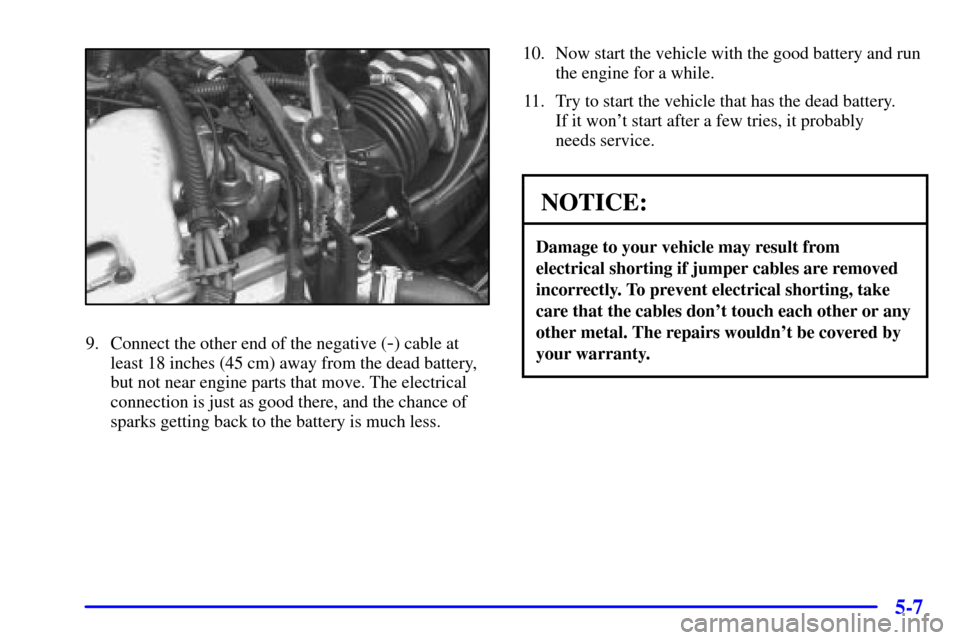
9. Connect the other end of the negative (-) cable at
least 18 inches (45 cm) away from the dead battery,
but not near engine parts that move. The electrical
connection is just as good there, and the chance of
sparks getting back to the battery is much less.10. Now start the vehicle with the good battery and run
the engine for a while.
11. Try to start the vehicle that has the dead battery.
If it won't start after a few tries, it probably
needs service.
NOTICE:
Damage to your vehicle may result from
electrical shorting if jumper cables are removed
incorrectly. To prevent electrical shorting, take
care that the cables don't touch each other or any
other metal. The repairs wouldn't be covered by
your warranty.
Page 216 of 343
5-8
Jumper Cable Removal
A. Heavy, Unpainted Metal Engine Part
B. Good Battery
C. Dead BatteryTo disconnect the jumper cables from both vehicles,
do the following:
1. Disconnect the black negative (
-) cable from the
vehicle that had the dead battery.
2. Disconnect the black negative (
-) cable from the
vehicle with good battery.
3. Disconnect the red positive (+) cable from the
vehicle with the good battery.
4. Disconnect the red positive (+) cable from the
other vehicle.
Towing Your Vehicle
Consult your dealer or a professional towing service if
you need to have your disabled vehicle towed. See
ªRoadside Assistanceº in the Index. If you want to
tow your vehicle behind another vehicle for recreational
purposes (such as behind a motorhome), see
ªRecreational Vehicle Towingº in the Index.