2002 NISSAN SENTRA brake light
[x] Cancel search: brake lightPage 52 of 235
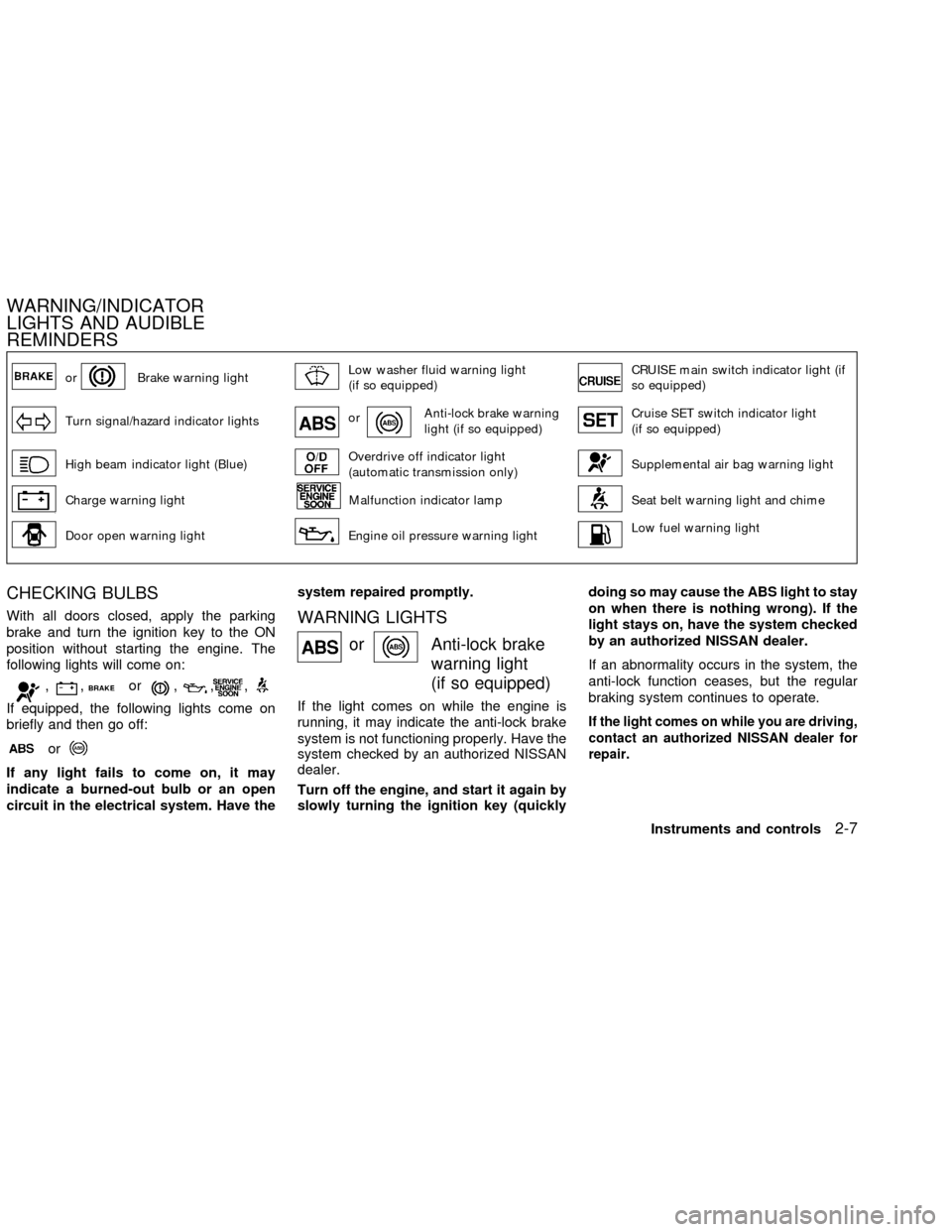
orBrake warning lightLow washer fluid warning light
(if so equipped)CRUISE main switch indicator light (if
so equipped)
Turn signal/hazard indicator lightsorAnti-lock brake warning
light (if so equipped)Cruise SET switch indicator light
(if so equipped)
High beam indicator light (Blue)Overdrive off indicator light
(automatic transmission only)Supplemental air bag warning light
Charge warning lightMalfunction indicator lampSeat belt warning light and chime
Door open warning lightEngine oil pressure warning lightLow fuel warning light
CHECKING BULBS
With all doors closed, apply the parking
brake and turn the ignition key to the ON
position without starting the engine. The
following lights will come on:
,,or,,,
If equipped, the following lights come on
briefly and then go off:
or
If any light fails to come on, it may
indicate a burned-out bulb or an open
circuit in the electrical system. Have thesystem repaired promptly.
WARNING LIGHTS
orAnti-lock brake
warning light
(if so equipped)
If the light comes on while the engine is
running, it may indicate the anti-lock brake
system is not functioning properly. Have the
system checked by an authorized NISSAN
dealer.
Turn off the engine, and start it again by
slowly turning the ignition key (quicklydoing so may cause the ABS light to stay
on when there is nothing wrong). If the
light stays on, have the system checked
by an authorized NISSAN dealer.
If an abnormality occurs in the system, the
anti-lock function ceases, but the regular
braking system continues to operate.If the light comes on while you are driving,
contact an authorized NISSAN dealer for
repair.
WARNING/INDICATOR
LIGHTS AND AUDIBLE
REMINDERS
Instruments and controls2-7
ZX
Page 53 of 235
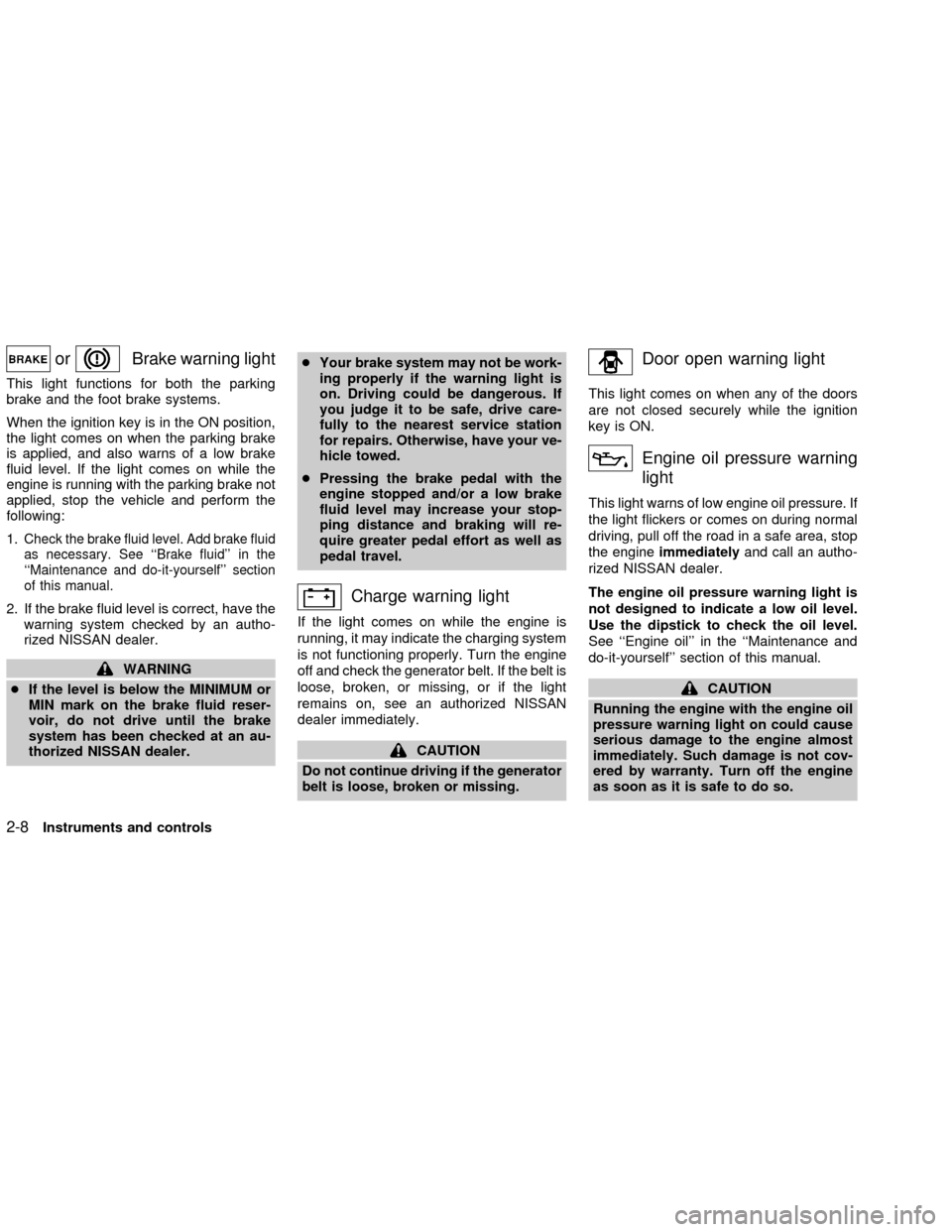
orBrake warning light
This light functions for both the parking
brake and the foot brake systems.
When the ignition key is in the ON position,
the light comes on when the parking brake
is applied, and also warns of a low brake
fluid level. If the light comes on while the
engine is running with the parking brake not
applied, stop the vehicle and perform the
following:
1.
Check the brake fluid level. Add brake fluid
as necessary. See ``Brake fluid'' in the
``Maintenance and do-it-yourself'' section
of this manual.
2. If the brake fluid level is correct, have the
warning system checked by an autho-
rized NISSAN dealer.
WARNING
cIf the level is below the MINIMUM or
MIN mark on the brake fluid reser-
voir, do not drive until the brake
system has been checked at an au-
thorized NISSAN dealer.cYour brake system may not be work-
ing properly if the warning light is
on. Driving could be dangerous. If
you judge it to be safe, drive care-
fully to the nearest service station
for repairs. Otherwise, have your ve-
hicle towed.
cPressing the brake pedal with the
engine stopped and/or a low brake
fluid level may increase your stop-
ping distance and braking will re-
quire greater pedal effort as well as
pedal travel.
Charge warning light
If the light comes on while the engine is
running, it may indicate the charging system
is not functioning properly. Turn the engine
off and check the generator belt. If the belt is
loose, broken, or missing, or if the light
remains on, see an authorized NISSAN
dealer immediately.
CAUTION
Do not continue driving if the generator
belt is loose, broken or missing.
Door open warning light
This light comes on when any of the doors
are not closed securely while the ignition
key is ON.
Engine oil pressure warning
light
This light warns of low engine oil pressure. If
the light flickers or comes on during normal
driving, pull off the road in a safe area, stop
the engineimmediatelyand call an autho-
rized NISSAN dealer.
The engine oil pressure warning light is
not designed to indicate a low oil level.
Use the dipstick to check the oil level.
See ``Engine oil'' in the ``Maintenance and
do-it-yourself'' section of this manual.
CAUTION
Running the engine with the engine oil
pressure warning light on could cause
serious damage to the engine almost
immediately. Such damage is not cov-
ered by warranty. Turn off the engine
as soon as it is safe to do so.
2-8Instruments and controls
ZX
Page 56 of 235

AUDIBLE REMINDERS
Key reminder chime
A chime sounds if the driver's side door is
opened while the key is left in the ignition
switch. Remove the key and take it with you
when leaving the vehicle.
Light reminder chime
With the ignition switch in the OFF position,
a chime sounds when the driver's side door
is opened if the headlights or parking lights
are on.
Turn the headlight control switch off before
leaving the vehicle.
Brake pad wear warning
The disc brake pads have an audible wear
warning. When a brake pad requires re-
placement, it makes a high pitched scraping
sound when the vehicle is in motion,
whether or not the brake pedal is de-
pressed. Have the brakes checked as soon
as possible if the warning sound is heard.Your vehicle has two types of security sys-
tems:
cNissan Vehicle Immobilizer System±
NVIS (if so equipped)
cVehicle security system (if so equipped)
NISSAN VEHICLE IMMOBILIZER
SYSTEM (NVIS) (if so equipped)
The Nissan Vehicle Immobilizer System
(NVIS) will not allow the engine to start
without the use of a registered NVIS key.
If the engine fails to start using a registered
NVIS key (for example, when interference iscaused by another NVIS key, an automated
toll road device or automated payment de-
vice on the key ring), restart the engine
using the following procedures:
1. Leave the ignition switch in the ON posi-
tion for approximately 5 seconds.
2. Turn the ignition switch to the OFF or
LOCK position, and wait approximately 5
seconds.
3. Repeat step 1 and 2.
4. Restart the engine while holding the de-
vice (which may have caused the inter-
ference) separate from the registered
NVIS key.
If the no start condition re-occurs, Nissan
recommends placing the registered NVIS
key on a separate key ring to avoid interfer-
ence from other devices.
Statement related to section 15 of FCC
rules for Nissan Vehicle Immobilizer
System (CONT ASSY - IMMOBILIZER,
ANT ASSY - IMMOBILIZER)
This device complies with part 15 of the
FCC Rules and RSS-210 of Industry
Canada. Operation is subject to the fol-
lowing two conditions;
IC0005
SECURITY SYSTEMS
Instruments and controls2-11
ZX
Page 62 of 235
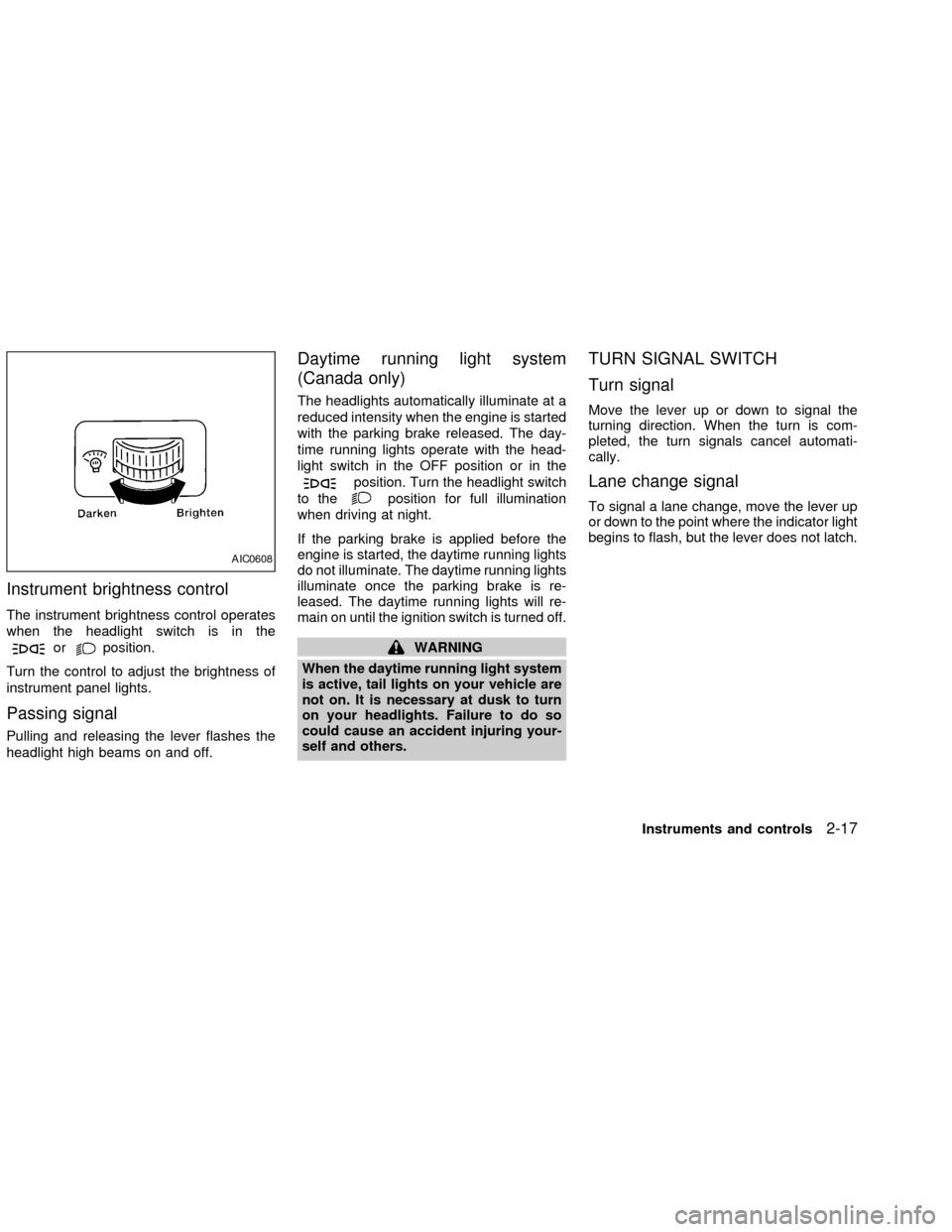
Instrument brightness control
The instrument brightness control operates
when the headlight switch is in the
orposition.
Turn the control to adjust the brightness of
instrument panel lights.
Passing signal
Pulling and releasing the lever flashes the
headlight high beams on and off.
Daytime running light system
(Canada only)
The headlights automatically illuminate at a
reduced intensity when the engine is started
with the parking brake released. The day-
time running lights operate with the head-
light switch in the OFF position or in the
position. Turn the headlight switch
to the
position for full illumination
when driving at night.
If the parking brake is applied before the
engine is started, the daytime running lights
do not illuminate. The daytime running lights
illuminate once the parking brake is re-
leased. The daytime running lights will re-
main on until the ignition switch is turned off.
WARNING
When the daytime running light system
is active, tail lights on your vehicle are
not on. It is necessary at dusk to turn
on your headlights. Failure to do so
could cause an accident injuring your-
self and others.
TURN SIGNAL SWITCH
Turn signal
Move the lever up or down to signal the
turning direction. When the turn is com-
pleted, the turn signals cancel automati-
cally.
Lane change signal
To signal a lane change, move the lever up
or down to the point where the indicator light
begins to flash, but the lever does not latch.
AIC0608
Instruments and controls2-17
ZX
Page 115 of 235

the influence of alcohol. Every year thou-
sands of people are injured or killed in
alcohol-related accidents. Although the lo-
cal laws vary on what is considered to be
legally intoxicated, the fact is that alcohol
affects all people differently and most
people underestimate the effects of alcohol.
Remember, drinking and driving don't mix!
And that is true for drugs, too (over-the-
counter, prescription, and illegal drugs). Do
not drive if your ability to operate your
vehicle is impaired by alcohol, drugs, or
some other physical condition.
AUTOMATIC TRANSMISSION
On automatic transmission models the igni-
tion lock is designed so the key cannot be
turned to LOCK and removed until the shift
selector lever is moved to the P (Park)
position.
When removing the key from the ignition,
make sure the shift selector lever is in the P
(Park) position.
When the key cannot be turned to the LOCK
position, proceed as follows to remove the
key.1) Move the shift selector lever into the P
(Park) position.
2) Turn the ignition key slightly toward the
ON position.
3) Turn the key to the LOCK position.
4) Remove the key.
The shift lever is designed so it cannot be
moved out of P(Park) and into any of the
other gear positions if the ignition key is
turned to OFF or if the key is removed from
the switch.
The shift selector lever can be moved if
the ignition switch is in the ON position
and the foot brake pedal is depressed.
There is an OFF position between the
LOCK and ACC positions. The OFF posi-
tion is indicated by a ``1'' on the key
cylinder. When the ignition is in OFF, the
steering wheel is not locked.
In order for the steering wheel to be
locked, it must be turned about 1/8 of a
turn clockwise from the straight up posi-
tion.
To lock the steering wheel, turn the key
to the LOCK position. To unlock the
steering wheel, insert the key and turn it
WSD0004
IGNITION SWITCH
5-4Starting and driving
ZX
Page 123 of 235
CAUTION
cDo not rest your foot on the clutch
pedal while driving. This may cause
clutch damage.
cStop your vehicle completely before
shifting into R (Reverse).
cWhen the vehicle is stopped with the
engine running (for example, at a
stop light), shift to N (Neutral) and
release the clutch pedal with the foot
brake applied.
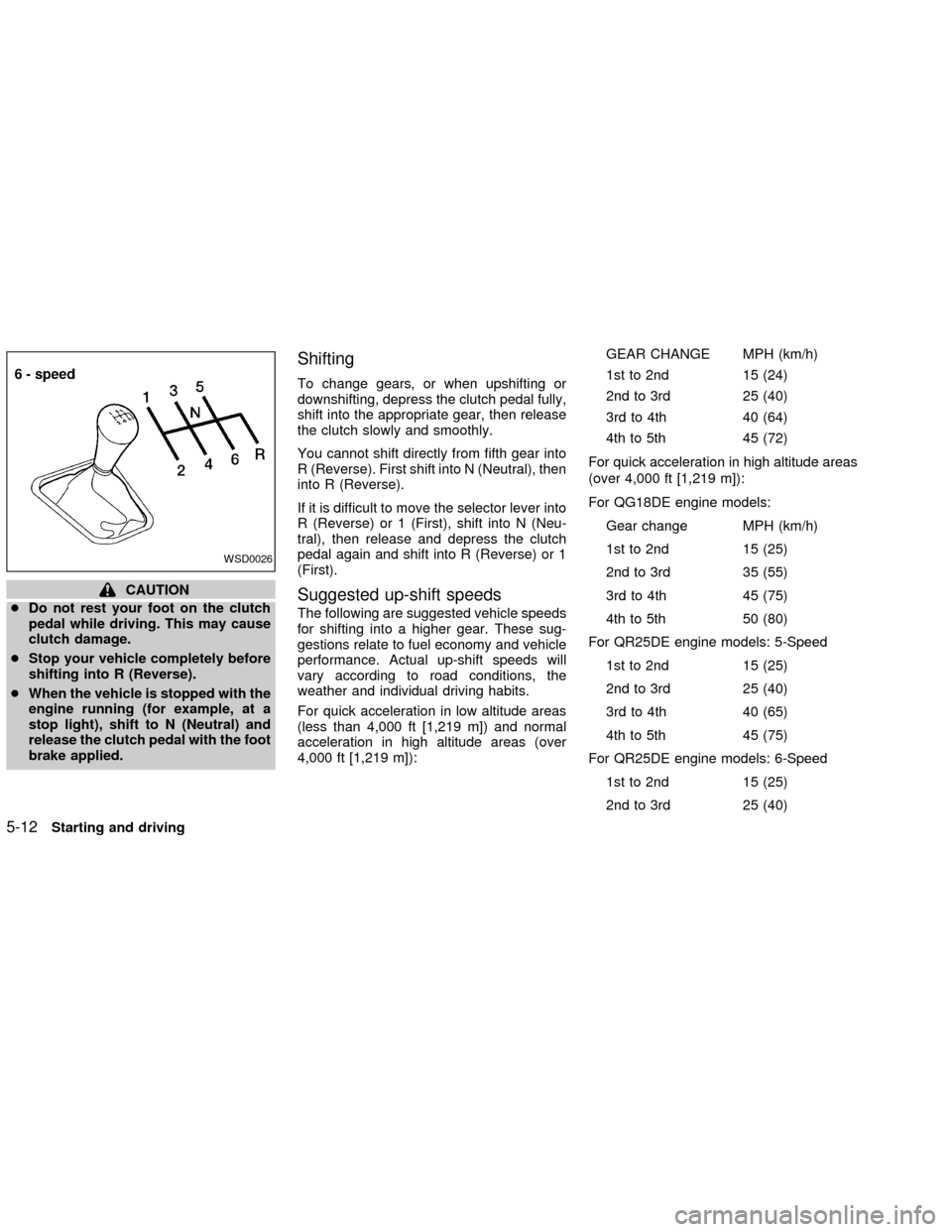
Shifting
To change gears, or when upshifting or
downshifting, depress the clutch pedal fully,
shift into the appropriate gear, then release
the clutch slowly and smoothly.
You cannot shift directly from fifth gear into
R (Reverse). First shift into N (Neutral), then
into R (Reverse).
If it is difficult to move the selector lever into
R (Reverse) or 1 (First), shift into N (Neu-
tral), then release and depress the clutch
pedal again and shift into R (Reverse) or 1
(First).
Suggested up-shift speeds
The following are suggested vehicle speeds
for shifting into a higher gear. These sug-
gestions relate to fuel economy and vehicle
performance. Actual up-shift speeds will
vary according to road conditions, the
weather and individual driving habits.
For quick acceleration in low altitude areas
(less than 4,000 ft [1,219 m]) and normal
acceleration in high altitude areas (over
4,000 ft [1,219 m]):GEAR CHANGE MPH (km/h)
1st to 2nd 15 (24)
2nd to 3rd 25 (40)
3rd to 4th 40 (64)
4th to 5th 45 (72)
For quick acceleration in high altitude areas
(over 4,000 ft [1,219 m]):
For QG18DE engine models:
Gear change MPH (km/h)
1st to 2nd 15 (25)
2nd to 3rd 35 (55)
3rd to 4th 45 (75)
4th to 5th 50 (80)
For QR25DE engine models: 5-Speed
1st to 2nd 15 (25)
2nd to 3rd 25 (40)
3rd to 4th 40 (65)
4th to 5th 45 (75)
For QR25DE engine models: 6-Speed
1st to 2nd 15 (25)
2nd to 3rd 25 (40)
WSD0026
5-12Starting and driving
ZX
Page 125 of 235
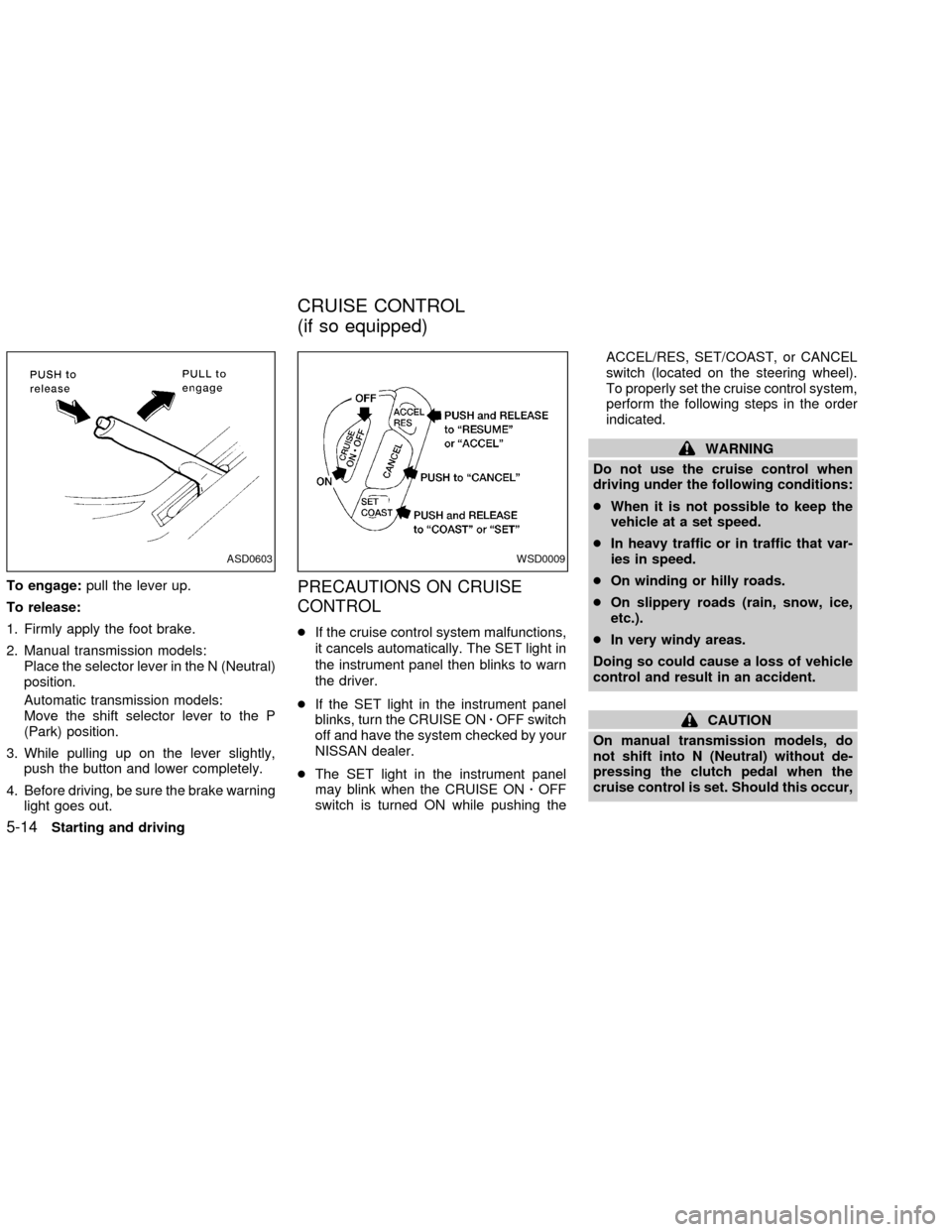
To engage:pull the lever up.
To release:
1. Firmly apply the foot brake.
2. Manual transmission models:
Place the selector lever in the N (Neutral)
position.
Automatic transmission models:
Move the shift selector lever to the P
(Park) position.
3. While pulling up on the lever slightly,
push the button and lower completely.
4. Before driving, be sure the brake warning
light goes out.PRECAUTIONS ON CRUISE
CONTROL
cIf the cruise control system malfunctions,
it cancels automatically. The SET light in
the instrument panel then blinks to warn
the driver.
cIf the SET light in the instrument panel
blinks, turn the CRUISE ONzOFF switch
off and have the system checked by your
NISSAN dealer.
cThe SET light in the instrument panel
may blink when the CRUISE ONzOFF
switch is turned ON while pushing theACCEL/RES, SET/COAST, or CANCEL
switch (located on the steering wheel).
To properly set the cruise control system,
perform the following steps in the order
indicated.
WARNING
Do not use the cruise control when
driving under the following conditions:
cWhen it is not possible to keep the
vehicle at a set speed.
cIn heavy traffic or in traffic that var-
ies in speed.
cOn winding or hilly roads.
cOn slippery roads (rain, snow, ice,
etc.).
cIn very windy areas.
Doing so could cause a loss of vehicle
control and result in an accident.
CAUTION
On manual transmission models, do
not shift into N (Neutral) without de-
pressing the clutch pedal when the
cruise control is set. Should this occur,
ASD0603WSD0009
CRUISE CONTROL
(if so equipped)
5-14Starting and driving
ZX
Page 126 of 235
depress the clutch pedal and turn
the main switch off immediately.
Failure to do so may cause engine
damage.
CRUISE CONTROL
OPERATIONS
The cruise control allows driving at a speed
between 25 to 90 MPH (40 to 144 km/h)
without keeping your foot on the accelerator
pedal.
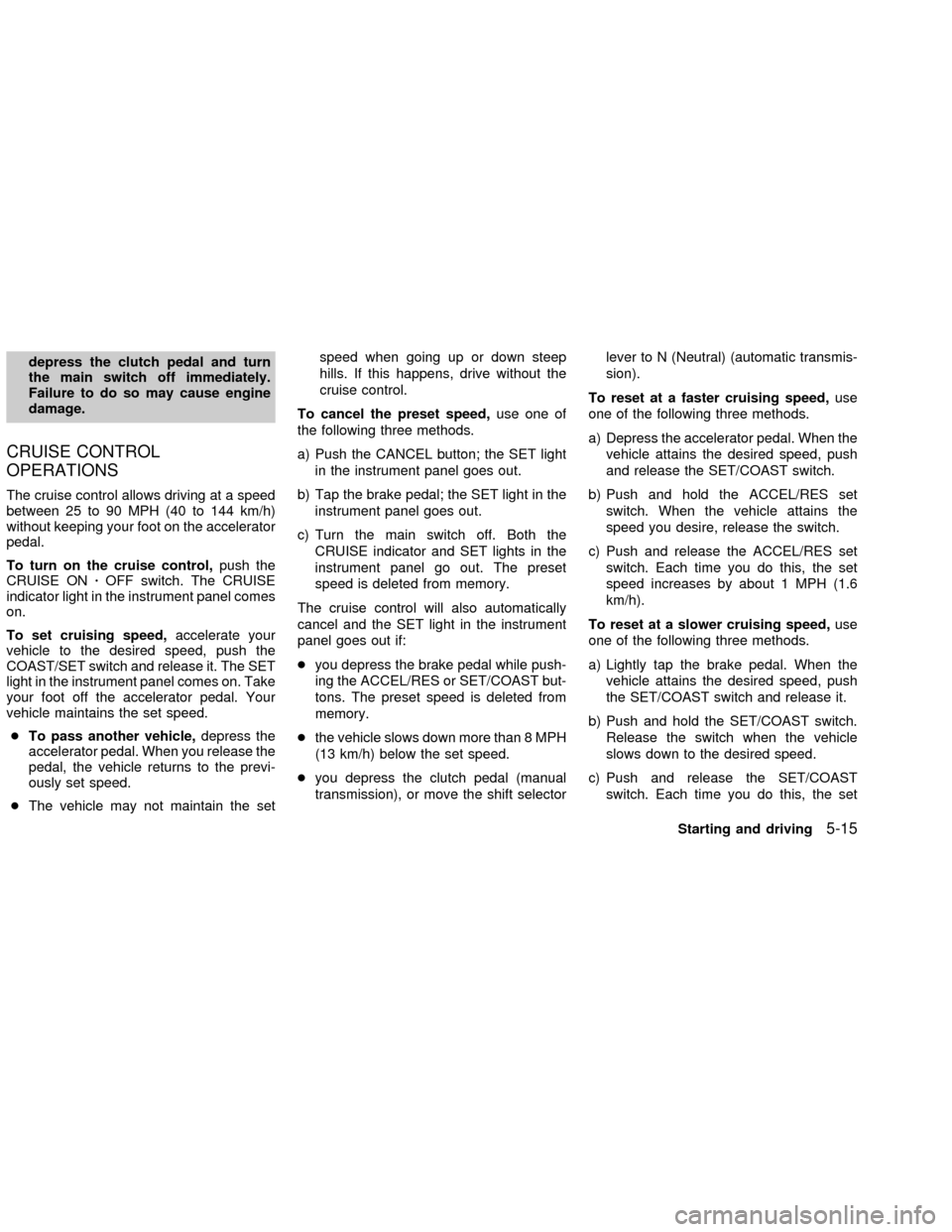
To turn on the cruise control,push the
CRUISE ONzOFF switch. The CRUISE
indicator light in the instrument panel comes
on.
To set cruising speed,accelerate your
vehicle to the desired speed, push the
COAST/SET switch and release it. The SET
light in the instrument panel comes on. Take
your foot off the accelerator pedal. Your
vehicle maintains the set speed.
cTo pass another vehicle,depress the
accelerator pedal. When you release the
pedal, the vehicle returns to the previ-
ously set speed.
cThe vehicle may not maintain the setspeed when going up or down steep
hills. If this happens, drive without the
cruise control.
To cancel the preset speed,use one of
the following three methods.
a) Push the CANCEL button; the SET light
in the instrument panel goes out.
b) Tap the brake pedal; the SET light in the
instrument panel goes out.
c) Turn the main switch off. Both the
CRUISE indicator and SET lights in the
instrument panel go out. The preset
speed is deleted from memory.
The cruise control will also automatically
cancel and the SET light in the instrument
panel goes out if:
cyou depress the brake pedal while push-
ing the ACCEL/RES or SET/COAST but-
tons. The preset speed is deleted from
memory.
cthe vehicle slows down more than 8 MPH
(13 km/h) below the set speed.
cyou depress the clutch pedal (manual
transmission), or move the shift selectorlever to N (Neutral) (automatic transmis-
sion).
To reset at a faster cruising speed,use
one of the following three methods.
a) Depress the accelerator pedal. When the
vehicle attains the desired speed, push
and release the SET/COAST switch.
b) Push and hold the ACCEL/RES set
switch. When the vehicle attains the
speed you desire, release the switch.
c) Push and release the ACCEL/RES set
switch. Each time you do this, the set
speed increases by about 1 MPH (1.6
km/h).
To reset at a slower cruising speed,use
one of the following three methods.
a) Lightly tap the brake pedal. When the
vehicle attains the desired speed, push
the SET/COAST switch and release it.
b) Push and hold the SET/COAST switch.
Release the switch when the vehicle
slows down to the desired speed.
c) Push and release the SET/COAST
switch. Each time you do this, the set
Starting and driving
5-15
ZX