2002 NISSAN SENTRA lights
[x] Cancel search: lightsPage 89 of 235
INSIDE MIRROR
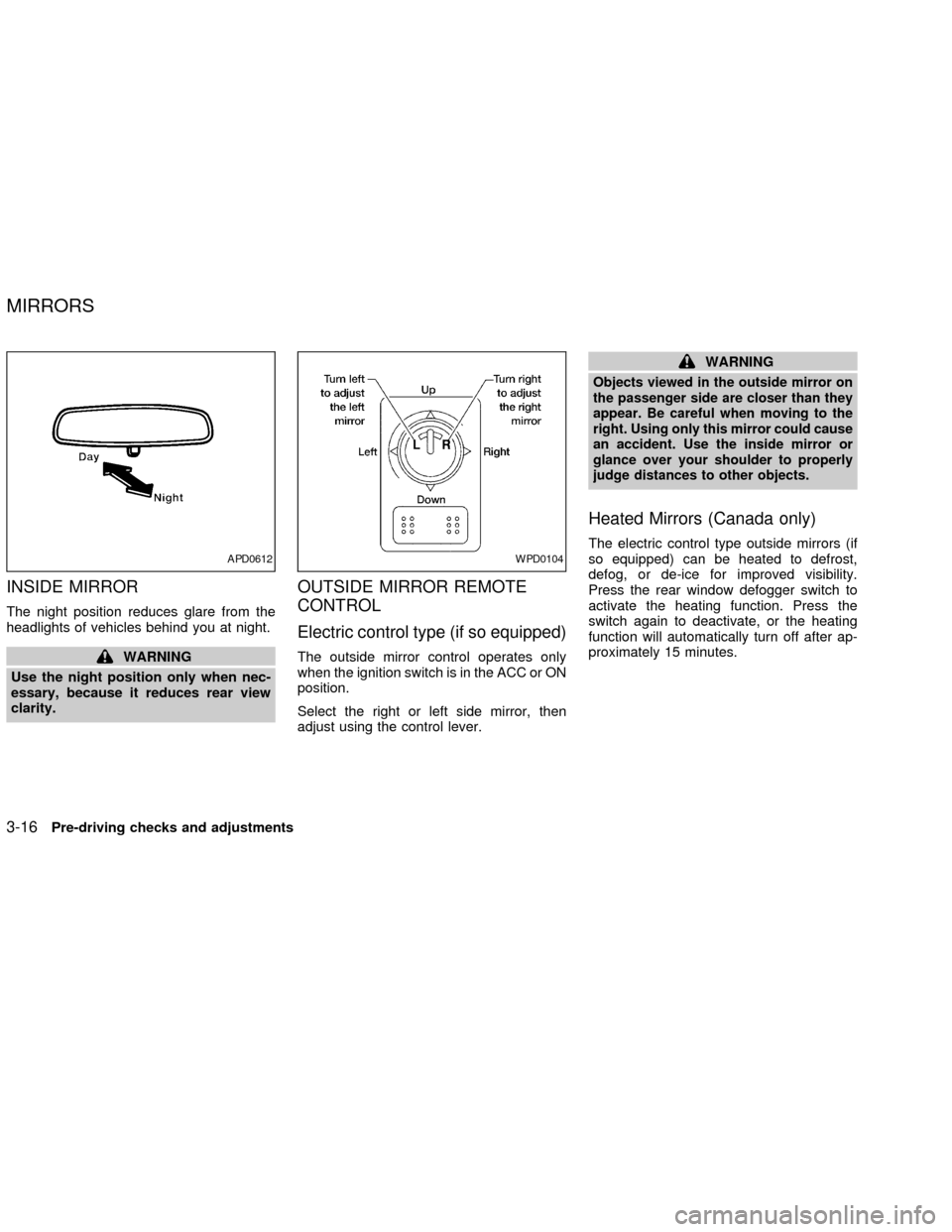
The night position reduces glare from the
headlights of vehicles behind you at night.
WARNING
Use the night position only when nec-
essary, because it reduces rear view
clarity.
OUTSIDE MIRROR REMOTE
CONTROL
Electric control type (if so equipped)
The outside mirror control operates only
when the ignition switch is in the ACC or ON
position.
Select the right or left side mirror, then
adjust using the control lever.
WARNING
Objects viewed in the outside mirror on
the passenger side are closer than they
appear. Be careful when moving to the
right. Using only this mirror could cause
an accident. Use the inside mirror or
glance over your shoulder to properly
judge distances to other objects.
Heated Mirrors (Canada only)
The electric control type outside mirrors (if
so equipped) can be heated to defrost,
defog, or de-ice for improved visibility.
Press the rear window defogger switch to
activate the heating function. Press the
switch again to deactivate, or the heating
function will automatically turn off after ap-
proximately 15 minutes.APD0612WPD0104
MIRRORS
3-16Pre-driving checks and adjustments
ZX
Page 102 of 235

lence even in areas where no obstacles
exist.
Static: Caused by thunderstorms, electrical
power lines, electric signs and even traffic
lights.
AUDIO OPERATION PRECAU-
TIONS
Compact Disc (CD) Player
cOnly use high quality 4.7 inches (12
cm) round discs that have the ``COM-
PACT disc DIGITAL AUDIO'' logo on
the disc or packaging.
cDuring cold weather or rainy days, the
player may malfunction due to thehumidity. If this occurs, remove the
CD and dehumidify or ventilate the
player completely.
cThe player may skip while driving on
rough roads.
cThe CD player sometimes cannot
function when the compartment tem-
perature is extremely high. Decrease
the temperature before use.
cDo not expose the CD to direct sun-
light.
cCDs that are of poor quality, dirty,
scratched, covered with fingerprints,
or that have pin holes may not work
properly.
c
Do not use the following CDs as they
may cause the CD player to malfunction:
c8 cm (3.1 in) discs with an adapter
cRecordable compact discs (CD-R)
cRewritable compact discs (CD-RW)
cCDs that are not round
cCDs with a paper label
cCDs that are warped, scratched, or
have abnormal edges
LHA0099
Heater, air conditioner and audio systems4-11
ZX
Page 108 of 235
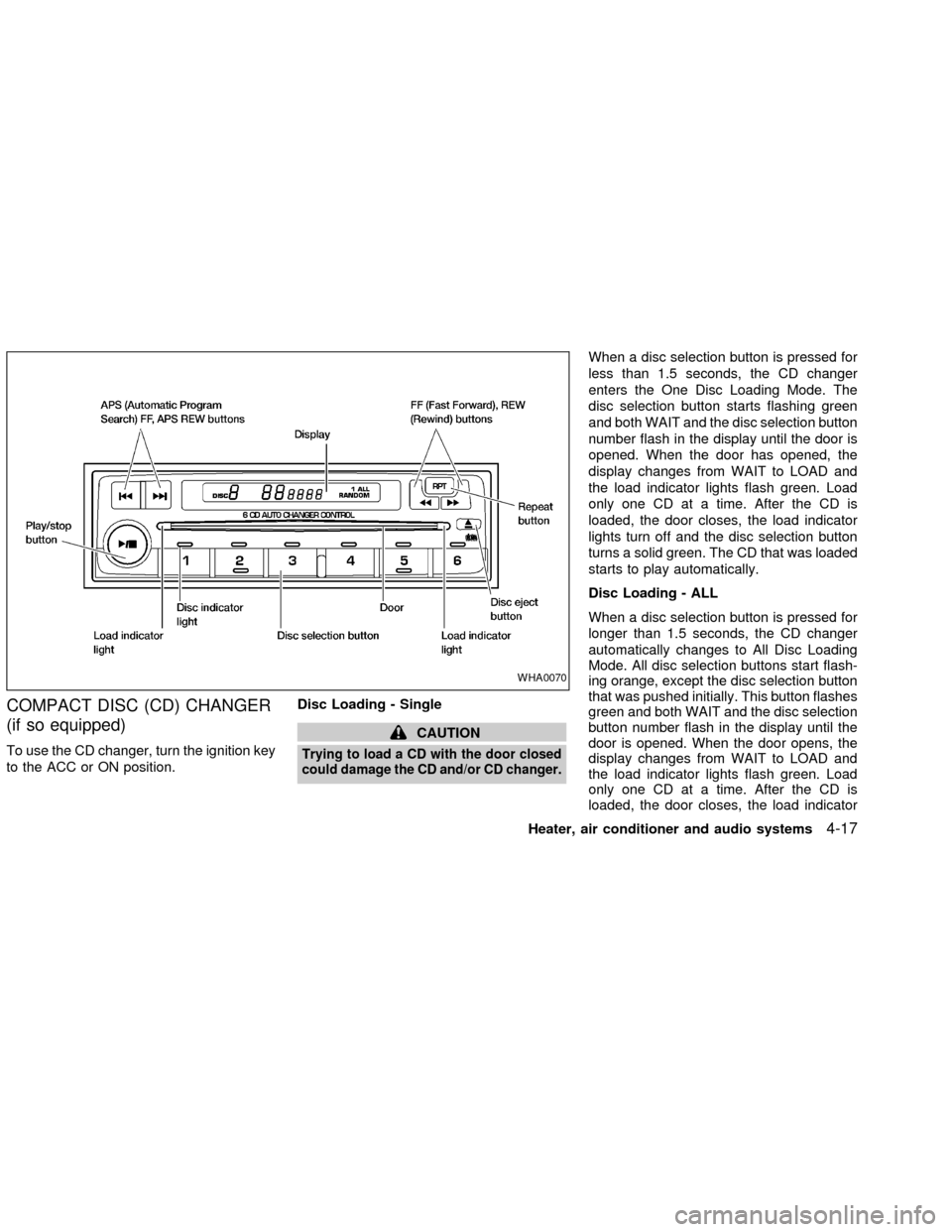
COMPACT DISC (CD) CHANGER
(if so equipped)
To use the CD changer, turn the ignition key
to the ACC or ON position.Disc Loading - Single
CAUTION
Trying to load a CD with the door closed
could damage the CD and/or CD changer.
When a disc selection button is pressed for
less than 1.5 seconds, the CD changer
enters the One Disc Loading Mode. The
disc selection button starts flashing green
and both WAIT and the disc selection button
number flash in the display until the door is
opened. When the door has opened, the
display changes from WAIT to LOAD and
the load indicator lights flash green. Load
only one CD at a time. After the CD is
loaded, the door closes, the load indicator
lights turn off and the disc selection button
turns a solid green. The CD that was loaded
starts to play automatically.
Disc Loading - ALL
When a disc selection button is pressed for
longer than 1.5 seconds, the CD changer
automatically changes to All Disc Loading
Mode. All disc selection buttons start flash-
ing orange, except the disc selection button
that was pushed initially. This button flashes
green and both WAIT and the disc selection
button number flash in the display until the
door is opened. When the door opens, the
display changes from WAIT to LOAD and
the load indicator lights flash green. Load
only one CD at a time. After the CD is
loaded, the door closes, the load indicator
WHA0070
Heater, air conditioner and audio systems4-17
ZX
Page 109 of 235
lights turn off and the disc selection button
turns a solid green. After all the CDs have
been loaded, the CD that was loaded first
starts to play.
Play/Stop button
Press the
button while a CD is play-
ing, the CD stops playing and the CD
changer turns off. Press the
button
while the CD changer is off, the last CD that
was loaded starts to play. Press the
button with no CDs loaded, the CD
changer enters the One Disc Loading
Mode.
FF (fast forward) REV
(reverse) buttons
When the
orbutton is pushed
while the CD is playing, the CD plays at an
increased speed while fast forwarding or
reversing. When the button is released, the
CD returns to normal play speed.
APS (Automatic Pro-
gram Search) FF, APS
REV
When the
button is pushed while the
CD is playing, the selection following the
current one starts to play from the begin-ning. Push the
button several times to
skip several selections. Each time the but-
ton is pushed, the CD advances one selec-
tion. When the last selection on the CD is
skipped, the first selection is played.
When the
button is pushed, the current
selection returns to the beginning. Push the
button several times to skip back sev-
eral selections. Each time the button is
pushed, the CD moves back one selection.
When the first selection on the CD is
skipped, the last selection is played.
Repeat Button
When the
button is pushed while a CD
is playing, the play pattern will change as
follows.
ALL - All disc repeat:All CDs are played
repeatedly in sequence.
BLANK (no symbol) - One disc repeat:
The current CD is repeated.
1 - One track repeat:The current selection
is repeated.
ALL RANDOM - All disc random:Selec-
tions from all the CDs that are stored are
played at random. The same program may
be repeated twice. Pressing the
but-ton will select the next random selection.
RANDOM - One disc random:Selections
from the current CD are played at random.
The same program may be repeated twice.
Pressing the
button will select the next
random selection.
When a new CD is inserted, the play
pattern automatically changes to the
``ALL'' play pattern.
CD Eject - Single
When the
button is pressed for less
than 1.5 seconds, then the current CD that
is playing (or if the CD changer is off, the
last CD that was played) ejects. The disc
indicator light starts flashing orange and
both WAIT and the disc selection button
number flash in the display until the CD is
ejected. When the CD is ejected, the disc
indicator light turns off and the display turns
from WAIT to EJECT. When the CD is
removed from the unit, the CD changer
automatically changes to One Disc Loading
Mode so a new CD can be loaded into the
empty holder. The disc indicator light starts
flashing green and both LOAD and the disc
selection button number appear in the dis-
play until a CD is loaded. One Disc Loading
4-18Heater, air conditioner and audio systems
ZX
Page 117 of 235

START: (4)
This position activates the starter motor,
which starts the engine.
NISSAN VEHICLE IMMOBILIZER
SYSTEM (NVIS) (if so equipped)
The Nissan Vehicle Immobilizer System
(NVIS) will not allow the engine to start
without the use of a registered NVIS key.
If the engine fails to start using a registered
NVIS key, it may be due to interference
caused by another NVIS key, an automated
toll road device or automated payment de-
vice on the key ring. Restart the engine
using the following procedures:
1. Leave the ignition switch in the ON posi-
tion for approximately 5 seconds.
2. Turn the ignition switch to the OFF or
LOCK position and wait approximately 5
seconds.
3. Repeat step 1 and 2 again.
4. Restart the engine while holding the de-
vice (which may have caused the inter-
ference) separate from the registered
NVIS key.
If this procedure allows the engine to start,NISSAN recommends placing the regis-
tered NVIS key on a separate key ring to
avoid interference from other devices.cMake sure the area around the vehicle is
clear.
cMaintenance items listed here should be
checked periodically, for example, each
time you check engine oil.
cCheck that all windows and lights are
clean.
cVisually inspect tires for their appearance
and condition. Also check tires for proper
inflation.
cLock all doors.
cPosition seat and adjust head restraints.
cAdjust inside and outside mirrors.
cFasten seat belts and ask all passengers
to do likewise.
c
Check the operation of warning lights
when key is turned to the ON (3) position.
See ``Warning/indicator lights and audible
reminders'' in the ``Instrument and con-
trols'' section.
BEFORE STARTING THE
ENGINE
5-6Starting and driving
ZX
Page 126 of 235
depress the clutch pedal and turn
the main switch off immediately.
Failure to do so may cause engine
damage.
CRUISE CONTROL
OPERATIONS
The cruise control allows driving at a speed
between 25 to 90 MPH (40 to 144 km/h)
without keeping your foot on the accelerator
pedal.
To turn on the cruise control,push the
CRUISE ONzOFF switch. The CRUISE
indicator light in the instrument panel comes
on.
To set cruising speed,accelerate your
vehicle to the desired speed, push the
COAST/SET switch and release it. The SET
light in the instrument panel comes on. Take
your foot off the accelerator pedal. Your
vehicle maintains the set speed.
cTo pass another vehicle,depress the
accelerator pedal. When you release the
pedal, the vehicle returns to the previ-
ously set speed.
cThe vehicle may not maintain the setspeed when going up or down steep
hills. If this happens, drive without the
cruise control.
To cancel the preset speed,use one of
the following three methods.
a) Push the CANCEL button; the SET light
in the instrument panel goes out.
b) Tap the brake pedal; the SET light in the
instrument panel goes out.
c) Turn the main switch off. Both the
CRUISE indicator and SET lights in the
instrument panel go out. The preset
speed is deleted from memory.
The cruise control will also automatically
cancel and the SET light in the instrument
panel goes out if:
cyou depress the brake pedal while push-
ing the ACCEL/RES or SET/COAST but-
tons. The preset speed is deleted from
memory.
cthe vehicle slows down more than 8 MPH
(13 km/h) below the set speed.
cyou depress the clutch pedal (manual
transmission), or move the shift selectorlever to N (Neutral) (automatic transmis-
sion).
To reset at a faster cruising speed,use
one of the following three methods.
a) Depress the accelerator pedal. When the
vehicle attains the desired speed, push
and release the SET/COAST switch.
b) Push and hold the ACCEL/RES set
switch. When the vehicle attains the
speed you desire, release the switch.
c) Push and release the ACCEL/RES set
switch. Each time you do this, the set
speed increases by about 1 MPH (1.6
km/h).
To reset at a slower cruising speed,use
one of the following three methods.
a) Lightly tap the brake pedal. When the
vehicle attains the desired speed, push
the SET/COAST switch and release it.
b) Push and hold the SET/COAST switch.
Release the switch when the vehicle
slows down to the desired speed.
c) Push and release the SET/COAST
switch. Each time you do this, the set
Starting and driving
5-15
ZX
Page 142 of 235
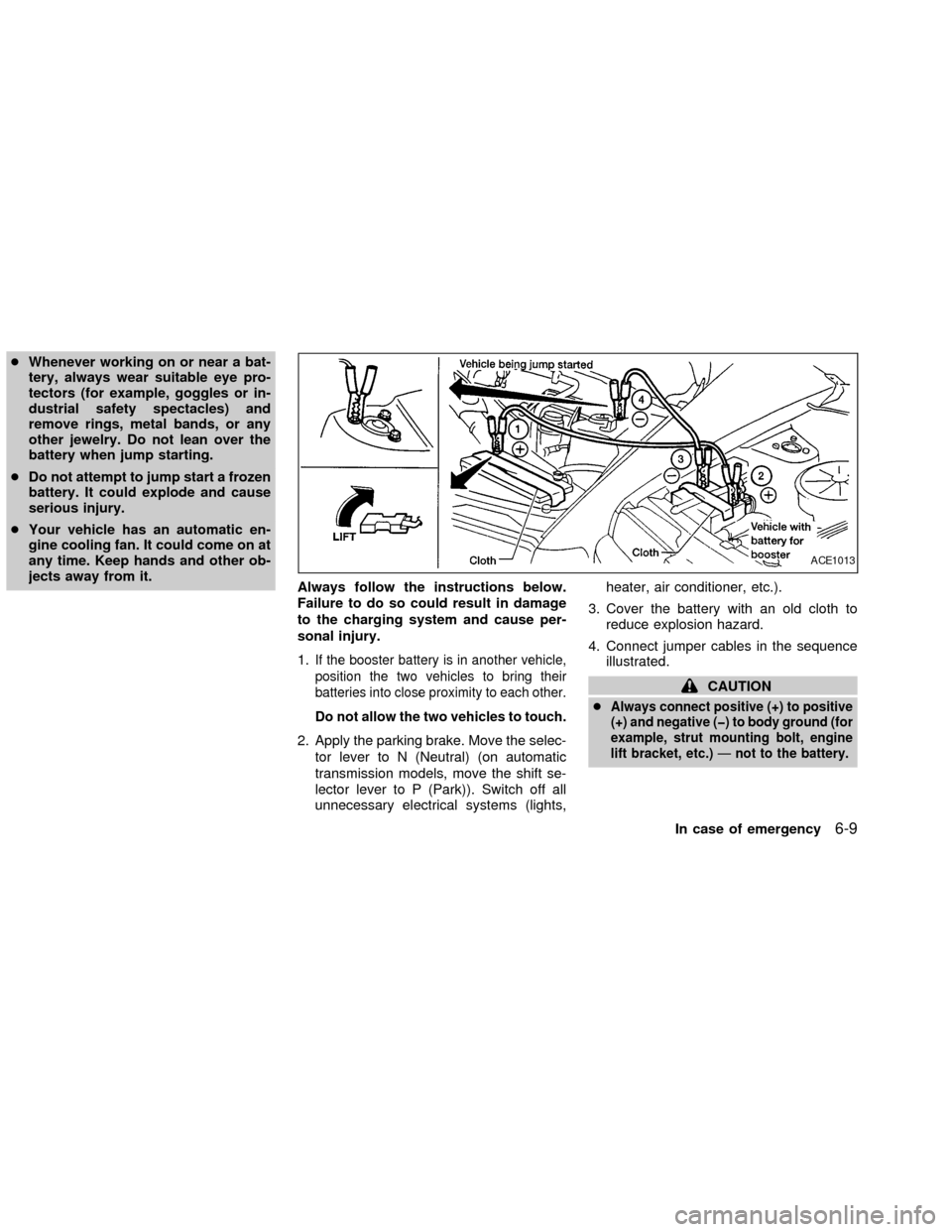
cWhenever working on or near a bat-
tery, always wear suitable eye pro-
tectors (for example, goggles or in-
dustrial safety spectacles) and
remove rings, metal bands, or any
other jewelry. Do not lean over the
battery when jump starting.
cDo not attempt to jump start a frozen
battery. It could explode and cause
serious injury.
cYour vehicle has an automatic en-
gine cooling fan. It could come on at
any time. Keep hands and other ob-
jects away from it.
Always follow the instructions below.
Failure to do so could result in damage
to the charging system and cause per-
sonal injury.
1.
If the booster battery is in another vehicle,
position the two vehicles to bring their
batteries into close proximity to each other.
Do not allow the two vehicles to touch.
2. Apply the parking brake. Move the selec-
tor lever to N (Neutral) (on automatic
transmission models, move the shift se-
lector lever to P (Park)). Switch off all
unnecessary electrical systems (lights,heater, air conditioner, etc.).
3. Cover the battery with an old cloth to
reduce explosion hazard.
4. Connect jumper cables in the sequence
illustrated.
CAUTION
c
Always connect positive (+) to positive
(+) and negative (þ) to body ground (for
example, strut mounting bolt, engine
lift bracket, etc.)Ðnot to the battery.
ACE1013
In case of emergency6-9
ZX
Page 155 of 235

8 Maintenance and do-it-yourself
Maintenance requirements .....................................8-2
General maintenance .............................................8-3
Explanation of general maintenance
items ..................................................................8-3
Maintenance precautions .......................................8-5
Engine compartment check locations -
QG engine .............................................................8-7
Engine compartment check locations -
QR engine .............................................................8-8
Engine cooling system ...........................................8-9
Checking engine coolant level ..........................8-9
Changing engine coolant ................................8-10
Engine oil .............................................................8-12
Checking engine oil level ................................8-12
Changing engine oil ........................................8-13
Changing engine oil filter.................................8-14
Automatic transmission fluid ................................8-15
Temperature conditions for checking ..............8-16
Power steering fluid..............................................8-17
Brake and clutch fluid...........................................8-18
Brake fluid........................................................8-18
Clutch fluid .......................................................8-18Window washer fluid ............................................8-19
Battery ..................................................................8-19
Jump starting ...................................................8-21
Drive belts ............................................................8-22
Spark plug ............................................................8-23
Replacing spark plugs .....................................8-23
Air cleaner ............................................................8-24
Cabin air filter (if so equipped) ........................8-24
Windshield wiper blades ......................................8-28
Cleaning ..........................................................8-28
Replacing .........................................................8-28
Parking brake and brake pedal ............................8-29
Checking park brake .......................................8-29
Checking brake pedal .....................................8-30
Brake booster ..................................................8-30
Clutch pedal .........................................................8-31
Checking clutch pedal .....................................8-31
Fuses ....................................................................8-31
Engine compartment .......................................8-31
Passenger compartment .................................8-34
Keyfob battery replacement .................................8-35
Lights ....................................................................8-36
ZX