2002 NISSAN PATHFINDER lights
[x] Cancel search: lightsPage 129 of 288

from a station transmitter, the signals will tend
to fade and/or drift.
Static and flutter: During signal interference
from buildings, large hills or due to antenna
position, usually in conjunction with increased
distance from the station transmitter, static or
flutter can be heard. This can be reduced by
adjusting the treble control counterclockwise
to reduce treble response.
Multipath reception: Because of the reflective
characteristics of FM signals, direct and re-
flected signals reach the receiver at the same
time. The signals may cancel each other,
resulting in momentary flutter or loss of sound.
The radio has an FM Diversity reception sys-
tem, which employs two antennas if so
equipped. One is a rod type antenna; the other
is an antenna printed on the window. This
system automatically switches to the antenna
which is receiving less noise.
For additional information, see ªAntennaº later
in this section.AM RADIO RECEPTIONAM signals, because of their low frequency,
can bend around objects and skip along the
ground. In addition, the signals can be
bounced off the ionosphere and bent back to
earth. Because of these characteristics. AMsignals are also subject to interference as they
travel from transmitter to receiver.
Fading: Occurs while the vehicle is passing
through freeway underpasses or in areas with
many tall buildings. It can also occur for sev-
eral seconds during ionospheric turbulence
even in areas where no obstacles exist.
Static: Caused by thunderstorms, electrical
power lines, electric signs and even traffic
lights.
AUDIO OPERATION
PRECAUTIONS
Cassette playerITo maintain good quality sound,
NISSAN recommends using cassette
tapes of 60 minutes or shorter in length.
ICassette tapes should be removed from
the player when not in use. Store cas-
settes in their protective cases and away
from direct sunlight, heat, dust, mois-
ture and magnetic sources.
IDirect sunlight can cause the cassette to
become deformed. The use of deformed
cassettes may cause the cassette to jam
in the player.
IDo not use cassettes with labels whichare peeling and loose. If used, the label
could jam in the player.
IIf a cassette has loose tape, insert a
pencil through one of the cassette hubs
and rewind the tape firmly around the
hubs. Loose tape may cause tape jam-
ming and wavering sound quality.
IOver a period of time, the playback
head, capstan and pinch roller may col-
lect a tape coating residue as the tape is
played. This residue accumulation can
cause weak or wavering sound, and
should be removed periodically with a
head cleaning tape. If the residue is not
removed periodically, the player may
need to be disassembled for cleaning.
4-12
Heater, air conditioner and audio systems
Z
01.9.21/R50-D/V5
X
Page 158 of 288
IMake sure the area around the vehicle is
clear.
ICheck fluid levels such as engine oil, cool-
ant, brake and clutch fluid, window washer
fluid as frequently as possible, at least
whenever you refuel.
ICheck to be sure that all windows and light
lenses are clean.
IVisually inspect tires for their appearance
and condition. Also check tires for proper
inflation.
ILock all doors.
IPosition seat and adjust head restraints.
IAdjust inside and outside mirrors.
IFasten seat belts and ask all passengers to
do likewise.
ICheck the operation of warning lights when
key is turned to the ON (3) position.1. Apply the parking brake.
2.Automatic transmission:
Move the selector lever to P (Park position)
or N (Neutral position). (P preferred)
The selector lever cannot be moved out
of P and into any of the other gear
positions if the ignition key is turned to
LOCK or if the key is removed from the
switch.
The starter is designed not to operate if
the selector lever is in one of the driving
positions.
Manual transmission:
Move the gearshift lever to N (Neutral po-
sition), and depress the clutch pedal to the
floor while starting the engine.
The starter is designed not to operate
unless the clutch pedal is fully de-
pressed.
3. Crank the enginewith your foot off the
accelerator pedalby turning the ignition
key to START. Release the key when the
engine starts. If the engine starts, but fails
to run, repeat the above procedure.
Ð If the engine is very hard to start in
extremely cold or hot weather ÐUse the accelerator pedal to help start the
engine.
CAUTION
Do not operate the starter for more than
15 seconds at a time. If the engine does
not start, turn the key off and wait 10
seconds before cranking again, other-
wise the starter could be damaged.
4.Warm-up
Always allow the engine to idle for at least
30 seconds after starting. Drive at moder-
ate speed for a short distance first, espe-
cially in cold weather.
BEFORE STARTING THE ENGINE STARTING THE ENGINE
Starting and driving
5-9
Z
01.9.21/R50-D/V5
X
Page 160 of 288
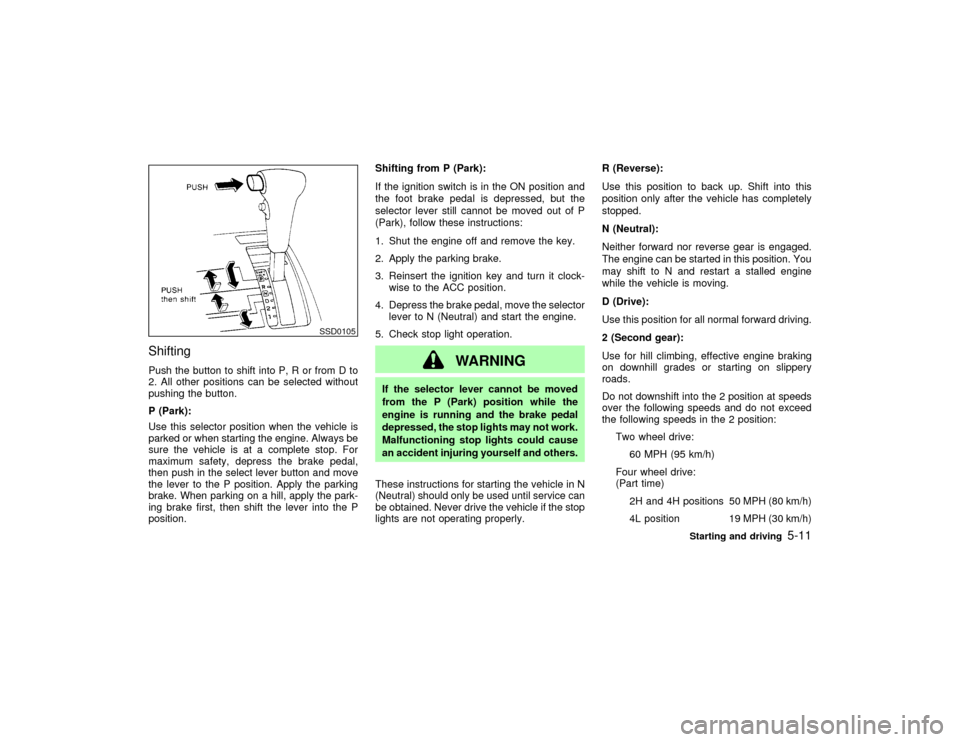
ShiftingPush the button to shift into P, R or from D to
2. All other positions can be selected without
pushing the button.
P (Park):
Use this selector position when the vehicle is
parked or when starting the engine. Always be
sure the vehicle is at a complete stop. For
maximum safety, depress the brake pedal,
then push in the select lever button and move
the lever to the P position. Apply the parking
brake. When parking on a hill, apply the park-
ing brake first, then shift the lever into the P
position.Shifting from P (Park):
If the ignition switch is in the ON position and
the foot brake pedal is depressed, but the
selector lever still cannot be moved out of P
(Park), follow these instructions:
1. Shut the engine off and remove the key.
2. Apply the parking brake.
3. Reinsert the ignition key and turn it clock-
wise to the ACC position.
4. Depress the brake pedal, move the selector
lever to N (Neutral) and start the engine.
5. Check stop light operation.
WARNING
If the selector lever cannot be moved
from the P (Park) position while the
engine is running and the brake pedal
depressed, the stop lights may not work.
Malfunctioning stop lights could cause
an accident injuring yourself and others.
These instructions for starting the vehicle in N
(Neutral) should only be used until service can
be obtained. Never drive the vehicle if the stop
lights are not operating properly.R (Reverse):
Use this position to back up. Shift into this
position only after the vehicle has completely
stopped.
N (Neutral):
Neither forward nor reverse gear is engaged.
The engine can be started in this position. You
may shift to N and restart a stalled engine
while the vehicle is moving.
D (Drive):
Use this position for all normal forward driving.
2 (Second gear):
Use for hill climbing, effective engine braking
on downhill grades or starting on slippery
roads.
Do not downshift into the 2 position at speeds
over the following speeds and do not exceed
the following speeds in the 2 position:
Two wheel drive:
60 MPH (95 km/h)
Four wheel drive:
(Part time)
2H and 4H positions 50 MPH (80 km/h)
4L position 19 MPH (30 km/h)
SSD0105
Starting and driving
5-11
Z
01.9.21/R50-D/V5
X
Page 162 of 288
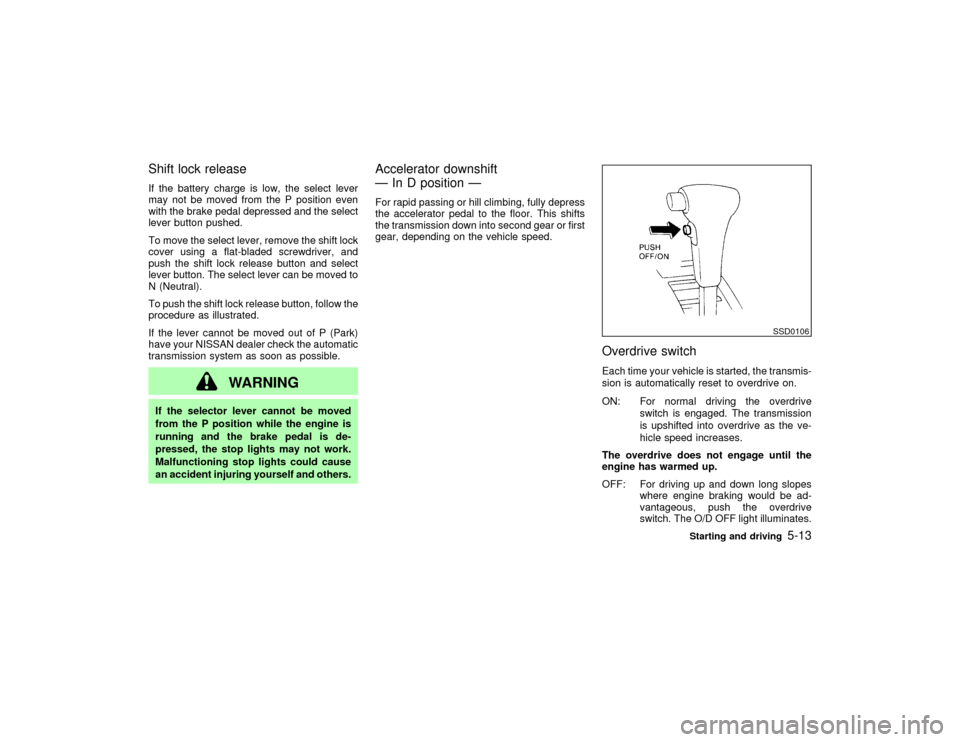
Shift lock releaseIf the battery charge is low, the select lever
may not be moved from the P position even
with the brake pedal depressed and the select
lever button pushed.
To move the select lever, remove the shift lock
cover using a flat-bladed screwdriver, and
push the shift lock release button and select
lever button. The select lever can be moved to
N (Neutral).
To push the shift lock release button, follow the
procedure as illustrated.
If the lever cannot be moved out of P (Park)
have your NISSAN dealer check the automatic
transmission system as soon as possible.
WARNING
If the selector lever cannot be moved
from the P position while the engine is
running and the brake pedal is de-
pressed, the stop lights may not work.
Malfunctioning stop lights could cause
an accident injuring yourself and others.
Accelerator downshift
Ð In D position ÐFor rapid passing or hill climbing, fully depress
the accelerator pedal to the floor. This shifts
the transmission down into second gear or first
gear, depending on the vehicle speed.
Overdrive switchEach time your vehicle is started, the transmis-
sion is automatically reset to overdrive on.
ON: For normal driving the overdrive
switch is engaged. The transmission
is upshifted into overdrive as the ve-
hicle speed increases.
The overdrive does not engage until the
engine has warmed up.
OFF: For driving up and down long slopes
where engine braking would be ad-
vantageous, push the overdrive
switch. The O/D OFF light illuminates.
SSD0106
Starting and driving
5-13
Z
01.9.21/R50-D/V5
X
Page 167 of 288

accelerator pedal. Your vehicle will maintain
the set speed.
ITo pass another vehicle,depress the
accelerator pedal. When you release the
pedal, the vehicle will return to the previ-
ously set speed.
IThe vehicle may not maintain the set speed
when going up or down steep hills. If this
happens, drive without the cruise control.
To cancel the preset speed,follow any of
these three methods:
a) Push the cancel switch; The SET light will
go out.
b) Tap the brake pedal; The SET light will go
out.
c) Turn the main switch off. Both the CRUISE
indicator and SET indicator lights will go
out.
IIf you depress the brake pedal while push-
ing the RES/ACCEL set switch and reset at
the cruising speed, turn the main switch off
once and then turn it on again.
IThe cruise control will automatically be can-
celled if the vehicle slows down more than
8 MPH (13 km/h) below the set speed.
IDepress the clutch pedal (manual transmis-sion), or move the selector lever to N posi-
tion (automatic transmission). The SET
light will go out.
To reset at a faster cruising speed,follow
either of these three methods:
a) Depress the accelerator pedal. When the
vehicle attains the desired speed, push and
release the COAST/SET switch.
b) Push and hold the RES/ACCEL set switch.
When the vehicle attains the speed you
desire, release the switch.
c) Push, then quickly release the RES/
ACCEL set switch. Each time you do this,
the set speed will increase by about 1 MPH
(1.6 km/h).
To reset at a slower cruising speed,follow
either of these three methods:
a) Lightly tap the brake pedal. When the ve-
hicle attains the desired speed, push the
COAST/SET switch and release it.
b) Push and hold the COAST/SET switch.
Release the switch when the vehicle slows
down to the desired speed.
c) Push, then quickly release the COAST/
SET switch. Each time you do this, the set
speed will decrease by about 1 MPH (1.6
km/h).To resume the preset speed,push and re-
lease the RES/ACCEL set switch. The vehicle
will resume the last set cruising speed when
the vehicle speed is over 25 MPH (40 km/h).
PrecautionsIThe CRUISE indicator may sometimes
blink when the cruise control switch (Main
switch) is turned ON while pushing the
RES/ACCEL switch or COAST/SET switch
or CANCEL switch (located on the steering
wheel). To properly set the cruise control
system perform the steps above in the
order indicated. (This is a fail-safe mode.
Turn the main switch OFF and turn it ON
again without pushing the set switch to
return to normal operation.)
IIf the cruise control system malfunctions, it
will cancel automatically. The SET indicator
in the meter assembly will then blink to
warn the driver.
IWhen the SET indicator blinks, turn the
cruise control switch (Main switch) OFF and
have the system checked by your NISSAN
dealer.
5-18
Starting and driving
Z
01.9.21/R50-D/V5
X
Page 210 of 288

8 Maintenance and do-it-yourselfMaintenance requirements ........................................ 8-2
General maintenance ................................................ 8-2
Explanation of general maintenance items .......... 8-2
Interior maintenance............................................. 8-3
Maintenance precautions .......................................... 8-5
Engine compartment check locations ....................... 8-7
Engine cooling system .............................................. 8-9
Checking engine coolant level ............................. 8-9
Changing engine coolant ................................... 8-10
Engine oil ................................................................ 8-13
Checking engine oil level ................................... 8-13
Changing engine oil ........................................... 8-14
Changing engine oil filter ................................... 8-15
Automatic transmission fluid ................................... 8-16
Temperature conditions for checking ................. 8-17
Power steering fluid ................................................ 8-18
Brake and clutch fluid ............................................. 8-18
Brake fluid .......................................................... 8-18
Clutch fluid.......................................................... 8-19
Window washer fluid ............................................... 8-20
Window washer fluid reservoir ........................... 8-20
Battery ..................................................................... 8-21
Jump starting ...................................................... 8-21
Drive belts ............................................................... 8-22Spark plugs ............................................................. 8-23
Replacing spark plugs ........................................ 8-23
Air cleaner ............................................................... 8-23
Windshield wiper blades ......................................... 8-24
Cleaning ............................................................. 8-24
Replacing............................................................ 8-24
Parking brake and brake pedal ............................... 8-25
Checking parking brake ..................................... 8-25
Checking brake pedal ........................................ 8-26
Brake booster ..................................................... 8-26
Clutch pedal ............................................................ 8-27
Checking clutch pedal ........................................ 8-27
Fuses....................................................................... 8-27
Engine compartment .......................................... 8-27
Passenger compartment .................................... 8-28
Keyfob battery replacement ............................... 8-29
Lights ....................................................................... 8-30
Headlights........................................................... 8-31
Wheels and tires ..................................................... 8-34
Tire pressure ...................................................... 8-34
Types of tires...................................................... 8-35
Tire chains .......................................................... 8-36
Changing wheels and tires ................................. 8-37
Clutch housing drain............................... 8-40Z
01.9.21/R50-D/V5
X
Page 212 of 288

Wheel nuts*:
When checking the tires, make sure no nuts
are missing, and check for any loose nuts.
Tighten if necessary.
Tire rotation*:
Tires should be rotated every 7,500 miles
(12,000 km). However, the timing for tire rota-
tion may vary according to your driving habits
and road surface conditions.
Wheel alignment and balance:
If the vehicle should pull to either side while
driving on a straight and level road, or if you
detect uneven or abnormal tire wear, there
may be a need for wheel alignment.
If the steering wheel or seat vibrates at normal
highway speeds, wheel balancing may be
needed.
For additional information regarding tires, refer
to ªImportant Tire Safety Informationº in the
Warranty Information Booklet (US) or ªTire
Safety Informationº in the Warranty Informa-
tion booklet (Canada).
Windshield:Clean the windshield on a regu-
lar basis. Check the windshield at least every
six months for cracks or other damage. Have a
damaged windshield repaired by a qualified
repair facility.Windshield wiper blades*:
Check for cracks or wear if they do not wipe
properly.
Doors and engine hood:
Check that all doors and the engine hood,
operate properly. Also ensure that all latches
lock securely. Lubricate hinges, latches, rollers
and links if necessary. Make sure that the
secondary latch keeps the hood from opening
when the primary latch is released.
When driving in areas using road salt or other
corrosive materials, check lubrication fre-
quently.
Inside the vehicleLights*:
Clean the headlights on a regular basis. Make
sure that the headlights, stop lights, tail lights,
turn signal lights, and other lights are all oper-
ating properly and installed securely. Also
check headlight aim.INTERIOR MAINTENANCEThe maintenance items listed here should be
checked on a regular basis, such as when
performing periodic maintenance, cleaning the
vehicle, etc.Warning lights and chimes:
Make sure that all warning lights and chimes
are operating properly.
Windshield wiper and washer*:
Check that the wipers and washer operate
properly and that the wipers do not streak.
Windshield defroster:
Check that the air comes out of the defroster
outlets properly and in sufficient quantity when
operating the heater or air conditioner.
Steering wheel:
Check for changes in the steering conditions,
such as excessive freeplay, hard steering or
strange noises.
Seats:
Check seat position controls such as seat
adjusters, seatback recliner, etc. to ensure
they operate smoothly and that all latches lock
securely in every position. Check that the head
restraints move up and down smoothly and
that the locks (if so equipped) hold securely in
all latched positions.
Seat belts:
Check that all parts of the seat belt system
(e.g. buckles, anchors, adjusters and retrac-
Maintenance and do-it-yourself
8-3
Z
01.9.21/R50-D/V5
X
Page 239 of 288

SDI1116
LIGHTS8-30
Maintenance and do-it-yourself
Z
01.9.21/R50-D/V5
X