2002 NISSAN PATHFINDER brake
[x] Cancel search: brakePage 174 of 288
*1:IThe transfer 4LO position indicator light
may blink. Stop the vehicle. Be sure to
shift the 4WD shift switch after the auto-
matic transmission lever has been
shifted to the N position. If the indicator
light keeps blinking after the 4WD shift
procedure in the previous page, drive
slowly without abrupt maneuvers for a
while. Then the light will turn on or off.
IAvoid making a turn or abrupt starts
while shifting to 4LO. Otherwise gears
may grind, damaging the drive system.
*2: Make sure the transfer 4LO position indica-
tor light turns on when you shift the 4WD
shift switch to 4LO.
The transfer case 4WD shift switch is used to
select either 2WD or 4WD depending on the
driving conditions. There are four types of
drive modes available, AUTO, 2WD, 4H and
4LO.
The 4WD shift switch electronically controls
the transfer case operation. Rotate the switch
to move between each mode, 2WD, AUTO, 4H
and 4LO.
You must push the switch in to select 4LO,
and the vehicle MUST be stationary and the
automatic transmission selector lever is in
the N position when changing into or out of
4LO.
WARNING
When parking, apply the parking brake
before stopping the engine and make
sure that the 4WD shift indicator light is
on and the ATP warning light goes off.
Otherwise, the vehicle could unexpect-
edly move even if the automatic trans-
mission is in the P position.
CAUTION
INever shift the 4WD shift switch be-
tween 4LO and 4H while driving.
IThe 4H position provides greater
power and traction. Avoid excessive
speed, as it will cause loss of trac-
tion. Speed over 50 MPH (80 km/h) in
4H is not recommend.
IThe 4LO position provides maximum
power and traction. Avoid raising ve-
hicle speed excessively, as the maxi-
mum speed is approximately 30 MPH
(50 km/h).IWhen driving straight, shift the 4WD
shift switch to the 2WD, AUTO or 4H
position. Do not move the 4WD shift
switch when making a turn or revers-
ing.
IDo not shift the 4WD shift switch
(between 2WD, AUTO and 4H) while
driving on steep downhill grades. Use
the engine brake.
IDo not operate the 4WD shift switch
(between 2WD, AUTO and 4H) with
the rear wheels spinning.
IDo not drive on dry hard surface
roads in the 4H or 4LO position. Driv-
ing on dry hard surfaces in 4H or 4LO
may cause unnecessary noise and
tire wear. We recommend driving in
the 2WD or AUTO position under
these conditions.
IVehicles equipped with a limited slip
differential (LSD) have improved driv-
ing performance on rough roads.
They have increased traction perfor-
mance, so when making a turn
Starting and driving
5-25
Z
01.9.21/R50-D/V5
X
Page 176 of 288
This occurs because the transfer clutch
is released and not because of a mal-
function.
CAUTION
IWhen driving straight, shift the 4WD
shift switch to the 2WD, AUTO, or 4H
position. Do not move the 4WD shift
switch when making a turn or revers-
ing.
IDo not shift the 4WD shift switch
while driving on steep downhill
grades. Use the engine brake.
IDo not operate the 4WD shift switch
with the rear wheels spinning.
IBefore placing the 4WD shift switch
in the 4H position from 2WD or AUTO,
ensure the vehicle speed is less than
50 MPH (80 km/h). Failure to do so
can damage the 4WD system.
INever shift the 4WD shift switch be-
tween 4LO and 4H while driving.
IEngine idling speed is high while
warming up the engine. Be espe-cially careful when starting or driving
on slippery surfaces with the 4WD
shift switch set in AUTO.
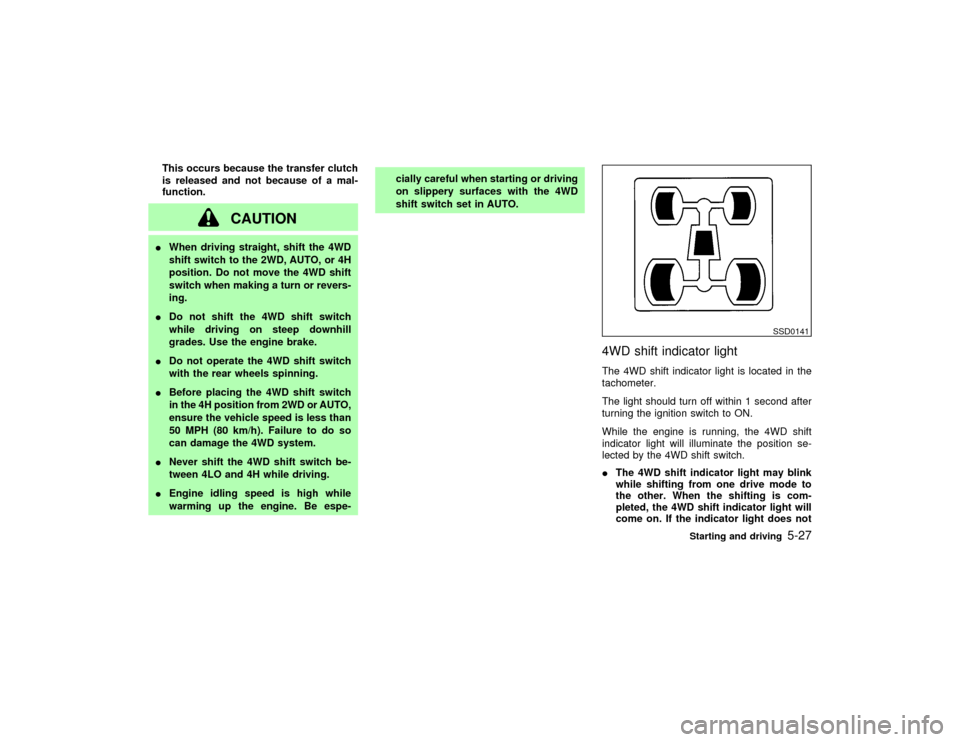
4WD shift indicator lightThe 4WD shift indicator light is located in the
tachometer.
The light should turn off within 1 second after
turning the ignition switch to ON.
While the engine is running, the 4WD shift
indicator light will illuminate the position se-
lected by the 4WD shift switch.
IThe 4WD shift indicator light may blink
while shifting from one drive mode to
the other. When the shifting is com-
pleted, the 4WD shift indicator light will
come on. If the indicator light does not
SSD0141
Starting and driving
5-27
Z
01.9.21/R50-D/V5
X
Page 179 of 288
WARNING
IDo not stop or park the vehicle over
flammable materials, such as dry
grass, waste paper, or rags. They may
ignite and cause a fire.
I
The transfer shift lever must
be in the 2H, 4H or 4L position and the
parking brake must be set to prevent
the vehicle from rolling.
INever place the transfer shift lever inthe N position, otherwise, the vehicle
could roll unexpectedly even if the
manual transmission is in gear or the
automatic transmission is in the P
position. This could result in serious
personal injury or property damage.
INever leave the engine running while
the vehicle is unattended.
INever leave children unattended in
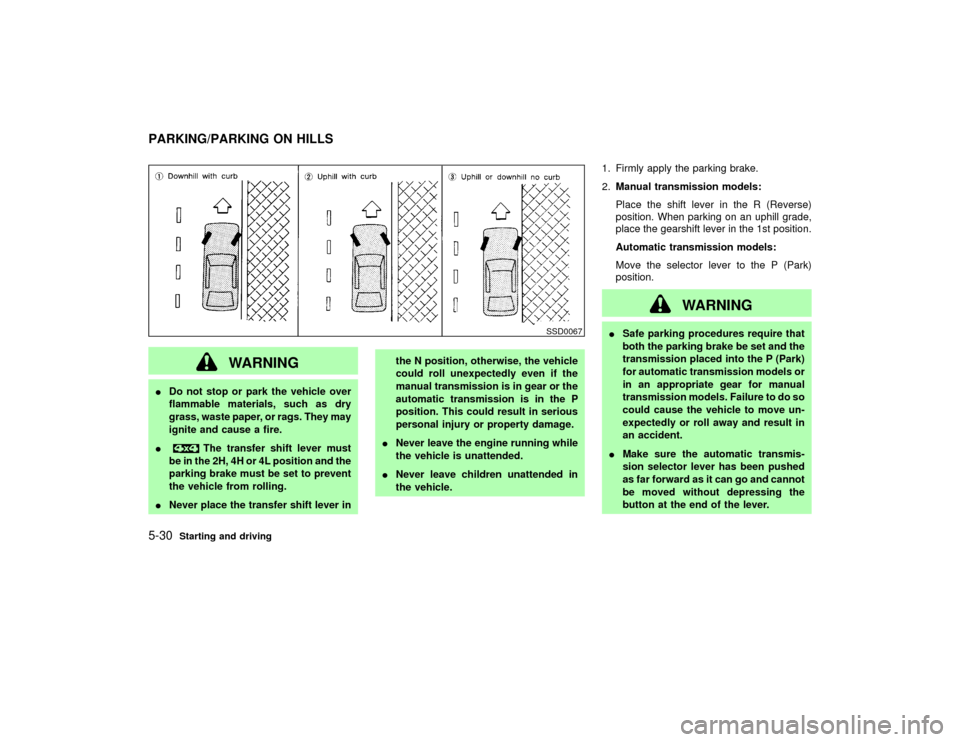
the vehicle.1. Firmly apply the parking brake.
2.Manual transmission models:
Place the shift lever in the R (Reverse)
position. When parking on an uphill grade,
place the gearshift lever in the 1st position.
Automatic transmission models:
Move the selector lever to the P (Park)
position.
WARNING
ISafe parking procedures require that
both the parking brake be set and the
transmission placed into the P (Park)
for automatic transmission models or
in an appropriate gear for manual
transmission models. Failure to do so
could cause the vehicle to move un-
expectedly or roll away and result in
an accident.
IMake sure the automatic transmis-
sion selector lever has been pushed
as far forward as it can go and cannot
be moved without depressing the
button at the end of the lever.
SSD0067
PARKING/PARKING ON HILLS5-30
Starting and driving
Z
01.9.21/R50-D/V5
X
Page 181 of 288
BRAKING PRECAUTIONSThe brake system has two separate hydraulic
circuits. If one circuit malfunctions, you will still
have braking at two wheels.Vacuum assisted brakeThe brake booster aids braking by using en-
gine vacuum. If the engine stops, you can stop
the vehicle by depressing the brake pedal.
However, greater foot pressure on the brake
pedal will be required to stop the vehicle and
the stopping distance will be longer.Using the brakesAvoid resting your foot on the brake pedal
while driving. This will overheat the brakes,
wear out the brake linings and pads faster and
reduce gas mileage.
To help save the brakes and to prevent the
brakes from overheating, before going down a
slope or long grade, reduce speed and down-
shift to a lower gear.Wet brakesWhen the vehicle is washed or driven through
water, the brakes may get wet. As a result,
your braking distance will be longer and the
vehicle may pull to one side during braking.To dry brakes, drive the vehicle at a safe
speed while lightly pressing the brake pedal to
heat-up the brakes. Do this until the brakes
return to normal. Avoid driving the vehicle at
high speeds until the brakes function correctly.
WARNING
IWhile driving on a slippery surface,
be careful when braking, accelerating
or downshifting. Abrupt braking or
accelerating could cause the wheels
to skid and result in an accident.
IIf the engine is not running or is
turned off while driving, the power
assist for the brakes will not work.
Braking will be harder.ANTI-LOCK BRAKE SYSTEM (ABS)The anti-lock brake system controls the brakes
at each wheel so the wheels will not lock when
braking abruptly or when braking on slippery
surfaces. The system detects the rotation
speed at each wheel and varies the brake fluid
pressure to prevent each wheel from locking
and sliding. By preventing wheel lockup, the
system helps the driver maintain steering con-trol and helps to minimize swerving and spin-
ning on slippery surfaces.
Using the systemDepress the brake pedal and hold it down.
WARNING
Do not pump the brake pedal. Doing so
may result in increased stopping dis-
tances.Normal operationThe anti-lock brake system will not operate at
speeds below 3 to 6 MPH (5 to 10 km/h) to
completely stop the vehicle. (The speeds will
vary according to road conditions.) When the
anti-lock system senses that one or more
wheels are close to locking up, the actuator
(under the hood) rapidly applies and releases
hydraulic pressure (like pumping the brakes
very quickly). While the actuator is working,
you may feel a pulsation in the brake pedal
and hear a noise or vibration from the actuator
under the hood. This is normal and indicates
that the anti-lock system is working properly.
However, the pulsation may indicate that road
BRAKE SYSTEM5-32
Starting and driving
Z
01.9.21/R50-D/V5
X
Page 182 of 288
conditions are hazardous and extra care is
required while driving.
If a tire slips on rough roads for more than
10 seconds, the ABS brake warning light
may come on. Turn OFF the ignition key,
restart the engine and drive the vehicle at
speeds above 20 MPH (30 km/h). If the
warning light does not go out, have the
vehicle checked at a NISSAN dealer.Self-test featureThe anti-lock brake system consists of elec-
tronic sensors, electric pumps, and hydraulic
solenoids controlled by a computer. The com-
puter has a built-in diagnostic feature that tests
the system each time you start the engine and
move the vehicle at a low speed in forward or
reverse. When the self-test occurs, you may
hear a clunk noise and/or feel a pulsation in
the brake pedal. This is normal and is not an
indication of any malfunction. If the computer
senses any malfunction, it switches the anti-
lock brake system OFF and turns on the ABS
brake warning light in the dashboard. The
brake system will then behave normally, but
without anti-lock assistance.
If the light comes on during the self check, or
while you are driving, you should take your
vehicle to your NISSAN dealer for repair at
your earliest convenience.
WARNING
The anti-lock brake system is a sophis-
ticated device, but it cannot prevent ac-
cidents resulting from careless or dan-
gerous driving techniques. It can help
maintain vehicle control during braking
on slippery surfaces, but remember that
the stopping distance on slippery sur-
faces will be longer than on normal
surfaces, even with the anti-lock sys-
tem. Stopping distances may also be
longer on rough, gravel or snow covered
roads, or if you are using tire chains.
Always maintain a safe distance from
the vehicle in front of you. Ultimately,
the responsibility for safety of self and
others rests in the hands of the driver.
Tire type and condition of tires may also
affect braking effectiveness.
IWhen replacing tires, install the
specified size of tires on all four
wheels.
IWhen installing a spare tire, make
sure it is the proper size and type asspecified on the tire placard. See
ªTire placardº in the ª9. Technical
and consumer informationº section
for tire placard location information.
Starting and driving
5-33
Z
01.9.21/R50-D/V5
X
Page 184 of 288
tread pattern on all four wheels.
CAUTION
ONLY use spare tires specified for each
four wheel drive model.SPECIAL WINTER EQUIPMENTIt is recommended that the following items be
carried in the vehicle during winter:
IA scraper and stiff-bristled brush to remove
ice and snow from the windows and wiper
blades.
IA sturdy, flat board to be placed under the
jack to give it firm support.
IA shovel to dig the vehicle out of snow-
drifts.
IExtra window washer fluid to refill the res-
ervoir tank.DRIVING ON SNOW OR ICE
WARNING
IWet ice (32ÉF, 0ÉC and freezing rain),very cold snow or ice can be slick and
very hard to drive on. The vehicle will
have a lot less traction or grip under
these conditions. Try to avoid driving
on wet ice until the road is salted or
sanded.
IWhatever the condition, drive with
caution. Accelerate and slow down
with care. If accelerating or down-
shifting too fast, the drive wheels will
lose even more traction.
IAllow more stopping distance under
these conditions. Braking should be
started sooner than on dry pavement.
IAllow greater following distances on
slippery roads.
IWatch for slippery spots (glare ice).
These may appear on an otherwise
clear road in shaded areas. If a patch
of ice is seen ahead, brake before
reaching it. Try not to brake while
actually on the ice, and avoid any
sudden steering maneuvers.IDo not use cruise control on slippery
roads.
ISnow can trap dangerous exhaust
gases under your vehicle. Keep snow
clear of the exhaust pipe and from
around your vehicle.
ENGINE BLOCK HEATER (if so
equipped)An engine block heater to assist extreme cold
temperature starting is available through your
NISSAN dealer.
WARNING
Do not use your heater with an un-
grounded electrical system or two-
pronged (cheater) adapters. You can be
injured by an electrical shock if you use
an ungrounded connection.
Starting and driving
5-35
Z
01.9.21/R50-D/V5
X
Page 187 of 288
CHANGING A FLAT TIREIf you have a flat tire, follow the instructions
below.Stopping the vehicle1. Safely move the vehicle off the road away
from traffic.
2. Turn on the hazard warning flasher.
3. Park on a level surface and apply the
parking brake. Shift the manual transmis-
sion into reverse (automatic transmission in
P).
WARNING
I
The transfer control lever
must be in the 2H, 4H or 4L position.
INever place the transfer control lever
in the N position. Otherwise, the ve-
hicle could roll unexpectedly even if
the manual transmission is in gear or
the automatic transmission is in the P
position. This could result in serious
personal injury or property damage.All-mode 4WD models:
IMake sure the 4WD shift indicator
and/or transfer 4LO position indicator
light remains illuminated before stop-
ping the engine.
IMake sure the ATP light is off before
stopping the engine. Otherwise, the
vehicle could roll unexpectedly even
if the automatic transmission is in the
P position. This could result in seri-
ous personal injury or property dam-
age.
4. Turn off the engine.
WARNING
IMake sure that the parking brake is
securely applied and the manual
transmission is shifted into R (re-
verse), on the automatic transmis-
sion in P (Park).
INever change tires when the vehicle
is on a slope, ice or a slippery area.This is hazardous.
INever change tires if oncoming traffic
is close to your vehicle. Wait for pro-
fessional road assistance.
5. Raise the hood to warn other traffic and to
signal professional road assistance person-
nel that you need help.
6. Have all passengers get out of the vehicle
and stand in a safe place away from traffic
and clear of the vehicle.
FLAT TIRE6-2
In case of emergency
Z
01.9.21/R50-D/V5
X
Page 191 of 288
the vehicle to move. This is especially
true for vehicle with limited slip dif-
ferential carriers.
IDo not allow passengers to stay in
the vehicle while it is on the jack.
Carefully read the following instructions.
1. Place the jack directly under the jack-up
point.
The jack should be used on level firm
ground.
2. Loosen each wheel nut one or two turns by
turning counterclockwise with the wheel nut
wrench.
Do not remove the wheel nuts until the tire
is off the ground.
3. Carefully raise the vehicle until the tire
clears the ground. To lift the vehicle, se-
curely hold the jack lever and rod with both
hands as shown above. Remove the wheel
nuts, and then remove the wheel. Do not
remove the brake drum with the wheel.
Installing the spare tire1. Clean any mud or dirt from the surface
between the wheel and hub.
2. Carefully put the wheel on and tighten the
wheel nuts finger tight.
3. With the wheel nut wrench, tighten wheel
nuts alternately and evenly until they are
tight.
4. Lower the vehicle slowly until the tire
touches the ground. Then, with the wheel
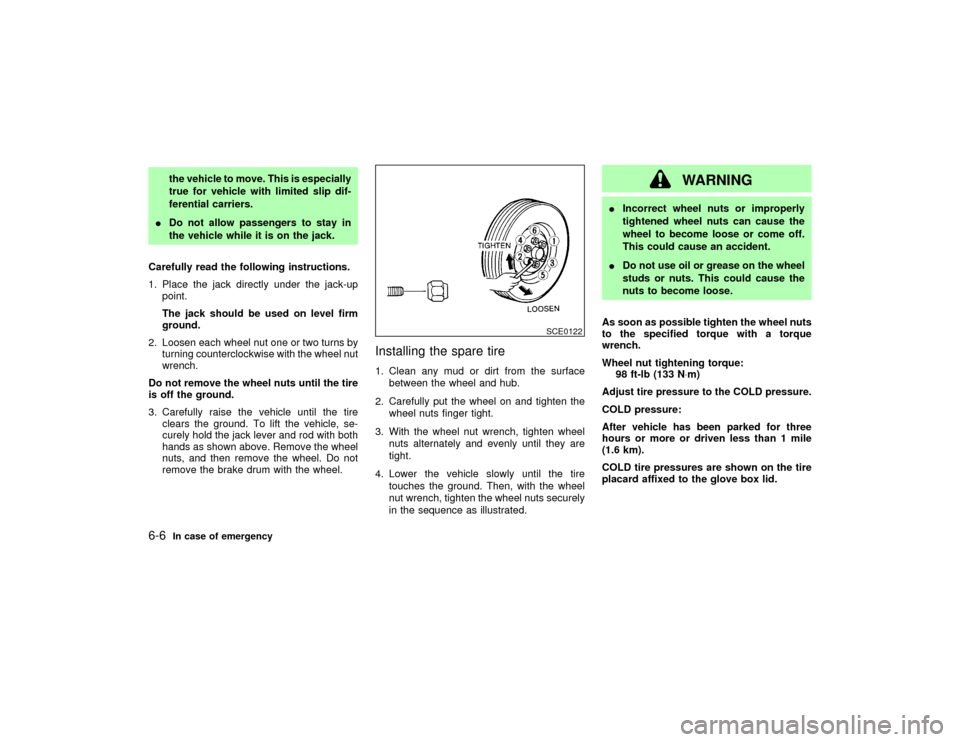
nut wrench, tighten the wheel nuts securely
in the sequence as illustrated.
WARNING
IIncorrect wheel nuts or improperly
tightened wheel nuts can cause the
wheel to become loose or come off.
This could cause an accident.
IDo not use oil or grease on the wheel
studs or nuts. This could cause the
nuts to become loose.
As soon as possible tighten the wheel nuts
to the specified torque with a torque
wrench.
Wheel nut tightening torque:
98 ft-lb (133 N×m)
Adjust tire pressure to the COLD pressure.
COLD pressure:
After vehicle has been parked for three
hours or more or driven less than 1 mile
(1.6 km).
COLD tire pressures are shown on the tire
placard affixed to the glove box lid.
SCE0122
6-6
In case of emergency
Z
01.9.21/R50-D/V5
X