2002 NISSAN ALTIMA turn signal
[x] Cancel search: turn signalPage 85 of 249
WARNING
cDo not use the HomeLinkTUniversal
Transceiver with any garage door
opener that lacks safety stop and
reverse features as required by fed-
eral safety standards. (These stan-
dards became effective for opener
models manufactured after April 1,
1982). A garage door opener which
cannot detect an object in the path of
a closing garage door and then au-
tomatically stop and reverse, does
not meet current federal safety stan-
dards. Using a garage door opener
without these features increases the
risk of serious injury or death.
cDuring programming, your garage
door or gate may open or close.
Make sure that people and objects
are clear of the garage door or gate
that you are programming.
cYour vehicle's engine should be
turned off while programming the
HomeLinkTUniversal Transceiver.
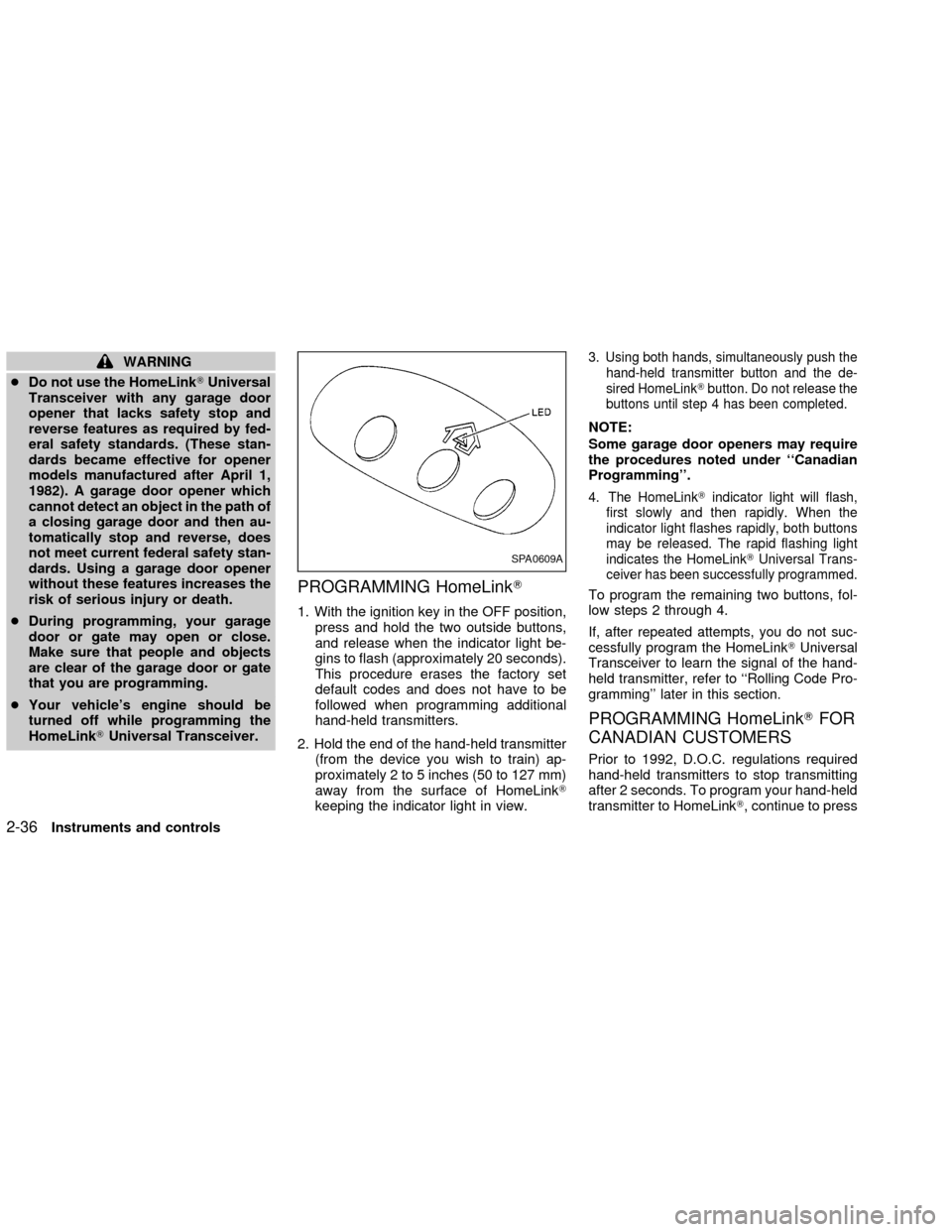
PROGRAMMING HomeLinkT
1. With the ignition key in the OFF position,
press and hold the two outside buttons,
and release when the indicator light be-
gins to flash (approximately 20 seconds).
This procedure erases the factory set
default codes and does not have to be
followed when programming additional
hand-held transmitters.
2. Hold the end of the hand-held transmitter
(from the device you wish to train) ap-
proximately 2 to 5 inches (50 to 127 mm)
away from the surface of HomeLinkT
keeping the indicator light in view.
3. Using both hands, simultaneously push the
hand-held transmitter button and the de-
sired HomeLinkTbutton. Do not release the
buttons until step 4 has been completed.
NOTE:
Some garage door openers may require
the procedures noted under ``Canadian
Programming''.
4. The HomeLinkTindicator light will flash,
first slowly and then rapidly. When the
indicator light flashes rapidly, both buttons
may be released. The rapid flashing light
indicates the HomeLinkTUniversal Trans-
ceiver has been successfully programmed.
To program the remaining two buttons, fol-
low steps 2 through 4.
If, after repeated attempts, you do not suc-
cessfully program the HomeLinkTUniversal
Transceiver to learn the signal of the hand-
held transmitter, refer to ``Rolling Code Pro-
gramming'' later in this section.
PROGRAMMING HomeLinkTFOR
CANADIAN CUSTOMERS
Prior to 1992, D.O.C. regulations required
hand-held transmitters to stop transmitting
after 2 seconds. To program your hand-held
transmitter to HomeLinkT, continue to press
SPA0609A
2-36Instruments and controls
ZX
Page 115 of 249

RADIO
Turn the ignition key to ACC or ON and
press the power on switch to turn on the
radio. If you listen to the radio with the
engine not running, the key should be
turned to the ACC position.
Radio reception is affected by station signal
strength, distance from radio transmitter,
buildings, bridges, mountains and other ex-
ternal influences. Intermittent changes in
reception quality normally are caused by
these external influences.
Using a cellular phone in or near the
vehicle may influence radio reception
quality.
Radio reception
Your NISSAN radio system is equipped with
state-of-the-art electronic circuits to en-
hance radio reception. These circuits are
designed to extend reception range, and to
enhance the quality of that reception.
However there are some general character-
istics of both FM and AM radio signals that
can affect radio reception quality in a mov-
ing vehicle, even when the finest equipment
is used. These characteristics are com-pletely normal in a given reception area,
and do not indicate any malfunction in your
NISSAN radio system.
Reception conditions will constantly change
because of vehicle movement. Buildings,
terrain, signal distance and interference
from other vehicles can work against ideal
reception. Described below are some of the
factors that can affect your radio reception.
FM RADIO RECEPTION
Range: FM range is normally limited to 25 to
30 miles (40 to 48 km), with monaural
(single channel) FM having slightly more
range than stereo FM. External influences
may sometimes interfere with FM station
reception even if the FM station is within 25
miles (40 km). The strength of the FM signal
is directly related to the distance between
the transmitter and receiver. FM signals
follow a line-of-sight path, exhibiting many
of the same characteristics as light. For
example they will reflect off objects.
Fade and drift: As your vehicle moves away
from a station transmitter, the signals will
tend to fade and/or drift.
Static and flutter: During signal interference
from buildings, large hills or due to antennaposition (usually in conjunction with in-
creased distance from the station transmit-
ter) static or flutter can be heard. This can
be reduced by adjusting the treble control
counterclockwise to reduce treble re-
sponse.
Multipath reception: Because of the reflec-
tive characteristics of FM signals, direct and
reflected signals reach the receiver at the
same time. The signals may cancel each
other, resulting in momentary flutter or loss
of sound.
AM RADIO RECEPTION
AM signals, because of their low frequency,
can bend around objects and skip along the
ground. In addition, the signals can be
bounced off the ionosphere and bent back
to earth. Because of these characteristics.
AM signals are also subject to interference
as they travel from transmitter to receiver.
Fading: Occurs while the vehicle is passing
through freeway underpasses or in areas
with many tall buildings. It can also occur for
several seconds during ionospheric turbu-
lence even in areas where no obstacles
exist.
Static: Caused by thunderstorms, electrical
AUDIO SYSTEM
4-12Heater, air conditioner and audio systems
ZX
Page 119 of 249

FM-AM RADIO WITH COMPACT
DISC (CD) PLAYER
ONzOFF/VOL control
Turn the ignition key to the ACC or ON
position, then push the PWR control knob. If
you listen to the radio with the engine not
running, turn the key to the ACC position.
The mode (radio or CD) that was playing
immediately before the system was turned
off resumes playing.
When no CD is loaded, the radio comes on.
Pushing the PWR control knob again turns
the system off.
Turn the PWR control knob to the right to
increase volume or to the left to decrease
volume.
Adjusting tone quality and speaker bal-
ance
Press the AUDIO button to enter the audio
adjust mode:
Bass!Mid!Treb!Fade!Bal
Press the TUNE/FF-REV (
or)or
SEEK/TRACK (or) to adjust to the
desired levels. The display will return to the
regular radio display after 7 seconds, or youmay press the AUDIO button again to return
to the regular radio display.
Clock operation
Pressing the MENU or CLOCK button dis-
plays the clock with the radio on or off.
Press the MENU or CLOCK button again to
turn off the clock display.
Clock set
1. Press and hold the MENU or CLOCK
button until it beeps (>2 seconds).
2. The hours will start flashing. Press
TUNE/FF-REV (
or)or
SEEK/TRACK (or) to adjust the
hours.
3. Press the MENU or CLOCK button to
switch to the minute adjustment.
4. Press TUNE/FF-REV (
or)or
SEEK/TRACK (or) to adjust
the minutes.
5. Press the MENU or CLOCK button again
to exit the clock set mode.
The display will return to the regular clock
display after 7 seconds, or you may press
the MENU or CLOCK button again to return
to the regular clock display.
FM-AM radio operation
FM-AM band select
Push the AM or the FM button to change
from AM to FM reception.
The FM stereo indicator, ST, illuminates
during FM stereo reception. When the ste-
reo broadcast signal is weak, the radio
automatically changes from stereo to mon-
aural reception.
Station signal strength, distance from radio
transmitter, buildings, bridges, mountains,
and other external influences affect radio
reception. Intermittent changes in reception
quality normally are caused by these exter-
nal influences.
Using a cellular phone in or near the
vehicle may influence radio reception
quality.
4-16Heater, air conditioner and audio systems
ZX
Page 124 of 249

FM-AM RADIO WITH COMPACT
DISC (CD) CHANGER (if so
equipped)
ONzOFF/VOL control
Turn the ignition key to the ACC or ON
position, then push the PWR control knob. If
you listen to the radio with the engine not
running, turn the key to the ACC position.
The mode (radio or CD) that was playing
immediately before the system was turned
off resumes playing.
When no CD is loaded, the radio comes on.
Pushing the PWR control knob again turns
the system off.
Turn the PWR control knob to the right to
increase volume or to the left to decrease
volume.
Adjusting tone quality and speaker bal-
ance
Press the AUDIO button to enter the audio
adjust mode:
Bass!Treb!Fade!Bal
Press the TUNE/FF-REV (
or)or
SEEK/TRACK (or) to adjust to
the desired levels. The display will return tothe regular radio display after 7 seconds, or
youmay press the AUDIO button again to
return to the regular radio display.
Clock operation
Pressing the MENU button displays the
clock with the radio on or off. Press the
MENU button again to turn off the clock
display.
Clock set
1. Press and hold the MENU button until it
beeps (>2 seconds).
2. The hours will start flashing. Press
TUNE/FF-REV (
or)or
SEEK/TRACK (
or) to adjust
the hours.
3. Press the MENU button to switch to the
minute adjustment.
4. Press TUNE/FF-REV (
or)or
SEEK/TRACK (
or) to adjust
the minutes.
5. Press the MENU button again to exit the
clock set mode.
The display will return to the regular clock
display after 7 seconds, or you may pressthe MENU button again to return to the
regular clock display.
FM-AM radio operation
FM-AM band select
Push the AM or the FM button to change
from AM to FM reception.
The FM stereo indicator, ST, illuminates
during FM stereo reception. When the ste-
reo broadcast signal is weak, the radio
automatically changes from stereo to mon-
aural reception.
Station signal strength, distance from radio
transmitter, buildings, bridges, mountains,
and other external influences affect radio
reception. Intermittent changes in reception
quality normally are caused by these exter-
nal influences.
Using a cellular phone in or near the
vehicle may influence radio reception
quality.
Heater, air conditioner and audio systems
4-21
ZX
Page 159 of 249
CHANGING A FLAT TIRE
If you have a flat tire, follow the instructions
below:
Stopping the vehicle
1. Safely move the vehicle off of the road
and away from traffic.
2. Turn on the hazard warning flashers.
3. Park on a level surface and apply the
parking brake. Shift the manual transmis-
sion into R (Reverse), or the automatic
transmission into P (Park).
4. Turn off the engine.
5. Raise the hood to warn other traffic, and
to signal professional road assistance
personnel that you need assistance.
6. Have all passengers get out of the ve-
hicle and stand in a safe place, away
from traffic and clear of the vehicle.
WARNING
cMake sure the parking brake is se-
curely applied and the manual trans-
mission is shifted into R (Reverse),
or the automatic transmission into P
(Park).
cNever change tires when the vehicle
is on a slope, ice or slippery areas.
This is hazardous.
cNever change tires if oncoming traf-
fic is close to your vehicle. Wait for
professional road assistance.
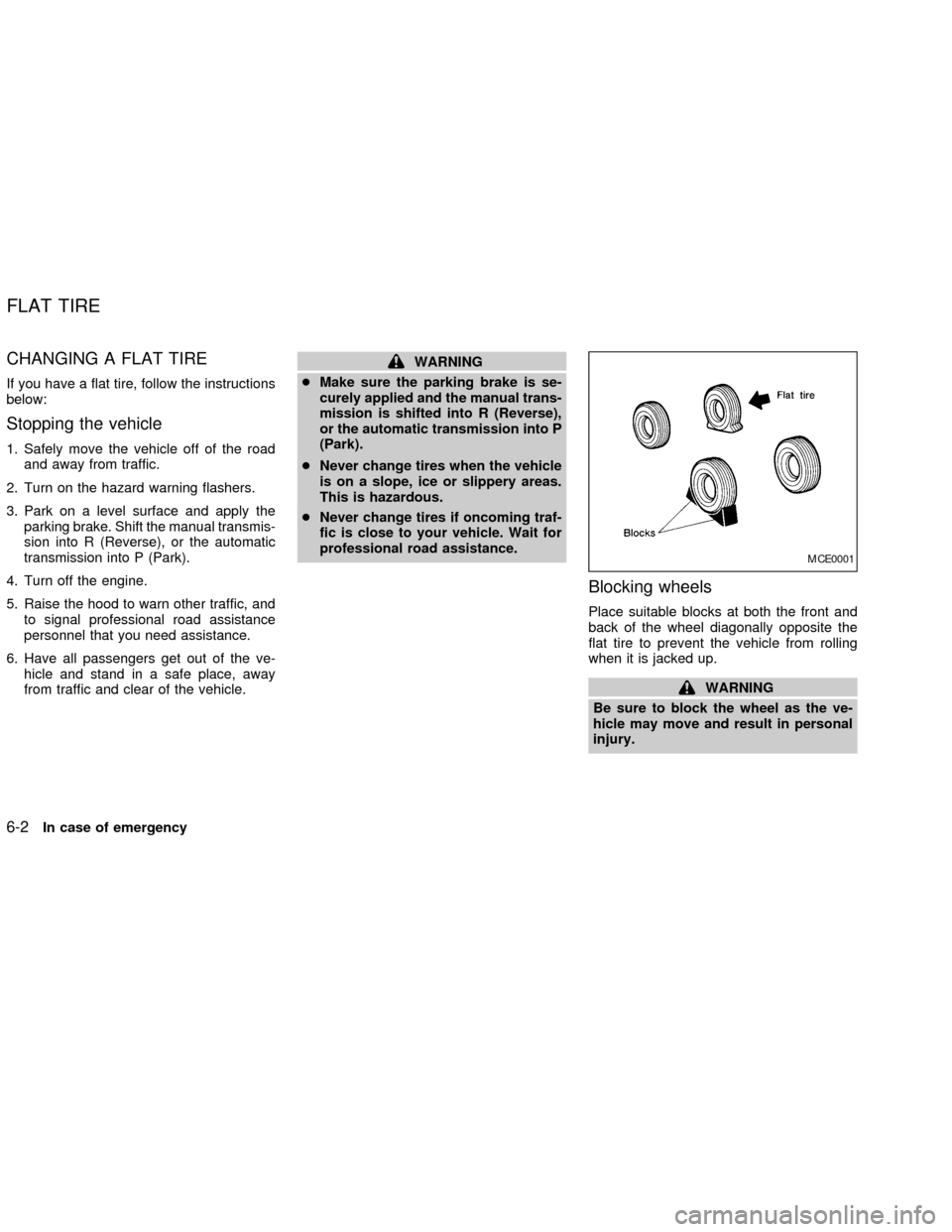
Blocking wheels
Place suitable blocks at both the front and
back of the wheel diagonally opposite the
flat tire to prevent the vehicle from rolling
when it is jacked up.
WARNING
Be sure to block the wheel as the ve-
hicle may move and result in personal
injury.
MCE0001
FLAT TIRE
6-2In case of emergency
ZX
Page 180 of 249

During the normal day-to-day operation of
the vehicle, general maintenance should be
performed regularly as prescribed in this
section. If you detect any unusual sounds,
vibrations or smells, be sure to check for the
cause or have an authorized NISSAN
dealer do it promptly. In addition, you should
notify an authorized NISSAN dealer if you
think that repairs are required.
When performing any checks or mainte-
nance work, closely observe the precau-
tions in this section.
EXPLANATION OF GENERAL
MAINTENANCE ITEMS
Additional information on the following
items with ``*'' is found later in this sec-
tion.
Outside the vehicle
The maintenance items listed here should
be performed from time to time, unless
otherwise specified.
Tires*Check the pressure with a gauge at
least once a month and always prior to long
distance trips, including the spare, and ad-
just to the specified pressure if necessary.Check carefully for damage, cuts or exces-
sive wear.
Wheel nuts*When checking the tires, make
sure no wheel nuts are missing, and check for
any loose wheel nuts. Tighten if necessary.
Tire rotation*Tires should be rotated every
7,500 miles (12,000 km).
Wheel alignment and balanceIf the ve-
hicle should pull to either side while driving
on a straight and level road, or if you detect
uneven or abnormal tire wear, there may be
a need for wheel alignment.
If the steering wheel or seat vibrates at
normal highway speeds, wheel balancing
may be needed.
WindshieldClean the windshield on a
regular basis. Check the windshield at least
every six months for cracks or other dam-
age. Have a damaged windshield repaired
by a qualified repair facility.
Windshield wiper blades*Check for
cracks or wear if they do not wipe properly.
Doors and hoodCheck that the doors and
the hood operate properly. Also ensure that
all latches lock securely. Lubricate hinges,
latches, latch pins, rollers and links as nec-essary. Make sure that the secondary latch
keeps the hood from opening when the
primary latch is released.
When driving in areas using road salt or
other corrosive materials, check lubrication
frequently.
Lights*Clean the headlights on a regular
basis. Make sure that the headlights, stop
lights, tail lights, turn signal lights, and other
lights are all operating properly and installed
securely. Also check headlight aim.
Inside the vehicle
The maintenance items listed here should
be checked on a regular basis, such as
when performing periodic maintenance,
cleaning the vehicle, etc.
Warning lights and chimesMake sure all
warning lights and chimes are operating
properly.
Windshield wiper and washer*Check that
the wipers and washer operate properly and
that the wipers do not streak.
Windshield defrosterCheck that the air
comes out of the defroster outlets properly
and in sufficient quantity when operating the
heater or air conditioner.
GENERAL MAINTENANCE
Maintenance and do-it-yourself8-3
ZX
Page 207 of 249
HEADLIGHTS
Replacing the xenon headlight bulb
WARNING
HIGH VOLTAGE
When xenon headlights are on, they
produce a high voltage. To prevent an
electric shock, never attempt to modify
or disassemble. Always have your xe-
non headlights replaced at an autho-
rized NISSAN dealer. For additional in-
formation, see ``Headlight and turn
signal switch'' in the ``Instruments and
controls'' section.
Replacing the halogen headlight
bulb
The headlight is a semi-sealed beam type
which uses a replaceable halogen bulb.
Because the headlight assembly must be
removed from the vehicle for bulb replace-
ment, see your NISSAN Dealer.
CAUTION
cDo not leave the headlight assembly
open without a bulb installed for a
long period of time. Dust, moisture,
smoke, etc. entering the headlight
body may affect bulb performance.
Remove the bulb from the headlight
assembly just before a replacement
bulb is installed.
cOnly touch the plastic base when
handling the bulb. Never touch the
glass envelope. Touching the glass
could significantly affect bulb life
and/or headlight performance.
cHigh pressure halogen gas is sealed
inside the halogen bulb. The bulb
may break if the glass envelope is
scratched or the bulb is dropped.
cUse the same number and wattage
as originally installed:
Low Beam High Beam
Wattage 55 60
Bulb no. H1 HB (9005)cAiming is not necessary after replac-
ing the bulb. When aiming adjust-
ment is necessary, contact an autho-
rized NISSAN dealer.
LIGHTS
8-30Maintenance and do-it-yourself
ZX
Page 244 of 249

Headlight and turn signal switch ............... 2-18
Heated seats.............................................. 2-24
Heater
Heater and air conditioner controls ........ 4-3
Heater operation ..................................... 4-4
Homelink Transceiver
Integrated HomeLinkTUniversal
Transceiver (If so equipped) ................ 2-35
Hood release ............................................... 3-9
Horn ........................................................... 2-23
I
Ignition switch .............................................. 5-4
Immobilizer system ..................... 2-14, 3-2, 5-6
Important vehicle information label............ 9-11
Increasing fuel economy............................ 5-16
Indicator lights and audible reminders
(See warning/indicator lights and audible
reminders) .................................................... 2-8
Inside mirror ............................................... 3-15
Instrument brightness control .................... 2-20
Integrated HomeLinkTUniversal Transceiver
(If so equipped).......................................... 2-35
Interior light ................................................ 2-34
Interior trunk lid release ............................. 3-11
J
Jump starting ...................................... 6-6, 8-18K
Key ............................................................... 3-2
Keyless entry system (See remote keyless
entry system) ............................................... 3-5
L
Labels
Air conditioner specification label ......... 9-12
Emission control information label........ 9-12
Engine serial number ........................... 9-11
F.M.V.S.S. certification label ................ 9-11
Vehicle identification number (VIN)
plate ...................................................... 9-10
Warning labels (for SRS) ..................... 1-19
License plate
Installing the license plate .................... 9-13
Light
Air bag warning light ............ 1-14, 1-19, 2-9
Bulb check/instrument panel .................. 2-8
Bulb replacement.................................. 8-32
Charge warning light .............................. 2-9
Front fog light switch ............................ 2-21
Headlight and turn signal switch .......... 2-18
Interior light ........................................... 2-34
Low washer fluid warning light ............. 2-10
Spotlights (See map light) .................... 2-34
Trunk light ............................................. 2-35
Warning/indicator lights and audible
reminders ................................................ 2-8Lock
Child safety rear door lock ..................... 3-4
Door locks............................................... 3-2
Fuel filler lid lock opener lever ............. 3-12
Glove box lock ...................................... 2-28
Power door locks .................................... 3-3
Trunk lid lock opener lever ................... 3-10
M
Maintenance
General maintenance ............................. 8-3
Maintenance precautions ................ 8-2, 8-5
Outside the vehicle ................................. 8-3
Seat belt maintenance.......................... 1-28
Under the hood and vehicle ................... 8-4
Malfunction indicator lamp (MIL) ............... 2-11
Map lights .................................................. 2-34
Meters and gauges .............................. 2-2, 2-3
Mirror
Inside mirror.......................................... 3-15
Outside mirror control ........................... 3-16
Vanity mirror ......................................... 3-14
Multi-remote control system (See remote
keyless entry system) .................................. 3-5
Multi-remote controller battery
replacement ............................................... 8-29
N
Nissan vehicle immobilizer system
(NVIS) ......................................... 2-13, 3-2, 5-6
10-3
ZX