Page 119 of 430
116 Instrument cluster
Te ch n i c a l
data Instruments
and controlsOperationDrivingInstrument
cluster displayPractical hints Car care Index
Speedometer (9)
When the cruise control is activated, the segments on
the speedometer scale between the set speed to the top
of the scale are illuminated. Cruise control, see
page 258.
When the Distronic (DTR) is activated, one or two
segments around the speed stored in memory light up
in the speedometer dial. Distronic (DTR), see page 261.Note:
The speed display is set to read out for
•USA in mph
•Canada in km/h.
The unit for the speed display can be set in the
individual setting menu “INST. CLUSTER” –
“SPEEDOMETER” on page 140.
Page 120 of 430
117 Instrument cluster
Te ch n i c a l
data Instruments
and controlsOperationDrivingInstrument
cluster displayPractical hints Car care Index Trip odometer (13)
To reset to “0” miles / km:
Activate the instrument cluster if it is not already
activated by pressing theJbutton on the instrument
cluster.
Press the è or ÿ button on the multifunction
steering wheel repeatedly until the trip odometer
appears if it is not displayed. See page 122.
Press button Jon the instrument cluster until the trip
odometer is reset.Tachometer (16)
The red marking on the tachometer denotes excessive
engine speed.
Avoid this engine speed, as it may result in serious
engine damage that is not covered by the
Mercedes-Benz Limited Warranty.
To help protect the engine, the fuel supply is interrupted
if the engine is operated within the red marking.
Page 121 of 430
118 Multifunction steering wheel, multifunction display
Te ch n i c a l
data Instruments
and controlsOperationDrivingInstrument
cluster displayPractical hints Car care Index
Multifunction steering wheel, multifunction display
Page 122 of 430

119 Multifunction steering wheel, multifunction display
Te ch n i c a l
data Instruments
and controlsOperationDrivingInstrument
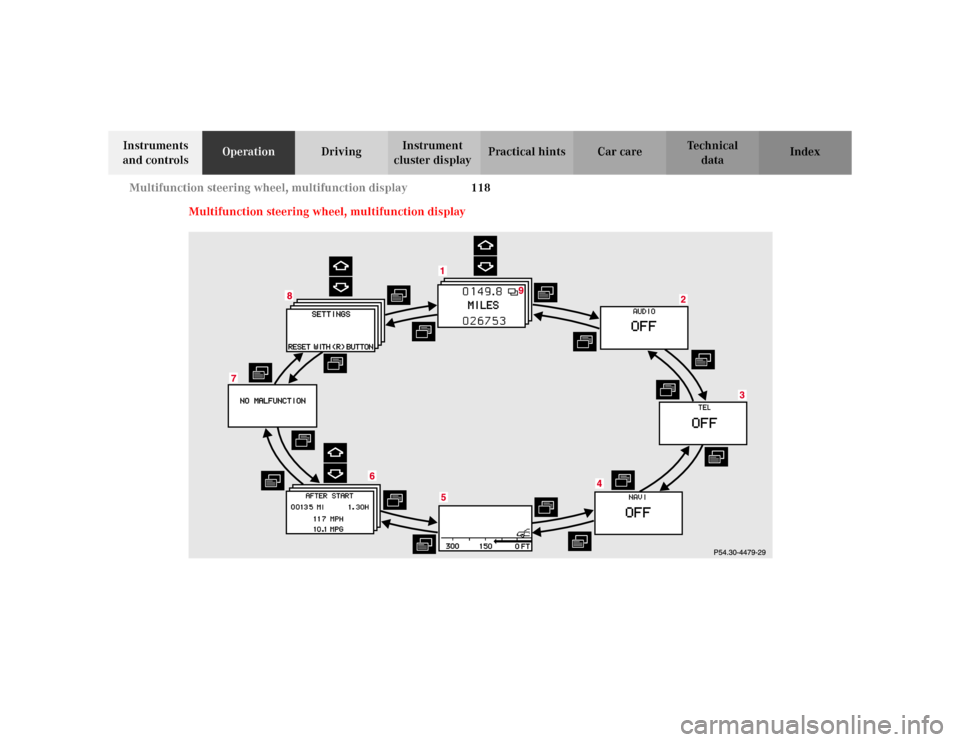
cluster displayPractical hints Car care Index Depending on your vehicle’s equipment, you may use
the buttons on the multifunction steering wheel to call
up, control and set the following systems in the
multifunction display:
1Trip and main odometer, see page 122
Flexible service system (FSS), see page 149
Tire inflation pressure monitor, see page 152
Engine oil level indicator, see page 156
2Audio systems, see page 124
Radio, seepage124
CD player, see page 125
Cassette player, see page 126
3Telephone, see page 1274Navigation system, see page 132
5Distronic (DTR), see page 133
6Trip computer, see page 134
After start
After reset
Range
7Malfunction message memory, see page 136
8Individual settings, see page 138
9Malfunction messages are stored in memory (7), see
page 136.
Press the è or ÿ button repeatedly until the
required system is displayed.
The display advances by one system each time the
button is pressed.
You may call up additional displays within some of these
categories by pressing the j or k button.
Page 123 of 430

120 Multifunction steering wheel, multifunction display
Te ch n i c a l
data Instruments
and controlsOperationDrivingInstrument
cluster displayPractical hints Car care Index
Note:
The displays in the multifunction display can be set to
German, English, French, Italian or Spanish language.
See “SETTINGS” – “INST. CLUSTER” – “TEXT” on
page 140 for instructions on changing the language
setting.
The displays for the audio systems (radio, CD player,
cassette player) will appear in English, regardless of the
language selected.
Wa r n i n g !
A driver’s attention to the road must always be his /
her primary focus when driving. For your safety and the safety of others, selecting
features through the multifunction steering wheel
should only be done by the driver when traffic and
road conditions permit it to be done safely. Bear in mind that at a speed of just 30 mph
(approximately 50 km/h), your vehicle is covering
a distance of approximately 50 feet (approximately
14 m) every second.
Page 124 of 430
121 Multifunction steering wheel, multifunction display
Te ch n i c a l
data Instruments
and controlsOperationDrivingInstrument
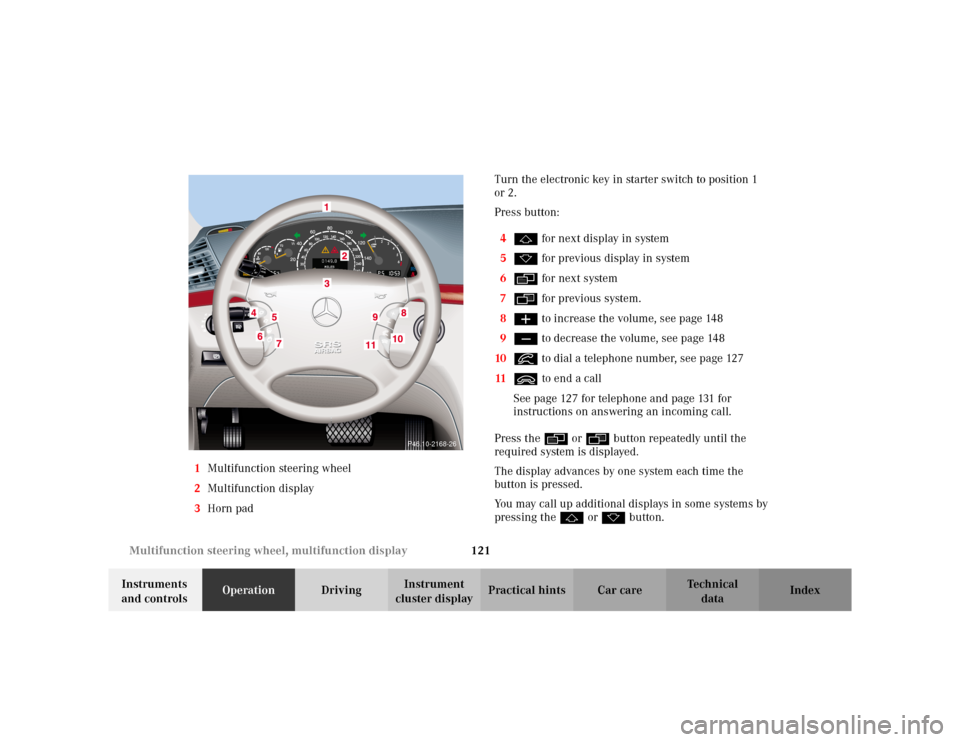
cluster displayPractical hints Car care Index 1Multifunction steering wheel
2Multifunction display
3Horn padTurn the electronic key in starter switch to position 1
or 2.
Press button:
4j for next display in system
5k for previous display in system
6è for next system
7ÿ for previous system.
8æ to increase the volume, see page 148
9ç to decrease the volume, see page 148
10í to dial a telephone number, see page 127
11ì to end a call
See page 127 for telephone and page 131 for
instructions on answering an incoming call.
Press the è or ÿ button repeatedly until the
required system is displayed.
The display advances by one system each time the
button is pressed.
You may call up additional displays in some systems by
pressing the j or k button.
P46.10-2168-26
Page 125 of 430
122 Multifunction steering wheel, multifunction display
Te ch n i c a l
data Instruments
and controlsOperationDrivingInstrument
cluster displayPractical hints Car care Index
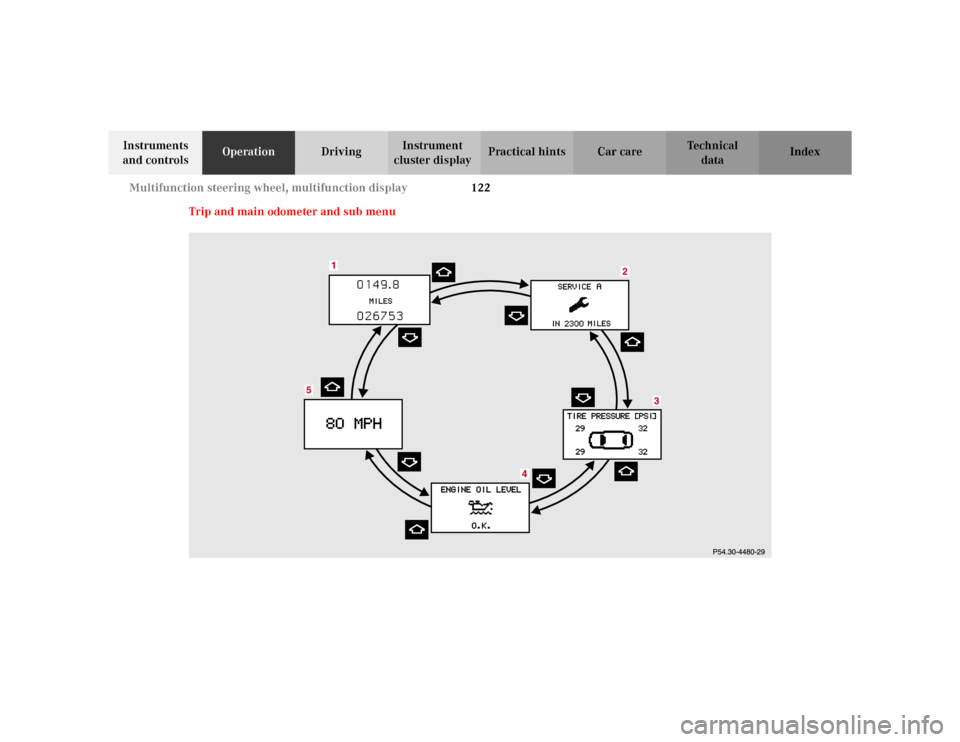
Trip and main odometer and sub menu
Page 126 of 430
123 Multifunction steering wheel, multifunction display
Te ch n i c a l
data Instruments
and controlsOperationDrivingInstrument
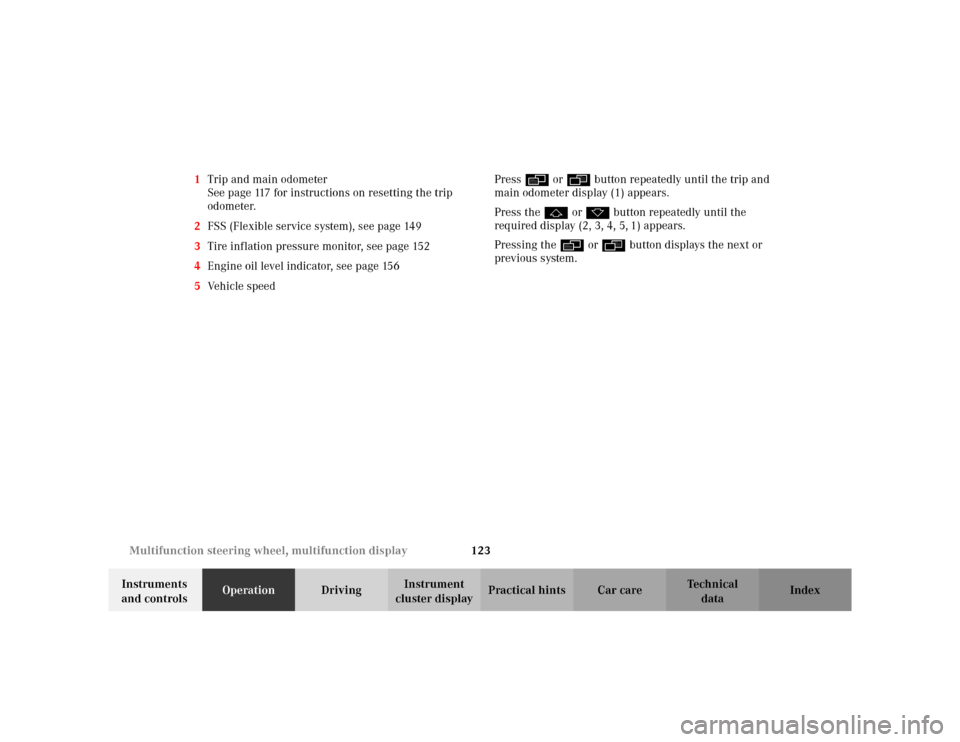
cluster displayPractical hints Car care Index 1Trip and main odometer
See page 117 for instructions on resetting the trip
odometer.
2FSS (Flexible service system), see page 149
3Tire inflation pressure monitor, see page 152
4Engine oil level indicator, see page 156
5Ve h i c l e s p e e dPress è or ÿ button repeatedly until the trip and
main odometer display (1) appears.
Press the j or k button repeatedly until the
required display (2, 3, 4, 5, 1) appears.
Pressing the è or ÿ button displays the next or
previous system.