2002 MERCEDES-BENZ CL500 set time
[x] Cancel search: set timePage 54 of 430
51 Central locking system
Te ch n i c a l
data Instruments
and controlsOperationDrivingInstrument
cluster displayPractical hints Car care Index Automatic central locking
Wit h t he autom ati c c entral lockin g s ystem ac ti vate d, t he
doors and trunk are locked at vehicle speeds of
approximately 9 mph (15 km/h) or more. The fuel filler
flap remains unlocked.
The automatic central locking function can be switched
on or off in the individual setting menu “VEHICLE” –
“AUTOMATIC DOOR LOCK”, see page 147.
Notes:
If doors are unlocked with the central locking switch
after activating the automatic central locking, and
neither door is opened, then the doors remain unlocked
even at vehicle speeds of approximately
9 mph (15 km/h) or more.
If a door is opened from the inside at speeds of
approximately 9 mph (15 km/h) or less with the
automatic central locking activated, the door will again
be automatically locked at speeds of approximately
9 mph (15 km/h) or more.
When a door is opened from the inside, the complete
vehicle is unlocked, if the vehicle is previously unlocked
in the global remote control mode.Important!
When towing the vehicle, or with the vehicle on a
dynamometer test stand, please, note the following:
With the automatic central locking activated and the
electronic key in starter switch position 2 (vehicles with
KEYLESS-GO: operation position, see page 230), the
vehicle doors will lock if the left front wheel as well as
the right rear wheel spin at vehicle speeds of
approximately 9 mph (15 km/h) or more.
Emergency unlocking in case of accident
The doors unlock automatically a short time after an
accident in which an airbag or emergency tensioning
retractor deploys (this is intended to aid rescue and
exit).
J_OM_215.book Seite 51 Mittwoch, 30. Mai 2001 2:01 14
Page 89 of 430

86 Restraint systems
Te ch n i c a l
data Instruments
and controlsOperationDrivingInstrument
cluster displayPractical hints Car care Index
Operation of seat belts
The inertia reel stops the belt from unwinding during
sudden stops or when quickly pulling on the belt.
The locking function of the reel may be checked by
quickly pulling out the belt.
Caution!
For safety reasons, avoid adjusting the seat or seat back
into positions which could affect the correct seat belt
positioning.
Unfastening of seat belts
Press release button (3) in the belt buckle (2).
Allow the retractor to completely rewind the seat belt by
guiding the latch plate (1).
Wa r n i n g !
USE SEAT BELTS PROPERLY.• Seat belts can only work when used properly.
Never wear seat belts in any other way than as
described in this section, as that could result
in serious injuries in case of an accident.• Each occupant should wear their seat belt at all
times, because seat belts help reduce the
likelihood of and potential severity of injuries
in accidents, including rollovers. The
integrated restraint system includes “SRS”
(driver airbag, front passenger airbag, side
impact airbags, head protection window
curtain airbags for side windows), “ETR” (seat
belt emergency tensioning retractors), and
front seat knee bolsters. The system is
designed to enhance the protection offered to
properly belted occupants in certain frontal
(front airbags) and side (side impact and
window curtain airbags) impacts which exceed
preset deployment thresholds.
J_OM_215.book Seite 86 Mittwoch, 30. Mai 2001 2:01 14
Page 118 of 430

115 Instrument cluster
Te ch n i c a l
data Instruments
and controlsOperationDrivingInstrument
cluster displayPractical hints Car care Index 1Knob for instrument cluster illumination,
seepage116
2Engine malfunction indicator lamp, see page 296
3Brake fluid low or parking brake engaged,
seepage307
4Supplemental restraint system (SRS) malfunction
indicator lamp, see page 299
5Coolant temperature gauge, see page 117
6Outside temperature indicator, see page 117
7Fuel gauge with reserve warning lamp, see page 299
8Left turn signal indicator lamp, see combination
switch on page 164
9Speedometer, see page 118
10Electronic stability program (ESP) warning lamp,
system is adjusting to road conditions, see page 301
11Distance warning lamp – vehicles with Distronic
(DTR), distance to the vehicle ahead is insufficient,
see page 270 and page 301.
Vehicles without Distronic: It illuminates with the
electronic key in starter switch position 2. It should
go out when the engine is running.12Multifunction display, see page 120
Malfunction and warning messages in the
multifunction display, see page 303
13Trip odometer, see page 119 and 124
14Main odometer, see page 124
15Right turn signal indicator lamp, see combination
switch on page 164
16Tachometer, see page 119
17Gear range indicator display, see selector lever
positions on page 238
18Digital clock
To set the time, see COMAND operator’s manual
19Antilock brake system (ABS) malfunction indicator
lamp, see page 300
20High beam headlamp indicator,
see exterior lamp switch, page 159, and
combination switch, page 164
21Fasten seat belts, see page 302
22Reset buttonJ, s e e p a g e s 116 , 119
J_OM_215.book Seite 115 Mittwoch, 30. Mai 2001 2:01 14
Page 124 of 430

121 Multifunction steering wheel, multifunction display
Te ch n i c a l
data Instruments
and controlsOperationDrivingInstrument
cluster displayPractical hints Car care Index Depending on your vehicle’s equipment, you may use
the buttons on the multifunction steering wheel to call
up, control and set the following systems in the
multifunction display:
1Trip odometer and main odometer, see page 119 and
page 124
Flexible service system (FSS), see page 150
Tire inflation pressure monitor, see page 153
Engine oil level indicator, see page 157
2Audio systems, see page 126
Radio, see page 126
CD player, see page 127
Cassette player, see page 128
3Telephone, see page 1294Navigation system, see page 134
5Distronic (DTR), see page 259
6Trip computer, see page 136
After start
After reset
Range
7Malfunction message memory, see page 138
8Individual settings, see page 140
9Malfunction messages are stored in memory (7),
see page 138.
Press theè orÿ button repeatedly until the
required system is displayed.
The display advances by one system each time the
button is pressed.
You may call up additional displays within some of these
categories by pressing thej or kbutton.
J_OM_215.book Seite 121 Mittwoch, 30. Mai 2001 2:01 14
Page 139 of 430
136 Multifunction steering wheel, multifunction display
Te ch n i c a l
data Instruments
and controlsOperationDrivingInstrument
cluster displayPractical hints Car care Index
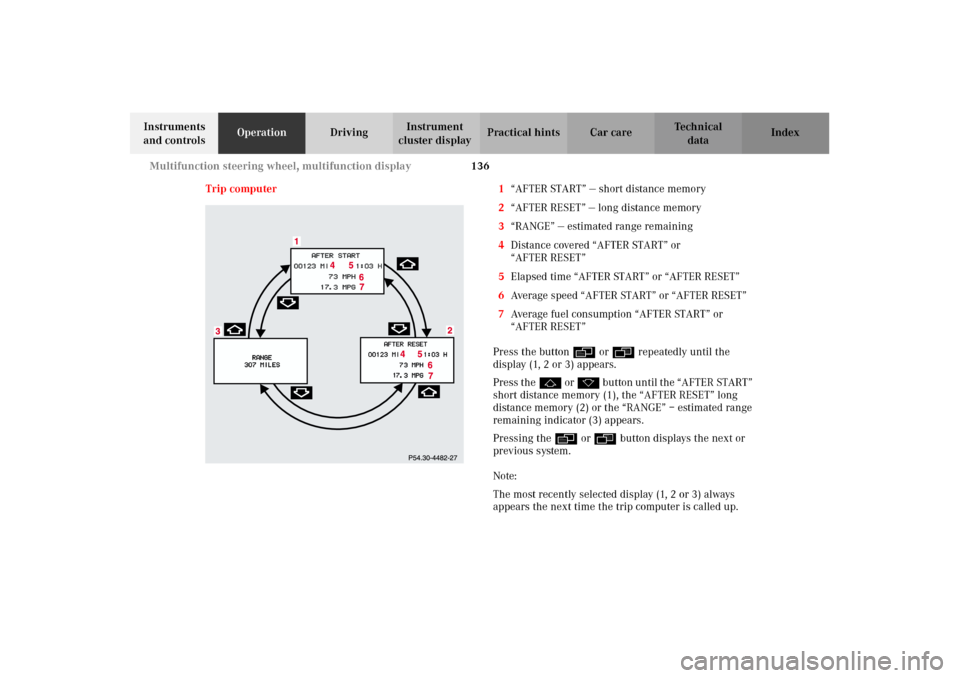
Trip computer 1“AFTER START” — short distance memory
2“AFTER RESET” — long distance memory
3“RANGE” — estimated range remaining
4Distance covered “AFTER START” or
“AFTER RESET”
5Elapsed time “AFTER START” or “AFTER RESET”
6Average speed “AFTER START” or “AFTER RESET”
7Average fuel consumption “AFTER START” or
“AFTER RESET”
Press the buttonè orÿ repeatedly until the
display (1, 2 or 3) appears.
Press thej o r k button until the “AFTER START”
short distance memory (1), the “AFTER RESET” long
distance memory (2) or the “RANGE” – estimated range
remaining indicator (3) appears.
Pressing the è or ÿ button displays the next or
previous system.
Note:
The most recently selected display (1, 2 or 3) always
appears the next time the trip computer is called up.
J_OM_215.book Seite 136 Mittwoch, 30. Mai 2001 2:01 14
Page 164 of 430
161 Exterior lamp switch
Te ch n i c a l
data Instruments
and controlsOperationDrivingInstrument
cluster displayPractical hints Car care Index Daytime running lamp mode
Turn exterior lamp switch to positionM orU.
When the engine is running, the low beam headlamps
are automatically switched on. In low ambient light
conditions the parking lamps will also switch on.
•Canada only:
When shifting from a driving position to
position “N” or “P”, the low beam switches off
(3 minutes delay).
For nighttime driving the exterior lamp switch
should be turned to position B to permit
activation of the high beam headlamps.•USA only:
The high beam headlamps can also be activated
when driving with the daytime running lamp mode
activated and exterior lamp switch in positionM.
To activate the daytime running lamp mode, see the
individual setting menu “LIGHTING” – “LAMP
CIRCUIT HEADLAMP” on page 144.
Note:
See page 159 for notes on the exterior lamp switch.
J_OM_215.book Seite 161 Mittwoch, 30. Mai 2001 2:01 14
Page 165 of 430

162 Exterior lamp switch
Te ch n i c a l
data Instruments
and controlsOperationDrivingInstrument
cluster displayPractical hints Car care Index
Night security illumination
Turn exterior lamp switch to positionU.
At low ambient light conditions and with the engine
having been turned off, the exterior lamps (fog lamps
and parking lamps) switch on for added illumination.
After the last door has been closed the lamp-on time
period commences.
To activate the function see the individual setting menu
“LIGHTING” –“HEADLAMPS DELAYED SHUT-OFF” on
page 144.
The lamp-on time period for night security illumination
can be set at several different timed levels from 0 (off) to
60 seconds.Note:
Within 10 minutes after closing the last door the night
security illumination can be reactivated by opening a
door.
If after switching the engine off, no doors are opened or
if after opening the doors they are not closed, the night
security illumination will switch off after approximately
60 seconds.
Deactivating night security illumination temporarily:
Turn the electronic key in starter switch to position 0
then to position 2 and back to position 0 again before
getting out of the vehicle. The night security
illumination will not be activated when the door is
opened.
J_OM_215.book Seite 162 Mittwoch, 30. Mai 2001 2:01 14
Page 176 of 430

173 Automatic climate control
Te ch n i c a l
data Instruments
and controlsOperationDrivingInstrument
cluster displayPractical hints Car care Index Basic setting – automatic mode
In the automatic mode the automatic climate control
cools or heats the interior depending on the direction
and strength of the sunlight, outside temperature,
selected interior temperature and the actual interior
temperature of the vehicle. With the automatic climate
control switched off, the air volume and distribution can
still be set manually.
There are three basic settings for the automatic mode:
•Automatic air volume control
•Automatic air outlet control, left and right
•Automatic air outlet control, center, see page 169
We recommend these settings to be used all year round.Air volume and distribution are controlled
automatically.
We recommend to set the temperature switches on the
left and right to 72
°F (22
°C). Please make changes from
this setting to suit your personal requirements.
Automat ic airf low regu lation:
Press the A on the air volume switch. The display
shows “AUTO”.
Automatic air distribution:
Press on both Uknobs until they click in. Theh,
jand ksymbols will no longer be visible.
The economy mode and air recirculation functions will
be switched off. The automatic blower will be activated
at the same time.
J_OM_215.book Seite 173 Mittwoch, 30. Mai 2001 2:01 14