Page 206 of 399

203 Interior equipment
Te ch n i c a l
data Instruments
and controlsOperationDrivingInstrument
cluster displayPractical hints Car care Index Interior lighting
1Rear interior lights
Press the button to switch the rear passenger
compartment lights on / off.
2Right front reading lamp
Press the button to switch the reading lamp on or
off. The right reading lamp will be switched on or
off.3To switch off automatic function:
Press the rocker switch.
The interior lighting remains switched off, even
when centrally unlocking the vehicle or opening a
door or the electronic key is removed from the
starter switch.
4To select automatic function:
Press the rocker switch to the center position.
Interior lamps are switched on in darkness, when
unlocking the vehicle, opening a door or removing
the electronic key from starter switch.
Interior lamps are switched off (soft fade) delayed,
when locking the vehicle, closing the doors or
inserting the electronic key in starter switch.
However, there will be no delay when the electronic
key is in starter switch position 2.
5Interior lamps, front:
Press rocker switch in to switch front interior lamps
on. The interior lighting stays on while the rocker
switch is pressed in.
Switching off the front interior lighting:
Press rocker switch to position (3).
Page 207 of 399
204 Interior equipment
Te ch n i c a l
data Instruments
and controlsOperationDrivingInstrument
cluster displayPractical hints Car care Index
6Left front reading lamp:
Press the button to switch the reading lamp on or
off. The left reading lamp will be switched on or off.Notes:
The time delay for the interior light to switch off after
the electronic key is removed from the starter switch
can be adjusted in the individual setting menu
“LIGHTING” – “INT. ILLUMINATION DELAYED
SWITCH–OFF”. See page 128.
To prevent the vehicle battery from being discharged
with doors open, all interior lamps switch off after
approximately 5 minutes, when the electronic key
removed or in starter switch position 0.
An interior lamp switched on manually does not go out
autom ati cally. Be for e leav ing t he vehic le , make s ure t hat
all interior lamps are switched off.
Page 208 of 399
205 Interior equipment
Te ch n i c a l
data Instruments
and controlsOperationDrivingInstrument
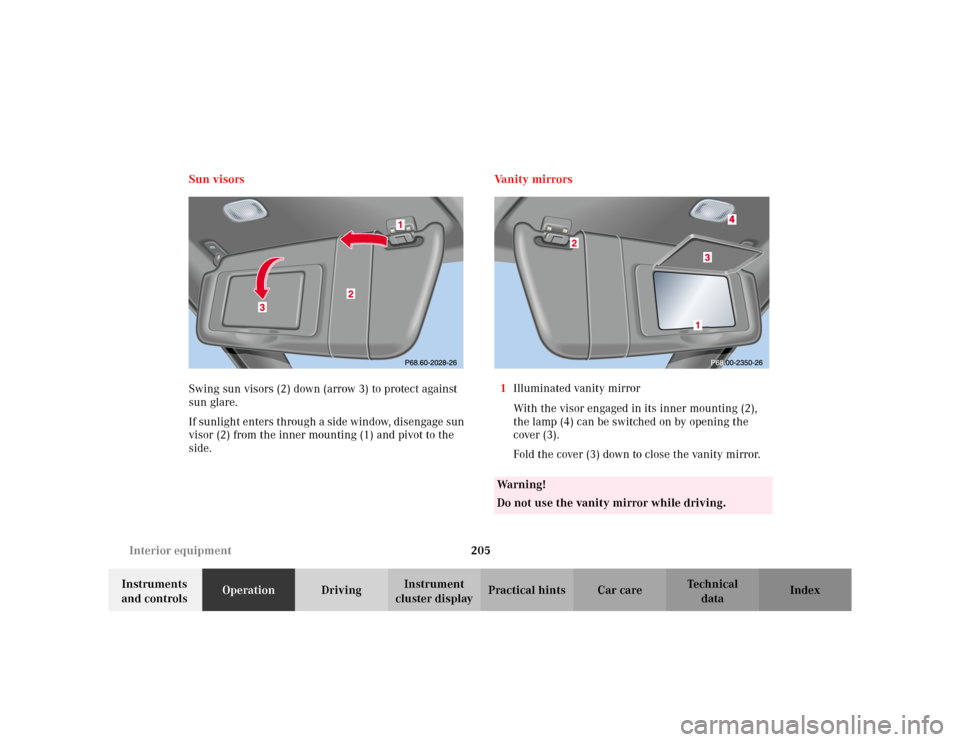
cluster displayPractical hints Car care Index Sun visors
Swing sun visors (2) down (arrow 3) to protect against
sun glare.
If sunlight enters through a side window, disengage sun
visor (2) from the inner mounting (1) and pivot to the
side.Va n i t y m i r r o r s
1Illuminated vanity mirror
With the visor engaged in its inner mounting (2),
the lamp (4) can be switched on by opening the
cover (3).
Fold the cover (3) down to close the vanity mirror.
Wa r n i n g !
Do not use the vanity mirror while driving.
Page 216 of 399
213 Interior equipment
Te ch n i c a l
data Instruments
and controlsOperationDrivingInstrument
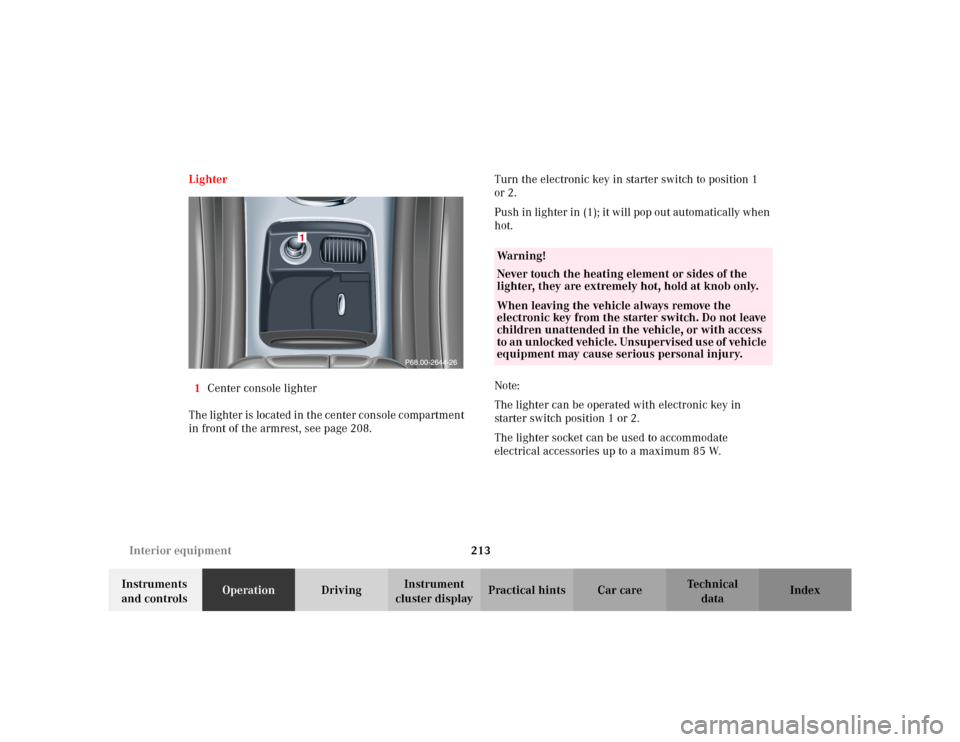
cluster displayPractical hints Car care Index Lighter
1Center console lighter
The lighter is located in the center console compartment
in front of the armrest, see page 208.Turn the electronic key in starter switch to position 1
or 2.
Push in lighter in (1); it will pop out automatically when
hot.
Note:
The lighter can be operated with electronic key in
starter switch position 1 or 2.
The lighter socket can be used to accommodate
electrical accessories up to a maximum 85 W.
Wa r n i n g !
Never touch the heating element or sides of the
lighter, they are extremely hot, hold at knob only.When leaving the vehicle always remove the
electronic key from the starter switch. Do not leave
children unattended in the vehicle, or with access
to an unlocked vehicle. Unsupervised use of vehicle
equipment may cause serious personal injury.
Page 236 of 399
233 Tele Aid
Te ch n i c a l
data Instruments
and controlsOperationDrivingInstrument
cluster displayPractical hints Car care Index Notes:
The indicator lamp in the Roadside Assistance
button remains illuminated in red for approx.
10 seconds during the system self-check after turning
electronic key in starter switch to position 2 (together
with the “SOS” button and the Information
button¡).
See system self-check on page 228 when the indicator
lamp does not light up in red or stays on longer than
approximately 10 seconds.
If the indicator lamp in the Roadside Assistance
button is illuminated continuously and there was
no voice connection to the Response Center established,
then the Tele Aid system could not initiate an Roadside
Assistance call (e.g. the relevant cellular phone network
is not available). The message “ROADSIDE
ASSISTANCE – CALL FAILED” appears in the
multifunction display.
Roadside Assistance calls can be terminated using the
ìbutton on the multifunction steering wheel.Information button ¡
Located below the center armrest cover is the
Information button¡. Pressing and holding the
button (for longer than 2 seconds) will initiate a call to
the Customer Assistance Center. The button will flash
while the call is in progress. The message “INFO –
CONNECTING CALL” will appear in the multifunction
display. When the connection is established, the
message “INFO – CALL CONNECTED” appears in the
multifunction display. The Tele Aid system will transmit
data generating the vehicle identification number,
model, color and location (subject to availability of
cellular and GPS signals).
A voice connection between the Customer Assistance
Center representative and the occupants of the vehicle
will be established. When a voice connection is
established the audio system mutes and the message
“TELE AID – INFO CALL ACTIVE” appears in the
multifunction display. Information regarding the
operation of your vehicle, the nearest Mercedes-Benz
Center or Mercedes-Benz USA products and services is
ava i l ab le to yo u .
For more details concerning Tele Aid, please visit
www.mbusa.com and use your ID and password, sent to
you separately, to learn more (USA only).
Page 237 of 399

234 Tele Aid
Te ch n i c a l
data Instruments
and controlsOperationDrivingInstrument
cluster displayPractical hints Car care Index
Notes:
The indicator lamp in the Information button¡
remains illuminated in red for approx. 10 seconds
during the system self-check after turning electronic
key in starter switch to position 2 (together with the
“SOS” button and the Roadside Assistance button).
See system self-check on page 228 when the indicator
lamp does not light up in red or stays on longer than
approximately 10 seconds.
If the indicator lamp in the Information button¡ is
illuminated continuously and there was no voice
connection to the Response Center established, then the
Tele Aid system could not initiate an Information call
(e.g. the relevant cellular phone network is not
available). The message “INFO – CALL FAILED” appears
in the multifunction display.
Information calls can be terminated using the
ìbutton on the multifunction steering wheel.Important!
If the indicator lamps do not start flashing after
pressing one of the buttons or remain illuminated (in
red) at any time, the Tele Aid system has detected a fault
or the service is not currently active, and may not
initiate a call.
Visit your Mercedes-Benz Center and have the system
checked or contact the Response Center at 1-800-756-
9018 (in the USA) or 1-888-923-8367 (in Canada) as
soon as possible.
Upgrade Signals
Tele Aid system processes calls using the following
priority.
•Automatic emergency – First priority
•Manual emergency – Second priority
•Roadside assistance – Third priority
•Information – Fourth priority
Should a higher priority call be initiated while you are
connected, an upgrade (alternating) tone will be heard,
and the appropriate indicator lamp will flash. If certain
information such as vehicle identification number or
Customer information is not available, the operator may
Page 243 of 399

240 Starter switch
Te ch n i c a l
data Instruments
and controlsOperationDrivingInstrument
cluster displayPractical hints Car care Index
Starter switch
0The electronic key can be withdrawn in this position
only. The steering is locked when the electronic key
is removed from the starter switch. If necessary,
move steering wheel slightly to allow the locking
mechanism to engage.
In vehicles with automatic transmission, the
electronic key can be removed only with the selector
lever in position “P”. After removing the electronic key or with the electronic key in starter switch
position 0 or 1 the selector lever is locked in
position “P”.
1Most electrical consumers can be operated. For
detailed information see respective subjects.
2Driving position.
Gear selector lever is unlocked.
To move the selector lever out of position “P” firmly
depress the service brake pedal.
3Starting position.
See page 242 for instructions on starting and turning off
the engine.
Wa r n i n g !
When leaving the vehicle always remove the
electronic key from the starter switch, and lock the
vehicle. Do not leave children unattended in the
vehicle, or with access to an unlocked vehicle.
Unsupervised use of vehicle equipment may cause
serious personal injury.
Page 252 of 399
249 Automatic transmission
Te ch n i c a l
data Instruments
and controlsOperationDrivingInstrument
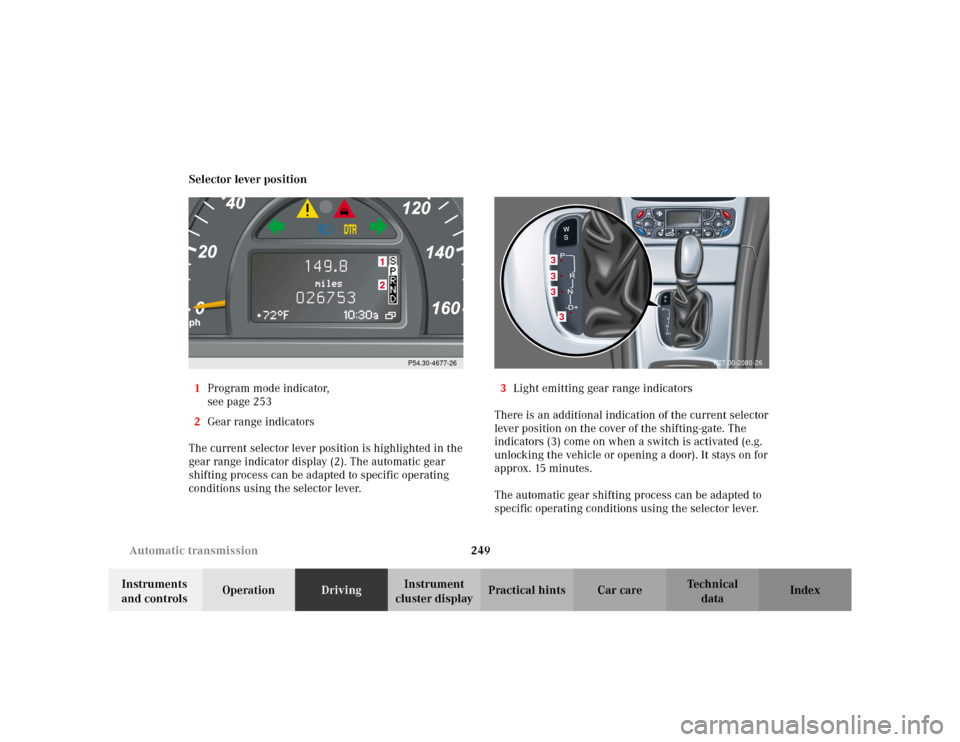
cluster displayPractical hints Car care Index Selector lever position
1Program mode indicator,
see page 253
2Gear range indicators
The current selector lever position is highlighted in the
gear range indicator display (2). The automatic gear
shifting process can be adapted to specific operating
conditions using the selector lever.3Light emitting gear range indicators
There is an additional indication of the current selector
lever position on the cover of the shifting-gate. The
indicators (3) come on when a switch is activated (e.g.
unlocking the vehicle or opening a door). It stays on for
approx. 15 minutes.
The automatic gear shifting process can be adapted to
specific operating conditions using the selector lever.
P54.30-4677-26
3333
P27.00-2080-26