Page 78 of 288

To install the new bulb:
Handle a halogen headlamp bulb carefully and keep out of
children’s reach. Grasp the bulb only by its plastic base and do
not touch the glass. The oil from your hands could cause the bulb
to break the next time the headlamps are operated.
NOTE: If the bulb is accidentally touched, it should be cleaned with
rubbing alcohol before being used.1. With the flat side of the bulb’s plastic base facing upward, insert the glass end of the bulb into the lamp assembly. You may need to turn
the bulb left or right to align the grooves in the plastic base with the
tabs in the lamp assembly. When the grooves are aligned, push the
bulb into the lamp assembly until the plastic base contacts the rear
of the lamp assembly.
2. Install the bulb retaining ring over the plastic base until it contacts the rear of the socket by rotating clockwise until you feel a “stop.”
3. Install the electrical connector into the plastic base until it snaps, locking it into position.
4. Install the headlamp on vehicle, push rearward and secure with two retainer pins.
5. Turn the headlamps on and make sure they work properly. If the headlamp was correctly aligned before you changed the bulb, you
should not need to align it again.
Replacing front side marker bulbs 1. Open the hood.
2. At the back of the headlamp, pry up the two retainer pins to
release the headlamp assembly
from the vehicle and pull
headlamp forward.
Lights
78
Page 79 of 288
3. Remove screw(s) from lampassembly.
4. Disengage lamp assembly (it has a snap fit).
5. Rotate bulb socket counterclockwise and remove
from lamp assembly.
6. Carefully pull bulb straight out of socket and push in the new
bulb.
7. Install the bulb socket in lamp assembly by turning clockwise.
8. Align the lamp on the vehicle and push to snap in place.
9. Install screw(s) on lamp assembly.
10. Install the headlamp on vehicle, push rearward and secure with two retainer pins.
Lights
79
Page 80 of 288
Replacing tail lamp/backup lamp bulbs
The tail lamp/backup lamp bulbs are
located in the same portion of the
tail lamp assembly, one just below
the other. Follow the same steps to
replace either bulb:1. Open the tailgate to expose the lamp assemblies.
2. Remove the four screws and the lamp assembly from vehicle.
3. Rotate bulb socket counterclockwise turn and
remove from lamp assembly.
4. Carefully pull the bulb straight out of the socket and push in
the new bulb.
5. Install the bulb socket in lamp assembly by turning clockwise.
6. Install the lamp assembly and secure with four screws.
Replacing fog lamp bulbs 1. Remove the bulb socket from the fog lamp by turning
counterclockwise.
2. Disconnect the electrical connector from the fog lamp
bulb.
Lights
80
Page 81 of 288
3. Connect the electrical connector to the new fog lamp bulb.
4. Install the bulb socket in the fog lamp turning clockwise.
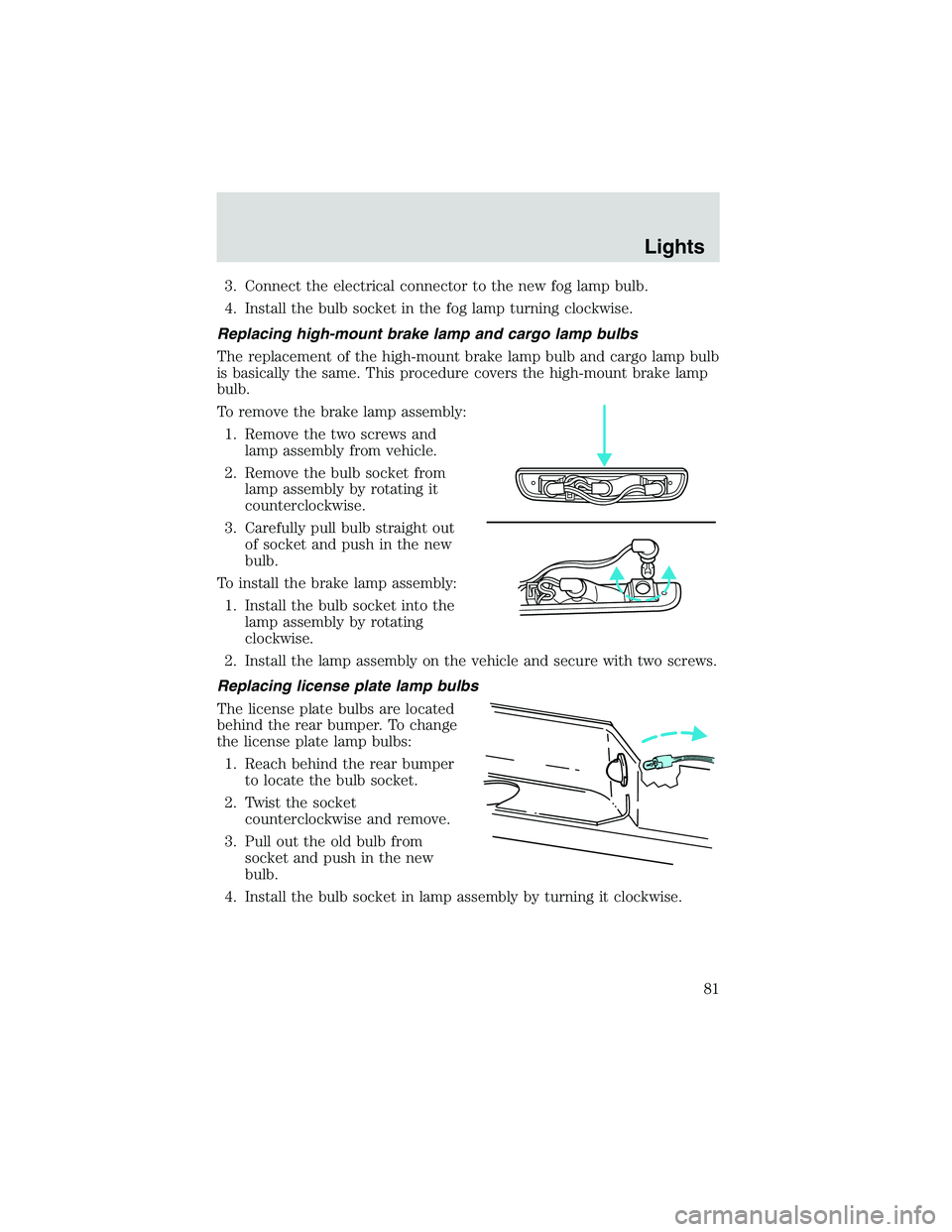
Replacing high-mount brake lamp and cargo lamp bulbs
The replacement of the high-mount brake lamp bulb and cargo lamp bulb
is basically the same. This procedure covers the high-mount brake lamp
bulb.
To remove the brake lamp assembly: 1. Remove the two screws and lamp assembly from vehicle.
2. Remove the bulb socket from lamp assembly by rotating it
counterclockwise.
3. Carefully pull bulb straight out of socket and push in the new
bulb.
To install the brake lamp assembly: 1. Install the bulb socket into the lamp assembly by rotating
clockwise.
2. Install the lamp assembly on the vehicle and secure with two screws.
Replacing license plate lamp bulbs
The license plate bulbs are located
behind the rear bumper. To change
the license plate lamp bulbs: 1. Reach behind the rear bumper to locate the bulb socket.
2. Twist the socket counterclockwise and remove.
3. Pull out the old bulb from socket and push in the new
bulb.
4. Install the bulb socket in lamp assembly by turning it clockwise.
Lights
81
Page 83 of 288
Changing the wiper blades
To replace the wiper blades:1. Pull the wiper arm away from the windshield and lock into the
service position.
2. Turn the blade at an angle from the wiper arm. Push the lock
pin manually to release the
blade and pull the wiper blade
down toward the windshield to
remove it from the arm.
3. Attach the new wiper to the wiper arm and press it into
place until a click is heard.
TILT STEERING WHEEL (IF EQUIPPED)
Pull the tilt steering control toward
you to move the steering wheel up
or down. Hold the control while
adjusting the wheel to the desired
position, then release the control to
lock the steering wheel in position.
Driver Controls
83
Page 86 of 288

AUTOMATIC DIMMING REAR VIEW MIRRORS (IF EQUIPPED)
Your vehicle is equipped with an inside rear view mirror with an
auto-dimming function. The electronic day/night mirror will change from
the normal state to the non-glare state when bright lights (glare) reach
the inside rear view mirror. When the inside rear view mirror detects
bright light from behind the vehicle, the inside rear view mirror will
automatically adjust (darken) to minimize glare.
Do not block the sensor on the backside of the inside rear view mirror
since this may impair proper system performance.
Press the left button on the mirror
to turn the auto dimming ON or
OFF. The green indicator light left
of the display will illuminate when
this feature is ON.
The mirror will automatically return
to the normal state whenever the
vehicle is placed in R
(Reverse)(when the mirror is on) to
ensure a bright clear view when
backing up.
COMPASS/TEMPERATURE EC MIRROR (IF EQUIPPED)
The compass reading may be affected when you drive near large
buildings, bridges, power lines and powerful broadcast antennas.
Magnetic or metallic objects placed in, on or near the vehicle may also
affect compass accuracy.
Usually, when something affects the compass readings, the compass will
correct itself after a few days of operating your vehicle in normal
conditions. If the compass still appears to be inaccurate, a manual
calibration may be necessary. Refer toCompass calibration
adjustment.
Most geographic areas (zones) have a magnetic north compass point that
varies slightly from the northerly direction on maps. This variation is four
degrees between adjacent zones and will become noticeable as the
vehicle crosses multiple zones. A correct zone setting will eliminate this
error. Refer to Compass zone adjustment.
Driver Controls
86
Page 89 of 288
POWER MIRROR CONTROL (IF EQUIPPED)
To adjust your mirrors:1. Select
to adjust the left
mirror or
to adjust the right
mirror.
2. Move the control in the direction you wish to tilt the
mirror.
3. Return to the center position to lock mirrors in place.
SPEED CONTROL (IF EQUIPPED)
To turn speed control on
• Press ON.
NOTE: Vehicle speed cannot be
controlled until the vehicle is
traveling at or above 48 km/h (30
mph).
WARNING: Do not use the
speed control in heavy traffic
or on roads that are winding,
slippery, or unpaved. You may
lose control of the vehicle.
WARNING: Do not shift the gearshift lever into N (Neutral)
with the speed control on. You may lose control of the vehicle
or cause engine system damage.
OFF
ON
Driver Controls
89
Page 96 of 288
4. Evenly push down on theextender and push the round
knobs in on each side locking it
in place.
Green markings on the shaft
indicate the locked position. The
locking clip screws below the middle
bar can be tightened
counterclockwise for extra security.
To stow the bed extender, follow
steps one through four in reverse
order.
The bed extender may be used to
secure a load of up to 46 kg (100
lbs.) on the tailgate.
The bed extender should always
be kept in the stowed position
with the tailgate closed when
not in use.
To remove the bed extender: 1. Extend the bed extender.
2. Pull the round knobs on each side of the extender to unlock
it.
Make sure the locking clip screws
are loose before removing the
extender. 1. Press the locking clips below the middle bar on each side and
lift the extender out of the bed.
To install the bed extender, follow
the removal procedure in reverse
order.
Driver Controls
96


