Page 165 of 288

AdvanceTracYStability Enhancement System (if equipped)
The AdvanceTracysystem helps the driver maintain the stability and
steerability of the vehicle. The system integrates anti-lock braking system
(ABS), Traction Controlyand a more advanced function to further
enhance the stability of the vehicle. The system shares many of the
electronic and mechanical elements already present in the Traction
Controlyand ABS systems.
The AdvanceTracyconstantly monitors the vehicle motion relative to
the driver's intended course. This is done by using added sensors that
compare the steering inputs from the driver with the actual motion of
the vehicle. When there is a discrepancy between the driver's inputs and
the vehicle motion, AdvanceTracychanges the force at each tire to help
control the vehicle. If the vehicle begins to rotate excessively left or
right, spin out, or slide sideways, the system will attempt to correct the
excessive motion. If the vehicle does not respond to steering inputs, the
system will attempt to increase the turning response of the vehicle.
The AdvanceTracyenhances stability during maneuvers that require all
available tire traction to control the vehicle. The benefits of the
AdvanceTracysystem are most noticeable when driving in wet/snowy/icy
road conditions and/or when performing emergency maneuvers. In an
emergency lane-change, the driver will experience better overall vehicle
traction, and have better control of the vehicle.
Driving conditions which may activate AdvanceTracyinclude:
²Taking a turn too fast
²Evasively maneuvering to avoid an accident, pedestrian or obstacle
²Hitting a patch of ice
²Changing lanes on a snow-rutted road
²Entering a snow-free road from a snow-covered side street
²Entering a paved road from a gravel road
²Hitting a curb while turning
²Driving on slick surfaces
The AdvanceTracysystem defaults to ON when the engine is started.
The system does not work when the vehicle is traveling backwards. In
reverse, ABS and Traction Controlywill continue to function. The
system uses ABS and Traction Controly(including control of the
engine) as well as its more advanced controls to enhance vehicle
stability.
Driving
165
Page 167 of 288

Aggressive driving in any road conditions can cause you to lose
control of your vehicle increasing the risk of severe personal
injury or property damage. The occurrence of an AdvanceTracyevent
is an indication that at least some of the tires have exceeded their
ability to grip the road and that you may lose control of the vehicle. If
you experience a severe road event, SLOW DOWN.
If you find yourself regularly experiencing AdvanceTracyevents,
you are driving too fast for conditions, you should reduce your
speed, and drive less aggressively. AdvanceTracyis limited by the laws
of physics. It is always possible to lose control of a vehicle due to
inappropriate driver inputs for the conditions. The occurrence of an
AdvanceTracyevent is an indication that at least some of the tires
have exceeded their ability to grip the road; this may cause you to lose
control of the vehicle increasing the risk of severe personal injury or
property damage.
AUTOMATIC TRANSMISSION OPERATION (IF EQUIPPED)
Brake-shift interlock
This vehicle is equipped with a brake-shift interlock feature that prevents
the gearshift lever from being moved from P (Park) when the ignition is
in the RUN position unless brake pedal is depressed.
If you cannot move the gearshift lever out of P (Park) with ignition in
the RUN position and the brake pedal depressed:
1. Apply the parking brake, turn ignition key to LOCK, then remove the
key.
2. Insert the key and turn it to OFF.Apply the brake pedal and shift
to N (Neutral).
In the ignition OFF position, the automatic transmission shift
lever can be moved from the P (Park) position without the brake
pedal depressed. To avoid unwanted vehicle movement, always set the
parking brake.
3. Start the vehicle.
Driving
167
Page 169 of 288

When the battery is disconnected or a new battery installed, the
transmission must learn its adaptive strategy. As a result of this, the
transmission may shift firmly. This operation is considered normal and
will fully update transmission operation to its optimum shift feel.
Understanding gearshift positions
Pull the gearshift lever towards you and downward to the desired gear.
The gearshift positions are displayed on the floor console next to the
gearshift lever and on the instrument cluster.
Hold the brake pedal down while you move the gearshift lever
from P (Park) to another position. If you do not hold the brake
pedal down, your vehicle may move unexpectedly and injure someone.
P (Park)
Always come to a complete stop
before shifting into P (Park). Make
sure the gearshift lever is securely
latched in P (Park). This position
locks the transmission and prevents
the rear wheels from turning.
Always set the parking
brake fully and make sure
the gearshift lever is latched in P
(Park). Turn off the ignition
whenever you leave your vehicle.
PRND5D4321
Driving
169
Page 177 of 288
Recommended upshifts when cruising
Select Shift V8 3.9L
Shift from:
1-2 n/a
2 - 3 26 km/h (16 mph)
3 - 4 47 km/h (29 mph)
4 - 5 61 km/h (38 mph)
MANUAL TRANSMISSION OPERATION (IF EQUIPPED)
Using the clutch
Vehicles equipped with a manual transmission have a starter interlock
that prevents cranking the engine unless the clutch pedal is fully
depressed.
When starting a vehicle with a manual transmission, you must:
1. Make sure the parking brake is
fully set.
2. Depress the clutch pedal fully.
3. Put the gearshift lever in N
(Neutral).
1
2
45
R3
Driving
177
Page 180 of 288
4. Turn the ignition key to position
1 (LOCK).
Do not park your vehicle in Neutral, it may move unexpectedly
and injure someone. Use 1 (First) gear and set the parking brake
fully.
Reverse
Make sure that your vehicle is at a complete stop before you shift into R
(Reverse). Failure to do so may damage the transmission.
Put the gearshift lever in N
(Neutral) and wait at least three
seconds before shifting into R
(Reverse).
Shift into R (Reverse) only by
moving the gearshift lever left of 1
(First) gear and then forward into R
(Reverse) gear.
Removing key from ignition
²Turn the ignition key to position
1 (LOCK).
²Remove the ignition key.
1
2
3
4
5
1
1
2
45
R3
1
2
3
4
5
1
Driving
180
Page 187 of 288

GETTING ROADSIDE ASSISTANCE
To fully assist if you should have a vehicle concern, Ford Motor Company
offers a complimentary roadside assistance program. This program is
separate from the New Vehicle Limited Warranty. The service is available:
²24±hours, seven days a week
²for the Basic warranty period (Canada) or New Vehicle Limited
Warranty period (U.S.) of three years or 60 000 km (36 000 miles),
whichever comes first on Ford and Mercury vehicles, and four years or
80 000 km (50 000 miles) on Lincoln vehicles
Roadside assistance will cover:
²changing a flat tire
²jump-starts
²lock-out assistance
²limited fuel delivery*
²towing of your disabled vehicle to the nearest Ford Motor Company
dealership, or your selling dealer if within 25 kms (15.5 miles) of the
nearest Ford Motor Company dealership (one tow per disablement).
Even non-warranty related tows, like accidents or getting stuck in the
mud or snow, are covered (some exclusions apply, such as impound
towing or repossession).
* Canadian customers refer to yourRoadside Assistance supplement
for exact fuel amounts.
USING ROADSIDE ASSISTANCE
Complete the roadside assistance identification card and place it in your
wallet for quick reference. In the United States, this card is found in the
Owner Guide portfolio in the glove compartment in Ford vehicles and is
mailed to you if you own a Mercury or Lincoln. In Canada, the card is
found in the Roadside Assistance book in the glove compartment.
U.S. Ford or Mercury vehicle customers who require roadside assistance,
call 1±800±241±3673; Lincoln vehicle customers call 1±800±521±4140.
Canadian customers who require roadside assistance, call
1±800±665±2006.
Roadside Emergencies
187
Page 192 of 288
Fuse/Relay
LocationFuse Amp
RatingPassenger Compartment Fuse
Panel Description
6 10A OBD II
7 5A DDM, DSM, Anti-theft LED,
Security Horn, PCM, Power Mirror
8 5A Right Front Turn, Right Front
Repeater, Right Front Sidemarker,
Right Front Park Lamps
9 10A Right Front Low Beam
10 5A Left Front Turn, Left Front
Repeater, Left Front Sidemarker,
Left Front Park Lamps
11 10A Left Front High Beam
12 5A Headlamp Levelling (if equipped)
13 5A Cluster
14 10A RCM, DATC
15 5A Not Used (Spare)
16 5A E/C Mirror, Heated Seat Controls,
RSM (Rain Sensor Module)
17 5A RCM, Alternator Warning Lamp
18 20A Radio, CIA
19 15A Tilt/Tele Motors
20 10A FEM, DATC, Cluster, Brake Shift
Interlock, REM
21 10A Power Folding Mirrors
22 10A DDM, Driver Door Mirror
23 10A Right Front High Beam
24 5A PATS
25 10A Left Front Low Beam
26 10A Wiper Relay, Windshield Washer
27 10A Radio, Cellphone, VCS
28 5A Not Used (Spare)
29 5A FEM
30 5A FEM, Passenger Power Mirror
Roadside Emergencies
192
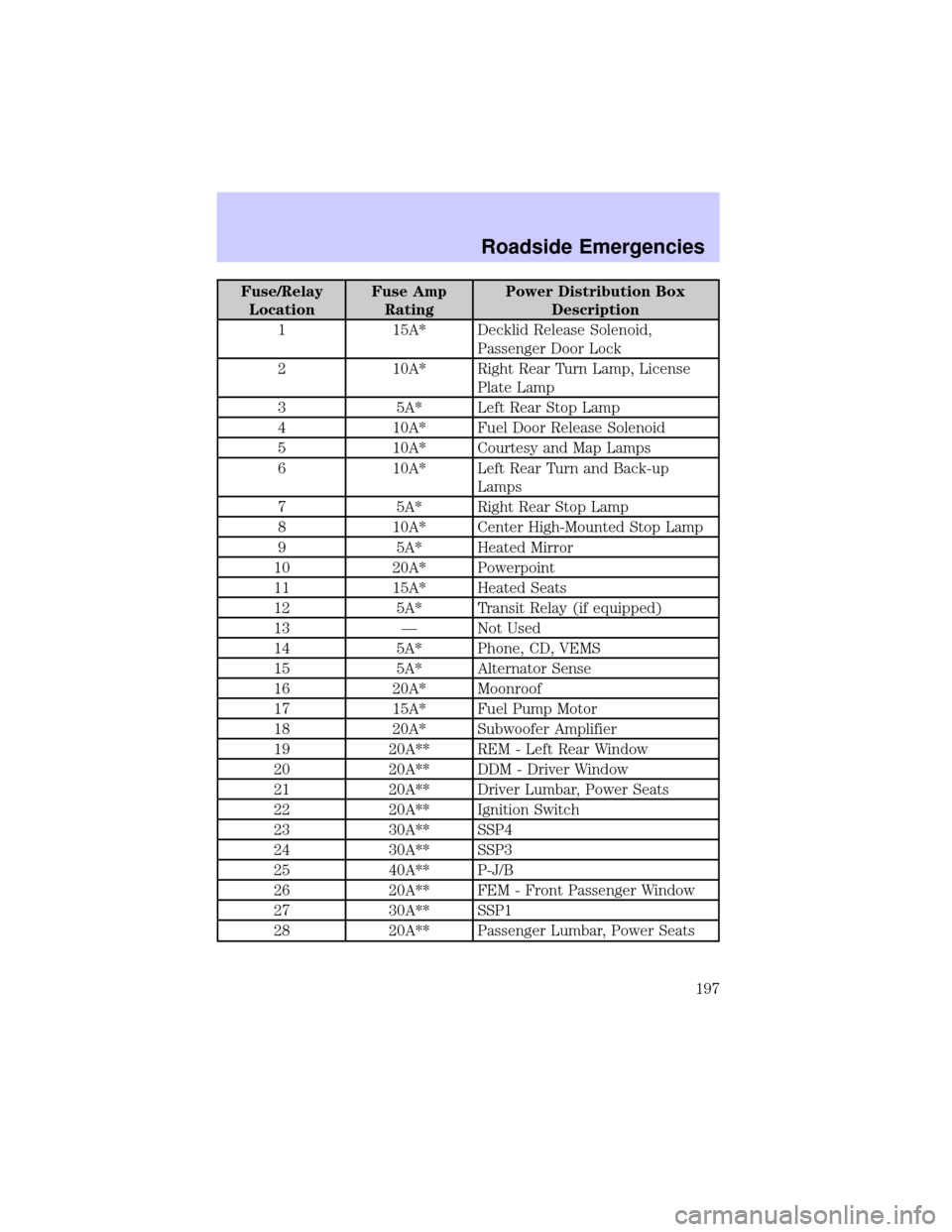
Page 197 of 288
Fuse/Relay
LocationFuse Amp
RatingPower Distribution Box
Description
1 15A* Decklid Release Solenoid,
Passenger Door Lock
2 10A* Right Rear Turn Lamp, License
Plate Lamp
3 5A* Left Rear Stop Lamp
4 10A* Fuel Door Release Solenoid
5 10A* Courtesy and Map Lamps
6 10A* Left Rear Turn and Back-up
Lamps
7 5A* Right Rear Stop Lamp
8 10A* Center High-Mounted Stop Lamp
9 5A* Heated Mirror
10 20A* Powerpoint
11 15A* Heated Seats
12 5A* Transit Relay (if equipped)
13 Ð Not Used
14 5A* Phone, CD, VEMS
15 5A* Alternator Sense
16 20A* Moonroof
17 15A* Fuel Pump Motor
18 20A* Subwoofer Amplifier
19 20A** REM - Left Rear Window
20 20A** DDM - Driver Window
21 20A** Driver Lumbar, Power Seats
22 20A** Ignition Switch
23 30A** SSP4
24 30A** SSP3
25 40A** P-J/B
26 20A** FEM - Front Passenger Window
27 30A** SSP1
28 20A** Passenger Lumbar, Power Seats
Roadside Emergencies
197