Page 67 of 288

Interior bulbs
Check the operation of the following interior bulbs frequently:
²front map lamps
²Rear dome/reading lamp
For bulb replacement, see a dealer or qualified technician.
Map lamps
For bulb replacement, see a qualified service technician or your dealer.
Replacing headlamp bulbs
To remove the high or low beam headlamp bulb:
1. Make sure headlamp switch is in
OFF position.
2. Lift the hood, push and release
four tabs and remove the protective
cover from the headlamps.
3. Disconnect the electrical
connector from the bulb by pulling
rearward.
4. Remove the old bulb from the
lamp assembly by turning to unlock
and pulling it straight out of the
lamp assembly.
To install the new bulb:
Handle a halogen headlamp bulb carefully and keep out of
children's reach. Grasp the bulb only by its plastic base and do
not touch the glass. The oil from your hand could cause the bulb to
break the next time the headlamps are operated.
1. Install the new bulb in lamp assembly by pushing straight in and
turning to lock in position. You may need to turn the bulb slightly to
align the grooves in the plastic base with the tabs in the lamp assembly.
2. Connect the electrical connector to the bulb.
3. Install the protective cover and secure with four tabs.
Lights
67
Page 68 of 288

4. Turn the headlamps on and make sure they work properly. If the
headlamp was correctly aligned before you changed the bulb, you should
not need to align it again.
Replacing foglamp bulbs
The halogen bulb contains gas under pressure. The bulb may
shatter if the glass envelope is scratched or if the bulb is
dropped. Handle the bulb carefully. Grasp the bulb only by its
base. Avoid touching the glass envelope.
1. Disconnect the electrical
connector from the foglamp bulb.
2. Rotate the foglamp bulb
counterclockwise and remove from
the foglamp (the rear side of the
foglamp is shown).
3. Install the foglamp bulb in
foglamp by rotating clockwise.
4. Connect the electrical connector
to the new foglamp bulb.
Replacing front parking lamp/turn signal lamp bulbs
For bulb replacement, see a dealer or qualified technician.
Replacing high-mount brakelamp bulbs
For bulb replacement, see a dealer or qualified technician.
Replacing tail lamp/backup bulbs
For bulb replacement, see a dealer or qualified technician.
Replacing license plate lamp bulbs
For bulb replacement, see a dealer or qualified technician.
Lights
68
Page 73 of 288
ILLUMINATED VISOR MIRROR
To turn on the visor mirror lamps,
lift the mirror cover. Adjust the
amount of light by sliding the
control.
POWER WINDOWS
Press and pull the rocker switches to open and close windows.
²Press the top portion of the
rocker switch to open.
²Pull the top portion of the rocker
switch to close.
AUTO
AUTO
Driver Controls
73
Page 74 of 288

Express down
To make the driver window open
fully without holding the window
control, press the top portion of the
driver window control completely
down to the second detent. Press or
pull the control to stop window operation.
Window lock
The window lock feature allows only
the driver to operate the rear power
windows.
To lock out the rear window
controls press the left side of the
control. Press the right side to restore the window controls.
Accessory delay
With accessory delay, the window switches may be used for up to ten
minutes after the ignition switch is turned to the OFF position or until
either front door is opened.
MIRRORS
Automatic dimming inside rear view mirror
Your vehicle is equipped with an inside rear view mirror which has an
auto-dimming function. The electronic day/night mirror will change from
the normal state to the non-glare state when bright lights (glare) reach
the mirror. When the mirror detects bright light from front or behind, it
will automatically adjust (darken) to minimize glare.
Do not block the sensor on the backside of the mirror since this may
impair proper mirror performance.
AUTO
Driver Controls
74
Page 75 of 288

Ensure the mirror is pulled down
low enough to prevent visibility
interference with the overhead
console. The mirror support arm has
two pivot points which lets you
adjust the mirror UP or DOWN and
from SIDE to SIDE.
Press the control to turn the mirror
on or off.
The mirror will automatically return to the normal state whenever the
vehicle is placed in R (Reverse)(when the mirror is on) to ensure a
bright clear view when backing up.
Electronic compass (if equipped)
The compass reading will remain accurate during most driving
conditions. Unknown to the driver, the compass is continuously
recalibrating due to magnetic fields and subtle, slow changes in vehicle
magnetics which can occur over the life of the vehicle.
The compass reading will remain fixed when significant levels are
experienced (such as steel bridges). The compass will return to normal
operation upon leaving the magnetized area.
If highly magnetized items (such as magnetic mount antennas) are
placed very near the compass the display will change to ªCº for 15
seconds, then display all segments until the magnetized item is removed.
If a ªCº is displayed, refer toCompass calibration adjustment.
Most geographic areas (zones) have a magnetic north compass point that
varies slightly from the northerly direction on maps. This variation is four
degrees between adjacent zones and will become noticeable as the
vehicle crosses multiple zones. A correct zone setting will eliminate this
error. Refer toCompass zone adjustment.
COMP MIRROR
Driver Controls
75
Page 83 of 288
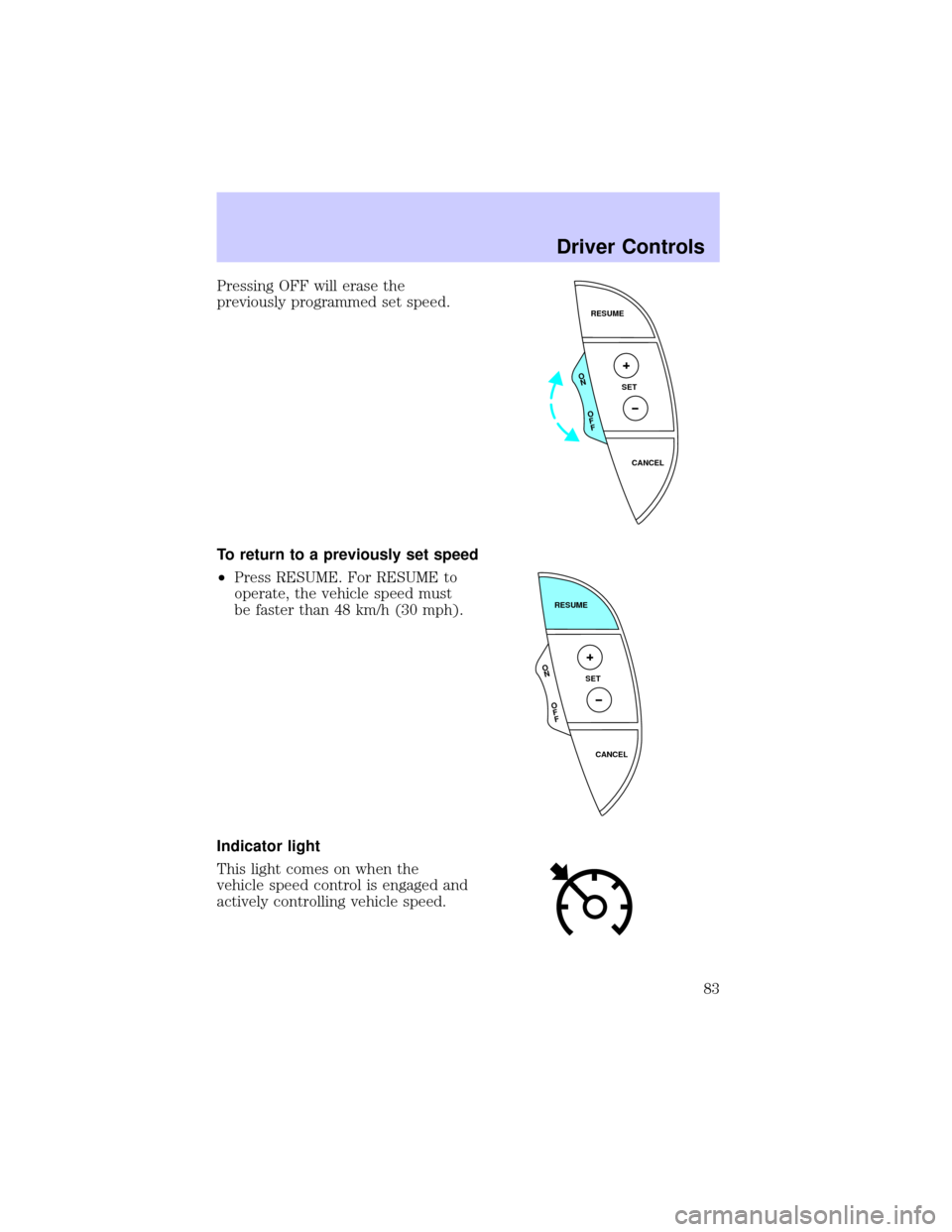
Pressing OFF will erase the
previously programmed set speed.
To return to a previously set speed
²Press RESUME. For RESUME to
operate, the vehicle speed must
be faster than 48 km/h (30 mph).
Indicator light
This light comes on when the
vehicle speed control is engaged and
actively controlling vehicle speed.
RESUME
SET
CANCEL
O
N
O
F
F
RESUME
SET
CANCEL
O
N
O
F
F
Driver Controls
83
Page 86 of 288

MOON ROOF (IF EQUIPPED)
To open the moon roof:
²Push up on the control to raise
the moon roof to the vent
position (when the glass panel is
closed).
²Push the front portion of the
control rearward to open the
moon roof.
²Press the rear portion of the
control past the first detent to
activate theAuto Openfeature.
To close the moon roof:
²To close from the vent, intermediate and full open positions, push the
rear portion of the control forward.
HOMELINKTUNIVERSAL TRANSCEIVER (IF EQUIPPED)
The HomeLinktUniversal Transceiver, located on the driver's visor,
provides a convenient way to replace up to three hand-held transmitters
with a single built-in device. This feature will learn the radio frequency
codes of most current transmitters to operate garage doors, entry gates,
security systems, entry door locks, and home or office lighting.
When programming your HomeLinktUniversal Transceiver, to a
garage door or gate be sure that people and objects are out of
the way to prevent potential harm or damage.
Do not use the HomeLinktUniversal Transceiver with any garage door
opener that lacks safety stop and reverse features as required by U.S.
federal safety standards (this includes any garage door opener model
manufactured before April 1, 1982). A garage door which cannot detect
an object, signaling the door to stop and reverse, does not meet current
U.S. federal safety standards. For more information on this matter, call
toll-free: 1±800±355±3515 or on the Internet atHomeLink.jci.com.
Driver Controls
86
Page 87 of 288

Programming
Do not program the HomeLinktUniversal Transceiver with the
vehicle parked in the garage.
1. Prepare for programming the
HomeLinktUniversal Transceiver by
erasing the three factory default
codes by holding down the two
outside buttons until the red light
begins to flash after 20 seconds.
Release both buttons.
2. Hold the end of your hand-held
transmitter 5±14 cm (2±5 inches)
away from the HomeLinktUniversal
Transceiver surface (located on your visor) while keeping the red light in
view.
3. Using both hands simultaneously
press and hold the hand-held
transmitter button and the desired
HomeLinktbutton. Do not release
the buttons until step 4 has been
completed.
Some entry gates and garage door
openers may require you to replace
step 3 with the procedure in the ªCanadian Programingº section.
4. The red light will flash slowly and then rapidly. Release both buttons
when the red light flashes rapidly.
5. Follow steps 2 through 4 to program the remaining two buttons.
If you do not successfully program the HomeLinktUniversal Transceiver
after repeated attempts, refer toRolling code programingwhich
follows, or call toll-free customer assistance: 1±800±355±3515 or on the
Internet atHomeLink.jci.com.
Canadian Programming
During programming, your hand-held transmitter may automatically stop
transmitting after two seconds which may not be long enough to
program the HomeLinktUniversal Transceiver.
Driver Controls
87