Page 57 of 288

Operating tips
²In humid weather, select
andRbefore driving. This will
reduce fogging on your windshield. After a few minutes, select any
desired position.
²To prevent humidity buildup inside the vehicle, don't drive with the
climate control system in the OFF position.
²DO NOT leave the DATC system in recirculated air mode for extended
periods of time while the system is in a heating mode or in cold or
damp conditions as this may cause interior fogging of the front, side
and rear windows.
²Do not place objects under the front seat that will interfere with the
airflow to the rear seats.
²Remove any snow, ice or leaves from the air intake area at the base of
the windshield.
²If your vehicle has been parked with the windows closed during hot
weather, the air conditioner will do a much faster job of cooling if you
drive for two or three minutes with the windows open. This will force
most of the hot, stale air out of the vehicle. Then operate the air
conditioner as you would normally.
²If the air conditioner works well with the recirculation feature on, but
not in the outside air mode, this may indicate that the cabin air filter
needs to be replaced.
²Do not place objects over the defroster outlets. These objects can
block airflow and reduce your ability to see through your windshield.
Also, avoid placing small objects on top of your instrument panel.
These objects can fall down into the defroster outlets and block
airflow and possibly damage your climate control system.
Climate Controls
57
Page 60 of 288
HEADLAMP CONTROL
Rotate the headlamp control to the
first position to turn on the parking
lamps. Rotate to the second position
to also turn on the headlamps.
Autolamp control
The autolamp system provides light
sensitive automatic on-off control of
the exterior lights normally
controlled by the headlamp control.
The autolamp system also keeps the
lights on for a preselected period of
time after the ignition switch is
turned to OFF.
²To turn autolamps on, rotate the
control counterclockwise. The
preselected time lapse is adjustable up to approximately three minutes
by continuing to rotate the control counterclockwise.
²To turn autolamps off, rotate the control clockwise to the off position
(O).
AUTO
AUTO
Lights
60
Page 65 of 288
INTERIOR LAMPS
Map lamps (if equipped)
The map lamps and controls are
located on the dome lamp. Press the
controls in front of each map lamp
to activate the lamps.
Rear dome lamp
The dome lamp lights when:
²any door is opened.
²the instrument panel dimmer
switch is rotated up until the
courtesy lamps come on.
²the remote entry UNLOCK
control is pressed and the ignition is OFF.
With the ignition key in the OFF, ACC or RUN position, the reading lamp
on the dome lamp can be turned on by pressing the control.
BULBS
Replacing exterior bulbs
Check the operation of the following lamps frequently:
²Headlamps
²Tail lamps
²Brakelamps
²High-mount brakelamp
²Turn signals
²Backup lamps
²License plate lamp
²Fog lamps
Lights
65
Page 67 of 288

Interior bulbs
Check the operation of the following interior bulbs frequently:
²front map lamps
²Rear dome/reading lamp
For bulb replacement, see a dealer or qualified technician.
Map lamps
For bulb replacement, see a qualified service technician or your dealer.
Replacing headlamp bulbs
To remove the high or low beam headlamp bulb:
1. Make sure headlamp switch is in
OFF position.
2. Lift the hood, push and release
four tabs and remove the protective
cover from the headlamps.
3. Disconnect the electrical
connector from the bulb by pulling
rearward.
4. Remove the old bulb from the
lamp assembly by turning to unlock
and pulling it straight out of the
lamp assembly.
To install the new bulb:
Handle a halogen headlamp bulb carefully and keep out of
children's reach. Grasp the bulb only by its plastic base and do
not touch the glass. The oil from your hand could cause the bulb to
break the next time the headlamps are operated.
1. Install the new bulb in lamp assembly by pushing straight in and
turning to lock in position. You may need to turn the bulb slightly to
align the grooves in the plastic base with the tabs in the lamp assembly.
2. Connect the electrical connector to the bulb.
3. Install the protective cover and secure with four tabs.
Lights
67
Page 68 of 288

4. Turn the headlamps on and make sure they work properly. If the
headlamp was correctly aligned before you changed the bulb, you should
not need to align it again.
Replacing foglamp bulbs
The halogen bulb contains gas under pressure. The bulb may
shatter if the glass envelope is scratched or if the bulb is
dropped. Handle the bulb carefully. Grasp the bulb only by its
base. Avoid touching the glass envelope.
1. Disconnect the electrical
connector from the foglamp bulb.
2. Rotate the foglamp bulb
counterclockwise and remove from
the foglamp (the rear side of the
foglamp is shown).
3. Install the foglamp bulb in
foglamp by rotating clockwise.
4. Connect the electrical connector
to the new foglamp bulb.
Replacing front parking lamp/turn signal lamp bulbs
For bulb replacement, see a dealer or qualified technician.
Replacing high-mount brakelamp bulbs
For bulb replacement, see a dealer or qualified technician.
Replacing tail lamp/backup bulbs
For bulb replacement, see a dealer or qualified technician.
Replacing license plate lamp bulbs
For bulb replacement, see a dealer or qualified technician.
Lights
68
Page 71 of 288
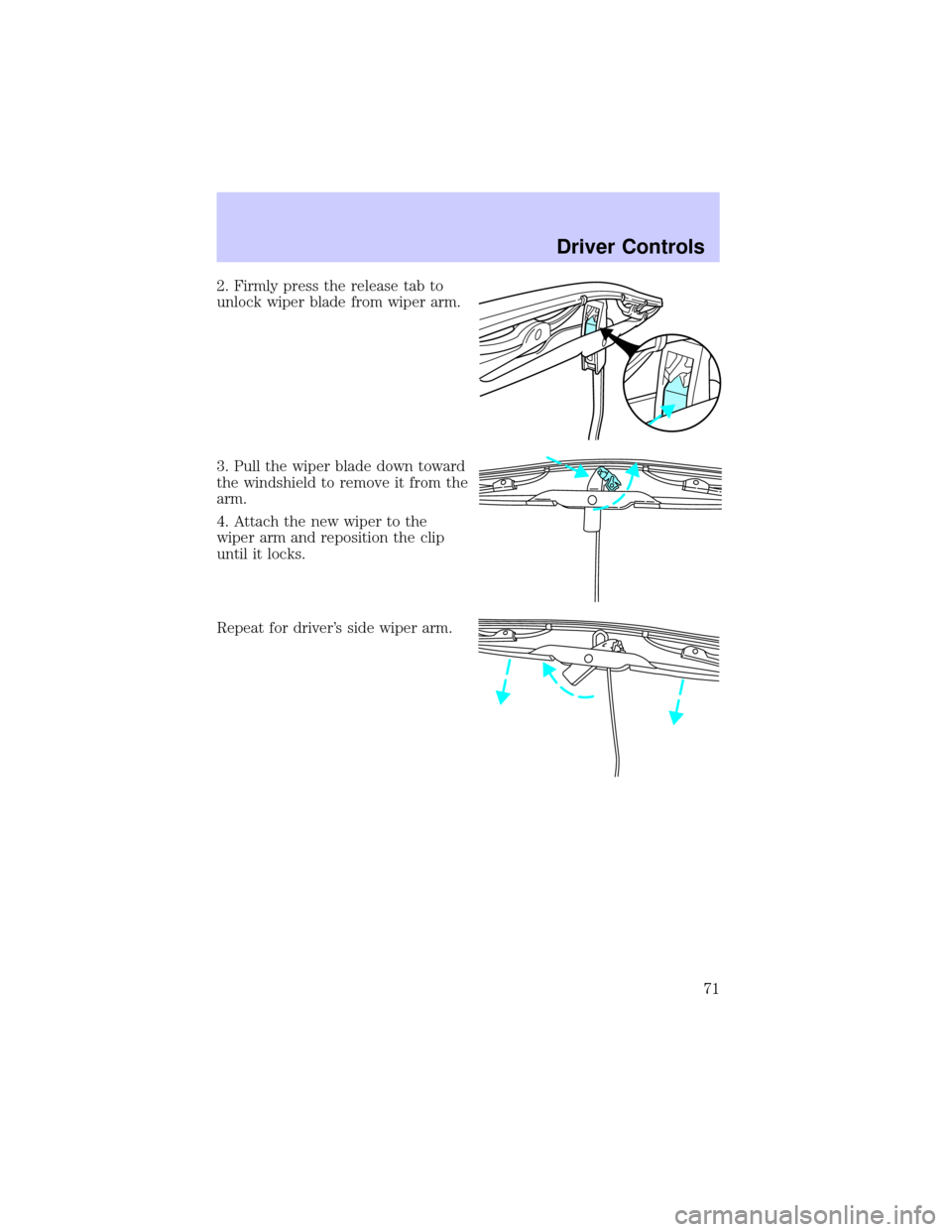
2. Firmly press the release tab to
unlock wiper blade from wiper arm.
3. Pull the wiper blade down toward
the windshield to remove it from the
arm.
4. Attach the new wiper to the
wiper arm and reposition the clip
until it locks.
Repeat for driver's side wiper arm.
Driver Controls
71
Page 74 of 288

Express down
To make the driver window open
fully without holding the window
control, press the top portion of the
driver window control completely
down to the second detent. Press or
pull the control to stop window operation.
Window lock
The window lock feature allows only
the driver to operate the rear power
windows.
To lock out the rear window
controls press the left side of the
control. Press the right side to restore the window controls.
Accessory delay
With accessory delay, the window switches may be used for up to ten
minutes after the ignition switch is turned to the OFF position or until
either front door is opened.
MIRRORS
Automatic dimming inside rear view mirror
Your vehicle is equipped with an inside rear view mirror which has an
auto-dimming function. The electronic day/night mirror will change from
the normal state to the non-glare state when bright lights (glare) reach
the mirror. When the mirror detects bright light from front or behind, it
will automatically adjust (darken) to minimize glare.
Do not block the sensor on the backside of the mirror since this may
impair proper mirror performance.
AUTO
Driver Controls
74
Page 77 of 288
Compass calibration adjustment
Perform this adjustment in an open area free from steel structures and
high voltage lines.
1. Start the vehicle.
2. Press and hold the COMP side of
the control for approximately six
seconds until ªCº appears in the
mirror display.
3. Drive the vehicle slowly (less
than 5 km/h [3 mph]) in circles or
on your everyday routine until the
display reads a direction.
4. The compass is now calibrated.
Power side view mirrors
The power mirrors can be operated at any time.
To adjust your mirrors:
1. Select L to adjust the left mirror
or R to adjust the right mirror.
2. Move the control in the direction
you wish to tilt the mirror.
3. Return to the center position to lock mirrors in place.
COMP MIRROR
NW
LR
LR
Driver Controls
77