2002 JEEP LIBERTY removal
[x] Cancel search: removalPage 374 of 1803

no continuity between terminals 87 and 30. If OK, go
to Step 2. If not OK, replace the faulty relay.
(2) Resistance between terminals 85 and 86 (elec-
tromagnet) should be 60.7 to 80.3 ohms. If OK, go to
Step 3. If not OK, replace the faulty relay.
(3) Connect a battery to terminals 85 and 86.
There should now be continuity between terminals
30 and 87, and no continuity between terminals 87A
and 30. If OK, see the Relay Circuit Test in this
group. If not OK, replace the faulty relay.
30 - COMMON FEED
85 - COIL GROUND
86 - COIL BATTERY
87 - NORMALLY OPEN
87A - NORMALLY CLOSED
RELAY CIRCUIT TEST
(1) The relay common feed terminal cavity (30) is
connected to battery voltage and should be hot at all
times. If OK, go to Step 2. If not OK, repair the open
circuit to the PDC fuse as required.
(2) The relay normally closed terminal (87A) is
connected to terminal 30 in the de-energized position,
but is not used for this application. Go to Step 3.
(3) The relay normally open terminal (87) is con-
nected to the common feed terminal (30) in the ener-
gized position. This terminal supplies battery voltage
to the rear glass and outside rear view mirror heat-
ing grids and the defogger switch indicator lamp.
There should be continuity between the cavity for
relay terminal 87 and the rear window defogger relay
output circuit cavities of the rear glass heating grid
connector, both outside rear view mirror heating grid
connectors, and the defogger switch connector at all
times. If OK, go to Step 4. If not OK, repair the open
circuit(s) as required.(4) The coil ground terminal (85) is connected to
the electromagnet in the relay. This terminal is pro-
vided with ground by the instrument cluster rear
window defogger timer and logic circuitry to energize
the defogger relay. There should be continuity to
ground at the cavity for relay terminal 85 when the
defogger switch is turned On. However, with the
defogger relay removed, the defogger switch indicator
lamp will not light to show that the defogger system
is turned On. Be certain that you depress the defog-
ger switch at least twice to confirm that the system
is turned on during this test. If OK, go to Step 5. If
not OK, repair the open circuit to the HVAC control
head as required.
(5) The coil battery terminal (86) is connected to
the electromagnet in the relay. It is connected to
fused ignition switch output voltage and should be
hot when the ignition switch is in the run position.
Check for battery voltage at the cavity for relay ter-
minal 86 with the ignition switch in the run position.
If OK, see the diagnosis for Instrument Cluster in
this group. If not OK, repair the open circuit to the
fuse in the junction block as required.
REMOVAL
WARNING: ON VEHICLES EQUIPPED WITH AIR-
BAGS, DISABLE THE AIRBAG SYSTEM BEFORE
ATTEMPTING ANY STEERING WHEEL, STEERING
COLUMN, OR INSTRUMENT PANEL COMPONENT
DIAGNOSIS OR SERVICE. DISCONNECT AND ISO-
LATE THE BATTERY NEGATIVE (GROUND) CABLE,
THEN WAIT TWO MINUTES FOR THE AIRBAG SYS-
TEM CAPACITOR TO DISCHARGE BEFORE PER-
FORMING FURTHER DIAGNOSIS OR SERVICE. THIS
IS THE ONLY SURE WAY TO DISABLE THE AIRBAG
SYSTEM. FAILURE TO TAKE THE PROPER PRE-
CAUTIONS COULD RESULT IN AN ACCIDENTAL
AIRBAG DEPLOYMENT AND POSSIBLE PERSONAL
INJURY.
(1) Disconnect and isolate the battery negative
cable.
(2) Unplug the rear window defogger relay from
the junction block.
INSTALLATION
(1) Install the rear window defogger relay by align-
ing the relay terminals with the cavities in the junc-
tion block and pushing the relay firmly into place.
(2) Connect the battery negative cable.
(3) Test the relay operation.
Fig. 4 DEFOGGER RELAY- TERMINAL LEGEND
KJWINDOW DEFOGGER 8G - 7
REAR WINDOW DEFOGGER RELAY (Continued)
Page 376 of 1803

DIAGNOSIS AND TESTING - REAR HVAC
CONTROL ASSEMBLY WINDOW DEFOGGER
FUNCTION
Before performing this test, complete the Defogger
Switch and Defogger Relay tests as described in this
group. For circuit descriptions and diagrams, (Refer
to Appropriate Wiring Information).
WARNING: ON VEHICLES EQUIPPED WITH AIR-
BAGS, DISABLE THE AIRBAG SYSTEM BEFORE
ATTEMPTING ANY STEERING WHEEL, STEERING
COLUMN, OR INSTRUMENT PANEL COMPONENT
DIAGNOSIS OR SERVICE. DISCONNECT AND ISO-
LATE THE BATTERY NEGATIVE (GROUND) CABLE,
THEN WAIT TWO MINUTES FOR THE AIRBAG SYS-
TEM CAPACITOR TO DISCHARGE BEFORE PER-
FORMING FURTHER DIAGNOSIS OR SERVICE. THIS
IS THE ONLY SURE WAY TO DISABLE THE AIRBAG
SYSTEM. FAILURE TO TAKE THE PROPER PRE-
CAUTIONS COULD RESULT IN AN ACCIDENTAL
AIRBAG DEPLOYMENT AND POSSIBLE PERSONAL
INJURY.
(1) Disconnect and isolate the battery negative
cable. Remove the defogger relay from the junction
block and unplug the defogger switch wire harness
connector.
(2) Remove the HVAC control head from the
instrument panel. This is accomplished by removing
the ashtray and the screw behind the ashtray and
uncliping the center bezel.
(3) Check for continuity between the rear window
defogger switch sense circuit cavity of the cluster
wire harness connector (connector B) and a good
ground. There should be no continuity. If OK, go to
Step 4. If not OK, repair the short circuit as
required.
(4) Check for continuity between the rear window
defogger switch sense circuit cavity of the right
instrument cluster wire harness connector (connector
B) and the defogger switch wire harness connector.
There should be continuity. If OK, go to Step 5. If not
OK, repair the open circuit as required.
(5) Check for continuity between the rear window
defogger relay control circuit cavity of the right
instrument cluster wire harness connector (connectorB) and a good ground. There should be no continuity.
If OK, go to Step 6. If not OK, repair the short circuit
as required.
(6) Check for continuity between the rear window
defogger relay control circuit cavities of the right
instrument cluster wire harness connector (connector
B) and the defogger relay receptacle (the cavity for
ISO relay terminal 85) in the junction block. There
should be continuity. If OK, replace the faulty HVAC
control head. If not OK, repair the open circuit as
required.
REMOVAL
WARNING: ON VEHICLES EQUIPPED WITH AIR-
BAGS, DISABLE THE AIRBAG SYSTEM BEFORE
ATTEMPTING ANY STEERING WHEEL, STEERING
COLUMN, OR INSTRUMENT PANEL COMPONENT
DIAGNOSIS OR SERVICE. DISCONNECT AND ISO-
LATE THE BATTERY NEGATIVE (GROUND) CABLE,
THEN WAIT TWO MINUTES FOR THE AIRBAG SYS-
TEM CAPACITOR TO DISCHARGE BEFORE PER-
FORMING FURTHER DIAGNOSIS OR SERVICE. THIS
IS THE ONLY SURE WAY TO DISABLE THE AIRBAG
SYSTEM. FAILURE TO TAKE THE PROPER PRE-
CAUTIONS COULD RESULT IN AN ACCIDENTAL
AIRBAG DEPLOYMENT AND POSSIBLE PERSONAL
INJURY.
(1) Disconnect and isolate the battery negative
cable.
(2) The Rear Window Defogger switch is part of
the HVAC assembly and if damaged or inoperative
the entire HVAC control assembly must be replace-
d(Refer to 24 - HEATING & AIR CONDITIONING/
CONTROLS/A/C HEATER CONTROL - REMOVAL).
INSTALLATION
(1) The Rear Window Defogger switch is part of
the HVAC control assembly and if damaged or inop-
erative you must replace the entire HVEAC control
head assembly(Refer to 24 - HEATING & AIR CON-
DITIONING/CONTROLS/A/C HEATER CONTROL -
INSTALLATION).
(2) Connect the battery negative cable.
KJWINDOW DEFOGGER 8G - 9
REAR WINDOW DEFOGGER SWITCH (Continued)
Page 377 of 1803

HEATED SEAT SYSTEM
TABLE OF CONTENTS
page page
HEATED SEAT SYSTEM
DESCRIPTION.........................10
OPERATION...........................10
DIAGNOSIS AND TESTING - HEATED SEAT
SYSTEM............................11
DRIVER SEAT HEATER SWITCH
DESCRIPTION.........................11
OPERATION...........................12
DIAGNOSIS AND TESTING - HEATED SEAT
SWITCH............................12
REMOVAL.............................13
INSTALLATION.........................13
HEATED SEAT ELEMENT
DESCRIPTION.........................13OPERATION...........................13
DIAGNOSIS AND TESTING - HEATED SEAT
ELEMENT...........................13
HEATED SEAT SENSOR
DIAGNOSIS AND TESTING - HEATED SEAT
SENSOR............................14
PASSENGER SEAT HEATER SWITCH
DESCRIPTION.........................14
OPERATION...........................14
DIAGNOSIS AND TESTING - HEATED SEAT
SWITCH............................14
REMOVAL.............................15
INSTALLATION.........................15
HEATED SEAT SYSTEM
DESCRIPTION
Individually controlled electrically heated front
seats are available on models that are also equipped
with the optional leather trim package. Vehicles with
this option can be visually identified by the two sep-
arate heated seat switches mounted on the outboard
seat cushion side shields. The heated seat system
allows the front seat driver and passenger to select
from two different levels of supplemental electrical
seat heating, or no seat heating to suit their individ-
ual comfort requirements. The heated seat system for
this vehicle includes the following major components:
²Heated Seat Switches- Two heated seat
switches are used per vehicle, including two Light-
Emitting Diode (LED) indicator lamps and an incan-
descent back lighting bulb for each switch. One
switch for the driver and one for the passenger front
seats. The switches are mounted on the outboard
seat cushion side shields.
²Heated Seat Module- also referred to as the
Seat Heat Interface Module (SHIM), this module con-
tains the solid state electronic control and diagnostic
logic circuitry for the heated seat system. One heated
seat module is used per vehicle and is mounted
under the left front seat cushion. Refer to the Elec-
tronic Control Modules section of the service manual
for heated seat module information.
²Heated Seat Elements- Four heated seat ele-
ments are used per vehicle, one for each front seat
back and one for each front seat cushion. The ele-
ments are integral to the individual front seat andseat back cushions and cannot be removed from the
cushions, once installed at the factory.
²Heated Seat Sensors- Two heated seat sen-
sors are used per vehicle, one for each front seat. The
sensors are integral to the individual front seat heat-
ing elements.
Following are general descriptions of the major
components in the heated seat system. See the own-
er's manual in the vehicle glove box for more infor-
mation on the features, use and operation of the
heated seat system. Refer toWiring Diagramsfor
the location of complete heated seat system wiring
diagrams.
OPERATION
The heated seat module receives fused battery cur-
rent through fuse #29 in the Junction Block (JB)
when the ignition switch is in the ªONº position. The
heated seat switches receive battery current through
fuse #25 in the Junction Block also, when the igni-
tion switch is in the ªONº position. The heated seat
module shares a common ground circuit with each of
the heated seat elements. The heated seat elements
will only operate when the surface temperature of
the seat cushion is below the designed temperature
set points of the system.
The heated seat system will also be turned off
automatically whenever the ignition switch is turned
to any position except On. If the ignition switch is
turned to the Off position while a heated seat is
turned ON, the heated seat will remain Off after the
ignition switch is turned back ªONº until a heated
seat switch is depressed again.
8G - 10 HEATED SEAT SYSTEMKJ
Page 379 of 1803

OPERATION
There are three positions that can be selected with
each of the heated seat switches: Off, Low, and High.
When the front of the switch rocker is fully
depressed, the High position is selected and the high
position LED indicator illuminates. When the rear of
the switch rocker is fully depressed, the Low position
is selected and the low position LED indicator illumi-
nates. When the switch rocker is depressed a second
time in either direction, Off is selected and both LED
indicators are extinguished.
Both switches provide separate resistor multi-
plexed hard wire inputs to the Heated Seat Module
to indicate the selected switch position. The heated
seat module monitors the switch inputs and responds
to the heated seat switch status messages by control-
ling the output to the seat heater elements of the
selected seat. The Low heat position set point is
about 36É C (97É F), and the High heat position set
point is about 41É C (105É F).
DIAGNOSIS AND TESTING - HEATED SEAT
SWITCH
If a heated seat fails to heat and one or both of the
indicator lamps on a heated seat switch flash, refer
toHeated Seat System Diagnosis and Testingin
this section for flashing LED failure identification.
Refer toWiring Diagramsfor complete heated seat
system wiring diagrams.
(1) If the problem being diagnosed involves a
heated seat switch indicator lamp that remains illu-
minated after the heated seat has been turned Off,refer toDiagnosis and Testing the Heated Seat
Modulein the Electronic Control Modules section for
heated seat module diagnosis and testing procedures.
If not, go to Step 2
(2) Remove the heated seat switch (Refer to 8 -
ELECTRICAL/HEATED SEATS/DRIVER HEATED
SEAT SWITCH - REMOVAL). Check for continuity
between the ground circuit cavity #5 of the heated
seat switch connector and a good ground. There
should be continuity. If OK, go to Step 3. If not OK,
repair the open ground circuit as required.
(3) Turn the ignition switch to the ON position.
Check for battery voltage at the fused ignition switch
output circuit cavity #1 of the heated seat switch con-
nector. If OK, go to Step 4. If not OK, repair the open
fused ignition switch output circuit as required.
(4) Check the continuity between pin #1 and pin
#3 of the heated seat switch (Fig. 2). If the readings
do not correspond to those in the Heated Seat Switch
Continuity table below, replace the heated seat
switch. If OK, and the heated seat system is still not
operating properly refer toDiagnosis and Testing
the Heated Seat Module.
NOTE: ANY RESISTANCE VALUES (OHMSV) GIVEN
IN THE FOLLOWING TEXT ARE SUPPLIED USING
THE AUTOMATIC RANGE GENERATED BY A
FLUKETAUTOMOTIVE METER. IF ANOTHER TYPE
OF MEASURING DEVICE IS USED, THE VALUES
GENERATED MAY NOT BE THE SAME AS THE
RESULTS SHOWN HERE, OR MAY HAVE TO BE
CONVERTED TO THE RANGE USED HERE.
Fig. 1 KJ POWER / HEATED SEAT
Fig. 2 Heated Seat Switches
8G - 12 HEATED SEAT SYSTEMKJ
DRIVER SEAT HEATER SWITCH (Continued)
Page 380 of 1803

HEATED SEAT SWITCH CONTINUITY
CONTINUITY
BETWEENSWITCH
POSITIONOHMS
READING +/±
10%
PIN 1 AND 3 OFF 2.2 K (2200)
OHMS
PIN 1 AND 3 LO .415 K (415)
OHMS
PIN 1 AND 3 HI 33 OHMS
REMOVAL
(1) Disconnect and isolate the negative battery
cable.
(2) Remove the appropriate seat cushion side
shield (Refer to 23 - BODY/SEATS/SEAT CUSHION
SIDE COVERS - REMOVAL).
(3) Disconnect the heated seat switch electrical
connector. Depress the locking tab and pull straight
apart.
(4) Working from the underside of the switch, gen-
tly rock the switch back and forth out of its mounting
location.
INSTALLATION
(1) Gently rock the switch back and forth in to its
mounting location.
(2) Connect the heated seat switch electrical con-
nector.
(3) Install the appropriate seat cushion side shield.
Refer to the Body section of the service manual for
the procedure.
(4) Connect the negative battery cable.
HEATED SEAT ELEMENT
DESCRIPTION
The heated seat system includes four seat heating
elements. Two are located in each front seat, one for
the seat cushion and the other for the seat back. All
models use two resistor wire heating elements for
each seat that are connected in series with the
Heated Seat Module (HSM). The temperature sensor
is a Negative Temperature Coefficient (NTC) ther-
mistor. One temperature sensor is used for each seat,
and it is located on the seat cushion heating element
for all models.
The seat heating elements are permanently
attached to the seat cushions. The heated seat ele-
ments and the temperature sensor cannot be
adjusted or repaired and, if faulty or damaged, the
seat cushions must be replaced. Refer to the Body
section for the seat cushion service procedures.
OPERATION
The heated seat elements resist the flow of electrical
current. When battery current is passed through the
elements, the energy lost by the resistance of the ele-
ments to the current flow is released in the form of
heat. When the temperature of the seat cushion cover
rises, the resistance of the sensor decreases. The Heated
Seat Module supplies a five-volt current to one side of
each sensor, and monitors the voltage drop through the
sensor on a return circuit. The Heated Seat Module
uses this temperature sensor input to monitor the tem-
perature of the seat, and regulates the current flow to
the seat heating elements accordingly.
DIAGNOSIS AND TESTING - HEATED SEAT
ELEMENT
SEAT CUSHION ELEMENT
(1) Disconnect and isolate the battery negative
cable. Disconnect the green heated seat cushion ele-
ment wire harness connector from the power seat
wire harness. The power seat wire harness connec-
tors for the seat cushion heating elements are
secured to a bracket located under the seat cushion
frame. Refer toWiringfor connector pin information.
(2) Check for continuity between the two heated
seat element circuit cavities. There should be conti-
nuity. If OK, the elements within the seat assembly
test OK, go to Step 3. If not OK, replace the faulty
seat heating element and cushion assembly.
(3) Test the seat wire harness between the heated
seat module connector and the heated seat wire har-
ness element connector for a shorted or open circuit.
If OK, element is OK, proceed with testing the
heated seat sensor and module. If not OK, repair the
shorted or open seat wire harness as required.
SEAT BACK ELEMENT
(1) Disconnect and isolate the battery negative
cable. Disconnect the green heated seat back element
wire harness connector from the power seat wire har-
ness. The power seat wire harness connectors for the
seat cushion heating elements are secured to a
bracket located under the seat cushion frame. Refer
toWiringfor connector pin information.
(2) Check for continuity between the two heated
seat element circuit cavities. There should be conti-
nuity. If OK, the elements within the seat assembly
test OK, go to Step 3. If not OK, replace the faulty
seat heating element and cushion assembly.
(3) Test the seat wire harness between the heated
seat module connector and the heated seat wire har-
ness element connector for a shorted or open circuit.
If OK, element is OK, proceed with testing the
heated seat sensor and module. If not OK, repair the
shorted or open seat wire harness as required.
KJHEATED SEAT SYSTEM 8G - 13
DRIVER SEAT HEATER SWITCH (Continued)
Page 382 of 1803
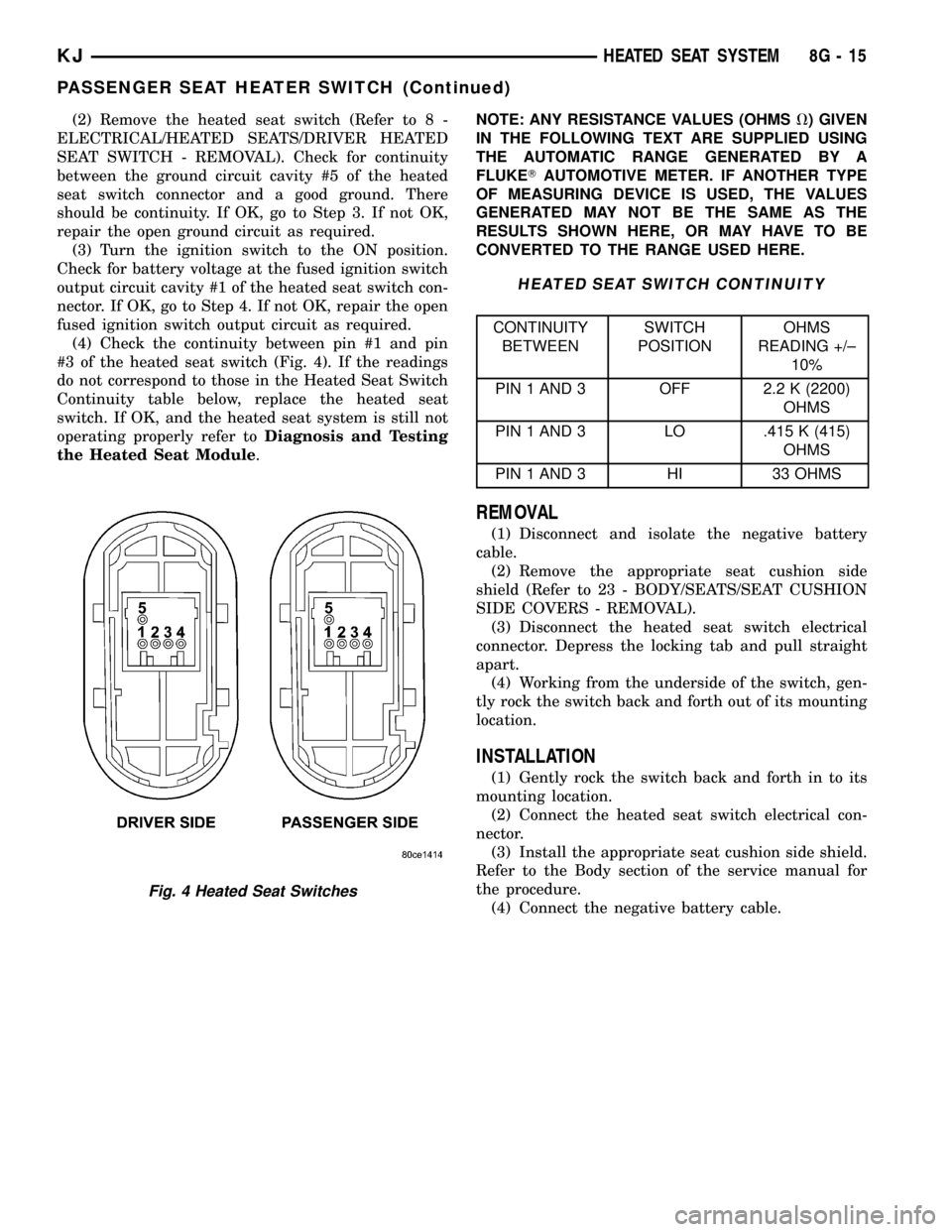
(2) Remove the heated seat switch (Refer to 8 -
ELECTRICAL/HEATED SEATS/DRIVER HEATED
SEAT SWITCH - REMOVAL). Check for continuity
between the ground circuit cavity #5 of the heated
seat switch connector and a good ground. There
should be continuity. If OK, go to Step 3. If not OK,
repair the open ground circuit as required.
(3) Turn the ignition switch to the ON position.
Check for battery voltage at the fused ignition switch
output circuit cavity #1 of the heated seat switch con-
nector. If OK, go to Step 4. If not OK, repair the open
fused ignition switch output circuit as required.
(4) Check the continuity between pin #1 and pin
#3 of the heated seat switch (Fig. 4). If the readings
do not correspond to those in the Heated Seat Switch
Continuity table below, replace the heated seat
switch. If OK, and the heated seat system is still not
operating properly refer toDiagnosis and Testing
the Heated Seat Module.NOTE: ANY RESISTANCE VALUES (OHMSV) GIVEN
IN THE FOLLOWING TEXT ARE SUPPLIED USING
THE AUTOMATIC RANGE GENERATED BY A
FLUKETAUTOMOTIVE METER. IF ANOTHER TYPE
OF MEASURING DEVICE IS USED, THE VALUES
GENERATED MAY NOT BE THE SAME AS THE
RESULTS SHOWN HERE, OR MAY HAVE TO BE
CONVERTED TO THE RANGE USED HERE.
HEATED SEAT SWITCH CONTINUITY
CONTINUITY
BETWEENSWITCH
POSITIONOHMS
READING +/±
10%
PIN 1 AND 3 OFF 2.2 K (2200)
OHMS
PIN 1 AND 3 LO .415 K (415)
OHMS
PIN 1 AND 3 HI 33 OHMS
REMOVAL
(1) Disconnect and isolate the negative battery
cable.
(2) Remove the appropriate seat cushion side
shield (Refer to 23 - BODY/SEATS/SEAT CUSHION
SIDE COVERS - REMOVAL).
(3) Disconnect the heated seat switch electrical
connector. Depress the locking tab and pull straight
apart.
(4) Working from the underside of the switch, gen-
tly rock the switch back and forth out of its mounting
location.
INSTALLATION
(1) Gently rock the switch back and forth in to its
mounting location.
(2) Connect the heated seat switch electrical con-
nector.
(3) Install the appropriate seat cushion side shield.
Refer to the Body section of the service manual for
the procedure.
(4) Connect the negative battery cable.
Fig. 4 Heated Seat Switches
KJHEATED SEAT SYSTEM 8G - 15
PASSENGER SEAT HEATER SWITCH (Continued)
Page 384 of 1803

HORN
TABLE OF CONTENTS
page page
HORN SYSTEM
DESCRIPTION..........................1
OPERATION............................1
DIAGNOSIS AND TESTING - HORN SYSTEM . . . 1
HORN
DIAGNOSIS AND TESTING - HORN..........2
REMOVAL.............................3
INSTALLATION..........................3HORN RELAY
DIAGNOSIS AND TESTING - HORN RELAY....3
REMOVAL.............................3
INSTALLATION..........................3
HORN SWITCH
DESCRIPTION..........................4
DIAGNOSIS AND TESTING - HORN SWITCH . . . 4
HORN SYSTEM
DESCRIPTION
A dual-note electric horn system is standard facto-
ry-installed equipment on this model (Fig. 1).
The dual-note horn system features dual electro-
magnetic horn units. The horn system includes the
following major components:
²Horn- The two horns are located below the
Power Distribution Center (PDC).
²Horn Relay- The horn relay is located in the
Junction Block (JB).²Horn Switch- The horn switch is molded into
the driver airbag assembly.OPERATION
The horn system operates on battery current
received through fuse 3 in the Junction Block (JB).
The horn system circuit is designed so that the sys-
tem will remain operational, regardless of the igni-
tion switch position.
DIAGNOSIS AND TESTING - HORN SYSTEM
In most cases, any problem involving continually
sounding horns can be quickly alleviated by removing
the horn relay from the Junction Block (JB). Refer to
horn relay for the removal procedure. Refer to the
appropriate wiring information. The wiring informa-
tion includes wiring diagrams, proper wire and con-
nector repair procedures, further details on wire
harness routing and retention, as well as pin-out and
location views for the various wire harness connec-
tors, splices and grounds.
WARNING: DISABLE THE AIRBAG SYSTEM
BEFORE ATTEMPTING ANY STEERING WHEEL,
STEERING COLUMN, SEAT BELT TENSIONER, SIDE
AIRBAG, OR INSTRUMENT PANEL COMPONENT
DIAGNOSIS OR SERVICE. DISCONNECT AND ISO-
LATE THE BATTERY NEGATIVE (GROUND) CABLE,
THEN WAIT TWO MINUTES FOR THE AIRBAG SYS-
TEM CAPACITOR TO DISCHARGE BEFORE PER-
FORMING FURTHER DIAGNOSIS OR SERVICE. THIS
IS THE ONLY SURE WAY TO DISABLE THE AIRBAG
SYSTEM. FAILURE TO TAKE THE PROPER PRE-
CAUTIONS COULD RESULT IN ACCIDENTAL AIR-
BAG DEPLOYMENT AND POSSIBLE PERSONAL
INJURY.
Fig. 1 HORN LOCATION
1 - HIGH NOTE HORN
2 - LOW NOTE HORN
KJHORN 8H - 1
Page 386 of 1803

REMOVAL
(1)Disconnect and isolate the battery negative cable.
(2) Disconnect the electrical harness connector
from the horns.
(3) Remove the mounting bolt (Fig. 2).
(4) Remove the horns.
INSTALLATION
(1) Install the horns.
(2) Install the mounting bolt. Tighten bolt to 25
N´m (19 lb. ft.).
(3) Connect the electrical harness connector to the
horns
(4) Connect the battery negative cable.
HORN RELAY
DIAGNOSIS AND TESTING - HORN RELAY
(1) Remove horn relay (Refer to 8 - ELECTRICAL/
HORN/HORN RELAY - REMOVAL).
(2) Using ohmmeter, test between relay connector
terminals 85 to 86 for 75 8 ohms resistance. If
resistance not OK, replace relay (Fig. 3).
(3) Test for continuity between ground and termi-
nal 85 of horn relay.
(a) When the horn switch is not depressed, no
continuity should be present.
(b) Continuity to ground when horn switch is
depressed.
(c) If continuity is not correct replace horn
switch or wiring as necessary, refer to the appro-
priate wiring information. The wiring information
includes wiring diagrams, proper wire and connec-
tor repair procedures, details of wire harness rout-ing and retention, connector pin-out information
and location views for the various wire harness
connectors, splices and grounds.
(4) Using voltmeter, test voltage at:
(a) Terminals 30 and 86 of the horn relay to
body ground.
(b) If NO voltage check fuse 3 of the Junction
Block (JB).
(c) If incorrect voltage, repair as necessary. Refer
to the appropriate wiring information. The wiring
information includes wiring diagrams, proper wire
and connector repair procedures, details of wire
harness routing and retention, connector pin-out
information and location views for the various wire
harness connectors, splices and grounds.
(5) Insert a jumper wire between terminal 30 and
87 of the Junction Block (JB).
(a) If horn sounds replace relay.
(b) If the horn does not sound, install horn relay
and test horn (Refer to 8 - ELECTRICAL/HORN/
HORN - DIAGNOSIS AND TESTING).
REMOVAL
(1) Disconnect and isolate the battery negative
cable.
(2) Remove the instrument panel end cap.
(3) Locate and pull the horn relay from the Junc-
tion Block (JB).
INSTALLATION
(1) Locate proper connector, and press relay into
position.
(2) Install instrument panel end cap.
(3) Connect battery negative cable.
Fig. 2 HORN MOUNTING
1 - POWER DISTRIBUTION CENTER
2 - LOW NOTE HORN
3 - HIGH NOTE HORN
Fig. 3 Horn Relay
30 - COMMON FEED
85 - COIL GROUND
86 - COIL BATTERY
87 - NORMALLY OPEN
87A - NORMALLY CLOSED
KJHORN 8H - 3
HORN (Continued)