2002 Hyundai Getz ignition
[x] Cancel search: ignitionPage 108 of 428

FEATURES OF YOUR HYUNDAI 1- 95
K240D01TB-GAT 1. Tape mode and side selection Button Press this button to play the tape when it is in the cassette deck. Once the tape mode is selected, you can play thereverse side of the tape by merely depressing the button again. 2. Cassette tape loading slot Insert the tape into the loading slot as the open side faces the right. Theplayer will pull the tape in and auto- matically begin playback even when the audio power is off and the ignitionswitch is either in the position of "ACC"or "ON". 3. Tape Eject Button ( ) Press this button to eject the cassette tape. Tape will be ejected even when the ignition switch is in the position of"OFF". 4. LCD LCD shows the operating conditions of the cassette in play. It informs thedriver of playing status, tape direction, FF or REW, MTL in metallic tape use, and Dolby etc. 5. Dolby Button When you play the Dolby recorded tape, press this button to reduce thebackground noise. If you press this button is displayed. One more press will let the disappear from the dis-play. 6. AMS-REW Button ( ) Press button to rewind the tape quickly and start replay at the beginning of the current music. During the AMS-RE-WINDING. "REW" sign blinks on the display. Press the button once more to stopREWINDING and start play again.7. Rewind button ( ) You can rewind the tape to the begin- ning of the tape by pressing the " "
button during the play ("REW" is shown on the display). Tape play starts when the " " button is pressed again duringthe REW mode. 8. AMS-FF Button ( ) Press button to fast forward the tape and start play at the beginning of next music segment. During the AMS-FF, "FF"sign blinks on the display.Press the button again to stop FF action and start play. 9. Fast Forward Button ( ) You can fast forward the tape to the end of the tape by pressing the " " button during the play. (Then "FF" is shown on the display). Tape play startswhen the button is pressed again
during the FF mode.
Page 110 of 428

FEATURES OF YOUR HYUNDAI 1- 97
H290B03E-GAT
1. POWER ON-OFF Control Knob The radio unit may be operated when the ignition key is in the "ACC" or "ON"position. Press the button to switch the power on. The display shows the radio frequency in the radio mode, the tapedirection indicator in the tape mode or CD track in either the CD mode or CD AUTO CHANGER mode. To switchthe power off, press the button again. VOLUME Control Rotate the knob clockwise to increase the volume and turn the knob counter- clockwise to reduce the volume.
2. BASS/BALANCE
Control Knob BASS Control Knob
Press to pop the knob out. To increase the bass, rotate the knob clockwise, while to decrease the bass, rotate theknob counterclockwise. BALANCE Control knob Pull the Bass control knob out further. Rotate the knob clockwise to empha-size right speaker sound. (Left speaker sound will be attenuated) When the control knob is turned counterclock-wise, left speaker sound will be em- phasized (Right speaker sound will be attenuated).
3. TREBLE/FAD Knob
TREBLE Control Knob
Press to pop the knob out and turn to the left or right for the desired trebletone. FAD (Fader Control) Knob Pull the Bass control knob out further. Turn the control knob counterclock- wise to emphasize front speaker sound. (Rear speaker sound will be attenu-ated) When the control knob is turned clockwise, rear speaker sound will be emphasized. (Front speaker sound willbe attenuated) 4. TUNE (Manual) Select Button Press the ( ) side or ( ) side to increase or to decrease the frequency.Press either button and hold down to continuously scroll, Release button once the desired station is reached. SEEK Operation (Automatic Channel Selection) Press the TUNE select button for 0.5 sec or more. Releasing it will automati- cally tune to the next available stationwith a beep sound. When the ( ) side is pressed longer than 0.5 second, releasing will auto-matically tune to the next higher fre- quency and when the ( ) side is pressed longer than 0.5 second andreleasing will automatically tune to the next lower frequency.
5. PRESET STATION Select
Buttons
Six (6) stations for AM, FM and FM2 respectively can be preset in the elec- tronic memory circuit.
Page 115 of 428

1- 102 FEATURES OF YOUR HYUNDAI
H290F01O-GAT
1. CD Select Button
o Insert the CD with the label facing
upward.
o Insert the CD to start CD playback, during radio operation or cassette tape playing.
o When a disc is in the CD deck, if you press the play button the CD playerwill begin playing even if the radio orcassette player is being used.
o The CD player can be used when
the ignition switch is in either the"ON" or "ACC" position.
2. FF/REW ( / ) If you want to fast forward or reverse through the compact disc track, push and hold in the FF ( ) or REW ( ) button.When you release the button, the com- pact disc player will resume playing. 3. TRACK UP/DOWN
o The desired track on the disc cur-
rently being played can be selected using the track number.
o Press button once to skip forwa-
rd to the beginning of the next track.Press button once to skip back to the beginning of the track.
4. REPEAT
o To repeat the music you are listen- ing to, press the RPT button. To cancel, press again.
o If you do not release RPT operation when the track ends, it will automati-cally be replayed.This process will be continued until you push the button again.
5. EQUALIZER Button Press the EQ button to select the CLASSIC, JAZZ, ROCK and DEFEATMODE for the desired tone quality. Each press of the button changes the display as follows; 6. CD EJECT Button When the button is pressed with the CD loaded, the CD is ejected.
7. SCAN Button (If installed)
o Press the SCAN button to playback
the first 10 seconds of each track.
o Press the SCAN button again within 10 sec. for the desired track.
NOTE:
o To assure proper operation of the unit, keep the vehicle interior temperature within a normalrange by using the vehicle's air conditioning or heating system.
o When replacing the fuse, replace
it with a fuse having the correctcapacity.
o The preset station frequencies
are all erased when the car bat-tery is disconnected. Therefore, all data will have to be set againif this should occur.
o Do not add any oil to the rotating
parts. Keep magnets, screwdriv-ers and other metallic objects away from the tape mechanism and head.
CLASSIC JAZZ ROCK DEFEAT
Page 124 of 428

DRIVING YOUR HYUNDAI 2- 3
C020A01O-GAT BEFORE STARTING THE EN- GINE Before you start the engine, you should always:
1. Look around the vehicle to be sure
there are no flat tires, puddles of oil, water or other indications of pos-sible trouble.
2. After entering the car, check to be
sure the parking brake is engaged.
3. Check that all windows, and lights are clean.
4. Check that the interior and exterior mirrors are clean and in position.
5. Check your seat, seatback and
headrest to be sure they are in theirproper positions.
6. Lock all the doors.
7. Fasten your seat belt and be sure
that all other occupants have fas- tened theirs.
8. Turn off all lights and accessories that are not needed.
9. When you turn the ignition switch to
"ON", check that all appropriate warning lights are operating and that you have sufficient fuel. 10.Check the operation of warning
lights and all bulbs when key is in the "ON" position.
!WARNING: (DIESEL ENGINE)
To ensure that sufficient vacuum exists within the brake system dur-ing cold weather start-up condi- tions, it is necessary to run the engine at idle for several secondsafter starting the engine. C030A01A-GAT COMBINATION IGNITION SWITCHTo Start the Engine
o If your Hyundai is equipped with a
manual transaxle, place the shift lever in neutral and depress theclutch pedal fully.
o If your Hyundai has an automatic
transaxle, place the shift lever in "P"(park).
o To start the engine, insert the igni-
tion key and turn it to the "START"position. Release it as soon as the engine starts. Do not hold the key in the "START" position for more than15 seconds.
NOTE: For safety, the engine will not start if the shift lever is not in "P" or "N"Position (Automatic transaxle).
Page 125 of 428
2- 4 DRIVING YOUR HYUNDAI
C070C01E
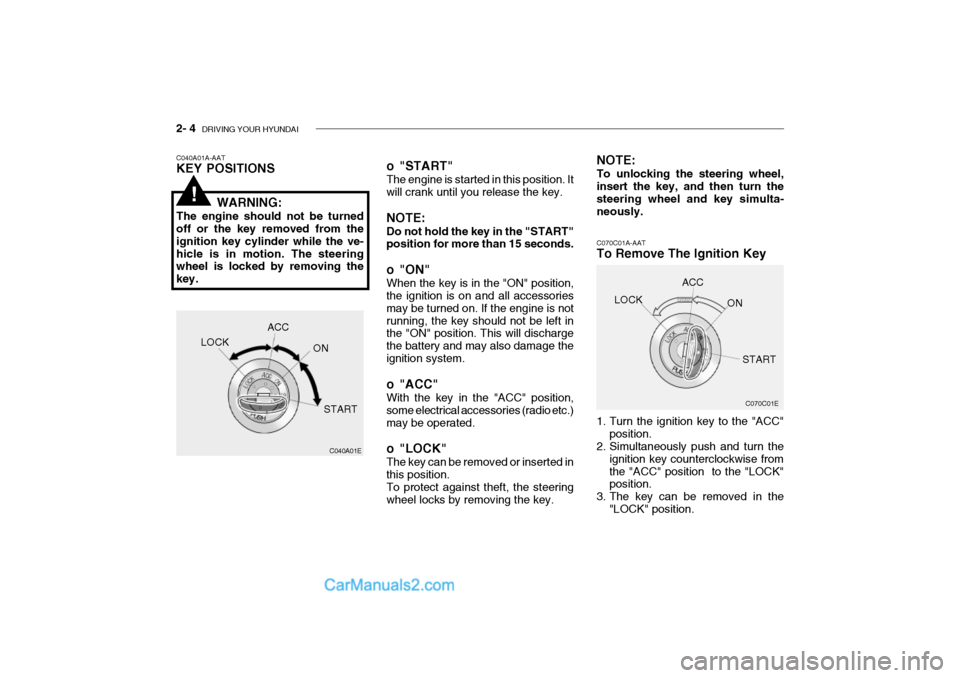
C070C01A-AAT
To Remove The Ignition Key
1. Turn the ignition key to the "ACC"
position.
2. Simultaneously push and turn the
ignition key counterclockwise from the "ACC" position to the "LOCK" position.
3. The key can be removed in the "LOCK" position.LOCK
ACC
ON
START
o "START" The engine is started in this position. It will crank until you release the key. NOTE: Do not hold the key in the "START" position for more than 15 seconds.
o "ON" When the key is in the "ON" position, the ignition is on and all accessories may be turned on. If the engine is notrunning, the key should not be left in the "ON" position. This will discharge the battery and may also damage theignition system.
o "ACC" With the key in the "ACC" position, some electrical accessories (radio etc.)may be operated.
o "LOCK" The key can be removed or inserted in this position. To protect against theft, the steering wheel locks by removing the key. NOTE: To unlocking the steering wheel, insert the key, and then turn the steering wheel and key simulta-neously.
C040A01A-AAT KEY POSITIONS
WARNING:
The engine should not be turned off or the key removed from the ignition key cylinder while the ve-hicle is in motion. The steering wheel is locked by removing the key.
C040A01E
LOCK
ACC
ON
START
!
Page 126 of 428

DRIVING YOUR HYUNDAI 2- 5
C050A01A-AAT STARTING
C050A01E
WARNING:
Never run the engine in a closed or poorly ventilated area any longer than is needed to move your car inor out of the area. The carbon mon- oxide gas emitted is odorless and can cause serious injury or death.
!
C051A01O-GAT STARTING FOR THE DIESEL ENGINE ENGINE COLD
o Turn the ignition key to position "ON" and wait for the pre-heat indi- cator light to go out.
o Operate the starter until the engine
runs.
ENGINE WARMOperate the starter. If the engine doesnot respond on the first attempt, wait several seconds and try again using the pre-heat. C050B02S-GAT NORMAL CONDITIONS The Starting Procedure:
1. Insert key, and fasten the seat belt.
2. Depress the clutch pedal fully and
place the gearshift lever (manualtransaxle) in neutral or the selectorlever (automatic transaxle) in "P" (park) position.
3. After turning the ignition key to the "ON" position, make certain all warn-ing lights and gauges are function- ing properly before starting the en-gine.
4. On vehicles equipped with the die-
sel preheat indicator light, turn theignition key to the "ON" position. The diesel pre-heat indicator light will first illuminate in amber, andthen after a short time, the amber illumination will go off, indicating that preheating is completed.
Page 127 of 428

2- 6 DRIVING YOUR HYUNDAI
C055B01B-GAT STARTING AND STOPPING THE ENGINE FOR TURBO CHARGERINTERCOOLER (DIESEL EN-GINE)
(1) Do not race the engine or sudden
accelerate the engine immediately after start it. If the engine is cold, allow the engine to idle for severalseconds before it is driven to en- sure sufficient lubrication of the turbo charger unit.
(2) After high speed or extended driv- ing, requiring a heavy engine load,the engine should be allowed to idleabout 1 minute before turning it off. This idle time will allow the turbo charger to cool prior to shutting theengine off.
!WARNING:
Do not turn the engine off immedi- ately after it has been subjected toa heavy load. Doing so may cause severe damage to the engine or turbo charger unit.
C050B01HP
NOTE: If the engine were not started 10 seconds after the preheating is com- pleted, turn the ignition key once more to the "LOCK" position, andthen to the "ON" position, in order to preheat again. WARNING:
Be sure that the clutch is fully de- pressed when starting a manual transaxle vehicle. Otherwise there is the potential to cause damage tothe vehicle or injury to someone inside or outside the vehicle as a result of the forward or backwardmovement of the vehicle that will occur if the clutch is not depressed when the vehicle is started.
5. Turn the ignition key to the "Start" position and release it when the engine starts.
!
Page 132 of 428

DRIVING YOUR HYUNDAI 2- 11
C090I02A-AAT
CAUTION:
o Shift into "R" and "P" position only when the vehicle has com- pletely stopped.
o Do not accelerate the engine in reverse or any of the forwardpositions with the brakes applied.
o Always apply the footbrake when shifting from "P" or "N", to "R",
"D", "2" or "L" position.
o Do not use the "P" (Park) posi- tion in place of the parking brake.Always set the parking brake, shift the transaxle into "P" (Park)position and turn off the ignition when you leave the vehicle, even momentarily. Never leave the ve-hicle unattended while the en- gine is running.
o Check the automatic transaxle fluid level regularly, and add fluidas necessary. See the maintenance schedulefor the proper fluid recommen- dation. C090N02A-AAT Good Driving Practices
o Never move the gear selector lever
from "P" or "N" to any other position with the accelerator pedal de- pressed.
o Never move the gear selector lever
into "P" when the vehicle is in mo-tion.
o Be sure the car is completely stopped before you attempt to shift into "R".
o Never take the car out of gear and
coast down a hill. This may be ex- tremely hazardous. Always leave the car in gear when moving.
o Do not "ride" the brakes. This can cause them to overheat and mal-function. Instead, when you are driv- ing down a long hill, slow down andshift to a lower gear. When you do this, engine braking will help slow the car.
o Slow down before shifting to a lower gear. Otherwise, the lower gear maynot be engaged.
o Always use the parking brake. Do not depend on placing the transaxlein "P" to keep the car from moving.
! o Exercise extreme caution when driv-
ing on a slippery surface. Be espe- cially careful when braking, acceler-ating or shifting gears. On a slippery surface, an abrupt change in ve- hicle speed can cause the drivewheels to lose traction and the ve- hicle to go out of control.
o Turn the overdrive switch on for good fuel economy and smooth driv-ing. If engine braking is needed in the "D" range or if repeated upshift-ing and downshifting between 3rd and 4th gear is needed when climb- ing a gentle slope, it is recommendedthat the overdrive switch be turned off. Turn the overdrive switch back on immediately afterward.