Page 40 of 277

This section gives inf ormation about
the controls and displays that
contribute to the daily operation of
your Honda. All the essential
controls are within easy reach............................
Control Locations . 42
...............................
Indicator Lights . 43
.............................................
Gauges . 47
...............................
Speedometer . 47
...............................
Select Button . 47
.................................
Tachometer . 47
...................
Temperature Gauge . 47
..................................
Fuel Gauge . 48
.....................................
Odometer . 48
...................................
Trip Meter . 48
Maintenance Required
...................................
Indicator . 49
Controls Near the Steering .......................................
Wheel . 50
...................................
Headlights . 51
............
Daytime Running Lights . 52
....
Instrument Panel Brightness . 52
................................
Turn Signals . 53
.....................
Windshield Wipers . 53
..................
Windshield Washers . 54
.................
Rear Window Def ogger . 55
...............................
Keys and Locks . 56
..............................................
Keys . 56
....................
Immobilizer System . 57
............................
Ignition Switch . 58
......................
Power Door Locks . 60 ...................
Remote Transmitter . 61
...........................................
Trunk . 64
........
Emergency Trunk Opener . 65
.............
Console Compartments . 66
............................
Seat Adjustments . 67
..............................
Power Windows . 68
..............................
Convertible Top . 70
..
Lowering the Convertible Top . 70
.....
Raising the Convertible Top . 73
...............
Convertible Top Cover . 75
................................
Maintenance . 76
..............................
Hazard Warning . 78
.............................................
Mirrors . 78
....
Adjusting the Power Mirrors . 78
.................................
Parking Brake . 79
.............................
Beverage Holder . 80
...............
Accessory Power Socket . 80
......................................
Audio Panel . 80
.................................
Interior Lights . 81
Instruments and Controls
Inst rument s and Cont rols 41
Page 49 of 277

�Î
Thetwoleversonthesteering
column contain controls f or driving
f eatures you use most of ten. The lef t
lever controls the turn signals,
headlights, and high beams. The
right lever controls the windshield
washers and wipers.
The engine start button and the
remote audio controls are under the
lef t air vent.
The instrument panel brightness
control is in the lower lef t corner of
the speedometer.
The cruise control master switch is
to the lef t of the steering column.
To use the horn, press the pad
around the ‘‘H’’ logo.
Controls Near the Steering Wheel
Inst rument s and Cont rols
50
((PP..5511))
HHOORRNN
RREEMMOOTTEEAAUUDDIIOOCCOONNTTRROOLLSS((PP..111155))
EENNGGIINNEESSTTAARRTTBBUUTTTTOONN((PP..113377))
HHOOOODDRREELLEEAASSEEHHAANNDDLLEE((PP..112244))
IINNSSTTRRUUMMEENNTTPPAANNEELLBBRRIIGGHHTTNNEESSSS((PP..5522))
RREEAARRWWIINNDDOOWWDDEEFFOOGGGGEERRBBUUTTTTOONN
CCRRUUIISSEECCOONNTTRROOLLMMAASSTTEERRSSWWIITTCCHH((PP..5555))WWIINNDDSSHHIIEELLDDWWIIPPEERRSS//WWAASSHHEERRSS((PP..5533))
HHEEAADDLLIIGGHHTTSS//TTUURRNNSSIIGGNNAALLSS
((PP..5555))
Page 58 of 277
�µ
�µ In this position,
you can operate the audio system
and the accessory power socket. You will hear a reminder beeper if
you leave the key LOCK (0) or
ACCESSORY (I) position and open
thedriver’sdoor.Removethekeyto
turn of f the beeper.
This is the normal key
position when driving. All f eatures
and accessories on the car are usable.
Several of the lights on the instru-
ment panel come on as a test when
you turn the ignition switch f rom
ACCESSORY to ON.
The engine will not start if the
Immobilizer System does not
recognize the key’s coding (see page ).
The engine can be started with the
key in this position by pressing the
engine START button (see page
).
137
57
A CCESSORY (I)
ON (II)
Keys and Locks
Inst rument s and Cont rols
59
Page 79 of 277
To open the beverage holder, push
on the f ront edge.
Be caref ul when you are using the
beverage holder. A spilled liquid that
is very hot can scald you or your
passenger. Spilled liquids can also
damage the upholstery, carpeting,
and electrical components in the
interior.To use the accessory power socket,
pull out on the cover. The ignition
switch must be in ACCESSORY (I)
or ON (II).
This socket is intended to supply
power f or 12 volt DC accessories
that are rated 120 watts or less (10
amps).
It will not power an automotive type
cigarette lighter element.To open the audio panel, push on the
top center and let the panel swing
down.Toclose,pivotthepanelup
andpushonituntilitlatches.Refer
to page f or operation of the
audio system.
92
Beverage Holder Accessory Power Socket Audio Panel
Beverage Holder, A ccessory Power Socket, A udio Panel
Inst rument s and Cont rols
80
Page 82 of 277

The heating and air conditioning
systems in your Honda provide a
comf ortable driving environment in
all weather conditions.
The standard audio system has
many f eatures. This section de-
scribes those f eatures and how to
use them. (If you selected an
optional audio system, ref er to the
operating instructions that came
with it.).......................
Heating and Cooling . 84
...........
What Each Control Does . 84
..............
How to Use the System . 88
............
To Turn Everything Of f . 91
Audio System ......
AM/FM/CD Audio System . 92
...................
Operating the Radio . 93
...................
Adjusting the Sound . 97
................................
Digital Clock . 98
............
Audio System Lighting . 100
....................
Radio Frequencies . 100
........................
Radio Reception . 101
.........
Operating the CD Player . 103
.....
Operating the CD Changer . 106
.......
Protecting Compact Discs . 107
....
CD Player Error Indications . 109
CD Changer Error
.............................
Indications . 110
................
Remote Audio Controls . 115
............................
Thef t Protection . 116
...............................
Cruise Control . 117
Comf ort and Convenience Features
Comf ort and Convenience Feat ures 83
Page 84 of 277

Use the MODE control dial to select
the vents the air flows from.Air flows from the vents on
both sides of the instrument panel,
andfromthedashboardventinfront
of the passenger.
When you select , the system
automatically switches to Fresh Air
mode and turns on the A/C.
Air f low is divided between
the vents in the dashboard and the
f loor vents.
Air flows from the center
vents in the dashboard above the
audio system, the vents on both
sides of the instrument panel, and
f rom the f loor vents. Select this
position when you drive with the
convertible top f olded.
Air f lows f rom the f loor
vents and the vents on both sides of
the instrument panel. Air f low is divided between
the f loor vents, the def roster vents at
the base of the windshield, and the
vents on both sides of the instrument
panel.
Air f lows f rom the def roster
vents at the base of the windshield
and the vents on both sides of the
instrument panel.
Heating and Cooling
Comf ort and Convenience Feat ures
Mode Control Dial
85
Page 91 of 277
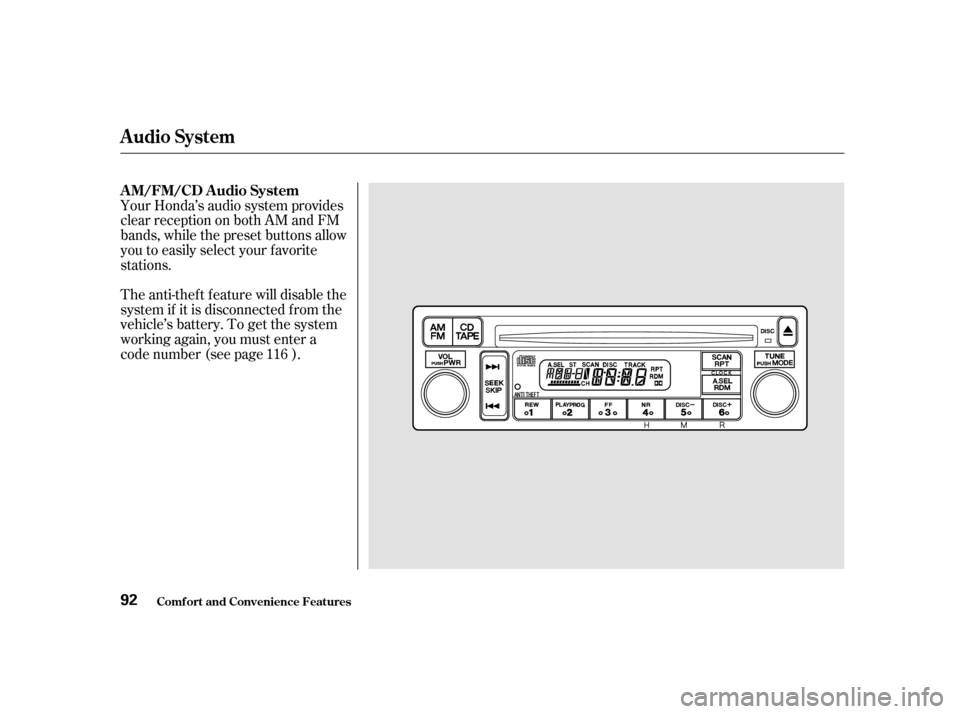
Your Honda’s audio system provides
clear reception on both AM and FM
bands, while the preset buttons allow
you to easily select your f avorite
stations.
The anti-thef t f eature will disable the
system if it is disconnected f rom the
vehicle’s battery. To get the system
working again, you must enter a
code number (see page ).116
AM/FM/CD Audio System
Audio System
Comf ort and Convenience Feat ures
92
Page 92 of 277

�µ
�µ The SEEK f unction
searches the band for a station with
a strong signal. To activate it, press
theSEEKbaroneitherthe or side, then release it.
Depending on which side you press,
the system scans upward or down-
ward f rom the current f requency. It
stops when it f inds a station with a
strong signal.
The ignition switch must be in
ACCESSORY (I) or ON (II) to
operate the audio system. Turn the
system on by pressing the PWR/
VOL knob or the AM/FM button.
Adjust the volume by turning the
knob.
The band and f requency that the
radio was last tuned to is displayed.
To change bands, press the AM/FM
button. On the FM band, ST will be
displayed if the station is broadcast-
ing in stereo. Stereo reproduction on
AM is not available.
You can use any of f ive methods to
find radio stations on the selected
band: TUNE, SEEK, SCAN, AUTO
SELECT, and the Preset buttons. Use the TUNE knob to
tune the radio to a desired f requency.
Turn the TUNE knob to the right to
tune to a higher f requency, or to the
lef t to tune to a lower f requency.
Turn the knob right or lef t until the
display reaches the desired
f requency.
CONT INUED
Operating the Radio SEEK
TUNE
Audio System
Comf ort and Convenience Feat ures 93