Page 237 of 399
Remove the f uel f ill cap slowly.
You may hear a hissing sound as
pressure inside the tank escapes.
Place the cap in the holder on the
fuel fill door.
Stop f illing the tank af ter the f uel
nozzle automatically clicks of f . Do
not try to ‘‘top off’’ the tank, leave
some room f or the f uel to expand
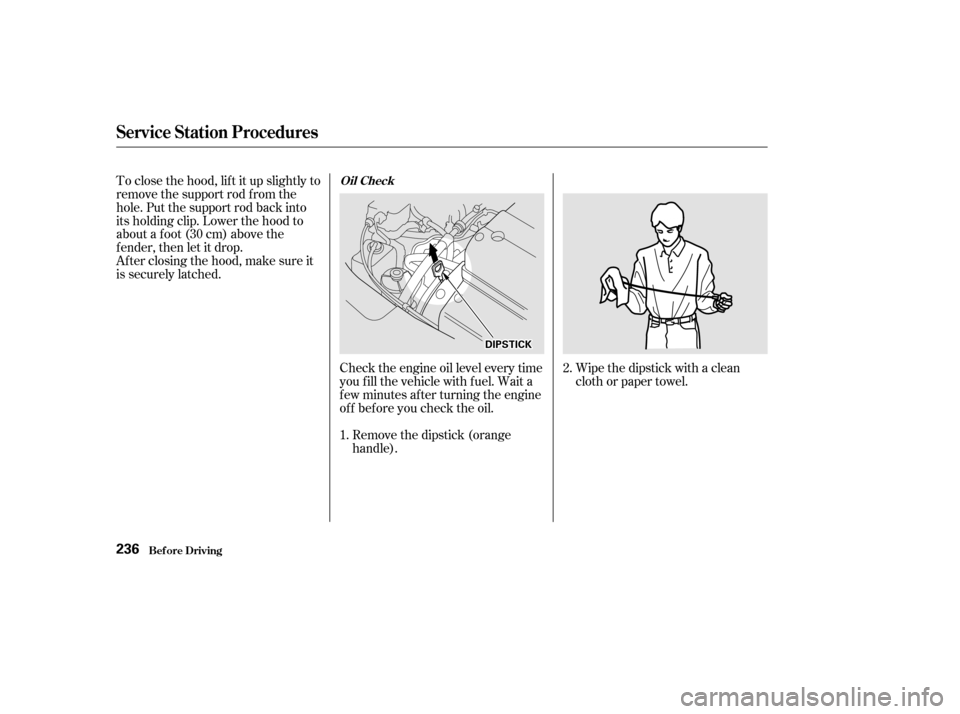
with temperature changes.Shift to Park or Neutral and set
the parking brake. Pull the hood
release handle located under the
lower lef t corner of the dashboard.
The hood will pop up slightly.
Screw the f uel f ill cap back on,
tighten it until it clicks several
times. If you do not properly
tighten the cap, the Malfunction
Indicator Lamp may come on (see
page ).
Push the f uel f ill door closed until
it latches.
Your vehicle has an on-board
ref ueling vapor recovery system to
help keep f uel vapors f rom going
into the atmosphere. If the fuel
pump keeps clicking of f even though
the tank is not full, there may be a
problem with this system. Consult
your dealer. 1.
3.
4.
5.
6.
356
Service Station Procedures
Bef ore Driving
Opening the Hood
234
H H
O
OO ODD R
REEL
LEE A
A S
SEE H
HA
AN
ND DL
LEE
Page 239 of 399
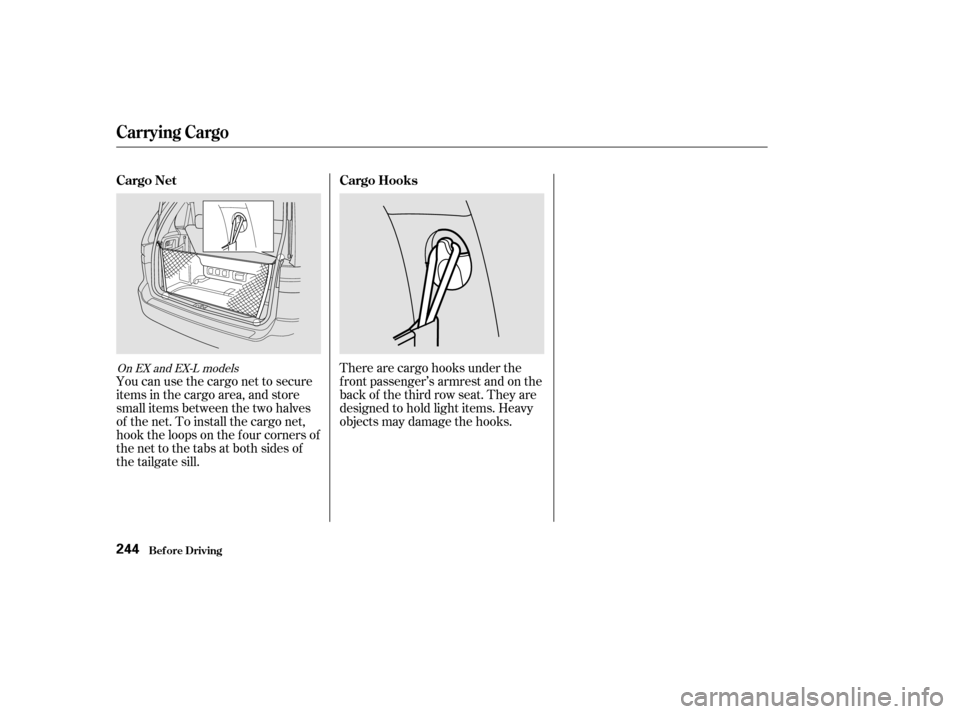
Wipe the dipstick with a clean
cloth or paper towel.
Check the engine oil level every time
you f ill the vehicle with f uel. Wait a
f ew minutes af ter turning the engine
of f bef ore you check the oil.
Remove the dipstick (orange
handle).
To close the hood, lif t it up slightly to
remove the support rod f rom the
hole. Put the support rod back into
its holding clip. Lower the hood to
about a f oot (30 cm) above the
fender,thenletitdrop.
Afterclosingthehood,makesureit
is securely latched.
2.
1.
Service Station Procedures
Bef ore Driving
Oil Check
236
D D I
IPP S
ST TI
ICCK K
Page 242 of 399

Your dealer has genuine Honda
accessories that allow you to
personalize your vehicle. These
accessories have been designed and
approved f or your vehicle, and are
covered by warranty.However, if electronic accessories
are improperly installed, or exceed
your vehicle’s electrical system
capacity, they can interf ere with theoperation of your vehicle, or even
cause the airbags to deploy.
Make sure the accessory does not
obscure any lights, or interf ere
with proper vehicle operation or
perf ormance.
Be sure electronic accessories do
not overload electrical circuits
(see page ).
Have the installer contact your
Honda dealer f or assistance bef ore
installing any electronic accessory.
If possible, have your dealer inspect
the f inal installation.
Modif ying your vehicle, or installing
some non-Honda accessories, can
make your vehicle unsaf e. Bef ore
you make any modif ications or add
anyaccessories,besuretoreadthe
f ollowing inf ormation.
Bef ore installing any accessory:
When properly installed, cellular
phones, alarms, two-way radios, and
low-powered audio systems should
not interf ere with your vehicle’s
computer-controlled systems, such
as the SRS and anti-lock brake
system.
Non-Honda accessories are usually
designed f or universal applications.
Although aftermarket accessories
may f it on your vehicle, they may not
meet f actory specif ications, and
could adversely af f ect your vehicle’s
handling and stability. (See
‘‘Modif ications’’ on page f or
additional information.)
240 360
A ccessories
A ccessories and Modif ications
Bef ore Driving239
Improper accessories or
modifications can affect your
vehicle’s handling, stability and
performance, and cause a
crash in which you can be hurt
or killed.
Follow all instructions in this
owner’s manual regarding
accessories and modifications.
Page 244 of 399
�Î
�Î
�Î
�Î
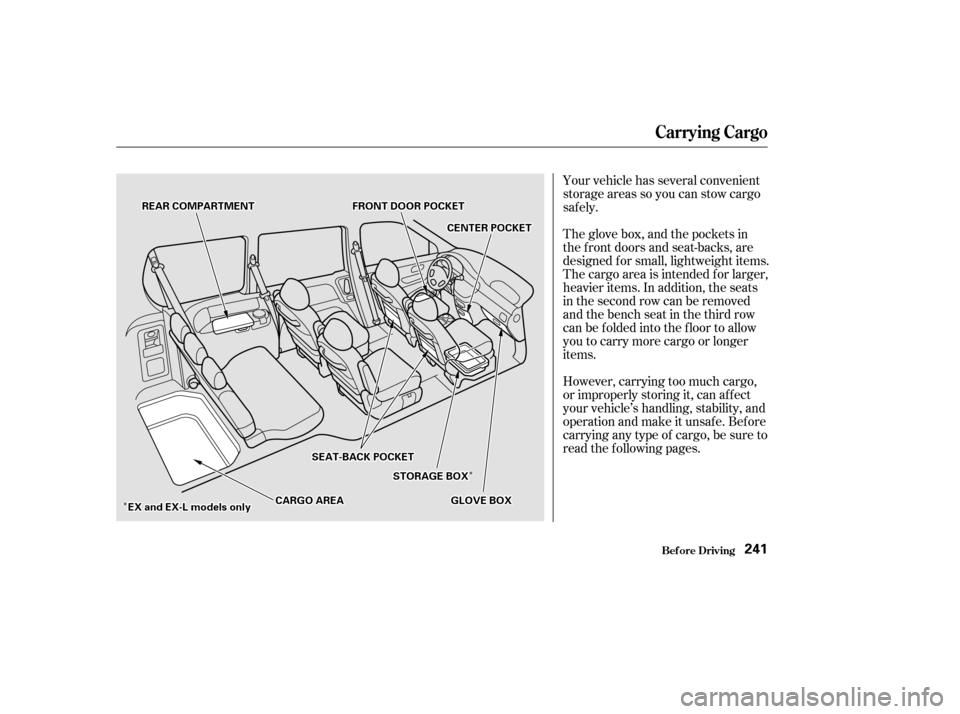
Your vehicle has several convenient
storage areas so you can stow cargo
saf ely.
The glove box, and the pockets in
the f ront doors and seat-backs, are
designed f or small, lightweight items.
The cargo area is intended f or larger,
heavier items. In addition, the seats
in the second row can be removed
andthebenchseatinthethirdrow
can be f olded into the f loor to allow
you to carry more cargo or longer
items.
However, carrying too much cargo,
or improperly storing it, can af f ect
your vehicle’s handling, stability, and
operation and make it unsafe. Before
carrying any type of cargo, be sure to
read the f ollowing pages.
Carrying Cargo
Bef ore Driving241
F FR RO ON NTT D
DO
OO ORR P
PO
OC CKKEET
T
G
GL LOOV VE
E B
BOOX X
S
SE
EA
A T
T-
-B
BA A C
CKK P
PO
OC CKKEET
T
S
ST TO
OR RAA G
GE E B
BOOX X
R
RE
EA
A R
R C
COOM M P
PA
A R
RTTM
M E
EN
NT T
C
CEEN
NT TE
ER
R P
PO
OC CKKEET
T
E
E X
X a
ann d
d E
EX
X -
-L
L m
m o
od
de
ellss o
on
nl
lyy C
CA
A R
RGGO O A
AR
REEA
A
Page 247 of 399
You can use the cargo net to secure
items in the cargo area, and store
small items between the two halves
of the net. To install the cargo net,
hook the loops on the f our corners of
the net to the tabs at both sides of
the tailgate sill.There are cargo hooks under the
f ront passenger’s armrest and on the
back of the third row seat. They are
designed to hold light items. Heavy
objects may damage the hooks.
On EX and EX-L models
Carrying Cargo
Cargo Net
Cargo Hooks
Bef ore Driving244
Page 249 of 399

Youshoulddothefollowingchecks
and adjustments every day bef ore
you drive your vehicle.Make sure all windows, mirrors,
and outside lights are clean and
unobstructed. Remove f rost, snow,
or ice. Check the adjustment of the seat
(see page ).
Check the adjustment of the
inside and outside mirrors (see
page ).
Check the adjustment of the
steering wheel (see page ).
Fasten your seat belt. Check that
your passengers have f astened
their seat belts (see page ).Turn the ignition switch ON (II).
Check the indicator lights in the
instrument panel.
Start the engine (see page ).
Check the gauges and indicator
lights in the instrument panel (see
page ).
Check that any items you may be
carrying with you inside are stored
properly or f astened down
securely. Visually check the tires. If a tire
looks low, use a gauge to check its
pressure. Check that the hood and tailgate
arefullyclosed. Makesurethedoorsandtailgate
are securely closed and locked.
3. 2.
1.
4. 5.
6.
7.
8.
9. 11.
12. 10.
15
99
116 78 247
63
Preparing to Drive
Driving246
Page 256 of 399

�µ
Always use the parking brake when
you park your vehicle. The indicator
on the instrument panel shows that
the parking brake is not f ully
released; it does not indicate that the
parking brake is f irmly set. Make
sure the parking brake is set f irmly
or your vehicle may roll if it is
parked on an incline.
Set the parking brake bef ore you put
the transmission in Park. This keeps
the vehicle from moving and putting
pressure on the parking mechanism
in the transmission making it
easier to move the shif t lever out of
Park when you want to drive away. If the vehicle is f acing uphill, turn
the f ront wheels away f rom the curb.
If the vehicle is f acing downhill, turn
the f ront wheels toward the curb.
Make sure the parking brake is f ully
released bef ore driving away.
Driving with the parking brake
partially set can overheat or damage
the rear brakes.
Make sure the windows are closed.
Turn of f the lights.
Place any packages, valuables, etc.,
in the cargo area or take them
with you.
Lockthedoorswiththekeyorthe
remote transmitter.
Never park over dry leaves, tall
grass, or other f lammable
materials. The three way catalytic
converter gets very hot, and could
cause these materials to catch on
fire.
Parking T ips
Parking
Driving253
Page 257 of 399

When the brake pads need replacing,
you will hear a distinctive metallic
‘‘screeching’’ sound when you apply
the brakes. If you do not have the
brake pads replaced, they will begin
screeching all the time.
Your brakes may sometimes squeal
or squeak when you apply them
lightly. Do not conf use this with the
brakewearindicators.Theymakea
very audible ‘‘screeching.’’
Constant application of the brakes
when going down a long hill builds
up heat and reduces their ef f ective-
ness. Use the engine to assist the
brakes by downshif ting to a lower
gear and taking your f oot of f the
accelerator pedal.
Check your brakes af ter driving
through deep water. Apply the
brakes moderately to see if they f eel
normal. If not, apply them gently and
f requently until they do. Since a
longer distance is needed to stop
with wet brakes, be extra cautious
and alert in your driving.
Your Honda is equipped with disc
brakes at all f our wheels. A power
assist helps reduce the ef f ort needed
on the brake pedal. The ABS helps
you retain steering control when
braking very hard.
Put your f oot on the brake pedal only
when you intend to brake. Resting
your f oot on the pedal keeps the
brakes applied lightly, causing them
to build up heat. Heat build-up can
reduce how well your brakes work. It
also keeps your brake lights on all
the time, conf using drivers behind
you.
All f our brakes have audible brake
wear indicators. Brake Wear Indicators
Driving
The Braking System
254