Page 80 of 372
To change f rom low beams to high
beams, push the turn signal lever
f orward until you hear a click. The
blue high beam indicator will light
(see page ). To return to low
beams, pull the turn signal lever
back. If you leave the lights on with the
ignition switch in ACCESSORY (I)
or LOCK (0), you will hear a
reminder tone when you open the
driver’s door.To f lash the high beams, pull the
turn signal lever back lightly, then
release it. The high beams will come
on and go of f . The high beams will
stay on f or as long as you hold the
lever back, no matter what position
the headlight switch is in.
The rotating switch on the lef t lever
controls the lights. Turning this
switch to the ‘‘ ’’ position turns
on the parking lights, taillights,
instrument panel lights, side-marker
lights, and rear license plate light.
Turning the switch to the ‘‘ ’’
position turns on the headlights.
69
Headlights
Controls Near the Steering Wheel
Inst rument s and Cont rols76
Page 85 of 372
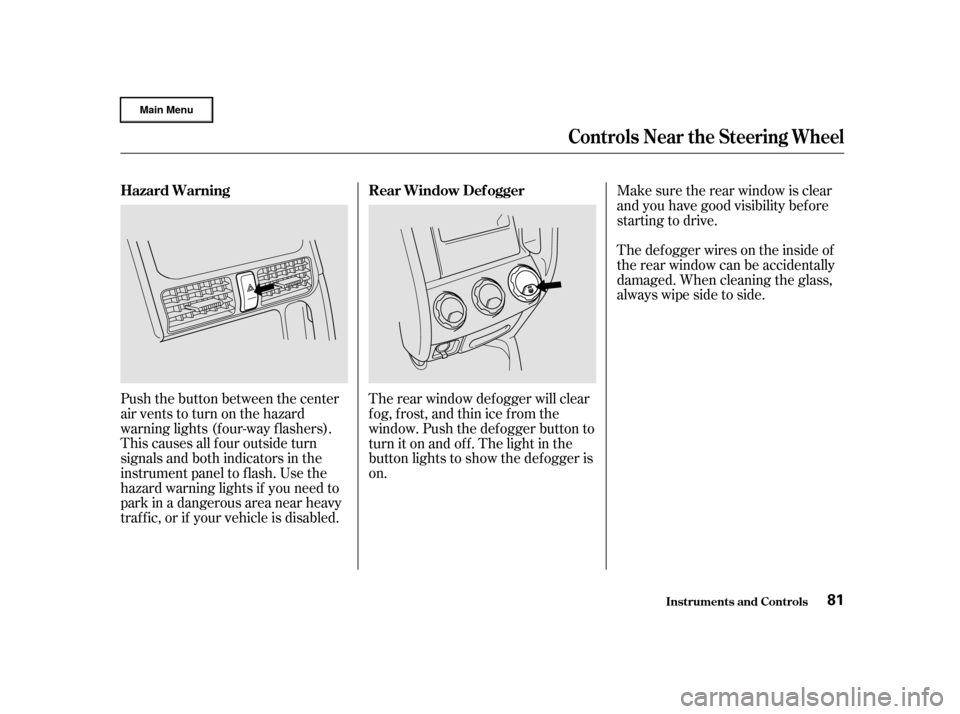
Push the button between the center
air vents to turn on the hazard
warning lights (f our-way f lashers).
This causes all f our outside turn
signals and both indicators in the
instrument panel to f lash. Use the
hazard warning lights if you need to
park in a dangerous area near heavy
traf f ic, or if your vehicle is disabled.The rear window def ogger will clear
fog, frost, and thin ice from the
window. Push the def ogger button to
turn it on and of f . The light in the
button lights to show the def ogger is
on.Make sure the rear window is clear
and you have good visibility bef ore
starting to drive.
Thedefoggerwiresontheinsideof
the rear window can be accidentally
damaged. When cleaning the glass,
always wipe side to side.
Controls Near the Steering Wheel
Inst rument s and Cont rols
Hazard Warning
Rear Window Def ogger
81
Page 90 of 372

The Immobilizer System indicator
will also blink several times when
you turn the ignition switch f rom ON
(II) to ACCESSORY (I) or LOCK (0).
If you have lost your key and you
cannot start the engine, contact your
Honda dealer. Do not attempt to alter this system
or add other devices to it. Electrical
problems could result that may make
your vehicle undriveable.The ignition switch is on the right
side of the steering column. It has
f our positions:
LOCK(0)
ACCESSORY (I)
ON (II)
START (III)As required by the FCC:This device complies with Part 15 of theFCC rules. Operation is subject to thef ollowing two conditions: (1) This devicemay not cause harmf ul interf erence, and(2) this device must accept anyinterf erence received, includinginterf erence that may cause undesiredoperation.
Changes or modif ications not expresslyapproved by the party responsible f orcompliance could void the user’sauthority to operate the equipment.
This device complies with IndustryCanada Standard RSS-210.Operation is subject to the f ollowing twoconditions: (1) this device may not causeinterf erence, and (2) this device mustaccept any interf erence that may causeundesired operation of the device.
Keys and Locks
Inst rument s and Cont rols
Ignition Switch
86
Page 91 of 372

�µ�µ
�µ �µ
You can insert or
remove the key only in this position.
To switch f rom ACCESSORY to
LOCK, you must push the key in
slightly as you turn it. If your vehicle
has an automatic transmission, the
shif t lever must also be in Park. The
anti-thef t lock will lock the steering
column when you remove the key.
If the f ront wheels are turned, the
anti-thef t lock may sometimes make
it difficult to turn the key from
LOCK to ACCESSORY. Firmly turn
the steering wheel to the lef t or to
the right as you turn the key. Use this position
only to start the engine. The switch
returns to ON (II) when you let go of
the key.
You will hear a reminder beeper if
you leave the key LOCK (0) or
ACCESSORY (I) position and open
thedriver’sdoor.Removethekeyto
turn of f the beeper. The engine will not start if the
Immobilizer System does not
recognize the key’s coding (see page ).
This is the normal key
position when driving. All f eatures
and accessories on the vehicle are
usable. Several of the lights on the
instrument panel come on as a test
when you turn the ignition switch
f rom ACCESSORY to ON. In this position,
you can operate the audio system
and the accessory power sockets. 85
Keys and Locks
Inst rument s and Cont rols
L OCK (0)
ST A RT (III)
ON (II) A CCESSORY (I)
87
Removing the key from the
ignition switch while driving
locks the steering. This can
cause you to lose control.
Remove the key from the
ignition switch only when
parked.
Page 92 of 372
To lock any passenger’s door when
getting out the vehicle, push the lock
tab down and close the door. To lock
the driver’s door, remove the key
f rom the ignition switch, pull the
outside door handle and push the
locktabdownorpushthemaster
switch down. Release the handle,
then close the door.
Each door has a lock tab at the top of
the door. When you push down the
lock tab on the driver’s door, all
doors and the tailgate lock. Pulling
up the lock tab on the driver’s door
unlocks only that door. The lock tab
on each passenger’s door only locks
and unlocks that door. The f ront doors can be locked and
unlocked f rom the outside with the
key.
The master door lock switch on the
driver’s door locks and unlocks all of
the doors and tailgate. Push the
switch down to lock all of the doors
and the tailgate, and up to unlock
them.
Keys and Locks
Inst rument s and Cont rols
Power Door L ocks
88
M M
A
AS
STTE
ER
R D
DO
OO ORR L
LOOC CKK S
SWWI ITT C
CH H
Page 93 of 372

CONT INUED
When you push the LOCK button a
second time within 5 seconds, the
horn will sound once to verif y that
thedoorsandthetailgatearelocked.
When you push the UNLOCK button
once, only the driver’s door unlocks.
The remaining doors and the tailgate
unlock when you push the button a
second time. The f ront turn signals,
parking lights, side marker lights,
taillights, license plate light, and the
instrument panel lights f lash twice
each time you push the button.
All doors and the tailgate lock when
youpushdownthelocktabonthe
driver’s door, or lock the driver’s
door from the outside with the key.
Only the driver’s door unlocks when
you use the key or the lock tab. To
unlock the passenger’s doors, use
the master door lock switch or the
locktaboneachdoor.
You can lock and unlock your vehicle
with the remote transmitter. When
you push the LOCK button, all doors
and the tailgate lock. The f ront turn
signals, parking lights, side marker
lights, taillights, license plate light,
and the instrument panel lights f lash
once.
On EX model in the U.S., and EX andEX-L models in Canada
Keys and Locks
Inst rument s and Cont rols
Remote Transmitter
89
U UN NLLOOC CKK
B
BU UT TT
TO
ON N P
P
A
A N
NI ICC
B
BU UT TT
TO
ON N
L
LO
OC CKK
B
BU UT TT
TO
ON N
H
H A
AT
TC
CH H
G
GL LAA S
SSS
R
RE EL
LEE A
A S
SEE
B
BU UT TT
TO
ON N
L
LE
E D
D
Page 97 of 372

The childproof door locks are
designed to prevent children seated
in the rear f rom accidentally opening
the rear doors. Each rear door has a
lock lever near the edge. With the
lever in the LOCK position, the door
cannot be opened f rom the inside
regardless of the position of the lock
tab. To open the door, pull the lock
tab up and use the outside door
handle.You can lock or unlock the tailgate in
any of these ways:
Useyourmasterorvaletkeyto
lock and unlock the tailgate.
Turnthekeyclockwisetolockthe
tailgate, and counterclockwise to
unlock it. Lockthetailgatebypushingdown
the lock tab on the driver’s door,
or by using the master or valet key
in the driver’s door lock.
Lock or unlock the tailgate with
the master door lock switch.
You can also lock and unlock the
tailgate with the remote
transmitter (see page ).
89
CONT INUED
On EX model in the U.S., and EX and
EX-L models in Canada
Childproof Door L ocks T ailgate
Keys and Locks
Inst rument s and Cont rols93
L Loo c
ckk
L
LEE V
V E
ER
R L
Lo
o c
ckk P
Po
os
siitti ioo n
n
U
Un nl
loo c
ckk
P
P o
os
siitti ioo n
n
Page 98 of 372
You can unlock the hatch glass in
any of these ways:Press the hatch glass release
button on the driver’s door.
With the tailgate unlocked, open the
tailgate by pulling the handle.
To keep the tailgate door open on an
incline, use the stop f rom the tool kit.
The tool kit is in the storage bin
under the cargo f loor. Put the stop
on the support strut as shown.
Make sure to remove the stop before
closing the tailgate.
Opening t he Hat ch Glass
Keys and Locks
Inst rument s and Cont rols94
H H
A
AN
ND DL
LEE
S
STTO
OP P