Page 74 of 372
�µBetween 8,000 miles (12,800 km)
and 10,000 miles (16,000 km) this
indicator will light f or two seconds
when you f irst turn the ignition
switch ON (II), and then f lash f or
ten seconds.
If you exceed 10,000 miles (16,000
km) without having the scheduled
maintenance perf ormed, this
indicator will remain on as a constant
reminder.
This light comes on if the tailgate or
the hatch glass is not closed tightly.
This light comes on if any door is not
closed tightly.
For the f irst 8,000 miles (12,800 km)
af ter the Maintenance Required
Indicator is reset, it will come on f or
two seconds when you turn the
ignition switch ON (II). Ref er to the Maintenance Schedules
f or Normal and Severe Driving
Conditions on pages.
This indicator reminds you that it is
time to take your vehicle in for sched-
uled maintenance.
238 242
Indicator L ights
Maintenance Required
Indicator
Tailgate and Hatch Glass
Open Indicator
Door-open Indicator
Inst rument s and Cont rols70
Page 77 of 372

CONT INUED
The odometer shows the total dis-
tance your vehicle has been driven.
It measures miles in U.S. models and
kilometers in Canadian models.
It is illegal under U.S. f ederal law and
Canadian provincial regulations to
disconnect, reset, or alter the
odometer with the intent to change
the number of miles or kilometers
indicated.
The trip meter shows the number of
miles (U.S.) or kilometers (Canada)
driven since you last reset it. There
are two trip meters: Trip A and Trip
B. Switch between these displays
and the odometer by pressing the
Select/Reset button repeatedly.
Each trip meter works independently,
so you can keep track of two
dif f erent distances.To reset a trip meter, display it, and
then press and hold the Select/Reset
button until the number resets to
‘‘0.0’’.
This indicator displays the outside
temperature in Centigrade.
Canadian models only
Inst rument s and Cont rols
Gauges
Odometer/T rip MeterOut side T emperat ure Indicat or
73
O OUUTTS
SI IDD E
E T
TE
EM
M P
PE
ER
RA A T
TU
UR REE I
INND DI
ICCA A T
TO
OR R
Page 78 of 372

This shows the temperature of the
engine’s coolant. During normal
operation, the pointer should rise
from the bottom white mark to about
the middle of the gauge. In severe
driving conditions, such as very hot
weather or a long period of uphill
driving, the pointer may rise to the
upper white zone. If it reaches the
red (Hot) mark, pull saf ely to the
side of the road. Turn to page f or
instructions and precautions on
checking the engine’s cooling
system.
The temperature sensor is located in
the f ront bumper. Theref ore, the
temperature reading can be af f ected
by heat ref lection f rom the road sur-
f ace, engine heat, and the exhaust
f rom the surrounding traf f ic. This
can cause the temperature reading
not to be correct when your speed is
under 19 mph (30 km/h).
This shows how much f uel you have.
It is most accurate when the vehicle
is on level ground. It may show
slightly more or less than the actual
amount when you are driving on
curvy or hilly roads.
The needle returns to the bottom
after you turn off the ignition. The
gauge shows the f uel level reading
immediately af ter you turn the
ignition switch back ON (II).
When the outside temperature goes
down below 37°F (3°C) the f irst
time, the temperature reading blinks
about ten times to show you the
outside temperature is low. In certain
weather conditions, temperature
readings near f reezing 32°F (0°C)
couldmeanthaticeisformingonthe
road surf ace. 323
Temperature Gauge
Fuel Gauge
Gauges
Inst rument s and Cont rols74
Avoid driving with an extremely low
f uel level. Running out of f uel could
cause the engine to misf ire, damaging
the catalytic converter.
Page 79 of 372

�Î
�Î
�Î
Thetwoleversonthesteering
column contain controls f or driving
f eatures you use most of ten. The lef t
lever controls the turn signals,
headlights, and high beams. The
right lever controls the windshield
washers and wipers.
The hazard warning lights switch is
on the dashboard between the
center air vents.
The tilt adjustment lever on the
underside of the steering column
allows you to tilt the steering wheel. The controls under the lef t air vent
are f or the moonroof and the cruise
control.To use the horn, press the center pad of the steering wheel.
:
Controls Near the Steering Wheel
Inst rument s and Cont rols75
A A /
/T
T m
m o
od
de
elli
iss s
shh o
ow
wn n.
.
(
(
P
P .
.7766,, 7777 )
)
M
M O
OOONNRROOO OFF
(
( P
P .
.111133 )
)
(
(P
P .
.8811) )
P
P
A
A R
RKKIINNG G B
BRRAA K
KEE
(
( P
P .
.8822) )
(
(
P
P .
.117799 )
)
C
CR
RUUI ISSE E C
COON NTTR
RO OL L
T
T I
ILLT T A
AD
DJ
JUUS STTM
M E
EN
NT T
(
( P
P .
.8833) ) H
H
O
OR RNN H
H
A
AZ
ZA
A R
RDD W
WA AR
RNNI INNG G
L
LI IGGH HT
TS
S
S
SH
H I
IFFT T L
LEE V
V E
ER
R (
(A
A /
/T
T )
)
R
REEA
A R
R W
WI INND DO
OW W
D
D E
EF
FOOG GGGEER
R
H
H
E
EA
A D
DL
LIIGGH HT
TS
S/ /T
T U
UR RNN S
SIIGGN NAAL
LSS
(
(P
P .
.220044))
(
(P
P .
.8811 )
)
W
WI INND DS
SHH I
IEE L
LDD W
WI IPP E
ER
RS S//
W
WA AS
SHH E
ER
RS S
(
( P
P .
.7788,, 7799))
Page 86 of 372
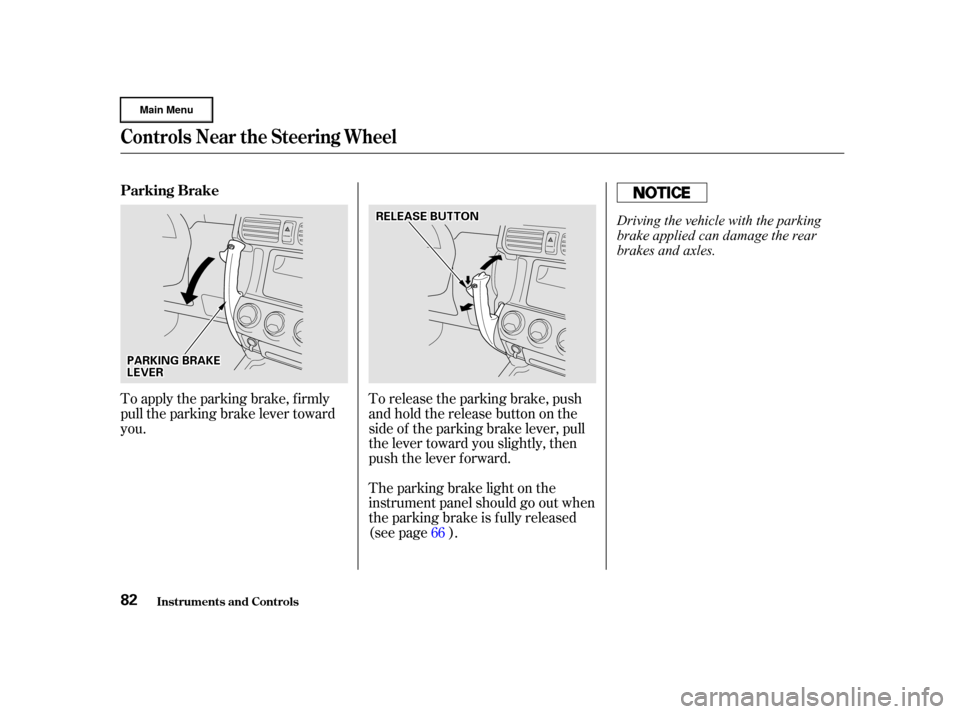
To release the parking brake, push
andholdthereleasebuttononthe
side of the parking brake lever, pull
the lever toward you slightly, then
push the lever f orward.
The parking brake light on the
instrument panel should go out when
the parking brake is fully released
(see page ).
To apply the parking brake, f irmly
pull the parking brake lever toward
you.
66
Controls Near the Steering Wheel
Inst rument s and Cont rols
Parking Brake
82
P PA
A R
RKKIINNG G B
BRRAA K
KEE
L
LE E V
V E
ER
R R
RE
EL
LEE A
A S
SEE B
BUUT TT
TO
ON N
Driving the vehicle with the parking
brake applied can damage the rear
brakes and axles.
Page 87 of 372
Push the lever up to lock the
steering wheel in that position.
Make sure you have securely
locked the steering wheel in place
by trying to move it up and down.
Push the lever under the steering
column all the way down.
Move the steering wheel to the
desired position, making sure the
wheel points toward your chest,
not toward your f ace. Make sure
you can see the instrument panel
gauges and the indicator lights.
To adjust the steering wheel upward
or downward:
Make any steering wheel adjustment
bef ore you start driving.
1.
2.3.
4.
See page f or important saf ety
inf ormation about how to properlyposition the steering wheel. 20
Inst rument s and Cont rols
Controls Near the Steering Wheel
Steering Wheel A djustment
83
Adjusting the steering wheel
position while driving may
cause you to lose control of the
vehicle and be seriously injured
inacrash.
Adjust the steering wheel only
when the vehicle is stopped.
Page 91 of 372

�µ�µ
�µ �µ
You can insert or
remove the key only in this position.
To switch f rom ACCESSORY to
LOCK, you must push the key in
slightly as you turn it. If your vehicle
has an automatic transmission, the
shif t lever must also be in Park. The
anti-thef t lock will lock the steering
column when you remove the key.
If the f ront wheels are turned, the
anti-thef t lock may sometimes make
it difficult to turn the key from
LOCK to ACCESSORY. Firmly turn
the steering wheel to the lef t or to
the right as you turn the key. Use this position
only to start the engine. The switch
returns to ON (II) when you let go of
the key.
You will hear a reminder beeper if
you leave the key LOCK (0) or
ACCESSORY (I) position and open
thedriver’sdoor.Removethekeyto
turn of f the beeper. The engine will not start if the
Immobilizer System does not
recognize the key’s coding (see page ).
This is the normal key
position when driving. All f eatures
and accessories on the vehicle are
usable. Several of the lights on the
instrument panel come on as a test
when you turn the ignition switch
f rom ACCESSORY to ON. In this position,
you can operate the audio system
and the accessory power sockets. 85
Keys and Locks
Inst rument s and Cont rols
L OCK (0)
ST A RT (III)
ON (II) A CCESSORY (I)
87
Removing the key from the
ignition switch while driving
locks the steering. This can
cause you to lose control.
Remove the key from the
ignition switch only when
parked.
Page 99 of 372

Youcanopenthehatchglassto
access the cargo area with the
tailgate closed. Make sure the
tailgate and the hatch glass are
closed and locked securely bef ore
driving.
The rear wiper will not operate with
the hatch glass open. If you open the
hatch glass while the rear wiper is
operating, the wiper will stop (see
page ).
See page for information on
cargoloading.Keepthetailgateand
the hatch glass closed at all times
while driving to avoid damaging the
tailgate and the hatch glass, and to
prevent exhaust gas f rom getting
into the interior. Seeon page .
Press and hold the hatch glass
release button on the remote
transmitter for about two seconds
(see page ). Use the master or valet key in the
tailgate lock. Turn the key
clockwise as f ar as it will go. The hatch glass will pop up slightly.
To open the hatch glass, lif t it up
f ully.
Make sure the rear wiper switch is
of f and the wiper is in its parked
position bef ore opening the hatch
glass.
To close the hatch glass, lower it,
then press on the handle until it
latches.
90 80
193
60
On EX model in the U.S., and EX andEX-L models in Canada
Keys and Locks
Inst rument s and Cont rols
Carbon
Monoxide Hazard
95
H H A
AT
TC
CH H G
GLLAA S
SSS
H
H A
AT
TC
CH H G
GLLAA S
SSS O
OPPE
EN
N P
PO
OS SIITT I
IOON N