Page 167 of 372

Press and hold the H (Preset 4)
button until the hour advances to the
desired time.
Press and hold the M (Preset 5)
button until the minutes advance to
the desired time.
Press the CLOCK (FM) button again
to enter the set time.
You can quickly set the time to the
nearest hour. If the displayed time is
bef ore the half hour, the clock is set
back to the previous hour by
pressing the CLOCK (FM) button
until you hear a beep, then pressing
the RESET (Preset 6) button. If the
displayed time is af ter the half hour,
the clock is set forward to the
beginning of the next hour.For example:
1:06 would RESET to 1:00
1:52 would RESET to 2:00 If your vehicle’s battery is
disconnected or goes dead, the time
setting will be lost. To set the time
again, f ollow the setting procedure.
To set the time, press the CLOCK
(FM) button until you hear a beep.
The displayed time begins to blink.
Audio System
Comf ort and Convenience Feat ures163
C CL
LOOC CKK B
BUUT TT
TO
ON N H
HB
BUUT TT
TO
ON N M
MB
BUUT TT
TO
ON N R
REES
SE ET
T B
BUUT TT
TO
ON N
Page 256 of 372
Do not add any rust inhibitors or
other additives to your vehicle’s
cooling system. They may not be
compatible with the coolant or
engine components.
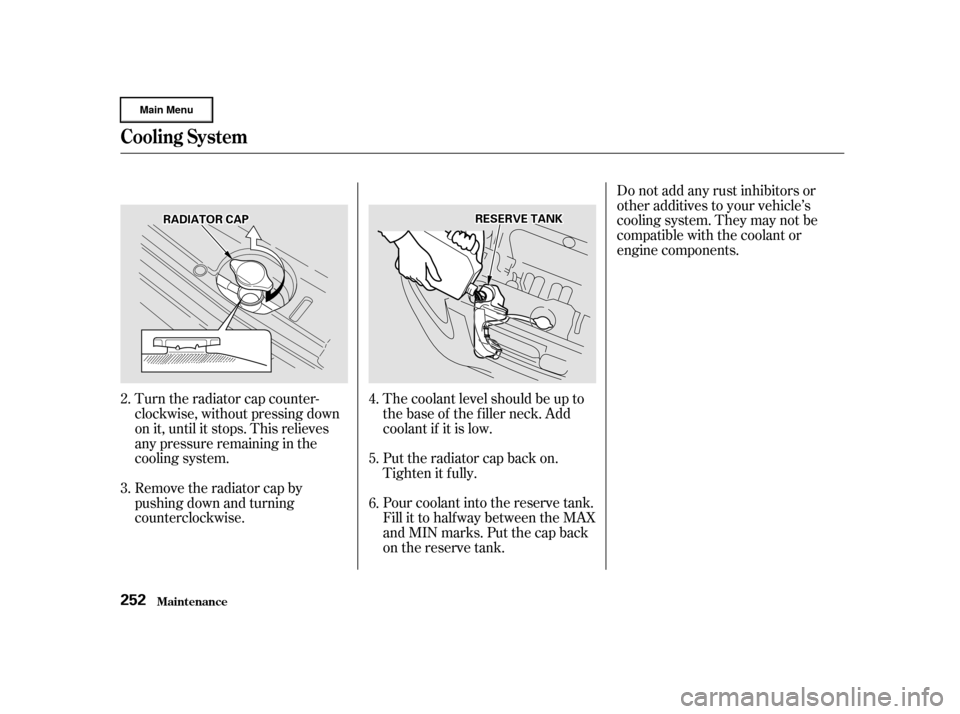
Pour coolant into the reserve tank.
Fill it to half way between the MAX
and MIN marks. Put the cap back
on the reserve tank. Put the radiator cap back on.
Tighten it f ully. The coolant level should be up to
the base of the f iller neck. Add
coolant if it is low.
Turn the radiator cap counter-
clockwise, without pressing down
on it, until it stops. This relieves
any pressure remaining in the
cooling system.
Remove the radiator cap by
pushing down and turning
counterclockwise.
2.
3.
4.
5.
6.
Cooling Syst em
Maint enance252
R RA
A D
DI
IAA T
TO
OR R C
CAA P
P R
RE
ES
SE ER
RV V E
E T
TA
A N
NK K
Page 257 of 372
CONT INUED
Thecoolingsystemshouldbe
completely drained and ref illed with
new coolant according to the time
and distance recommendations in
the maintenance schedule. Only use
Honda All Season Antif reeze/
Coolant Type 2.
Draining the coolant requires access
to the underside of the vehicle.
Unless you have the tools and
knowledge, you should have this
maintenance done by a skilled
mechanic.Remove the radiator cap.
Turn the ignition ON (II). Turn
the heater temperature control
dial f ully clockwise. Turn the
ignition of f .
Openthehood.Makesurethe
engine and radiator are cool to the
touch.
1.
2.
3.
Replacing Engine Coolant
Cooling Syst em
Maint enance253
Page 274 of 372

�µIf you need to connect the battery to
a charger, disconnect both cables to
prevent damage to the vehicle’s
electrical system.
If the terminals are severely cor-
roded, clean them with baking soda
and water. Then use a wrench to
loosen and remove the cables f rom
the terminals. Always disconnect the
negative ( ) cable f irst and recon-
nect it last. Clean the battery termi-
nals with a terminal cleaning tool or
wire brush. Reconnect and tighten
the cables, then coat the terminals
with grease. If your vehicle’s battery is
disconnected or goes dead, the audio
system will disable itself . The next
timeyouturnontheradioyouwill
see ‘‘ ’’ in the f requency
display. Use the Preset buttons to
enter the f ive-digit code (see page
).Youwillthenhavetosetthe
clock and enter your station presets. 178
Battery
Maint enance270
The battery gives off explosive
hydrogen gas during normal
operation.
A spark or flame can cause the
battery to explode with enough
force to kill or seriously hurt you.
Wear protective clothing and a
face shield, or have a skilled
mechanic do the battery
maintenance. Charging the battery with the cables
connected can seriously damage your
vehicle’s electronic controls. Detach
the battery cables bef ore connecting
the battery to a charger.
Page 292 of 372

Unclip the end of the hold-down
wire f rom its slot. Pivot it out of
the way and remove the bulb.
Insert the new bulb into the hole,
making sure the tabs are in their
slots. Pivot the hold-down wire
back in place and clip the end into
the slot.
Install the rubber seal over the
back of the headlight assembly.
Make sure it is right side up; it is
marked ‘‘TOP.’’
Push the electrical connector onto
the new bulb. Make sure it is
connected securely.
Turn on the headlights to test the
new bulb.Remove the socket f rom the
headlight assembly by turning it
one-quarter turn counterclockwise. Open the hood. The f ront side
marker/turn signal light is next to
the headlight bulb. Pull the bulb straight out of its
socket.
Push the new bulb straight into
the socket until it bottoms.
Insert the socket back into the
headlight assembly. Turn it
clockwise to lock it in place.
Testthelightstomakesurethe
new bulb is working.
4.
5.
6.
7.
1.
2.3.
4.
5.
Lights
Maint enance
Replacing a Front Side Marker/
Turn Signal Light Bulb
288
Page 293 of 372
Use a wrench to loosen the bolt on
the battery hold-down. Remove
the seven holding clips f rom the
cover by using a flat-tipped
screwdriver. Then pull the
radiator support cover away. To access the parking light bulb: Open the hood. The f ront parking
light is next to the headlight bulb.Insert the socket back into the
headlight assembly. Turn it
clockwise to lock it in place.
Turn on the parking lights and
check that the new bulb is
working.
Reinstall the radiator support
cover. Lock the holding clips by
pushing on the center of each clip.
Tighten the bolt on the battery
hold-down.
Push the new bulb straight into
the socket until it bottoms. Pull the bulb straight out of its
socket. Remove the socket from the
headlight assembly by turning it
one-quarter turn counterclockwise.
1.
2. 3.
4.5.
6.
7.
Lights
Maint enance
Replacing a Front Parking L ight
Bulb
289
B BO
OL LTT
Page 294 of 372
Open the tailgate. Place a cloth on
the edge of the cover. Remove the
covers by caref ully prying on the
edge with a small f lat-tipped
screwdriver.Use a Phillips-head screwdriver to
remove the taillight assembly
mounting screw under each cover.
Determine which of the f our bulbs
is burned out: stop/taillight, back-
up light, turn signal, or side
marker.
Remove the socket by turning it
one-quarter turn counterclockwise.
Pull the taillight assembly out of
the rear pillar.
1.
2.
3.4.
5.
Lights
Maint enance
Replacing Rear Bulbs
290
C CO
OV VE
ER
R
S
SCCRREEW
W
Page 295 of 372
Pull the bulb straight out of its
socket.
Push the new bulb straight into
the socket until it bottoms.
Reinstall the socket into the light
assembly by turning it clockwise
until it locks.
Testthelightstomakesurethe
new bulb is working.
Align the clips on the taillight
assembly with the holes in the
body, then push the taillight
assembly into place. Tighten the
two mounting screws securely and
reinstall the covers.Place a cloth and insert a small
f lat-tipped screwdriver between
the right edge of the lens and the
housing. The lens will come down.
Pull the bulb straight out of its
socket. Push the new bulb in until
it bottoms in the socket.Turn on the parking lights and
check that the new bulb is
working.
Put the lens back into the light
assembly, lef t side f irst. Push on
the right edge until it snaps into
place.
1.
2.
6.
7.
8.
9.
3.
4.
Maint enance
Lights
Replacing a Rear License Plate
Bulb
291