Page 52 of 158

�µ�µ
�µ
�Ó �Ó
�Ó�Ó
�´�µ
�´�µ
Select the CD changer by pressing
the CD button. You will see ‘‘Cd’’ in
the display. The system will begin
playing the last selected disc in the
CD changer. You will see the disc
and track numbers displayed.
When that disc ends, the next disc in
the CD changer is loaded and played.
Af ter the last disc f inishes, the
system returns to disc 1.
To select a dif f erent disc, press the
appropriate Preset button (1 6). If
youselectanemptypositioninthe
CD changer, the system will go into
the loading sequence (see page ).
You can use the SKIP buttons while
a disc is playing to select passages
and change tracks. To activate the Repeat
f eature, press and release the RPT
button. You will see RPT in the
display as a reminder. The system
continuously replays the current
track. Press the RPT button again to
turn it off. Pressing either of the
SKIP buttons also turns off the
repeat feature.
This feature,
when activated, plays the tracks
within a CD in random order, rather
than in the order they are recorded
on the CD. To activate Random Play,
press the RDM button. You will see
RDM in the display. The system will
then select and play tracks randomly.
This continues until you deactivate
RandomPlaybypressingtheRDM
button again, or you select a
dif f erent CD with a preset button.
To move rapidly within a track, press
and hold the appropriate SKIP
button. You will hear a beep and the
system will continue to move. Press
the button to move forward, or
the button to move backward.
Release the button when the system
reaches the point you want.
Each time you press the button
and release it, the system skips
f orward to the beginning of the next
track. Press and release the
buttontoskipbackwardtothe
beginning of the current track. Press
and release it again to skip to the
beginning of the previous track.
157
CONT INUED
Operat ionREPEAT
RANDOM PLAY
Audio System
Comf ort and Convenience Feat ures159
Page 53 of 158
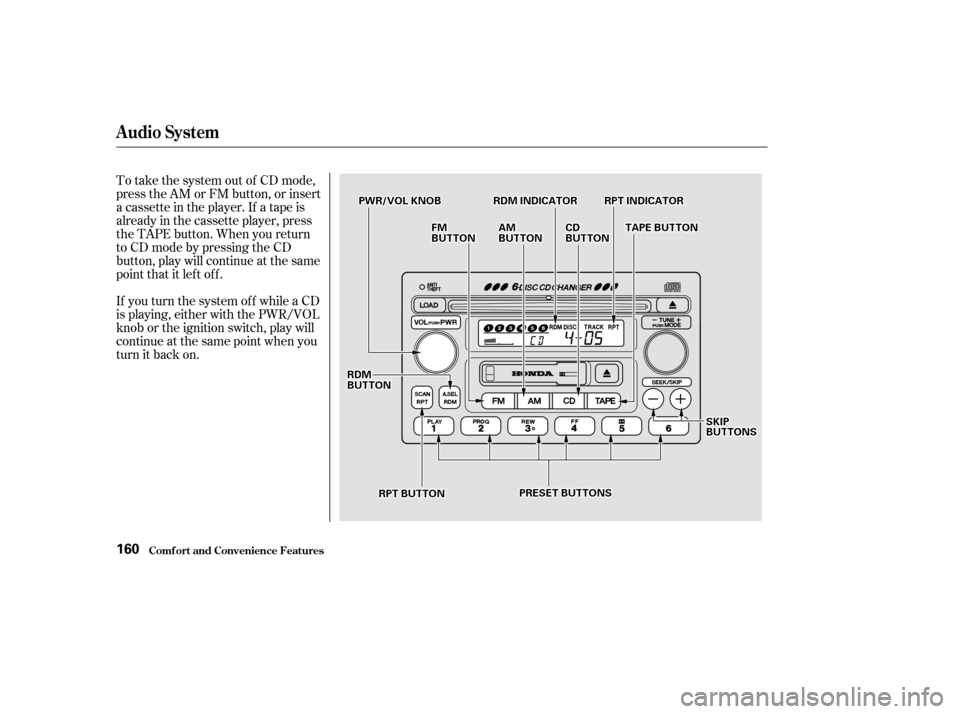
To take the system out of CD mode,
press the AM or FM button, or insert
a cassette in the player. If a tape is
already in the cassette player, press
the TAPE button. When you return
to CD mode by pressing the CD
button, play will continue at the same
point that it left off.
If you turn the system of f while a CD
is playing, either with the PWR/VOL
knob or the ignition switch, play will
continue at the same point when you
turn it back on.
Audio System
Comf ort and Convenience Feat ures160
PPWWRR//VVOOLLKKNNOOBB
PPRREESSEETTBBUUTTTTOONNSS
RRDDMMBBUUTTTTOONN
SSKKIIPPBBUUTTTTOONNSS
CCDDBBUUTTTTOONN
RRPPTTBBUUTTTTOONN
FFMMBBUUTTTTOONNAAMMBBUUTTTTOONNTTAAPPEEBBUUTTTTOONN
RRPPTTIINNDDIICCAATTOORRRRDDMMIINNDDIICCAATTOORR
Page 54 of 158
To remove the disc that is currently
playing, press the Eject button. You
will see ‘‘EJEC’’ in the display. When
you remove the disc f rom the slot,
the system automatically begins the
Load sequence so you can load
another CD in that position. If you do
not load another CD, af ter ten
seconds the system begins playing
the next disc in the changer. If the
changer is empty, the system selects
the previous mode (AM, FM, or
Tape).
If you do not remove the disc f rom
the slot, the system will reload the
disc af ter 15 seconds and put the CD
changer in pause mode. To begin
playing the disc, press the CD button.
To remove a different CD from the
changer,firstselectitwiththe
appropriate preset button. When that
CD begins playing, press the Eject
button.
CONT INUED
Removing CDs f rom t he Changer
Comf ort and Convenience Feat ures
Audio System
161
CCDDSSLLOOTTCCDDEEJJEECCTTBBUUTTTTOONN
CCDDBBUUTTTTOONN
Page 55 of 158

�µ
�µ
�µ
�µ
�Ó�Ó
�µ�´
The SCAN f unction
samples all the stations with strong
signals on the selected band. To
activate it, press the SCAN button,
then release it. The system will scan
up the band for a station with a
strong signal. When it f inds one, it
will stop and play that station f or
approximately f ive seconds. If you do
nothing, the system will then scan
f or the next strong station and play
that f or f ive seconds. When it plays a
station that you want to continue
listening to, press the SCAN button
again. To store a f requency:
Select the desired band, AM or
FM. FM1 and FM2 let you store
two f requencies with each Preset
button.
Use the TUNE or SEEK f unction
to tune the radio to a desired
station.
Pick the Preset button you want
for that station. Press the button
and hold it until you hear a beep.
Repeat steps 1 to 3 to store a total
of six stations on AM and twelve
on FM.
Once a station’s frequency is stored,
simply press and release the proper
preset button to tune to it.
You can use any of f our methods to
f ind radio stations on the selected
band: TUNE, SEEK, SCAN or the
Preset buttons.
Use the TUNE knob to
tune the radio to a desired f requency.
Turn the knob clockwise to tune to a
higher f requency, or
counterclockwise to tune to a lower
f requency.
The preset f requencies will be lost if
your vehicle’s battery goes dead, is
disconnected, or the radio f use is
removed.
You can store the
f requencies of your f avorite radio
stations in the six preset buttons.
Each button will store one f requency
on the AM band, and two
f requencies on the FM band.
The SEEK f unction
searches the band for a station with
a strong signal. To activate it, press
either SEEK button ( or ), then
release it. Depending on which
SEEK button you press, the system
scans upward or downward f rom the
current f requency. It stops when it
finds a station with a strong signal. 1. 2. 3.4.
SCAN
TUNE
Preset
SEEK
Comf ort and Convenience Feat ures
Audio System
166
Page 56 of 158
�µIf you are
traveling far from home and can no
longer receive the stations you
preset, you can use the Auto Select
feature to find stations in the local
area.
If you are in a remote area, Auto
Select may not f ind six strong AM
stations or twelve strong FM stations.
If this happens, you will see a ‘‘0’’
displayed when you press any preset
button that does not have a station
stored.
To activate Auto Select, press the
A. SEL button. A. SEL will f lash in
the display, and the system will go
into scan mode f or several seconds.
It automatically scans both bands,
looking f or stations with strong
signals. It stores the f requencies of
six AM stations and twelve FM
stations in the preset buttons. You
can then use the preset buttons to
select those stations.
CONT INUED
AUTO SELECT
Comf ort and Convenience Feat ures
Audio System
167
AA..SSEELLIINNDDIICCAATTOORR
AA..SSEELLBBUUTTTTOONN
Page 57 of 158
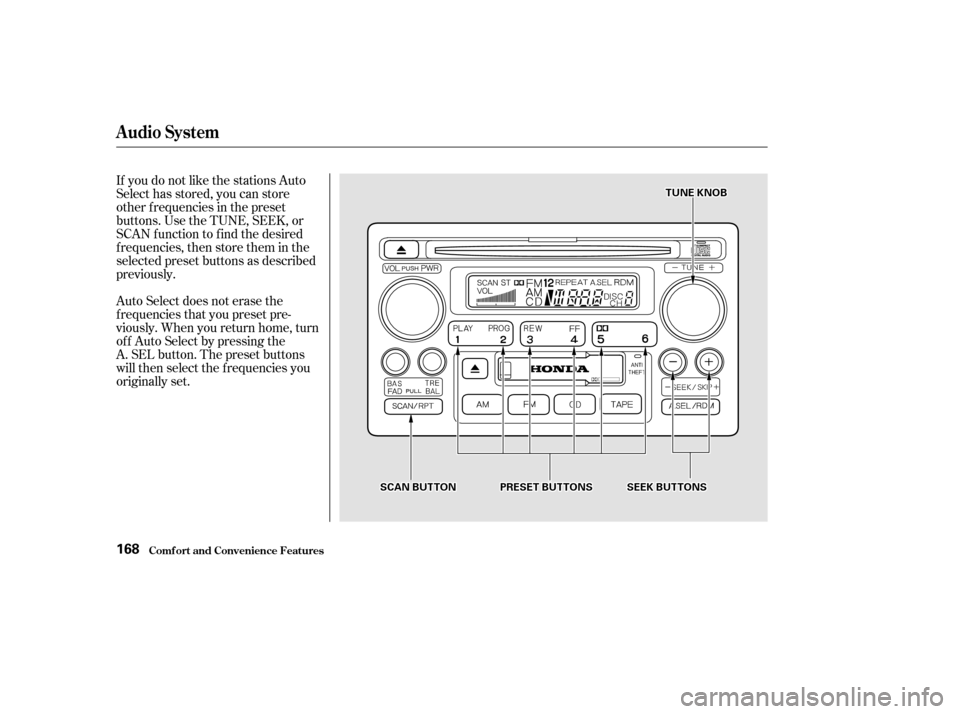
If you do not like the stations Auto
Select has stored, you can store
other f requencies in the preset
buttons. Use the TUNE, SEEK, or
SCAN f unction to f ind the desired
f requencies, then store them in the
selected preset buttons as described
previously.
Auto Select does not erase the
f requencies that you preset pre-
viously. When you return home, turn
of f Auto Select by pressing the
A. SEL button. The preset buttons
will then select the f requencies you
originally set.
Audio System
Comf ort and Convenience Feat ures168
SSEEEEKKBBUUTTTTOONNSSPPRREESSEETTBBUUTTTTOONNSS
TTUUNNEEKKNNOOBB
SSCCAANNBBUUTTTTOONN
Page 58 of 158
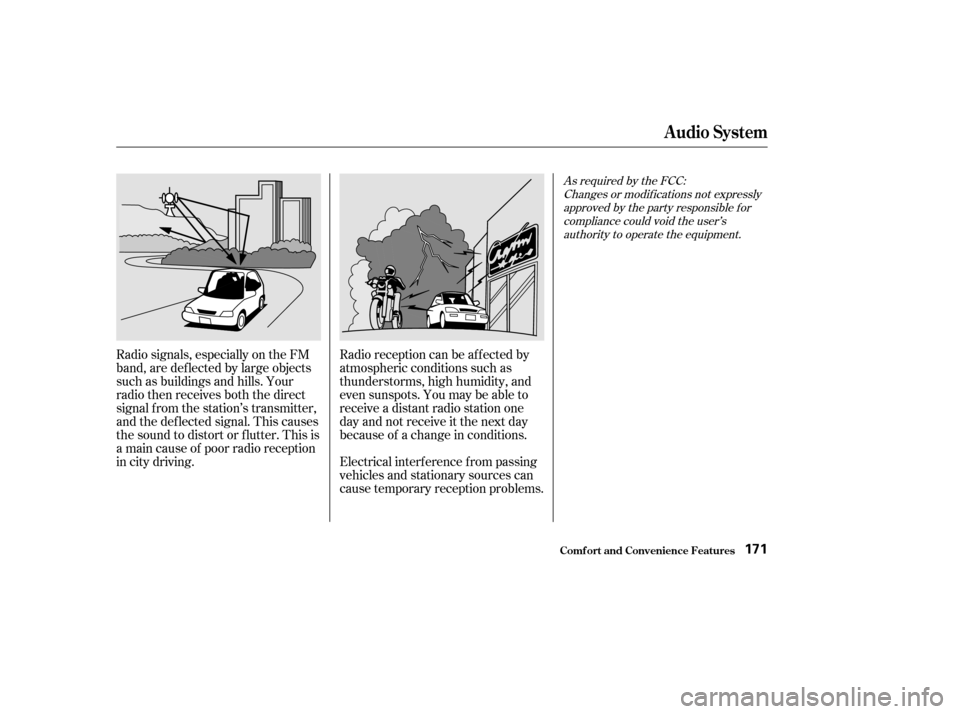
Radio signals, especially on the FM
band, are def lected by large objects
such as buildings and hills. Your
radio then receives both the direct
signal f rom the station’s transmitter,
and the def lected signal. This causes
the sound to distort or flutter. This is
a main cause of poor radio reception
in city driving.Radio reception can be af f ected by
atmospheric conditions such as
thunderstorms, high humidity, and
even sunspots. You may be able to
receive a distant radio station one
day and not receive it the next day
because of a change in conditions.
Electrical interf erence f rom passing
vehicles and stationary sources can
cause temporary reception problems.
As required by the FCC:
Changes or modif ications not expresslyapproved by the party responsible f orcompliance could void the user’sauthority to operate the equipment.
Audio System
Comf ort and Convenience Feat ures171
Page 59 of 158

�µ
�Ó
�Ó �µ
�Ó �Ó
�´
�µ
�´�µ
You can use the SKIP buttons while
a disc is playing to select passages
and change tracks.
This feature,
when activated, plays the tracks on
the CD in random order, rather than
in the order they are recorded on the
CD. To activate Random Play, press
the RDM button. You will see RDM
in the display. The system will then
select and play tracks randomly.
This continues until you deactivate
RandomPlaybypressingtheRDM
button again.
To move rapidly within a track, press
and hold an appropriate SKIP button.
Press the button to move f orward,
or the button to move backward.
Release the button when the system
reaches the point you want.
To activate the Repeat
feature, press and release the Repeat
button. You will see REPEAT in the
display. The system continuously
replays the current track. Press the
Repeat button again to turn it off.
Each time you press the button
and release it, the system skips
f orward to the beginning of the next
track. Press and release the
buttontoskipbackwardtothe
beginning of the current track. Press
and release it again to skip to the
beginning of the previous track.
If you eject the disc, but do not
remove it from the slot, the system
will automatically reload the disc
af ter 15 seconds and put the CD
player in pause mode. To begin
playing the disc, press the CD button.
Press the eject button to remove the
disc f rom the drive.
If you turn the system of f while a CD
is playing, either with the PWR/VOL
knob or by turning off the ignition,
the disc will stay in the drive. When
youturnthesystembackon,theCD
will begin playing where it lef t of f .
When the system reaches the end of
the disc, it will return to the begin-
ning and play that disc again.
You can switch to the radio while a
CD is playing by pressing the AM or
FM button. Press the CD button to
return to playing the CD. The CD
will begin playing where it lef t of f .
RANDOM PLAY
REPEAT
Audio System
Comf ort and Convenience Feat ures173