Page 65 of 223

�µThe power window system has a key-
of f delay f unction. The windows will
stilloperateforuptotenminutes
after you turn off the ignition.
Opening either f ront door cancels
the delay function. You must turn
the ignition switch ON (II) again
bef ore you can raise or lower the
windows.
The master control panel also con-
tains these extra features:
To open the driver’s window only
partially, push the window switch
down lightly and hold it. The window
will stop as soon as you release the
switch.
To open the driver’s
window f ully, push the window
switch f irmly down and release it.
The window automatically goes all
the way down. To stop the window
f rom going all the way down, pull
back on the window switch brief ly.
The AUTO f unction only works to
lower the driver’s window. To raise
the window, you must pull back on
the window switch and hold it until
the window reaches the desired
position. The MAIN switch controls power to
the passengers’ windows. With this
switch of f , the passengers’ windows
cannot be raised or lowered. The
MAIN switch does not af f ect the
driver’s window. Keep the MAIN
switch of f when you have children in
the car so they do not injure them-
selves by operating the windows
unintentionally.
The moonroof has two positions: it
can be tilted up in the back f or
ventilation, or it can be slid back into
the roof . Use the switch under the
lef t dashboard vent to operate the
moonroof . The ignition switch must
be ON (II).
On U.S. EX and all SE and EX V-6models
Moonroof
AUTO
Inst rument s and Cont rols
Power Windows, Moonroof
92
MMOOOONNRROOOOFFSSWWIITTCCHH
Page 66 of 223

Keeptheinsideandoutsidemirrors
clean and adjusted f or best visibility.
Be sure to adjust the mirrors bef ore
you start driving.
The inside mirror has day and night
positions. The night position reduces
glare f rom headlights behind you.
Flip the tab on the bottom edge of
the mirror to select the day or night
position.
The moonroof has a key-of f delay.
You can still open and close the
moonroof f or up to ten minutes af ter
you turn of f the ignition. The key-of f
delay cancels as soon as you open
either f ront door. You must then
turn the ignition ON (II) for the
moonroof to operate.
To tilt up the back of the moonroof ,
press and hold the center button
( ). To close the moonroof ,
press and hold the top of the switch
( ). To open the moonroof ,
press and hold the bottom of the
switch ( ). Release the switch
when the moonroof gets to the
desired position. Make sure
everyone’s hands are away f rom the
moonroof bef ore opening or closing
it.
CONT INUED
Mirrors
Moonroof , Mirrors
Inst rument s and Cont rols93
TTAABB
Opening or closing the
moonroof on someone’s hands
or fingers can cause seriousinjury.
Make sure all hands and fingers
are clear of the moonroof
before opening or closing it. If you try to open the moonroof in
below-f reezing temperatures, or when
it is covered with snow or ice, you can
damage the moonroof panel or motor.
Page 68 of 223
To apply the parking brake, pull the
lever up f ully. To release it, pull up
slightly, push the button, and lower
the lever. The parking brake light on
the instrument panel should go out
when the parking brake is f ully
released with the engine running
(see page ).
The outside mirrors are heated to re-
move fog and frost. With the ignition
switchON(II),turnontheheaters
by pressing the button. The light in
the button comes on as a reminder.
Press the button again to turn the
heaters of f .
57On all Canadian models
Inst rument s and Cont rols
Mirrors, Parking Brake
Parking Brake
95
PPAARRKKIINNGGBBRRAAKKEELLEEVVEERR
HHEEAATTEEDDMMIIRRRROORRBBUUTTTTOONNDriving the car with the parking brake
applied can damage the rear brakes
and axles.
Page 72 of 223
To use the sun visor, pull it down.
You can also use the sun visor at the
side window. Remove the support
rod f rom the clip and swing the sun
visor toward the side window. In this
position, the sun visor can be
extended by sliding out the
extension.Touseavanitymirroronthebackof
the sun visor, pull up the cover.
Make sure you put the sun visor
back in place when you are getting
into or out of the car. Do not use the
sun visor extension over the rear
view mirror.
All models except the U.S. DX and
Value Package models have lighted
vanity mirrors.
The light beside the mirror comes
on only when the headlight switch is
in one of the on positions.
Inst rument s and Cont rols
Sun Visor, Vanit y Mirror
Sun Visor Vanity Mirror
99
Page 73 of 223
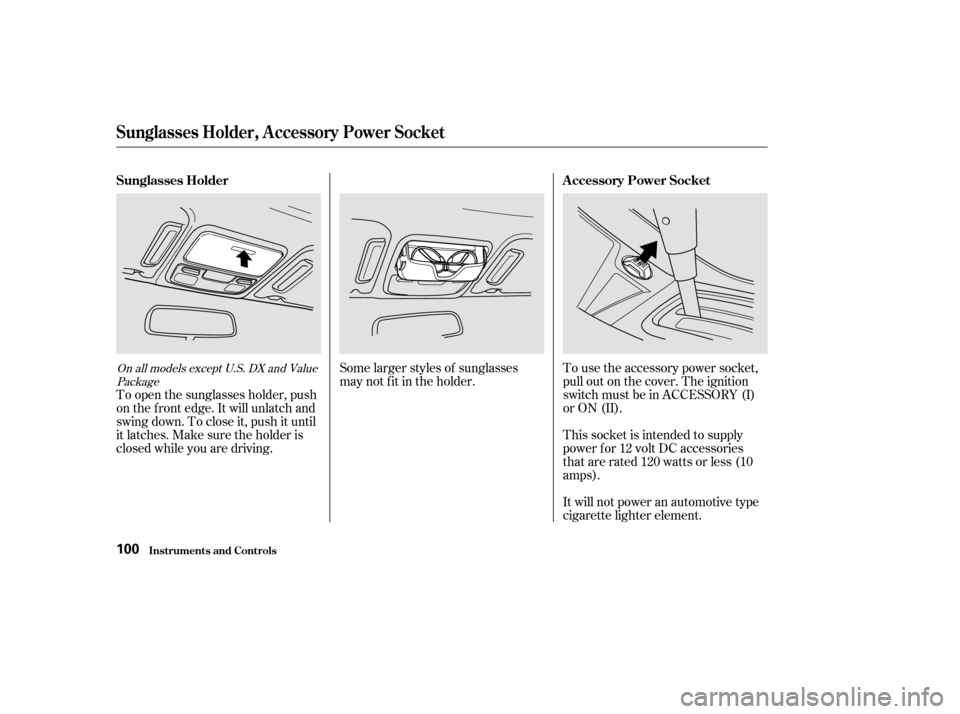
Some larger styles of sunglasses
may not f it in the holder.This socket is intended to supply
power f or 12 volt DC accessories
that are rated 120 watts or less (10
amps).
It will not power an automotive type
cigarette lighter element.
To use the accessory power socket,
pull out on the cover. The ignition
switch must be in ACCESSORY (I)
or ON (II).
To open the sunglasses holder, push
on the f ront edge. It will unlatch and
swing down. To close it, push it until
it latches. Make sure the holder is
closed while you are driving.On all models except U.S. DX and Value
Package
Sunglasses Holder, A ccessory Power Socket
Inst rument s and Cont rols
Sunglasses Holder A ccessory Power Socket
100
Page 74 of 223
The ceiling light has a three-position
switch. In the OFF position, the light
does not come on. In the center
position, the ceiling light comes on
when you open any door.The ceiling light (with the switch in
the center position) also comes on
when you unlock the door with the
remote transmitter (see page ).
The light f ades out af ter both doors
are closed.
After all doors are closed tightly, the
light dims slightly, then f ades out in
about 10 seconds. In the ON position,
the ceiling light stays on
continuously.
The light goes out when all doors are
closed. Turn on the spotlight by pushing the
button next to each light. Push the
button again to turn it off. You can
use the spotlights at all times.
75On all models except U.S. DX and Value
Package
U.S. DX, Value Package, LX, LX V-6 and all SE models EX, EX V-6
Interior Lights
Inst rument s and Cont rols
Ceiling L ight
Spotlights
101
DDOOOORRAACCTTIIVVAATTEEDD
OOFFFF
OONN
Page 75 of 223

.....................
Heating and Cooling . 104
.........
What Each Control Does . 104
............
How to Use the System . 107
..........
To Turn Everything Of f . 110
...............
Climate Control System . 111
.......
Fully-automatic Operation . 113
.......
Semi-automatic Operation . 114
Sunlight Sensor/
............
Temperature Sensor . 118
......................
Audio System (DX) . 119
.................
Operating the Radio . 120
.................
Adjusting the Sound . 123
Operating the Cassette
.....................................
Player . 124
.................
Caring f or Cassettes . 126
Operating the Optional CD
.................................
Changer . 127
.......
Protecting Compact Discs . 129
CD Changer Error
.............................
Indications . 130
Audio System ...........
(LX and U.S. LX V-6) . 131
.................
Operating the Radio . 131
.................
Adjusting the Sound . 135
.........
Operating the CD Player . 136
.....
Operating the CD Changer . 138 CD player Error
.............................
Indications . 140
CD Changer Error .............................
Indications . 141
Operating the Cassette .....................................
Player . 142
............
Tape Search Functions . 144
Caring f or the Cassette
.....................................
Player . 145
Audio System (U.S. EX, ...
Canada EX-L and EX V-6) . 146
.................
Operating the Radio . 147
.................
Adjusting the Sound . 151
............
Audio System Lighting . 152
Operating the Cassette
.....................................
Player . 152
............
Tape Search Functions . 153
Caring f or the Cassette
.....................................
Player . 155
.....
Operating the CD Changer . 156
.......
Protecting Compact Discs . 162
CD Changer Error
.............................
Indications . 163
Audio System (U.S. Value .....
Package and SE models) . 164
.................
Operating the Radio . 165 .................
Adjusting the Sound . 169
....................
Radio Frequencies . 170
........................
Radio Reception . 170
.........
Operating the CD Player . 172
Operating the Optional CD
.................................
Changer . 174
.......
Protecting Compact Discs . 175
....
CD Player Error Indications . 176
CD Changer Error
.............................
Indications . 177
Operating the Cassette .....................................
Player . 178
Caring f or the Cassette .....................................
Player . 181
...........
Remote Audio Controls . 182
.......................
Thef t Protection . 183
............................
Security System . 184
...............................
Cruise Control . 185
Homelink Universal
................................
Transceiver . 188
Comf ort and Convenience Features
Comf ort and Convenience Feat ures103
Page 76 of 223

Proper use of the Heating and
Cooling system can make the
interior dry and comf ortable, and
keep the windows clear f or best
visibility.This button controls the source of
the air going into the system. When
the indicator above this button is lit,
air f rom the car’s interior is sent
through the system again (Recircula-
tion mode). When the indicator is off,
air is brought in f rom outside the car
(Fresh Air mode).
This button turns the air condi-
tioning ON and OFF. The indicator
above the button lights when the
A/C is on.
Air Conditioning is optional on the
U.S. DX model.
Turning this dial clockwise increases
the temperature of the air flow.
Turning this dial clockwise increases
the f an’s speed, which increases air
flow.
If your car does not have air
conditioning, it can be installed at
any time. Your dealer can install a
genuine Honda air conditioning
system that meets Honda’s high
quality standards and is designed to
exactly f it your car. Please contact
your dealer f or more inf ormation.
This button turns the rear window
def ogger on and of f (see page ).68
Except EX V-6 model
Comf ort and Convenience Feat ures
Heating and Cooling
Air Conditioning (A/C) Button Recirculation Button
Rear Window Def ogger Button
T emperature Control Dial
Fan Control Dial
What Each Control Does
104
TTEEMMPPEERRAATTUURREECCOONNTTRROOLLDDIIAALLFFAANNCCOONNTTRROOLLDDIIAALLMMOODDEEBBUUTTTTOONNSS
RREEAARRWWIINNDDOOWWDDEEFFOOGGGGEERRBBUUTTTTOONNRREECCIIRRCCUULLAATTIIOONNBBUUTTTTOONNAAIIRRCCOONNDDIITTIIOONNIINNGGBBUUTTTTOONN