Page 69 of 223
The digital clock displays the time
with the ignition switch in any
position.
To set the clock:Press and hold the H button until
the hour advances to the desired
time.
Press and hold the M button until
the numbers advance to the
desired time. You can use R to quickly set the time
to the nearest hour. If the displayed
time is before the half hour, pressing
Rsetstheclockbacktotheprevious
hour. If the displayed time is af ter
the half hour, pressing R sets the
clock f orward to the beginning of the
next hour.
For example:
1:06 would RESET to 1:00.
1:52 would RESET to 2:00.
1. 2.
Digital Clock
Inst rument s and Cont rols96
RRMMHH
Page 73 of 223
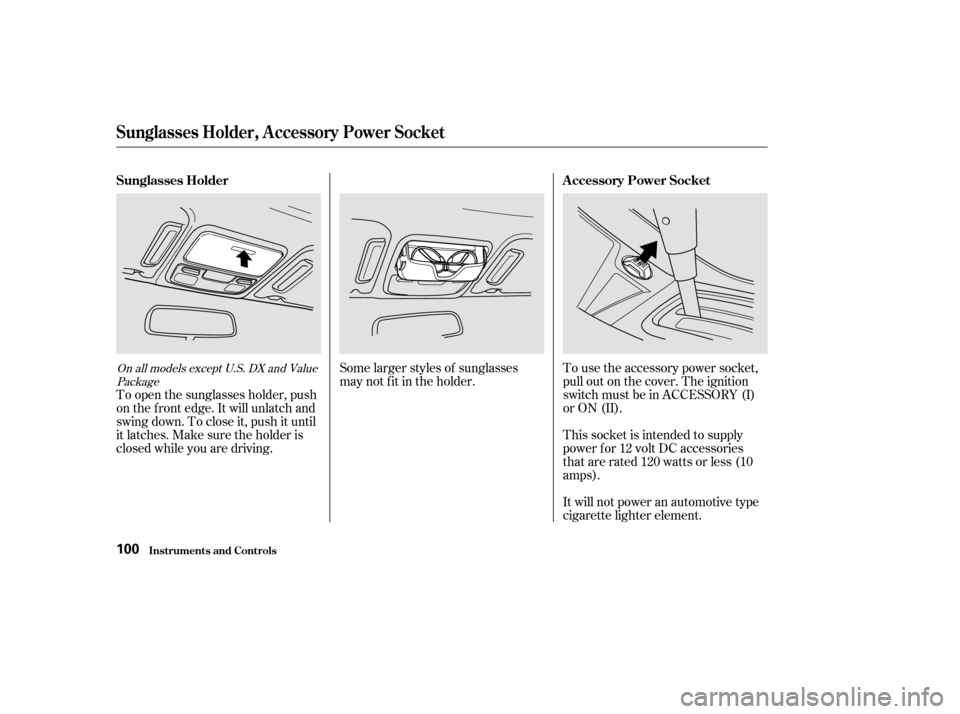
Some larger styles of sunglasses
may not f it in the holder.This socket is intended to supply
power f or 12 volt DC accessories
that are rated 120 watts or less (10
amps).
It will not power an automotive type
cigarette lighter element.
To use the accessory power socket,
pull out on the cover. The ignition
switch must be in ACCESSORY (I)
or ON (II).
To open the sunglasses holder, push
on the f ront edge. It will unlatch and
swing down. To close it, push it until
it latches. Make sure the holder is
closed while you are driving.On all models except U.S. DX and Value
Package
Sunglasses Holder, A ccessory Power Socket
Inst rument s and Cont rols
Sunglasses Holder A ccessory Power Socket
100
Page 84 of 223

�µ�µ
�Û
�Ý
You can use any of f our methods to
f ind radio stations on the selected
band: TUNE, SEEK, SCAN or the
Preset buttons.
Use the TUNE bar to tune
the radio to a desired f requency.
Press the upper part ( ) to tune
to a higher f requency, or the lower
part ( ) to tune to a lower
f requency. The f requency numbers
will start to change rapidly. Release
the bar when the display reaches the
desired f requency. To change the
f requency in small increments, press
and release the TUNE bar quickly. The SEEK f unction
searches the band for a station with
a strong signal. To activate it, push
the SEEK switch up or down, then
release it. Depending on which way
you push the switch, the system
scans upward or downward f rom the
current f requency. It stops when it
finds a station with a strong signal.
The ignition switch must be in
ACCESSORY (I) or ON (II) to
operate the audio system. Turn the
system on by pushing the PWR/
VOL knob.
Adjust the volume by turning the
PWR/VOL knob.
The band and f requency that the
radio was last tuned to is displayed.
To change bands, press the AM/FM
button. On the FM band, ST will be
displayed if the station is broadcast-
ing in stereo. Stereo reproduction on
AM is not available.
Audio System
Comf ort and Convenience Feat ures
Operating the Radio
TUNESEEK
120
Page 89 of 223
If the system is in Repeat mode, you
must turn it of f by pressing RPT
bef ore you can select Random Play.
Then press the button again until
you see RDM displayed.
To take the system out of CD mode,
press the AM/FM button or insert a
cassette in the player. If a tape is
already in the cassette player, press
the TAPE button. When you return
to CD mode, play will continue at the
same disc and track.
For inf ormation on how to handle
and protect compact discs, see page.
If you turn the system of f while a CD
is playing, either with the PWR/VOL
knob or the ignition switch, play will
continue at the same disc and track
when you turn it back on.
175
Audio System
Comf ort and Convenience Feat ures
Protecting Compact Discs
129
PPRREESSEETTBBUUTTTTOONNSS
RRAANNDDOOMMIINNDDIICCAATTOORR
RREEPPEEAATTIINNDDIICCAATTOORR
SSKKIIPPSSWWIITTCCHH
RRPPTTBBUUTTTTOONN
TTAAPPEE//CCDDBBUUTTTTOONN
AAMM//FFMMBBUUTTTTOONN
PPWWRR//VVOOLLKKNNOOBB
Page 91 of 223
Your Honda’s audio system provides
clear reception on both AM and FM
bands, while the preset buttons allow
you to easily select your f avorite
stations.The ignition switch must be in
ACCESSORY (I) or ON (II) to
operate the audio system. Turn the
system on by pushing the PWR/
VOL knob or the AM/FM button.
Adjust the volume by turning the
knob.The band and f requency that the
radio was last tuned to is displayed.
To change bands, press the AM/FM
button. On the FM band, ST will be
displayed if the station is broadcast-
ing in stereo. Stereo reproduction on
AM is not available.
CONT INUED
For LX and U.S. LX V-6 models
Audio System
AM/FM/CD Audio System
Operating the Radio
Comf ort and Convenience Feat ures131
Page 93 of 223

You operate the CD player with the
same controls used f or the radio.
You can use the instrument panel
brightness control dial to adjust the il-
lumination of the audio system (see
page ). The audio system
illuminates when the parking lights
are on, even if the radio is turned of f .
For inf ormation, see page .
With the ignition switch in
ACCESSORY (I) or ON (II), insert
the disc into the CD slot. Push the
disc in half way, the drive will pull it
in the rest of the way and begin to
play. The number of the track that is
playing is shown in the display. You can also play 3-inch (8-cm) discs
without using an adapter ring. Play
only standard round discs. Odd-
shaped CDs may jam in the drive or
cause other problems.
For best results when using CD-R
discs, use only high quality discs
labeled f or audio use. When
recording a CD-R, the recording
must be closed in order f or the disc
to be used by CD players. CD-RW
discs will not work in this unit.
170
65
Audio System
Comf ort and Convenience Feat ures
Operating the CD Player
A udio System L ighting
Radio Frequencies and Reception
136
CCDD//TTAAPPEEBBUUTTTTOONNRREEPPEEAATTIINNDDIICCAATTOORR
AAMM//FFMMBBUUTTTTOONNCCDDSSLLOOTTRRPPTTBBUUTTTTOONN
EEJJEECCTTBBUUTTTTOONN
PPWWRR//VVOOLLKKNNOOBB
SSEEEEKK//SSKKIIPPBBAARR
RRAANNDDOOMMIINNDDIICCAATTOORR
AA..SSEELL//RRDDMMBBUUTTTTOONN
Page 97 of 223

�Î
�Î
The cassette system f eatures Dolby
noise reduction, automatic sensing of
chromium-dioxide (CrO ) tape, and
auto-reverse f or continuous play.
To operate the cassette player, the
ignition switch must be in
ACCESSORY(I) or ON(II). Make
sure the tape opening on the cassette
is f acing to the right, then insert the
cassette most of the way into the slot.
The system will pull it in the rest of
the way, and begin to play.
2
Dolby noise reduction manuf actured under
license from Dolby Laboratories Licensing Corpo-
ration. ‘‘DOLBY’’ and the double-D symbol
are trademarks of Dolby Laboratories
Licensing Corporation.
Operating the Cassette Player
(Optional)
Audio System
Comf ort and Convenience Feat ures142
TTAAPPEEDDIIRREECCTTIIOONNIINNDDIICCAATTOORR
RREEPPEEAATTIINNDDIICCAATTOORRRREEPPEEAATTBBUUTTTTOONN
AAMM//FFMMBBUUTTTTOONN
PPWWRR//VVOOLLKKNNOOBBCCDD//TTAAPPEEBBUUTTTTOONN
SSEEEEKK//SSKKIIPPBBAARRPPLLAAYY//PPRROOGGBBUUTTTTOONNNNRRBBUUTTTTOONN
RREEWWBBUUTTTTOONNFFFFBBUUTTTTOONN
Page 101 of 223

�µ
�µ �Ó�Ó
�µ�´
The ignition switch must be in
ACCESSORY (I) or ON (II) to
operate the audio system. Turn the
system on by pressing the PWR/
VOL knob or the AM or FM button.
Adjust the volume by turning the
knob.
The band and f requency that the
radio was last tuned to is displayed.
To change bands, press the AM or
FM button. On the FM band, ST will
be displayed if the station is broad-
castinginstereo.Stereo
reproduction on AM is not available.
The anti-thef t f eature will disable the
system if it is disconnected f rom the
car’s battery. To get the system
working again, you must enter a
code number (see page ).
You can use any of f ive methods to
f ind radio stations on the selected
band: TUNE, SEEK, SCAN, AUTO
SELECT, and the Preset buttons.
Use the TUNE knob to
tune the radio to a desired f requency.
Turn the TUNE knob to the right to
tune to a higher f requency, or to the
lef t to tune to a lower f requency.
Turn the knob right or lef t until the
display reaches the desired
f requency.
The SEEK f unction
searches the band for a station with
a strong signal. To activate it, press
either SEEK button ( or ), then
release it. Depending on which
SEEK button you press, the system
scans upward or downward f rom the
current f requency. It stops when it
finds a station with a strong signal.
183
CONT INUED
Operating the Radio
TUNE SEEK
Audio System
Comf ort and Convenience Feat ures147