Page 99 of 394

2-26 Torque Lock
If you are parking on a hill and you don't shift your
transmission into PARK (P) properly, the weight of the
vehicle may put too much force on the parking pawl in
the transmission. You may find it difficult to pull the
shift lever out of PARK (P). This is called ªtorque lock.º
To prevent torque lock, set the parking brake and then
shift into PARK (P) properly before you leave the
driver's seat. To find out how, see ªShifting Into
PARK (P)º in the Index.
When you are ready to drive, move the shift lever out
of PARK (P) before you release the parking brake.
If torque lock does occur, you may need to have another
vehicle push yours a little uphill to take some of the
pressure from the parking pawl in the transmission,
so you can pull the shift lever out of PARK (P).
Shifting Out of PARK (P)
Your vehicle has an automatic transmission shift lock
control system. You have to fully apply your regular
brakes before you can shift from PARK (P) when the
ignition is in RUN. See ªAutomatic Transmissionº
in the Index.
If you cannot shift out of PARK (P), ease pressure
on the shift lever and push the shift lever all the way up
into PARK (P) as you maintain brake application.
Then, move the shift lever into the gear you want.
If you ever hold the brake pedal down but still can't
shift out of PARK (P), try this:
1. Turn the key to OFF.
2. Apply and hold the brake until the end of Step 4.
3. Shift the vehicle to NEUTRAL (N).
4. Start the vehicle and then shift to the drive gear
you want.
5. Have the system fixed as soon as you can.
Page 102 of 394

2-29
Locking Rear Axle
If your vehicle has this feature, your locking rear axle
can give you additional traction on snow, mud, ice, sand
or gravel. It works like a standard axle most of the time,
but when one of the rear wheels has no traction and
the other does, this feature will allow the wheel with
traction to move the vehicle.
All-Wheel Drive
With this feature, engine power is sent to all four wheels
when extra traction is needed.
This is like four
-wheel drive, but there is no separate
lever or switch to engage or disengage the front axle.
It is fully automatic, and adjusts itself as needed for
road conditions.
QUADRASTEER� (4WS)
The QUADRASTEER System has a control and
diagnostic module that monitors and records current
system status and operational information.
If your vehicle is equipped with the 4WS system it has
the ability to steer the vehicle with all four wheels.
Once this mode is selected, it is recommended to leave
the vehicle in this mode at all times.
The 4WS system is equipped with three different
driving modes:
�Two wheel steering (2WS)
�Four wheel steering (4WS)
�Four wheel steering with a trailer mode (4WS TOW)
Page 106 of 394
2-33
Horn
To sound the horn, press the center pad on the
steering wheel.
Tilt Wheel
A tilt wheel allows you to adjust the steering wheel before
you drive. You can raise it to the highest level to give your
legs more room when you exit and enter your vehicle.
The tilt steering wheel lever
is located on the lower left
side of the steering column.
To tilt the wheel, hold the steering wheel and pull the
lever. Then move the steering wheel to a comfortable
position and release the lever to lock the wheel in place.
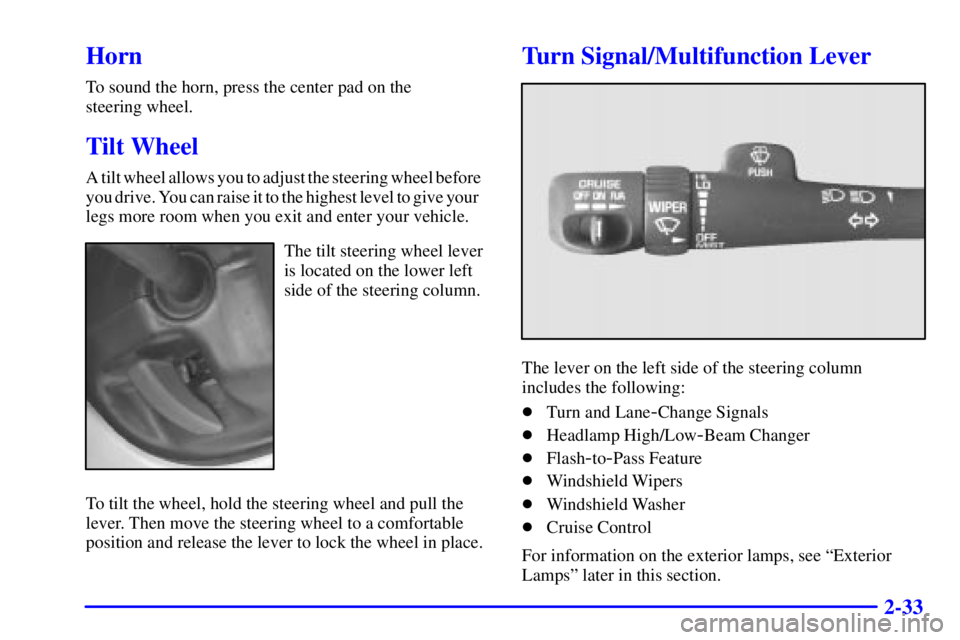
Turn Signal/Multifunction Lever
The lever on the left side of the steering column
includes the following:
�Turn and Lane
-Change Signals
�Headlamp High/Low
-Beam Changer
�Flash
-to-Pass Feature
�Windshield Wipers
�Windshield Washer
�Cruise Control
For information on the exterior lamps, see ªExterior
Lampsº later in this section.
Page 108 of 394

2-35 Flash-to-Pass Feature
This feature allows you to use your high-beam
headlamps to signal a driver in front of you that you
want to pass. It works even if your headlamps are off.
To use it, pull the turn signal lever toward you, but not
so far that you hear it click.
If your headlamps are off or on low beam, your
high
-beam headlamps will turn on. They'll stay on as
long as you hold the lever toward you. The high
-beam
indicator on the instrument panel will come on. Release
the lever to turn the high
-beam headlamps off.
Windshield Wipers
You control the windshield wipers by turning the band
with the wiper symbol on it.
For a single wiping cycle, turn the band to MIST. Hold
it there until the wipers start, then let go. The wipers will
stop after one wipe. If you want more wipes, hold the
band on MIST longer.
You can set the wiper speed for a long or short delay
between wipes. This can be very useful in light rain
or snow. Turn the band to choose the delay time.
The closer to LO, the shorter the delay.For steady wiping at low speed, turn the band away
from you to the LO position. For high
-speed wiping,
turn the band further, to HI. To stop the wipers, move
the band to OFF.
Be sure to clear ice and snow from the wiper blades
before using them. If they're frozen to the windshield,
carefully loosen or thaw them. If your blades do become
worn or damaged, get new blades or blade inserts.
Windshield Washer
There is a paddle marked with the windshield washer
symbol at the top of the multifunction lever. To spray
washer fluid on the windshield, push the paddle.
The wipers will clear the window and then either stop
or return to your preset speed.
CAUTION:
In freezing weather, don't use your washer until
the windshield is warmed. Otherwise the washer
fluid can form ice on the windshield, blocking
your vision.
Page 111 of 394
2-38
Using Cruise Control on Hills
How well your cruise control will work on hills depends
upon your speed, load and the steepness of the hills.
When going up steep hills, you may want to step on the
accelerator pedal to maintain your speed. When going
downhill, you may have to brake or shift to a lower gear
to keep your speed down. Of course, applying the brake
takes you out of cruise control. Many drivers find this
to be too much trouble and don't use cruise control on
steep hills.
Ending Cruise Control
There are two ways to turn off the cruise control:
�Step lightly on the brake pedal.
�Move the cruise control switch to OFF.
Erasing Speed Memory
When you turn off the cruise control or the ignition,
your cruise control set speed memory is erased.Exterior Lamps
The control on the driver's side of the instrument panel
operates the exterior lamps.
Turn the control clockwise to operate the lamps.
Page 113 of 394

2-40
There is a delay in the transition between the daytime
and nighttime operation of the Daytime Running Lamps
(DRL) and the automatic headlamp systems so that
driving under bridges or bright overhead street lights does
not affect the system. The DRL and automatic headlamp
system will only be affected when the light sensor sees a
change in lighting lasting longer than the delay.
To idle your vehicle with the automatic headlamp
system off, set the parking brake while the ignition is
off. Then start your vehicle. The automatic headlamp
system will stay off until you release the parking brake.
You may be able to turn off your automatic headlamp
system. See ªDaytime Running Lamps (DRL)º later in
this section for more information.
As with any vehicle, you should turn on the regular
headlamps if you need them.
Lamps On Reminder
A reminder chime will sound when your headlamps or
parking lamps are manually turned on and your ignition
is in OFF, LOCK or ACCESSORY. To disable the
chime, turn the thumbwheel all the way down. In the
automatic mode, the headlamps turn off once the
ignition key is in OFF.
Daytime Running Lamps
Daytime Running Lamps (DRL) can make it easier
for others to see the front of your vehicle during
the day. DRL can be helpful in many different driving
conditions, but they can be especially helpful in the
short periods after dawn and before sunset. Fully
functional daytime running lamps are required on all
vehicles first sold in Canada.
The DRL system will come on when the following
conditions are met:
�The ignition is on,
�the exterior lamp control off,
�the automatic transmission is not in PARK (P),
�the light sensor determines it is daytime and
�the parking brake is released.
When the DRL are on, only your DRL lamps will be on.
The taillamps, sidemarker and other lamps won't be on.
The instrument panel won't be lit up either.
Page 114 of 394

2-41
When it begins to get dark, the automatic headlamp
system will switch from DRL to the headlamps or the
last chosen headlamp setting that was used.
When you turn the exterior lamp control to off,
the headlamps will go off, and your DRL lamps will
illuminate, provided it is not dark outside.
To idle your vehicle with the DRL off, set the
parking brake, before starting the vehicle. Shifting the
transmission into PARK (P) will also allow you to idle
the vehicle with the DRL off. The DRL will stay off
until you release the parking brake or shift the
transmission out of PARK (P).
The following procedure applies only to vehicles first
sold in the United States.
When necessary, you may turn off the automatic
headlamp system and the Daytime Running Lamps
(DRL) feature by following these steps. When the system
is turned off, the headlamps will not automatically come
on when it becomes dark outside.1. Turn the ignition to RUN.
2. Press the DOME OVERRIDE button four times
within six seconds. After the fourth press of the
button, a chime will sound informing you the
system is off.
The system will revert back to the automatic mode when
the DOME OVERRIDE button is again pushed four
times within six seconds (a chime will sound), or when
the ignition is turned off and on again.
As with any vehicle, you should turn on the regular
headlamp system when you need it.
Puddle Lamps
Your vehicle is equipped with puddle lamps to help you
see the area near the base of the front doors when it is
dark out. The puddle lamps will illuminate when a door
is opened or when you press the UNLOCK button on the
keyless entry transmitter. You can program the puddle
lamps not to come on if you wish. See ªSecondary
Information Centerº in the Index for more information.
Page 118 of 394

2-45
Mirrors
Electrochromic Inside Rearview Mirror
with Compass, Temperature Display and
OnStar Controls
When on, an electrochromic mirror automatically dims
to the proper level to minimize glare from lights behind
you after dark.
The mirror also includes a dual display in the upper
right corner of the mirror face. The compass reading and
the outside temperature will both appear in the display at
the same time.Temperature and Compass Display
Press the on/off button, located to the far left, briefly to
turn the comp/temp display on or off.
If the display reads CAL, you will need to calibrate
the compass. For more information on calibration,
see below.
To switch between Fahrenheit and Celsius
do the following:
1. Press and hold the on/off button for four seconds
until either a flashing �F, or �C appears.
2. Press the button again to change the display to the
desired unit of measurement. After approximately
four seconds of inactivity, the new unit will be
locked in and the compass/temperature display
will return.