Page 106 of 394
2-33
Horn
To sound the horn, press the center pad on the
steering wheel.
Tilt Wheel
A tilt wheel allows you to adjust the steering wheel before
you drive. You can raise it to the highest level to give your
legs more room when you exit and enter your vehicle.
The tilt steering wheel lever
is located on the lower left
side of the steering column.
To tilt the wheel, hold the steering wheel and pull the
lever. Then move the steering wheel to a comfortable
position and release the lever to lock the wheel in place.
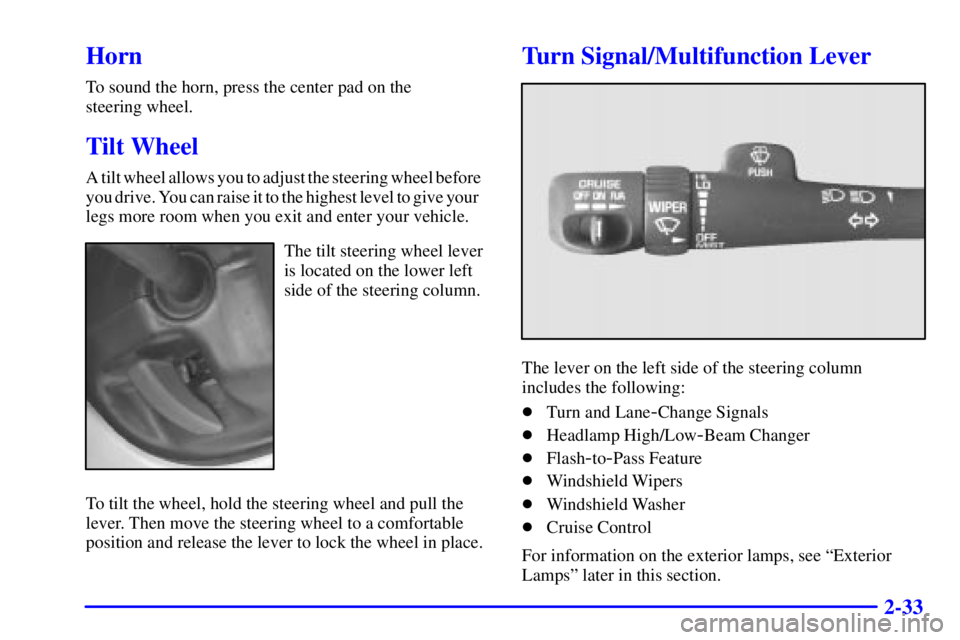
Turn Signal/Multifunction Lever
The lever on the left side of the steering column
includes the following:
�Turn and Lane
-Change Signals
�Headlamp High/Low
-Beam Changer
�Flash
-to-Pass Feature
�Windshield Wipers
�Windshield Washer
�Cruise Control
For information on the exterior lamps, see ªExterior
Lampsº later in this section.
Page 127 of 394

2-54
OnStar� System (If Equipped)
OnStar is a vehicle communications system that offers a
variety of services and provides a one
-touch hands-free
communication link between you and the OnStar Center.
To receive OnStar services, a service subscription
agreement is required and an additional fee may be
required. Services are available 24 hours a day, 7 days a
week. For more information, call 1
-888-ONSTAR-7
(1
-888-667-8277).
OnStar Services Button: Press this button once
to contact an advisor who will be able to assist you with
these services. If you are not quickly connected, the
system will automatically reset and redial. This ensures
connection to the center; there is no additional action
required. Press the Communication button to cancel the
automatic redial.
Emergency Button: In an emergency situation,
press the emergency service button. Upon receiving the
call, an advisor at the center will locate your vehicle and
assess the situation. If necessary, the advisor will alert
the nearest emergency service provider.
Communication Button: Press this button at
the end of a call. Also press this button to answer
a call from the center, or cancel a call if one of the
other buttons is accidentally pressed. This button is
also used to access OnStar Personal Calling and Virtual
Advisor services. See the OnStar owner package for
more information.
Volume Control: You can control the volume of
the OnStar System using either the volume control
knob on the radio or if equipped, the steering wheel
volume controls.
Telltale Light: This light will indicate the status of
the system. A solid green light will come on when you
start the vehicle to let you know that the system is on
and is ready to make or receive calls.
If the light blinks green it means that an incoming or
outgoing call is in progress. Press the Communication
button if you notice the light blinking and you are
not on a call.
Page 134 of 394
2-61
The main components of your instrument panel are the following:
A. Dome Lamp Override Button
B. Exterior Lamp Control
C. Air Outlets
D. Storage Compartment
E. Multifunction Lever
F. Instrument Panel Cluster
G. Shift Lever
H. Tow/Haul Selector Switch
I. Audio System
J. Comfort Control System
K. Instrument Panel Fuse BlockL. Hood Release
M. Audio Steering Wheel Controls
N. Center Instrument Panel Fuse Block
O. Tilt Lever
P. Parking Brake Release
Q. Secondary Information Center (SIC)
R. Rear Window Defogger Button
S. Compact Disc Changer
T. Ashtray
U. Accessory Power Outlet
V. Air Bag Off Switch and 4
-Wheel Steer Button
W. Glovebox
Page 160 of 394
3-
3-1
Section 3 Comfort Controls and Audio Systems
In this section, you'll find out how to operate the comfort control and audio systems offered with your vehicle.
Be sure to read about the particular systems supplied with your vehicle.
3
-2 Comfort Controls
3
-4 Air Conditioning
3
-5 Heating
3
-5 Defogging and Defrosting
3
-6 Rear Window Defogger
3
-7 Ventilation System
3
-8 Audio Systems
3
-8 Setting the Clock for Systems with HR and
MIN Buttons
3
-9AM-FM Stereo with Cassette Tape Player and
Automatic Tone Control3
-13 Rear Seat Audio (RSA)
3
-16 Compact Disc Changer
3
-19 Theft-Deterrent Feature
3
-21 Audio Steering Wheel Controls
3
-22 Understanding Radio Reception
3
-22 Tips About Your Audio System
3
-23 Care of Your Cassette Tape Player
3
-24 Care of Your Compact Discs
3
-24 Care of Your Compact Disc Player
3
-24 Fixed Mast Antenna
Page 180 of 394
3-21 Audio Steering Wheel Controls
You can control certain radio functions using the buttons
on your steering wheel.
PROG (Program): Press this button to play a station
you have programmed on the radio preset buttons on the
selected band. If a cassette tape is playing, press this
button to play the other side of the tape. If a compact
disc is playing in the CD changer, press this button to go
to the next available CD.
SEEK : Press the up or down arrow to seek to the
next or previous radio station and stay there. If a cassette
tape or compact disc is playing, the player will advance
with the up arrow and reverse with the down arrow.
MUTE: Press this button to silence the system. Press it
again to turn on the sound.
VOL (Volume): Press the up or down arrow to
increase or decrease volume.
Page 184 of 394
4-
4-1
Section 4 Your Driving and the Road
Here you'll find information about driving on different kinds of roads and in varying weather conditions. We've also
included many other useful tips on driving.
4
-2 Defensive Driving
4
-3 Drunken Driving
4
-6 Control of a Vehicle
4
-6 Braking
4
-9 Steering
4
-11 Off-Road Recovery
4
-12 Passing
4
-13 Loss of Control
4
-14 Operating Your All-Wheel-Drive Vehicle Off
Paved Roads
4
-28 Driving at Night4
-30 Driving in Rain and on Wet Roads
4
-33 City Driving
4
-34 Freeway Driving
4
-35 Before Leaving on a Long Trip
4
-36 Highway Hypnosis
4
-36 Hill and Mountain Roads
4
-38 Winter Driving
4
-42 Recreational Vehicle Towing
4
-42 Loading Your Vehicle
4
-48 Pickup Conversion to Chassis Cab
4
-49 Towing a Trailer
Page 189 of 394

4-6
Control of a Vehicle
You have three systems that make your vehicle go where
you want it to go. They are the brakes, the steering and
the accelerator. All three systems have to do their work
at the places where the tires meet the road.
Sometimes, as when you're driving on snow or ice, it's
easy to ask more of those control systems than the tires
and road can provide. That means you can lose control
of your vehicle.
Braking
Braking action involves perception time and
reaction time.
First, you have to decide to push on the brake pedal.
That's perception time. Then you have to bring up your
foot and do it. That's reaction time.
Average reaction time is about 3/4 of a second. But
that's only an average. It might be less with one driver
and as long as two or three seconds or more with
another. Age, physical condition, alertness, coordination
and eyesight all play a part. So do alcohol, drugs and
frustration. But even in 3/4 of a second, a vehicle
moving at 60 mph (100 km/h) travels 66 feet (20 m).
That could be a lot of distance in an emergency, so
keeping enough space between your vehicle and others
is important.
And, of course, actual stopping distances vary greatly
with the surface of the road (whether it's pavement or
gravel); the condition of the road (wet, dry, icy); tire
tread; the condition of your brakes; the weight of the
vehicle and the amount of brake force applied.
Page 192 of 394

4-9
Remember: Anti-lock doesn't change the time you need
to get your foot up to the brake pedal or always decrease
stopping distance. If you get too close to the vehicle in
front of you, you won't have time to apply your brakes
if that vehicle suddenly slows or stops. Always leave
enough room up ahead to stop, even though you have
anti
-lock brakes.
Using Anti
-Lock
Don't pump the brakes. Just hold the brake pedal down
firmly and let anti
-lock work for you. You may feel the
brakes vibrate, or you may notice some noise, but this
is normal.
Braking in Emergencies
With anti-lock, you can steer and brake at the same
time. In many emergencies, steering can help you more
than even the very best braking.
Steering
Power Steering
If you lose power steering assist because the engine
stops or the system is not functioning, you can steer but
it will take much more effort.
Steering Tips
Driving on Curves
It's important to take curves at a reasonable speed.
A lot of the ªdriver lost controlº accidents mentioned on
the news happen on curves. Here's why:
Experienced driver or beginner, each of us is subject to
the same laws of physics when driving on curves. The
traction of the tires against the road surface makes it
possible for the vehicle to change its path when you turn
the front wheels. If there's no traction, inertia will keep
the vehicle going in the same direction. If you've ever
tried to steer a vehicle on wet ice, you'll understand this.
The traction you can get in a curve depends on the
condition of your tires and the road surface, the angle
at which the curve is banked, and your speed. While
you're in a curve, speed is the one factor you
can control.