Page 83 of 312

²SHOW (NAME, TYPE, NONE)-Refer toRadio data system.
²RDS ONÐ Refer toRadio data system.
²SELECT HOURS Ð Refer toSetting the clock.
²SELECT MINUTES ÐRefer toSetting the clock.
When in CD mode, you can access: SELECT HOURS, SELECT MINUTES
or COMP ON/OFF.
SELECT HOURS, SELECT MINUTESÐ Allows you to adjust the hours
and minutes. Refer toSetting the clock.
TRAFFIC ON/OFFÐ Traffic announcements can be programmed as local
or distant. Refer toTraffic announcements.
RDS ON/OFFÐ This feature allows your audio system to receive text
information from RDS-equipped FM radio stations. Refer to.RDS feature.
FIND type Ð Allows you to select your desired FM program type and
search for that selection.
SHOW Ð Allows you to select from NAME (displays the name of the
radio station), TYPE (displays the RDS program type: rock, jazz, etc.), or
NONE (deactivates the RDS display).
Radio data system (RDS) feature
This feature allows your audio
system to receive text information
from RDS-equipped FM radio
stations.
To activate RDS:
²When in FM mode, press the MENU control until RDS OFF displays.
²Press the SEL control to engage this feature (RDS ON).
RDS features:
Once the RDS feature is on, press the MENU control to scroll through
the following selections:
Traffic announcements
This feature allows you to hear traffic announcements while in CD mode.
These announcements are broadcast by traffic capable RDS stations.
When in this mode, traffic announcements will interrupt radio and CD
play.
²Press the MENU control until TRAFFIC is displayed.
SEL+MENU
Controls and features
83
Page 86 of 312

Press the DSP control again to access the occupancy modes. Use the
SEL control to optimize the sound based upon the occupants in the
vehicle. The following occupancy modes can be selected:
²ALL SEATS
²DRIVER SEAT
²REAR SEATS
Mute mode
Press the control to mute the
playing media. Press the control
again to return to the playing media.
Setting the clock
Press the MENU control until
SELECT HOUR or SELECT
MINUTE is displayed.
Use the SEL control to manually set
the time.
²Press
to increase
hours/minutes.
²Press
to decrease
hours/minutes.
Troubleshooting the CD changer (if equipped)
The laser beam used in the compact disc player is harmful to the
eyes. Do not attempt to disassemble the case.
If sound skips:
²You may be traveling on a rough road, playing badly scratched discs or
the disc may be dirty. Skipping will not scratch the discs or damage
the player.
If your changer does not work, it may be that:
²A disc is already loaded where you want to insert a disc.
²The disc is inserted with the label surface downward.
MENU
SEL
Controls and features
86
Page 110 of 312

Press control to lock all doors.
LIFTGATE
An additional power door lock can be accessed by opening the liftgate.
The button is located either on the top of the left hand quarter trim
panel underneath the rear window, or on the bottom of the left hand
quarter trim panel. Press this button to lock or unlock all the doors.
CHILDPROOF DOOR LOCKS
When these locks are set, the rear
doors cannot be opened from the
inside. The rear doors can be
opened from the outside when the
doors are unlocked.
The childproof locks are located on
rear edge of each rear door and
must be set separately for each
door. Setting the lock for one door
will not automatically set the lock
for both doors.
Move lock control up to engage the childproof lock. Move control down
to disengage childproof locks.
POWER SIDE VIEW MIRRORS
The ignition must be in the ACC or ON position to adjust the power side
view mirrors.
To adjust your mirrors:
1. Rotate the control clockwise to
adjust the right mirror and rotate
the control counterclockwise to
adjust the left mirror.
Controls and features
110
Page 181 of 312
3. Rotate the access panel (counter
clockwise) with a flat head screw
driver until it is lined up to the
access hole in the open position.
4. Insert the vehicle key or screw driver into the access hole to override
the brake-shift interlock. Apply the brake and shift into Neutral.
5. Return the cover plate (rotate
clockwise) to the closed position.
Start the vehicle.
If it is necessary to use the above procedure to move the gearshift lever,
it is possible that a fuse has blown or the vehicle's brakelamps are not
operating properly. Refer toFuses and relaysin theRoadside
emergencieschapter.
Do not drive your vehicle until you verify that the brakelamps
are working.
Driving
181
Page 218 of 312
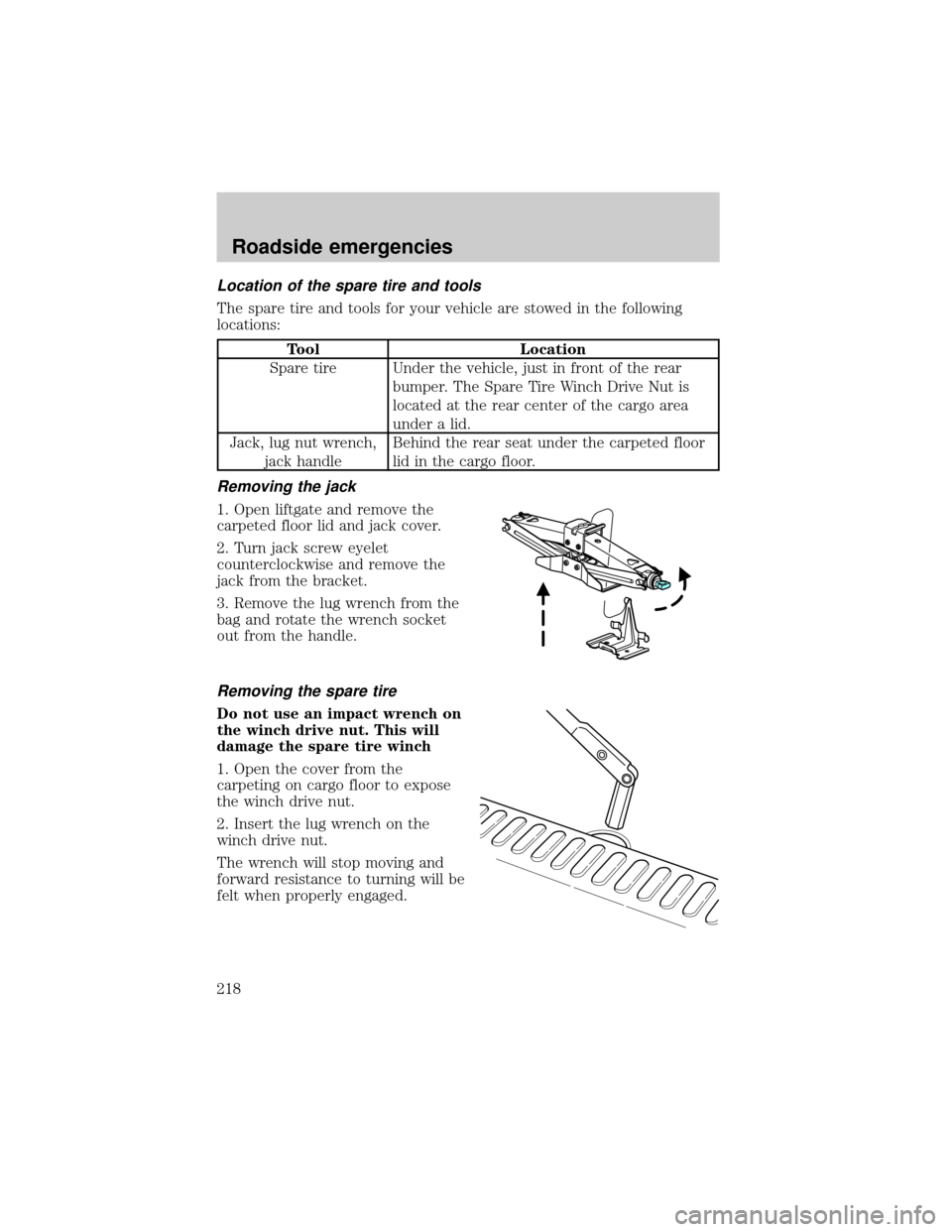
Location of the spare tire and tools
The spare tire and tools for your vehicle are stowed in the following
locations:
Tool Location
Spare tire Under the vehicle, just in front of the rear
bumper. The Spare Tire Winch Drive Nut is
located at the rear center of the cargo area
under a lid.
Jack, lug nut wrench,
jack handleBehind the rear seat under the carpeted floor
lid in the cargo floor.
Removing the jack
1. Open liftgate and remove the
carpeted floor lid and jack cover.
2. Turn jack screw eyelet
counterclockwise and remove the
jack from the bracket.
3. Remove the lug wrench from the
bag and rotate the wrench socket
out from the handle.
Removing the spare tire
Do not use an impact wrench on
the winch drive nut. This will
damage the spare tire winch
1. Open the cover from the
carpeting on cargo floor to expose
the winch drive nut.
2. Insert the lug wrench on the
winch drive nut.
The wrench will stop moving and
forward resistance to turning will be
felt when properly engaged.
Roadside emergencies
218
Page 219 of 312
3. Turn the wrench
counterclockwise until tire is
lowered to the ground making sure
the other end of the wrench does
not scuff kick plate, the tire can be
slid rearward and the cable is
slightly slack.
4. Lift tire on one side and remove
the retainer from the spare tire.
Tire change procedure
To prevent the vehicle from moving when you change a tire, be
sure the parking brake is set, then block (in both directions) the
wheel that is diagonally opposite (other side and end of the vehicle) to
the tire being changed.
If the vehicle slips off the jack, you or someone else could be
seriously injured.
Refer to the tire changing instruction sheet for detailed tire change
instructions.
1. Park on a level surface, activate
hazard flashers and set the parking
brake.
2. Place gearshift lever in P (Park)
or in the reverse gear (manual
transmission) and turn engine OFF.
Roadside emergencies
219
Page 221 of 312
7. Position the jack on the frame
under the diamond shaped hole and
turn the jack handle clockwise until
the tire is a maximum of 25 mm (1
inch) off the ground.
To lessen the risk of
personal injury, do not put
any part of your body under the
vehicle while changing a tire. Do
not start the engine when your
vehicle is on the jack. The jack is
only meant for changing the tire.
²Never use the front or rear
differential as a jacking point.
8. Remove the lug nuts with the lug wrench.
9. Replace the flat tire with the spare tire, making sure the valve stem is
facing outward. Reinstall the lug nuts, cone side in, until the wheel is
snug against the hub. Do not fully tighten the lug nuts until the wheel
has been lowered.
10. Lower the wheel by turning the jack handle counterclockwise.
Roadside emergencies
221
Page 222 of 312
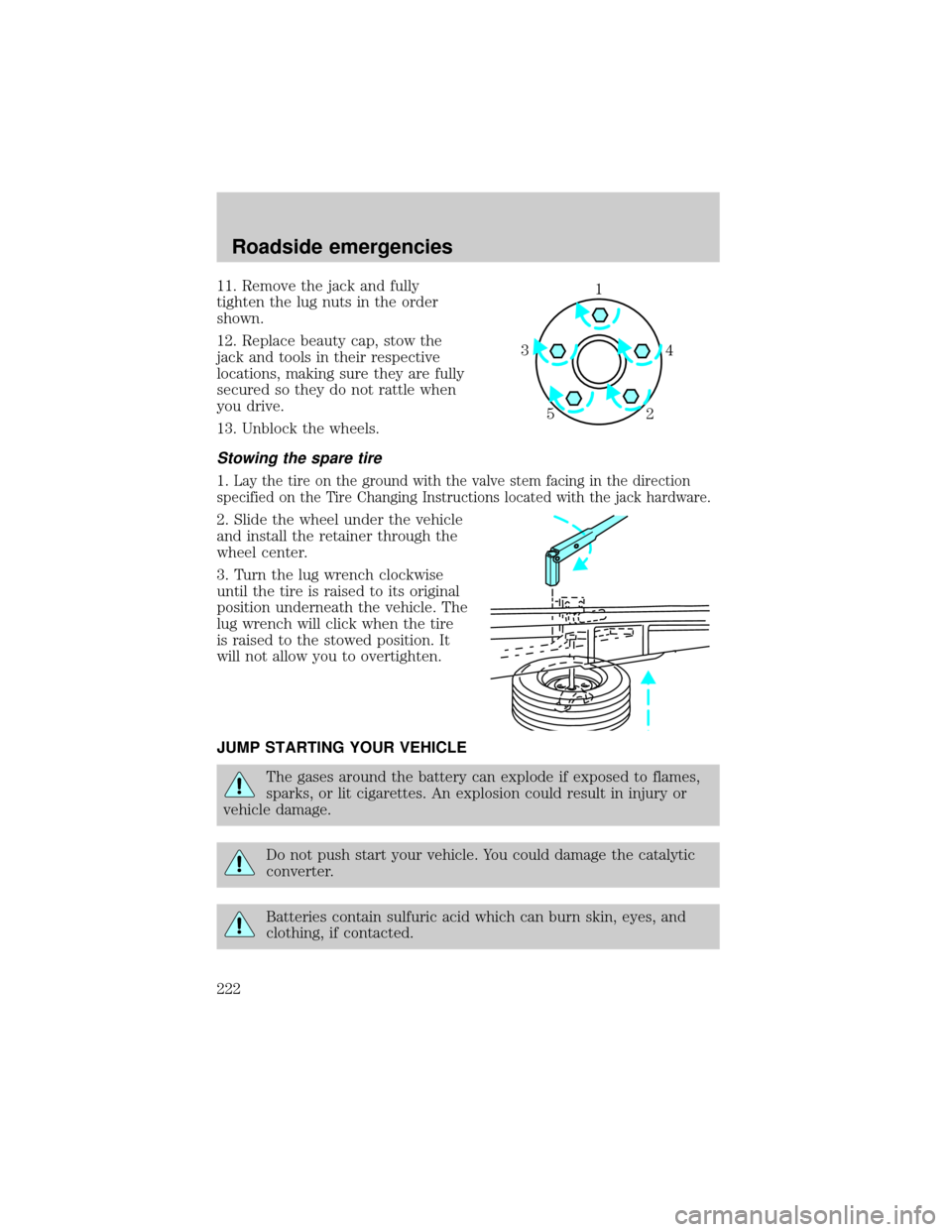
11. Remove the jack and fully
tighten the lug nuts in the order
shown.
12. Replace beauty cap, stow the
jack and tools in their respective
locations, making sure they are fully
secured so they do not rattle when
you drive.
13. Unblock the wheels.
Stowing the spare tire
1.Lay the tire on the ground with the valve stem facing in the direction
specified on the Tire Changing Instructions located with the jack hardware.
2. Slide the wheel under the vehicle
and install the retainer through the
wheel center.
3. Turn the lug wrench clockwise
until the tire is raised to its original
position underneath the vehicle. The
lug wrench will click when the tire
is raised to the stowed position. It
will not allow you to overtighten.
JUMP STARTING YOUR VEHICLE
The gases around the battery can explode if exposed to flames,
sparks, or lit cigarettes. An explosion could result in injury or
vehicle damage.
Do not push start your vehicle. You could damage the catalytic
converter.
Batteries contain sulfuric acid which can burn skin, eyes, and
clothing, if contacted.
1
4 3
2 5
Roadside emergencies
222


