3-2
Comfort Controls
This section tells you how to use the comfort controls.
With these systems, you can control the heating, cooling
and ventilation in your vehicle.
Comfort Controls Personalization
(If Equipped)
If your vehicle is equipped with the automatic comfort
control system and memory seats and mirrors, you
can store and recall the climate control settings for
temperature, air delivery mode and fan speed for
two different drivers. The personal choice settings
recalled are determined by the transmitter used to enter
the vehicle. After the button with the unlock symbol on
a remote keyless entry transmitter is pressed, the climate
control will adjust to the last settings of the identified
driver. The settings can also be changed by pressing one
of the memory buttons (1 or 2) located on the driver's
door. When adjustments are made, the new settings are
automatically saved for that driver.
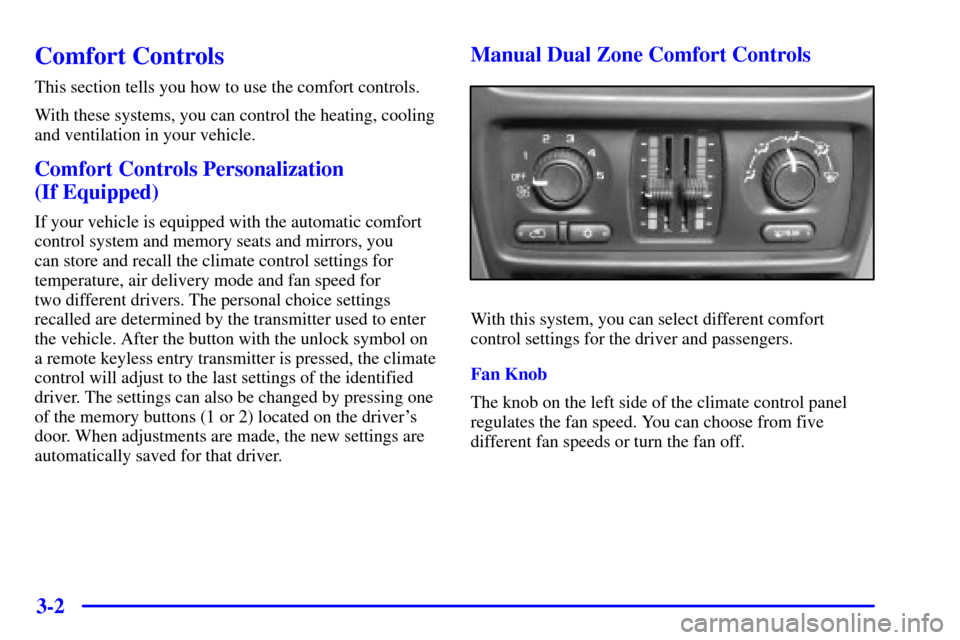
Manual Dual Zone Comfort Controls
With this system, you can select different comfort
control settings for the driver and passengers.
Fan Knob
The knob on the left side of the climate control panel
regulates the fan speed. You can choose from five
different fan speeds or turn the fan off.
3-3
Driver's Side Temperature Lever
The lever on the left side of the climate control panel is
used to adjust the air temperature on the driver's side,
independent of the temperature set by the passenger.
Slide the lever upward to raise the temperature. Slide the
lever downward to lower the temperature.
Passenger's Side Temperature Lever
The lever on the right side of the climate control panel
is used to adjust the air temperature on the passenger's
side, independent of the temperature set by the driver.
Slide the lever upward to raise the temperature. Slide the
lever downward to lower the temperature.
This lever also adjusts the temperature to the rear
seat outlets.Mode Knob
The knob on the right side of the control panel has
several settings to control the direction of airflow:
(Panel): Selecting panel mode will deliver air to
the instrument panel outlets.
(Bi-Level): Selecting bi-level mode will deliver
warmer air to the floor and cooler air to the instrument
panel outlets.
(Floor): Selecting floor mode will deliver air to
the floor outlets and some air to the defroster and side
window vents.
(Defog): Selecting defog will deliver air to the
floor, windshield outlets and side window vents.
(Defrost): Selecting this setting directs most of
the air through the defroster and side window vents.
Some of the air also goes to the floor ducts.