Page 159 of 397
2-93
Cruise Light (If Equipped)
The CRUISE light comes
on whenever you set your
cruise control. See ªCruise
Controlº in the Index.
Fuel Gage
United States-3400 V6
Engine ClusterUnited States-3800 V6
Engine Cluster
Canada-3400 V6
Engine ClusterCanada-3800 V6
Engine Cluster
The fuel gage, when the ignition is on, tells you about
how much fuel you have left in your tank.
The gage will first indicate empty before you are out of
fuel, and you should get more fuel as soon as possible.
Page 160 of 397

2-94
Here are four situations you may experience with
your fuel gage. None of these indicate a problem with
the fuel gage.
�At the gas station, the fuel pump shuts off before the
gage reads full.
�It takes a little more or less fuel to fill up than the
fuel gage indicated. For example, the gage may have
indicated the tank was half full, but it actually took a
little more or less than half the tank's capacity to fill
the tank.
�The gage goes back to empty when you turn off
the ignition.
�The gage pointer moves while cornering, braking
or acceleration.
Message Center
The message center is located below the temperature
gage or the tachometer gage (if equipped) on the
instrument panel cluster. It gives you important safety
and maintenance facts.
Modes
Service Traction System (If Equipped)
United States Canada
If this message appears when you are driving, there is a
problem with your traction control system and your
vehicle is in need of service.
When this message is displayed, the system will not
limit wheel spin. The message will stay on for 60
seconds and then go out. Four chimes will also be heard.
Adjust your driving accordingly.
When the ignition is turned off, this message will be
displayed again for three seconds to remind you that
your traction control system is not working properly. Be
sure to have your vehicle serviced right away.
Page 166 of 397
2-100
Low Fuel
United States Canada
This message is displayed when your vehicle is low on
fuel. Four chimes will also sound.
Refer to the fuel gage for a better indication of the
amount of fuel remaining in the fuel tank.Low Washer FluidUnited States Canada
This message is displayed when the vehicle is low on
windshield washer fluid.
The message is only displayed for 60 seconds at the
start of each ignition cycle. For more information see,
ªWindshield Washer Fluidº in the Index.
When the ignition is turned off, this message will be
displayed again for three seconds to remind you that
your washer fluid is low. Be sure to refill the washer
fluid tank right away.
Page 169 of 397
2-103
Driver Information Center
(DIC) (Option)
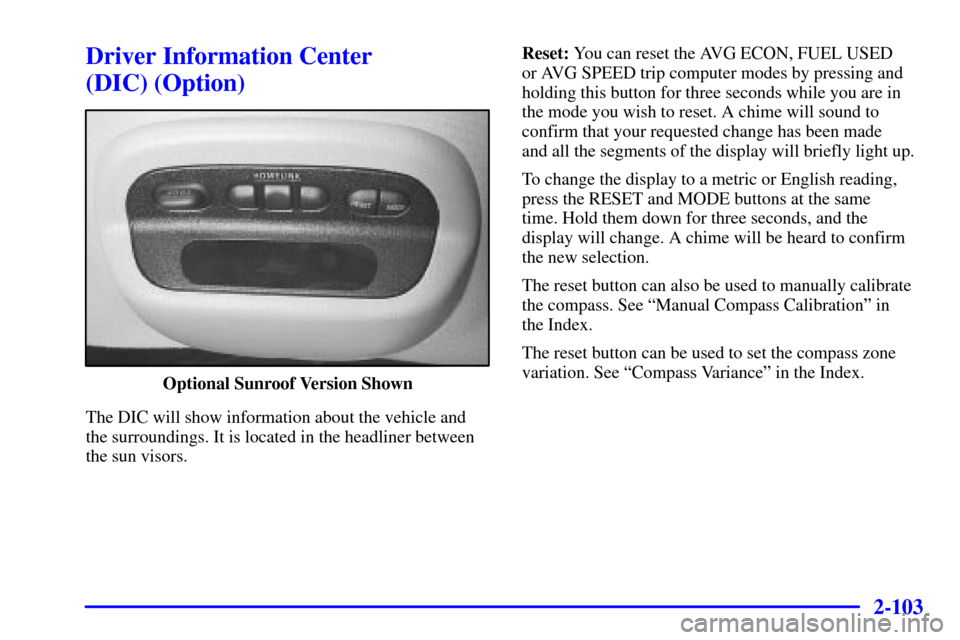
Optional Sunroof Version Shown
The DIC will show information about the vehicle and
the surroundings. It is located in the headliner between
the sun visors.Reset: You can reset the AVG ECON, FUEL USED
or AVG SPEED trip computer modes by pressing and
holding this button for three seconds while you are in
the mode you wish to reset. A chime will sound to
confirm that your requested change has been made
and all the segments of the display will briefly light up.
To change the display to a metric or English reading,
press the RESET and MODE buttons at the same
time. Hold them down for three seconds, and the
display will change. A chime will be heard to confirm
the new selection.
The reset button can also be used to manually calibrate
the compass. See ªManual Compass Calibrationº in
the Index.
The reset button can be used to set the compass zone
variation. See ªCompass Varianceº in the Index.
Page 172 of 397

2-106
Manual Compass Calibration
If the compass appears erratic and the calibration
symbol does not appear, you must manually put the
compass into the calibration mode.
Turn the ignition on and cycle the DIC to the
Compass/Temperature mode. Press the RESET button
for at least 10 seconds until the calibration symbol
appears and all segments of the compass display are
illuminated. A chime will sound to confirm that the
calibration mode is active. Release the button and
complete two or three 360� turns in an area free from
large metal objects. The calibration symbol will turn off
and the compass reading will be displayed. A chime will
sound to verify that the calibration is complete.
Error Displays
�An error of the speed sensor or fuel sender will
cause
-E- to be displayed.
�In the absence of vehicle communications, a
dash ª
--º is displayed.
If one of these error messages appear, see your dealer.
Trip Computer
There are five trip computer displays which may be
stepped through by pushing the MODE button.
The information will appear in the following order:
�AVG ECON (Average Fuel Economy): This shows
the average fuel economy since the last reset.
�INST ECON (Instantaneous Fuel Economy):
This shows fuel economy for the most recent second
of driving.
�RANGE (Trip Range): This shows the estimated
distance that can be traveled with the remaining fuel.
The fuel economy used to calculate range is based on
the last few hours of driving. When in a low fuel
condition, LO is displayed.
�FUEL USED (Trip Fuel Used): This shows the
accumulated fuel used since the last reset.
�AVG SPEED (Average Speed): This shows the
average speed since the last reset.
Resetting the Trip Computer
Press and hold the RESET button for at least three
seconds. The reset is acknowledged with all segments of
the display lit briefly and a chime. A reset can only be
done in AVG ECON, FUEL USED and AVG SPEED
displays. Each setting must be reset individually.
Page 235 of 397

4-23
Once you are moving on the freeway, make certain you
allow a reasonable following distance. Expect to move
slightly slower at night.
When you want to leave the freeway, move to the proper
lane well in advance. If you miss your exit, do not,
under any circumstances, stop and back up. Drive on to
the next exit.
The exit ramp can be curved, sometimes quite sharply.
The exit speed is usually posted.
Reduce your speed according to your speedometer, not
to your sense of motion. After driving for any distance
at higher speeds, you may tend to think you are going
slower than you actually are.
Before Leaving on a Long Trip
Make sure you're ready. Try to be well rested. If you
must start when you're not fresh
-- such as after a day's
work
-- don't plan to make too many miles that first part
of the journey. Wear comfortable clothing and shoes you
can easily drive in.Is your vehicle ready for a long trip? If you keep it
serviced and maintained, it's ready to go. If it needs
service, have it done before starting out. Of course,
you'll find experienced and able service experts in
Chevrolet dealerships all across North America.
They'll be ready and willing to help if you need it.
Here are some things you can check before a trip:
�Windshield Washer Fluid: Is the reservoir full?
Are all windows clean inside and outside?
�Wiper Blades: Are they in good shape?
�Fuel, Engine Oil, Other Fluids: Have you checked
all levels?
�Lamps: Are they all working? Are the lenses clean?
�Tires: They are vitally important to a safe,
trouble
-free trip. Is the tread good enough for
long
-distance driving? Are the tires all inflated to
the recommended pressure?
�Weather Forecasts: What's the weather outlook
along your route? Should you delay your trip a short
time to avoid a major storm system?
�Maps: Do you have up
-to-date maps?
Page 242 of 397

4-30
Run your engine only as long as you must. This saves
fuel. When you run the engine, make it go a little faster
than just idle. That is, push the accelerator slightly. This
uses less fuel for the heat that you get and it keeps the
battery charged. You will need a well
-charged battery to
restart the vehicle, and possibly for signaling later on
with your headlamps. Let the heater run for a while.
Then, shut the engine off and close the window almost
all the way to preserve the heat. Start the engine again
and repeat this only when you feel really uncomfortable
from the cold. But do it as little as possible. Preserve the
fuel as long as you can. To help keep warm, you can get
out of the vehicle and do some fairly vigorous exercises
every half hour or so until help comes.
Recreational Vehicle Towing
Recreational vehicle towing means towing your vehicle
behind another vehicle
-- such as behind a motorhome.
The two most common types of recreational vehicle
towing are known as ªdinghy towingº (towing your
vehicle with all four wheels on the ground) and ªdolly
towingº (towing your vehicle with two wheels on the
ground and two wheels up on a device known as
a ªdollyº).With the proper preparation and equipment, many
vehicles can be towed in these ways. See ªDinghy
Towingº and ªDolly Towing,º following.
Here are some important things to consider before
you do recreational vehicle towing:
�What's the towing capacity of the towing
vehicle? Be sure you read the tow vehicle
manufacturer's recommendations.
�How far will you tow? Some vehicles have
restrictions on how far and how long they can tow.
�Do you have the proper towing equipment? See your
dealer or trailering professional for additional advice
and equipment recommendations.
�Is your vehicle ready to be towed? Just as you would
prepare your vehicle for a long trip, you'll want to
make sure your vehicle is prepared to be towed.
See ªBefore Leaving on a Long Tripº in the Index.
Page 244 of 397

4-32
Loading Your Vehicle
Two labels on your vehicle show how much weight it
may properly carry. The Tire
-Loading Information label
is on the inside of the trunk lid. The label tells you the
proper size, speed rating and recommended inflation
pressures for the tires on your vehicle. It also gives you
important information about the number of people that
can be in your vehicle and the total weight you can
carry. This weight is called the vehicle capacity weight
and includes the weight of all occupants, cargo and all
nonfactory
-installed options.
The other label is the Certification label, found on the
rear edge of the driver's door. It tells you the gross
weight capacity of your vehicle, called the Gross
Vehicle Weight Rating (GVWR). The GVWR includes
the weight of the vehicle, all occupants, fuel and cargo.
Never exceed the GVWR for your vehicle or the Gross
Axle Weight Rating (GAWR) for either the front or
rear axle.
If you do have a heavy load, spread it out. Don't carry
more than 167 pounds (75 kg) in your trunk.